
Cosy
Cosy automates Slack onboarding and member connections, boosting engagement while saving you hours of manual effort.
VisitPublished on:
November 13, 2025
Pricing:
About Cosy
Cosy is a groundbreaking Slack-native tool that revolutionizes how communities engage and connect within Slack workspaces. Designed specifically for community managers, team leaders, and organizations aiming to enhance collaboration, Cosy automates essential community management tasks, allowing users to focus more on fostering relationships than on tedious administration. With features like automated onboarding, member introductions, and a searchable member directory, Cosy makes welcoming new members a breeze. Imagine saving hours each week while ensuring your community thrives and remains connected, regardless of its size. Cosy’s user-friendly interface guarantees seamless integration with your existing Slack setup, enabling you to cultivate a dynamic and interactive space. By prioritizing engagement, Cosy empowers you to build a vibrant community effortlessly.
Features of Cosy
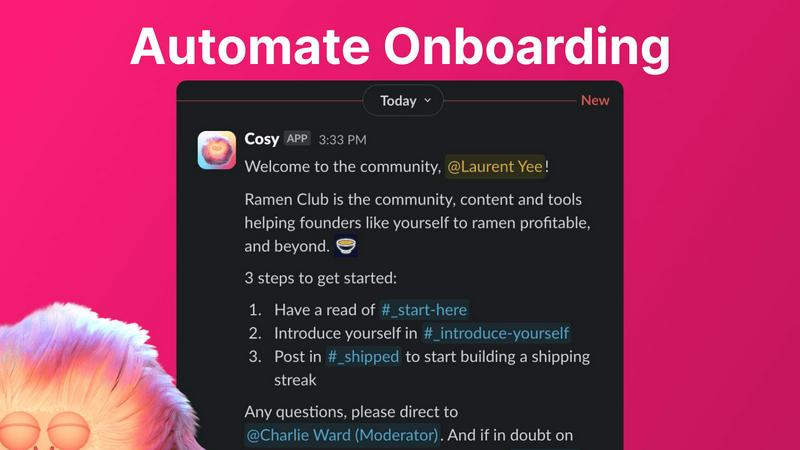
Automate Onboarding
Cosy allows you to create and automate onboarding sequences for new community members, sending welcome DMs tailored to their needs. You can customize messages with their names, links, and emojis, ensuring a personal touch. The automation can trigger immediately or after a set delay, meaning new members will always receive a warm welcome—even at odd hours!
Connect Your Members
Enhance community engagement by automatically introducing members to one another through direct messages. You can customize the frequency and timing of these introductions, fostering connections among members without manual effort. This feature ensures that members meet each other regularly, helping to build a more cohesive community.
Member Directory
Cosy provides a simple yet effective searchable directory for your community members, all within Slack. Members can easily create their profiles with customizable fields, making it easier for everyone to connect based on shared interests or expertise. This directory can be accessed via a simple command or through the Cosy app, promoting interaction without leaving Slack.
Content Highlights
With Cosy, you can quickly surface the top engaging posts within your community using slash commands. Whether it's the most engaged messages from a specific channel or a comprehensive view across all public channels, this feature allows you to keep track of active discussions and ensure valuable content does not go unnoticed.
Use Cases of Cosy
Streamlined Community Onboarding
When new members join, Cosy's automated onboarding feature can significantly reduce the time spent on welcome messages. By ensuring every new member receives tailored communication, you create a positive initial experience that encourages engagement right from the start.
Enhanced Member Interaction
By frequently introducing members to one another, Cosy fosters a culture of collaboration and networking. This feature is particularly beneficial in larger communities where personal connections might otherwise be overlooked, helping to forge valuable relationships among members.
Efficient Member Management
The member directory simplifies the process of managing a community by allowing members to find and connect with each other easily. This functionality is perfect for communities with diverse interests or professional backgrounds, making it easier to locate expertise or support.
Content Engagement Tracking
Cosy’s content highlights feature helps you stay on top of community discussions. By identifying the most engaging posts, community leaders can encourage continued participation and ensure valuable discussions remain active, fostering a vibrant community environment.
Frequently Asked Questions
How does Cosy automate onboarding for new members?
Cosy automates onboarding by sending personalized welcome DMs to new members based on customizable sequences. These messages can be sent immediately upon joining or delayed, ensuring no new member feels neglected.
Can I customize the introduction messages sent to members?
Yes, you can customize the introduction messages, including the frequency and timing of these introductions. This allows you to create a personal touch that suits your community's culture.
Is the member directory easy to access?
Absolutely! Members can access the member directory through a simple slash command or the Cosy app, making it easy to find and connect with others in the community without leaving Slack.
What types of content can I highlight with Cosy?
With Cosy, you can highlight the top 10 most engaging posts in specific channels or across all public channels. This ensures that community leaders and members are aware of valuable discussions and content, promoting ongoing engagement.
Explore more in this category:
Similar to Cosy

AI Email Filter sorts incoming mail into folders using plain-language prompts you write. Works with any IMAP mailbox; bring your own LLM if you want.

A strictly human-verified directory for active SaaS, practical AI tools, and custom n8n workflows. Discover software that works without bot spam.

E-signatures for small teams. $19/month, unlimited users.

Digital guest pager system with zero hardware. Guests scan QR code to track order status and get buzzed on their own phone. No apps or SMS fees

Free collection of online developer utilities, code formatters, and digital converters designed to streamline your daily workflow.


All-in-One POS, Inventory & Accounting Software for Bangladeshi Businesses

Online tally counter for tracking attendance, workouts, inventory, visitors, sports scores, habits, and everyday counting tasks.