
MeetingMind
Capture every Zoom meeting detail effortlessly with automatic recording, AI summaries, and intelligent transcriptions.
Visit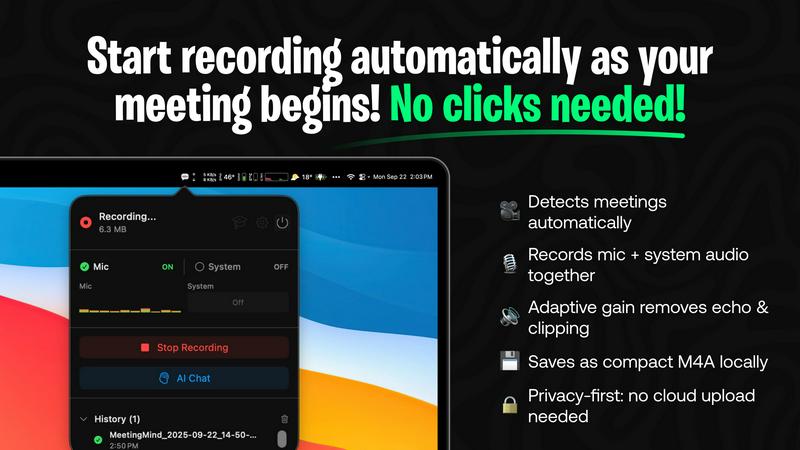
About MeetingMind
MeetingMind is an advanced intelligent meeting assistant that transforms the way professionals handle their meetings. Designed specifically for the modern workforce, this innovative tool automatically detects and records Zoom meetings, allowing users to focus entirely on the conversation without the distraction of manual note-taking. With real-time, speaker-attributed transcripts, MeetingMind organizes discussions into clean, interactive markdown notes that capture every significant detail. It is ideal for busy professionals, remote teams, and anyone who prioritizes effective communication and collaboration. By leveraging on-device AI technology, users can query discussions, highlight key takeaways, and track action items effortlessly. MeetingMind prioritizes user privacy by ensuring that all data processing occurs locally on the device, keeping sensitive information secure. With its user-friendly interface and robust features, MeetingMind empowers individuals to make the most of their meetings, ensuring that every conversation is productive and impactful.
Features of MeetingMind
Automatic Detection
MeetingMind automatically detects Zoom meetings without the need for any clicks. This seamless integration means users can join discussions and let the software handle the recording, freeing them to engage fully in the conversation.
Comprehensive Recording
The tool captures both microphone and system audio simultaneously, thanks to adaptive gain technology. This feature ensures that all voices and sounds during the meeting are recorded clearly, providing an accurate representation of the discussion.
AI Assistant Options
Users can choose between two AI assistants: a local Ollama or a cloud-based OpenRouter. This flexibility allows for personalized summaries and insights, tailoring the experience to individual preferences while enhancing the comprehension of meeting content.
Markdown Export
After each meeting, MeetingMind generates AI-driven summaries and transcripts that can be saved as formatted markdown files. This feature allows users to easily organize and share meeting notes, making follow-ups and action items straightforward and efficient.
Use Cases of MeetingMind
Efficient Team Meetings
Imagine a team meeting where every member can contribute without worrying about taking notes. MeetingMind captures the entire meeting, allowing team members to focus on collaboration and decision-making.
Remote Work Collaboration
In a remote work environment, clear communication is crucial. MeetingMind ensures that all details from virtual meetings are recorded and accessible, fostering better collaboration among distributed teams.
Educational Sessions
Educators and trainers can utilize MeetingMind to record lectures or training sessions, providing students with accurate transcripts and summaries for review, enhancing the learning experience.
Client Consultations
During client meetings, professionals can use MeetingMind to capture critical discussions and agreements. This ensures that all client interactions are documented, which is essential for maintaining strong professional relationships.
Frequently Asked Questions
What is the main benefit of using MeetingMind?
The primary benefit of MeetingMind is its ability to automatically record and transcribe Zoom meetings, allowing users to remain engaged in discussions while ensuring that no important details are missed.
How does MeetingMind handle privacy?
MeetingMind processes all data locally on your device, which means that sensitive meeting information never leaves your Mac. This commitment to privacy ensures that user data remains secure.
Can I use MeetingMind on different devices?
Currently, MeetingMind is designed specifically for macOS, providing a seamless experience for users within the Apple ecosystem.
What happens after my free trial?
After the free trial, users can continue to enjoy up to 60 minutes of recording per day for free. For those needing more, an unlimited version is available for a one-time purchase with no subscription fees.
Explore more in this category:
Similar to MeetingMind

AI Email Filter sorts incoming mail into folders using plain-language prompts you write. Works with any IMAP mailbox; bring your own LLM if you want.

E-signatures for small teams. $19/month, unlimited users.

Digital guest pager system with zero hardware. Guests scan QR code to track order status and get buzzed on their own phone. No apps or SMS fees

Free collection of online developer utilities, code formatters, and digital converters designed to streamline your daily workflow.

All-in-One POS, Inventory & Accounting Software for Bangladeshi Businesses

Online tally counter for tracking attendance, workouts, inventory, visitors, sports scores, habits, and everyday counting tasks.

