
Typebar
Every key you press lights up on an on-screen keyboard, and each shortcut is named as you press it.
Visit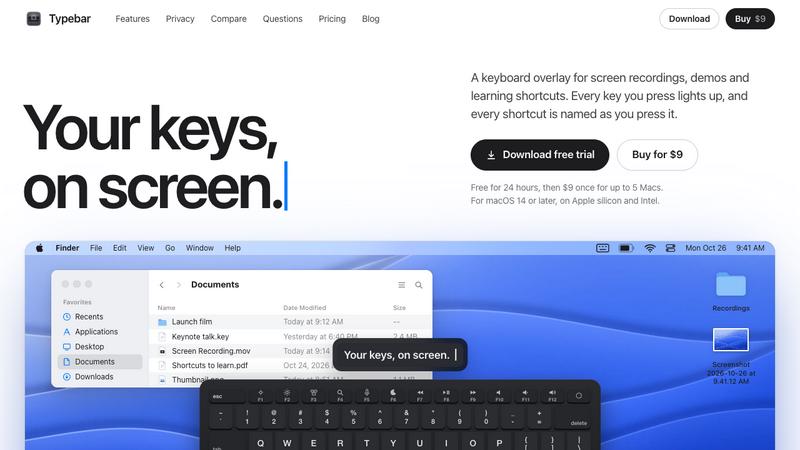
About Typebar
Typebar is a keyboard overlay for the Mac, made for screen recordings, demos and learning shortcuts. Every key you press lights up on an on-screen keyboard, and a pill names each shortcut from the app's own menus, like Screenshot Selection for Shift Command 4.
Hold a modifier and the keys show what they do in the app in front. There are cheatsheets for every app, 20 hand-made packs and your own keybindings from 11 apps. Click ripples, a cursor halo, Spotlight, six switch sounds and 40 themes with a theme editor are built in.
Password fields stay private, and nothing you type is saved or sent anywhere. Typebar can show itself when a recording starts and hide when it stops.
Free for 24 hours, then $9 once for up to 5 Macs. macOS 14 or later, on Apple silicon and Intel.
Explore more in this category:
Similar to Typebar

Find, qualify, and capture high-quality local business leads effortlessly.

AI hairstyle previews, portrait editing, image generation and short videos in one web workspace.

VD6S is a free online YouTube video downloader that supports HD, 4K and up to 8K downloads. Save videos in MP4 or audio in multiple formats.

All-in-One Managed IT Platform on Credits — Hosting, VPS, AI Agents, Business Email & Software Development

AI-powered platform that evaluates the safety of LinkedIn automation tools and helps reduce the risk of account restrictions.

Make a 19-second desk-concert video with lead and sax, full band, Halloween or pet-band modes; audio and silent MP4.

Timers and hourly checks to figure how out long until a certain time or how many days away.
