
PseudoRun
Master IGCSE pseudocode effortlessly with PseudoRun's free ad-free editor and real-time simulation tools.
Visit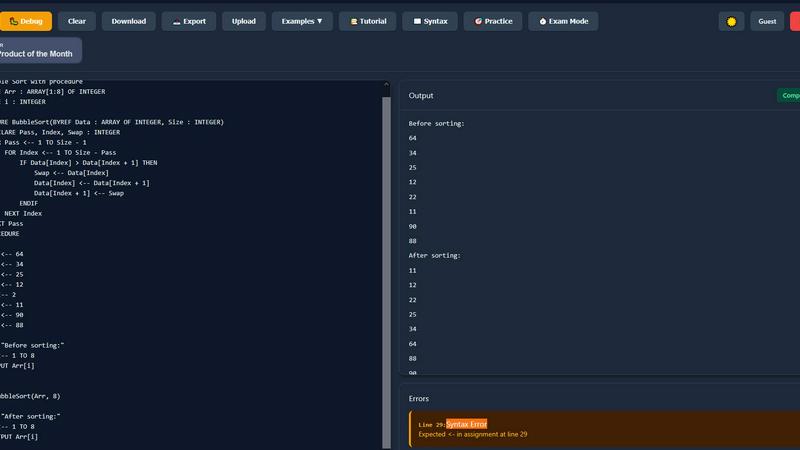
About PseudoRun
PseudoRun is the premier free online platform tailored specifically for mastering IGCSE Computer Science pseudocode. This innovative tool is more than just an editor; it's a fully interactive simulation environment designed for students to write, execute, and debug algorithms seamlessly in real time. Fully aligned with the Cambridge IGCSE specifications, PseudoRun eliminates the cumbersome setup associated with traditional programming environments, allowing students to focus on learning without distractions. With instant feedback and a user-friendly interface, this platform is dedicated to enhancing exam readiness. PseudoRun offers a wealth of resources, including targeted practice problems and a step-by-step debugger, ensuring that students not only grasp core concepts but also build confidence in their abilities. For educators, it serves as a vital resource, making the teaching of complex programming concepts engaging and effective. Built on a foundation of zero ads and complete feature access, PseudoRun prioritizes student privacy, bridging the gap between theoretical knowledge and practical application, making it accessible and engaging for all learners.
Features of PseudoRun
IGCSE Exam Focused
PseudoRun is meticulously designed to align with Cambridge IGCSE Computer Science pseudocode specifications and exam patterns. This focus ensures students are thoroughly prepared for the structure and content of their upcoming exams.
Real-Time Validation
Experience the power of instant syntax checking and error detection with PseudoRun's real-time validation feature. This allows students to write perfect IGCSE pseudocode while instantly receiving feedback on their code, significantly improving their learning curve.
Step-by-Step Debugger
Mastering algorithms becomes easier with PseudoRun's step-by-step debugger. This feature enables line-by-line execution and variable tracking, providing students with a deeper understanding of how their pseudocode operates and revealing the intricacies of algorithmic logic.
Free Cloud Storage
With PseudoRun, students can save unlimited pseudocode programs in the cloud, ensuring they can access their work from any device. This feature is essential for seamless exam preparation, allowing students to review and refine their code anytime, anywhere.
Use Cases of PseudoRun
Student Exam Preparation
IGCSE students can utilize PseudoRun as a dedicated platform for exam preparation, practicing with real IGCSE-style examples and exercises. This targeted practice helps them gain familiarity with exam formats and enhances their problem-solving skills.
Educator Resource
Teachers can leverage PseudoRun as a teaching aid to illustrate core programming concepts. The interactive nature of the platform allows educators to demonstrate algorithms in real time, facilitating a more engaging learning environment for their students.
Algorithm Testing and Debugging
Students can use PseudoRun to write and test algorithms, debugging their code in an intuitive environment. The step-by-step debugger helps students understand where errors occur, making it easier to learn from their mistakes.
Collaborative Learning
With the ability to save and access pseudocode programs from any device, PseudoRun encourages collaborative learning. Students can share their work with peers or instructors for feedback, fostering a community of learners focused on IGCSE success.
Frequently Asked Questions
Is PseudoRun completely free to use?
Yes, PseudoRun is entirely free to use, with no hidden fees or subscription models. All features are accessible without any charges.
Do I need to create an account to use PseudoRun?
No, you can start using PseudoRun immediately without needing to log in or create an account, making it easy to begin your learning journey.
How does the step-by-step debugger work?
The step-by-step debugger allows you to execute your pseudocode line by line. This feature helps you track variable changes and understand the flow of your algorithm, making debugging much simpler.
Can I access my saved work from different devices?
Absolutely! PseudoRun offers free cloud storage, enabling you to save your pseudocode programs and access them from any device, ensuring a seamless experience as you prepare for your exams.
Similar to PseudoRun

Sorry100Times.org instantly generates and copies apology text — up to 10,000 repeats, styled and ready to paste.

Your trusted source for residential and rotating proxy provider comparisons, helping developers and businesses make informed decisions for their web s

Free, Live 3D Satellite, Space Weather & Climate Tracker in real time on an interactive globe alongside articles and insights.

Learn French through visual stories told by a native speaker. Words you meet come back on their own, right before you'd forget them.

Free construction calculators with formulas, steps, and assumptions.


Turn Long YouTube Videos into Quick AI Summaries in Seconds.
