Adswize vs AutomagicWP
Side-by-side comparison to help you choose the right product.

Adswize
Adswize is your AI assistant that analyzes Meta Ads and gives you clear daily actions to optimize them.
Last updated: March 4, 2026

AutomagicWP updates all your WordPress plugins across every site with a single, effortless upload.
Last updated: March 4, 2026
Visual Comparison
Adswize
AutomagicWP

Feature Comparison
Adswize
Daily AI Optimization Recommendations
Wake up to a clear, prioritized list of actions. Adswize analyzes your account overnight and delivers specific commands like "Pause underperforming Ad Set X," "Increase budget for high-ROAS audience Y," or "Refresh creative Z." This turns complex data into straightforward tasks, enabling you to execute optimizations in minutes, not hours, and ensuring your budget is always working hardest for you.
Clear, Insight-Driven Dashboard
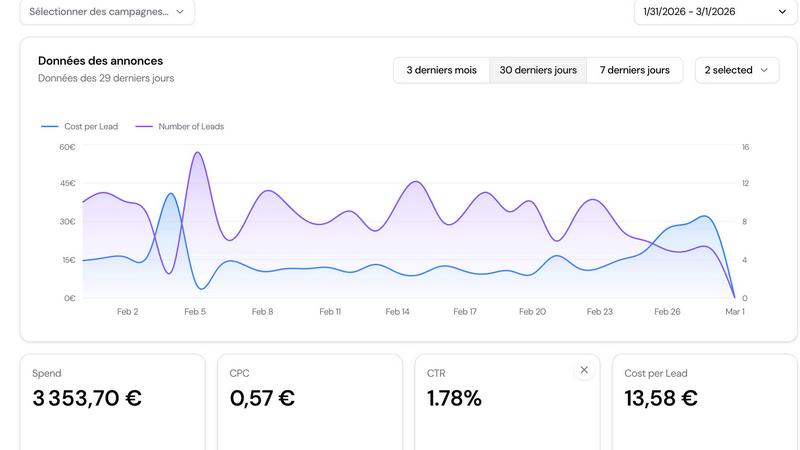
Ditch the spreadsheets and confusing graphs. Adswize's dashboard cuts through the noise to show you only what matters: a high-level view of performance, what's working, and what's burning cash. You get instant clarity on campaign health without needing to analyze raw numbers, allowing for faster, more confident strategic decisions.
Deep AI Insights on Any Ad
Go beyond surface-level metrics. Select any ad or campaign and instantly get AI-powered analysis on why performance changed. Understand the underlying trends, creative fatigue, or audience shifts driving your results in seconds. This deep diagnostic power replaces hours of manual investigation and spreadsheet cross-referencing.
Conversational AI Assistant
Stop guessing and get instant answers. Simply ask the AI assistant questions like "Which audience converts best?" or "Why did my ROAS drop yesterday?" Receive immediate, data-backed explanations and suggestions. This interactive feature puts a senior analyst at your fingertips 24/7, accelerating learning and optimization cycles.
AutomagicWP
One-Click, Universal Updates
Upload a single plugin or theme ZIP file to AutomagicWP, and it's instantly propagated to every connected WordPress site. The platform handles the entire distribution chain, triggering the native WordPress update checker on each site. This means zero manual logins, zero individual uploads, and guaranteed consistency across your entire client base or user portfolio with one effortless action.
Professional Plugin Repository
Give your plugins a polished, professional presence directly within your clients' wp-admin. AutomagicWP allows you to upload icons, banners, and screenshots, and write full descriptions, changelogs, and FAQs. This transforms your private distribution into an experience that mirrors the official WordPress repository, building trust and providing clear update information without needing a public listing.
Seamless CI/CD & GitHub Integration
Integrate your development workflow directly with deployment. By connecting your GitHub repository, you can automate releases entirely. Simply push a version tag, and AutomagicWP's GitHub Action will package and publish the release automatically. This enables true continuous delivery, where code merges can trigger updates to go live without any manual intervention, speeding up your release cycles dramatically.
Centralized Release Management & Rollback
Maintain complete control over every version you ship. The dashboard provides a clear version history for every plugin, showing release details, PHP requirements, and timestamps. Need to revert? You can easily pull down any previous version directly from the dashboard, enabling quick rollbacks if an issue is discovered, ensuring stability and control alongside your automation.
Use Cases
Adswize
For Scaling E-commerce Brands
E-commerce teams drowning in SKUs and campaigns use Adswize to instantly identify top-performing products and audiences. The daily recommendations automate the process of scaling winners and cutting losers, directly protecting profit margins and freeing up time to focus on creative strategy and growth initiatives instead of manual data crunching.
For Performance Marketing Agencies
Agencies managing multiple client accounts leverage Adswize to streamline reporting and optimization workflows. It provides clear, client-ready insights and actionable steps for each account, dramatically reducing analysis time per client. This allows agencies to scale their service offerings, improve results, and deliver more value without increasing headcount.
For Solopreneurs & In-House Marketers
Wearing multiple hats, solo marketers use Adswize as their dedicated ads analyst. It eliminates the daily mental load of deciding what to optimize next, providing a trusted, automated second opinion. This ensures their limited time and budget are invested in the highest-impact actions, preventing costly mistakes from oversight or analysis paralysis.
For Creative Testing & Analysis
Teams running constant creative tests use Adswize's deep insights to quickly understand why an ad is winning or failing. Instead of waiting for full funnel data, they get immediate feedback on CTR trends and engagement, allowing for rapid creative iteration and more efficient testing cycles to discover breakthrough messaging.
AutomagicWP
WordPress Development Agencies
Agencies managing dozens or hundreds of client sites can standardize and secure their update process. Instead of juggling countless admin credentials and performing repetitive manual updates, they deploy a custom plugin or theme update once from a central dashboard. This ensures all client sites are always on the latest, most secure version simultaneously, saving immense time and reducing human error.
Independent Plugin & Theme Developers
Solo creators selling premium WordPress products can use AutomagicWP as a private, white-label distribution platform. It provides all the professional update infrastructure of larger marketplaces without the fees or lack of control. Developers can deliver automatic updates, display changelogs, and manage licenses, offering a premium experience to their customers without building a complex backend system.
Freelancers with Recurring Maintenance Clients
Freelancers offering WordPress maintenance plans can automate the most time-consuming part of their service: updating custom code. By connecting each client's site, they turn update deployment from a billable hour of manual work into a background process that happens instantly, allowing them to scale their maintenance offerings and focus on higher-value tasks for their clients.
Modern DevOps Teams
Teams practicing continuous integration and deployment can integrate AutomagicWP directly into their CI/CD pipeline. Using the REST API or GitHub Action, they can automatically build, version, and deploy plugin updates directly from their code repository to all live environments. This bridges the gap between modern development practices and the WordPress ecosystem, enabling agile, automated workflows.
Overview
About Adswize
Adswize is the AI-powered Meta Ads assistant engineered to eliminate guesswork and deliver razor-sharp, actionable insights. Built for advertisers, media buyers, agencies, and brands, it directly tackles the overwhelming complexity of daily campaign management. If you're tired of manually sifting through dense dashboards, wrestling with indecision over which ad to pause, where to allocate budget, or what audience to test next, Adswize is your solution. The platform connects directly to your Meta ad accounts and performs automatic, deep-dive analysis of your campaign performance over customizable periods. Instead of drowning you in raw data, it provides structured, daily summaries that pinpoint exactly what's driving results, what's underperforming, and where your budget is leaking. Adswize then delivers specific, prioritized optimization recommendations—telling you precisely which levers to pull across campaigns, ad sets, and creatives. It transforms hours of analytical drudgery into minutes of clear decision-making, slashing wasted ad spend and empowering you to scale winning strategies with absolute confidence. Think of it as having an expert media buyer audit your account every single morning, so you can stop guessing and start winning.
About AutomagicWP
AutomagicWP is the definitive private distribution hub built to automate WordPress plugin and theme updates at scale. It completely eliminates the archaic, manual "ZIP loop" where developers and agencies must log into countless wp-admin dashboards to upload new versions. Instead, you upload a release just once to AutomagicWP. Every WordPress site connected via a simple API key will then update itself automatically, leveraging WordPress's own native update mechanism for seamless, reliable delivery. This isn't just a convenience; it's a massive efficiency overhaul that reclaims hours every week, turning a tedious chore into a fully automated, set-and-forget process. It's engineered for WordPress agencies managing large client portfolios, solo developers tired of repetitive tasks, and premium plugin/theme creators who need a professional, white-label distribution channel without the complexity of a full e-commerce platform. Beyond mere file delivery, AutomagicWP provides a professional presence for your plugins with support for icons, banners, screenshots, and detailed changelogs visible right in the user's dashboard. With deep integrations like CI/CD via GitHub Actions and a comprehensive REST API, it fits perfectly into modern, agile development workflows, ensuring your code moves from repository to live site faster than ever.
Frequently Asked Questions
Adswize FAQ
How does Adswize connect to my Meta Ads account?
Adswize uses Meta's secure, official API for a read-only connection. You authorize the integration with one click through Meta's login portal. Adswize only pulls performance data to analyze; it cannot make changes to your account automatically, ensuring you remain in full control of all budget and campaign decisions.
What kind of recommendations does the AI provide?
The AI provides specific, actionable recommendations based on performance trends. These include pausing ad sets with rising CPA, scaling budgets for audiences with high ROAS, shifting budget between campaigns, and refreshing creatives with declining engagement metrics. Each recommendation comes with a clear data-backed reason.
Is my advertising data secure with Adswize?
Absolutely. Security is a top priority. Adswize uses bank-level encryption for all data in transit and at rest. The connection to Meta is read-only, and we adhere to strict data privacy protocols. We do not share or sell your campaign data to any third parties.
Can I use Adswize for multiple ad accounts?
Yes. Adswize is built to handle multiple Meta ad accounts seamlessly. This is ideal for agencies or businesses managing several brands or client accounts. You can connect and switch between accounts easily within the dashboard, receiving tailored AI insights and recommendations for each one.
AutomagicWP FAQ
What is AutomagicWP?
AutomagicWP is a private, automated distribution platform for WordPress plugins and themes. It acts as your own central update server, allowing you to upload a release once and have it automatically delivered to every connected WordPress site using WordPress's built-in update mechanism. It's designed to eliminate the need for manually logging into individual wp-admin dashboards to upload ZIP files.
How does automatic plugin updating work?
You install a lightweight connector plugin on each WordPress site and link it to your AutomagicWP account with a unique API key. This allows the site to securely check your private AutomagicWP repository for updates. When you publish a new release, WordPress's standard update checker sees it on its next scheduled run and initiates the update process seamlessly, just like with plugins from the official directory.
Is AutomagicWP free to start?
Yes. AutomagicWP offers a free Starter tier to begin with, requiring no credit card. This plan includes support for one plugin, ample storage and releases, automatic site updates, and API access. You can fully connect a plugin and start pushing automated updates in under five minutes, making it risk-free to integrate into your workflow.
Can I roll back a release if there's a problem?
Absolutely. AutomagicWP maintains a complete version history of every release you upload. From your central dashboard, you can view all past versions and, if necessary, easily reactivate or redeploy a previous stable release. This provides a crucial safety net, allowing for quick rollbacks to ensure site stability while you fix any issues in a new version.
Alternatives
Adswize Alternatives
Adswize is an AI-powered assistant designed to optimize Meta Ads by analyzing performance and delivering clear, daily action plans. It falls into the category of advertising automation and optimization tools, helping users cut through data complexity to save time and ad spend. Users often explore alternatives for various reasons, including budget constraints, the need for different feature sets, or compatibility with other advertising platforms beyond Meta. The search for the right tool is driven by the desire to find a perfect balance between cost, functionality, and ease of use. When evaluating an alternative, focus on core capabilities like automated analysis depth, the clarity of actionable insights, and integration scope. Prioritize tools that genuinely reduce your daily mental load and translate data into confident decisions, ensuring you get a strong return on your investment.
AutomagicWP Alternatives
AutomagicWP is a specialized tool in the WordPress ecosystem, designed as a private distribution hub for plugins and themes. It automates the tedious process of pushing updates to multiple client sites, saving agencies and developers significant time and effort. Users often explore alternatives for various reasons. Some may have specific budget constraints or require a different feature set, like built-in licensing or deeper e-commerce integration. Others might need a solution that fits a particular scale, from managing a handful of sites to thousands, or one that aligns with a unique technical stack. When evaluating options, focus on core needs. Consider the automation depth, security model, and update delivery method. Assess the ease of integration with your existing development workflow and whether the platform offers the professional presentation features your products require.