
Ai Watermark Remover vs FilexHost
Side-by-side comparison to help you choose the right product.

Ai Watermark Remover
Remove watermarks from photos instantly with AI while preserving perfect image quality.
Last updated: March 1, 2026

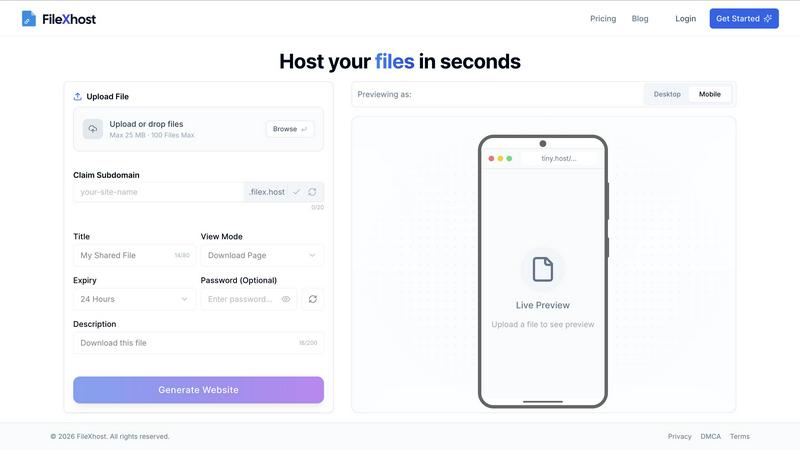
Effortlessly host and share your files with instant, secure links using FilexHost’s simple drag-and-drop interface.
Last updated: February 26, 2026
Visual Comparison
Ai Watermark Remover

FilexHost
Feature Comparison
Ai Watermark Remover
Smart AI Detection & Removal
Our advanced AI engine intelligently scans your uploaded image to automatically identify and isolate watermarks, logos, and text overlays. There's no need for tedious manual selection or complex editing tools. The AI precisely targets the unwanted elements, analyzing the underlying pixels to ensure a clean removal that blends perfectly with the surrounding image area, saving you immense time and effort.
Original Quality Preservation
Unlike basic editors that leave behind blurry patches or distorted colors, our AI is meticulously trained to preserve the original resolution, fine details, and color integrity of your image. The technology reconstructs the area beneath the watermark using context from the rest of the photo, ensuring the final result looks natural and professional, as if the watermark was never there to begin with.
Lightning-Fast Processing
Speed is at the heart of our service. From the moment you upload your image, our optimized AI algorithms go to work, typically delivering a ready-to-download, watermark-free image in just 5 to 15 seconds. This incredible processing power eliminates long waits and bottlenecks, allowing you to edit batches of images rapidly and keep your projects moving forward without delay.
Secure & User-Friendly Interface
We prioritize your privacy and ease of use. The platform features an intuitive drag-and-drop uploader that makes starting a removal job effortless. Your images are processed securely, and for anonymous users, they are automatically deleted after processing. Registered users benefit from private storage. The entire experience is designed to be hassle-free, requiring no technical expertise or software installation.
FilexHost
Universal File Support
FileXHost supports a wide array of file types, including PDFs, Excel spreadsheets, images, audio, video, ZIP archives, and even HTML projects. This versatility ensures that users can host virtually any file they need, making it ideal for a range of applications.
Instant Subdomains
With FileXHost, every uploaded file gets an instant subdomain (your-file.filex.host), requiring zero setup. This feature makes sharing your files incredibly efficient, as you can distribute links immediately after upload without additional configuration.
Smart View Modes
FileXHost offers smart view modes that allow recipients to either directly render files in their browsers or access a download page. This flexibility enhances user experience, ensuring that files are easily accessible and viewable in the way that best suits the recipient's needs.
Secure by Default
Every link generated by FileXHost comes with free SSL encryption, ensuring that your files are shared securely. This commitment to security means users can share sensitive documents without worrying about unauthorized access.
Use Cases
Ai Watermark Remover
E-commerce Product Image Enhancement
Online sellers can instantly clean up product photos by removing distracting watermarks, promotional text, or sample logos placed by manufacturers. This creates a polished, professional catalog that enhances brand credibility, improves customer trust, and can directly lead to increased sales by presenting products in their best possible light.
Professional Presentation & Marketing Material
Create compelling and clean visuals for client presentations, reports, social media campaigns, and marketing brochures. Remove dated timestamps, unwanted text annotations, or placeholder logos from stock imagery to craft cohesive and authoritative materials that communicate your message clearly and professionally without visual clutter.
Personal Photo Restoration & Projects
Revive old personal photos by removing dated timestamps or camera brand watermarks. Clean up images for personal blogs, digital albums, or creative projects like custom invitations and artwork. This use case empowers individuals to reclaim and refine their memories and personal creations with professional-grade editing tools.
Content Creation & Social Media Management
Bloggers, influencers, and social media managers can quickly prepare images for publication by removing source watermarks, intrusive logos from free graphic resources, or temporary stickers. This enables the creation of original-looking, branded content at high velocity, essential for maintaining a consistent and engaging online presence.
FilexHost
Client Report Sharing
Professionals can use FileXHost to share client reports effortlessly. By uploading reports and generating secure links, they can provide instant access to clients, ensuring timely communication and feedback without the hassle of email attachments.
Developer Hosting
Developers can host landing pages or mock APIs using FileXHost. With the ability to share live HTML projects, they can easily collaborate with team members or showcase their work to potential clients without any complex setup.
Digital Product Distribution
Creators can distribute digital products such as eBooks, music files, or software through FileXHost. The simple drag and drop interface allows them to share their creations quickly, reaching their audience efficiently and effectively.
Quick File Testing
Individuals needing to test files can use FileXHost for quick sharing and access. Whether it is a presentation, spreadsheet, or media file, users can upload and test their files in real-time without the burden of managing file servers or configurations.
Overview
About Ai Watermark Remover
Ai Watermark Remover is a cutting-edge, AI-powered online tool engineered to deliver professional-grade image editing in seconds. It leverages sophisticated artificial intelligence to seamlessly detect and eliminate unwanted visual elements like watermarks, logos, text stamps, and signatures from your photos. The core mission is to provide a fast, efficient, and accessible solution for anyone needing clean, distraction-free images without compromising the original quality. Designed with a user-friendly drag-and-drop interface, it removes the complexity from photo editing, making advanced results achievable for everyone from casual users to professionals. Its standout value proposition is the combination of powerful AI technology with a commitment to accessibility, offering a free daily removal option with no signup or credit card required. Whether you're cleaning up personal memories, polishing product photos for an online store, or preparing visuals for a critical presentation, Ai Watermark Remover delivers lightning-fast, high-fidelity results that streamline your workflow and enhance your creative projects.
About FilexHost
FileXHost is your go-to solution for instant file hosting and sharing, designed to streamline the process of delivering files effortlessly. It caters to a diverse audience, including professionals, developers, and creators, providing high-speed hosting for any file type—documents, media, spreadsheets, or even entire websites. With FileXHost, sharing files becomes a breeze thanks to its intuitive "Drop & Share" workflow. Users simply drag and drop their files, receive an instant secure URL, and share it without any complicated setups or recipient logins. The platform prioritizes viewer experience, ensuring that files are presented beautifully and optimally without the need for downloads or plugins. Whether you are sharing client reports, hosting landing pages, or distributing digital products, FileXHost combines speed, simplicity, and security to transform how you manage and share your files.
Frequently Asked Questions
Ai Watermark Remover FAQ
Is AI Watermark Remover free to use?
Yes, the tool offers a free tier that allows users to remove watermarks from one image per day without any cost, signup, or credit card required. This makes professional-grade image editing accessible to everyone. For users with higher volume needs, there are paid credit packs available that provide additional removals.
What types of images and watermarks are supported?
The platform supports common image formats including PNG, JPG, JPEG, WebP, and HEIC, with uploads up to 5MB. The AI is effective at removing a wide variety of overlays such as semi-transparent logos, solid text stamps, signatures, and graphical watermarks, provided they are not excessively large or covering a critical portion of the image.
How do you ensure the privacy and security of my images?
We take privacy seriously. For users processing images without an account, all uploaded files are automatically and permanently deleted from our servers shortly after processing is complete. For registered users, images are stored privately within their account. We do not share or use your images for any other purpose.
Is it legal to remove watermarks from images?
It is crucial to only remove watermarks from images for which you own the copyright or have explicit permission from the copyright holder to modify. Removing watermarks to infringe on someone else's intellectual property rights is illegal. Our tool is designed for legitimate use cases like editing your own photos, cleaning purchased stock images (where permitted), or working with assets you have the right to modify.
FilexHost FAQ
What is FileXHost?
FileXHost is an instant file hosting and sharing solution that allows users to upload and share a wide variety of files effortlessly. It prioritizes simplicity and speed, providing users with quick access to secure links for file distribution.
Is it really free?
Yes, FileXHost offers a free plan that allows users to host up to 1,000 files with a maximum size of 25 MB each. This plan includes ad support and a 7-day expiry for hosted files, making it suitable for quick sharing and testing.
What file types are supported?
FileXHost supports a broad range of file types, including documents (PDF, TXT), spreadsheets (XLSX, CSV), images (JPG, PNG), media files (MP4, MP3), and even ZIP archives and HTML projects, ensuring versatility for all your hosting needs.
How do I update my site?
To update your hosted site, simply re-upload your file or website ZIP using the drag and drop interface. FileXHost will automatically generate a new link for you, ensuring that your latest version is always accessible.
Alternatives
Ai Watermark Remover Alternatives
Ai Watermark Remover is a top-tier productivity tool that uses advanced AI to instantly strip watermarks, logos, and text from images. It's designed for anyone needing clean visuals fast, from social media managers to e-commerce sellers. Its core promise is professional results without the complexity of traditional editing software. Users often explore alternatives for various reasons. Some need different pricing models or unlimited processing, while others require specific features like batch editing or offline desktop applications. Platform preference, whether mobile, web, or software, also drives the search for a different solution. When evaluating other options, prioritize core capabilities. Look for strong AI detection accuracy, a commitment to preserving original image quality, and processing speed. Security practices for your uploaded files and a transparent, cost-effective pricing structure are also critical factors to ensure you find a tool that truly enhances your workflow.
FilexHost Alternatives
FilexHost is an innovative file hosting and sharing service that simplifies the process of sharing files through a straightforward drag-and-drop interface. Users can effortlessly upload any file type, from documents to media, and receive a live, shareable URL in seconds, making it an ideal solution for professionals, developers, and creatives alike. However, users often seek alternatives to FilexHost for various reasons, including pricing structures, specific feature sets, or compatibility with particular platforms. When looking for an alternative, it's essential to consider aspects such as ease of use, file type support, security features, and storage options to ensure the chosen service aligns with your needs for fast and reliable file sharing.