CloudBurn vs Mod
Side-by-side comparison to help you choose the right product.

CloudBurn
Stop surprise AWS bills by seeing cost estimates in every pull request.
Last updated: February 28, 2026

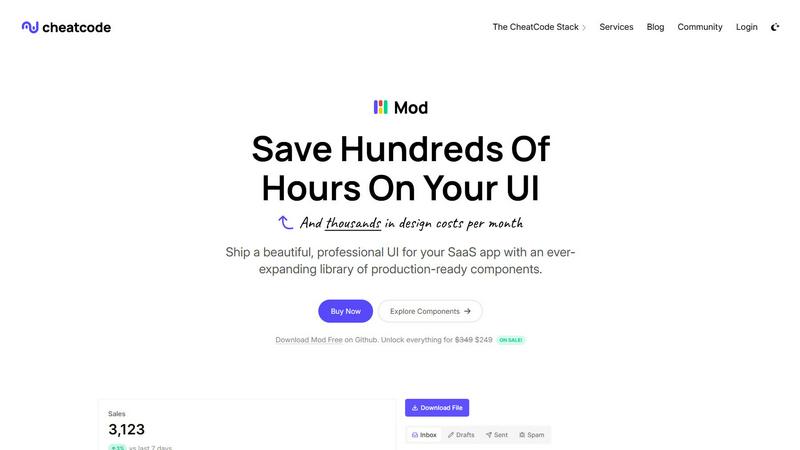
Mod is a CSS framework to build and ship SaaS application interfaces with speed.
Visual Comparison
CloudBurn

Mod
Feature Comparison
CloudBurn
Real-Time Pre-Deployment Cost Analysis
CloudBurn provides instant, accurate cost estimates for every infrastructure change before it merges into your main branch. By analyzing the output of your cdk diff or terraform plan, it calculates the precise monthly dollar impact using up-to-the-minute AWS pricing data. This feature eliminates guesswork and outdated spreadsheet models, giving developers and reviewers a clear financial context for every architectural decision during the code review phase, when it matters most.
Automated GitHub PR Comments
The tool seamlessly integrates into your GitHub workflow, automatically posting detailed cost reports as comments on relevant pull requests. This happens within seconds of a PR being opened or updated, requiring zero manual intervention. The comment breaks down costs per resource, shows the overall monthly change, and provides granular pricing details, making cost visibility an inherent, non-disruptive part of your standard development and review process.
Support for Terraform & AWS CDK
CloudBurn is built for the tools modern engineering teams use. It offers dedicated, easy-to-install GitHub Actions for both AWS CDK (CDK Diff PR Commenter) and Terraform (Terraform Plan PR Commenter). This native support ensures accurate parsing of infrastructure changes and reliable cost calculations, whether your team prefers declarative Terraform HCL or the programmatic power of the AWS CDK.
Proactive Cost Anomaly Prevention
Beyond simple reporting, CloudBurn acts as a financial guardrail for your infrastructure. By highlighting expensive resource changes—like accidentally provisioning a cluster of xlarge instances instead of micros—it prevents costly misconfigurations from ever reaching production. This proactive shield helps teams catch mistakes that could add thousands to the monthly bill, turning potential financial disasters into minor, pre-merge discussion points.
Mod
Extensive Component Library
Mod ships with a vast library of 88+ ready-to-use components, covering everything from complex data tables and interactive forms to navigation bars, modals, and stat cards. Each component is built with accessibility and semantic HTML in mind, ensuring a solid foundation. This eliminates the need to build and style these common UI elements from scratch, saving countless hours of development time and ensuring consistency across your entire application interface.
Framework-Agnostic Flexibility
Unlike CSS frameworks tied to a specific JavaScript ecosystem, Mod is designed to work anywhere. It provides clean, utility-based CSS classes that you can apply in any tech stack, including Next.js, Nuxt, Vite, Svelte, Ruby on Rails, and Django. This future-proofs your investment and gives your team the freedom to adopt new technologies without abandoning your UI system. Simply drop Mod's stylesheet into your project and start building.
Complete Theming & Dark Mode
Mod includes two professionally designed themes (light and dark) out of the box, with full support for automatic dark mode detection and toggling. The theming system is built with CSS custom properties, making it incredibly simple to customize primary colors, spacing, typography, and more to match your brand identity. This allows you to achieve a premium, polished look with minimal effort and provide a modern user experience that meets today's expectations.
Icon System & Responsive Design
Accelerate your workflow further with integrated access to over 1,500+ icons, covering a wide range of use cases for SaaS applications. Every component and layout in Mod is built with a mobile-first, fully responsive approach. Your interfaces will automatically adapt and look flawless on devices of all sizes, from desktop monitors to mobile phones, without requiring you to write custom media queries.
Use Cases
CloudBurn
Enabling Cost-Aware Code Reviews
Engineering teams can integrate financial accountability directly into their peer review process. Reviewers no longer have to wonder about the cost implications of a change; they are presented with a clear dollar figure alongside the code diff. This empowers teams to ask questions like "Is this the most cost-effective way to achieve our goal?" and fosters a collaborative culture where cost optimization is a shared engineering responsibility, not just a finance team concern.
Preventing Costly Deployment Mistakes
Platform and DevOps engineers use CloudBurn as a critical safety net. It automatically flags high-cost changes in pull requests, such as unintentionally switching instance types, enabling expensive features, or misconfiguring auto-scaling groups. This allows teams to catch and correct errors that would otherwise go unnoticed until the next billing cycle, preventing budget overruns and the painful, risky process of refactoring live production resources.
Streamlining FinOps for Engineering Teams
CloudBurn automates the first and most crucial step of the FinOps lifecycle—inform. It provides engineers with real-time cost data exactly when and where they need it: as they are writing and reviewing infrastructure code. This eliminates the friction and delay of manual cost estimation processes, seamlessly embedding financial governance into the CI/CD pipeline and allowing FinOps practices to scale with engineering velocity.
Onboarding and Educating Developers
For teams growing their cloud expertise, CloudBurn serves as an invaluable educational tool. New developers can see the direct cost impact of their infrastructure choices as they learn, building cost intuition from day one. It provides immediate, contextual feedback, helping to train engineers to think about cost efficiency as a fundamental aspect of building and shipping cloud-native applications.
Mod
Rapid SaaS Prototyping & MVP Development
For founders and solo developers validating an idea, speed is everything. Mod allows you to transform a concept into a functional, professional-looking prototype or Minimum Viable Product in days, not weeks. By using the pre-built components and layouts, you can assemble a convincing UI that focuses user testing on functionality and flow, not on visual design details, allowing for faster iteration and feedback cycles.
Streamlining Team-Based Development
In team environments, inconsistent UI can create friction and slow down progress. Mod serves as a single source of truth for your application's visual design. Developers can pull from the same component library, ensuring that every new feature or page adheres to the same design standards without constant back-and-forth with a designer, leading to more predictable shipping schedules and a cohesive final product.
Modernizing Legacy Application UIs
Revamping the user interface of an older application can be a daunting, resource-intensive project. Mod can be incrementally adopted into existing codebases, regardless of their framework. Teams can systematically replace outdated UI sections with Mod's modern components, achieving a visual refresh and improved user experience without a risky, full-scale rewrite of the application.
Building Internal Tools & Admin Panels
Internal dashboards and admin interfaces are crucial for operations but often don't justify a large design budget. Mod is perfect for these projects, providing all the complex data visualization components, form controls, and layout structures needed to build powerful, intuitive internal tools quickly. You get a clean, professional interface that improves team productivity without the overhead.
Overview
About CloudBurn
CloudBurn is the proactive FinOps shield engineered for modern development teams deploying on AWS. It's built specifically for developers and platform engineers using Terraform or AWS CDK who are tired of the reactive, post-mortem shock of a spiraling cloud bill. The core problem it tackles is the critical absence of a financial feedback loop during the development cycle. Teams currently make infrastructure changes in isolation, deploy them, and only discover the cost impact weeks later when the bill arrives—long after changes are costly and risky to undo. CloudBurn flips this broken model on its head by injecting real-time, actionable AWS cost intelligence directly into the code review process. When a pull request with infrastructure changes is opened, CloudBurn automatically analyzes the diff, calculates the precise monthly cost impact using live AWS pricing data, and posts a clear, detailed report as a PR comment. This transforms cost from a post-deployment accounting surprise into a first-class, pre-deployment engineering metric. It empowers teams to debate, optimize, and prevent expensive mistakes while the code is still in review and changes are trivial to make. By integrating seamlessly into your existing GitHub CI/CD workflow, CloudBurn enables a culture of cost-aware development, delivers immediate ROI by catching costly misconfigurations early, and ensures your team ships infrastructure with both performance and budget in mind.
About Mod
Mod is the high-velocity CSS framework engineered for shipping polished, production-ready SaaS user interfaces at breakneck speed. It eliminates the design bottleneck for developers by providing a comprehensive, battle-tested system of visual primitives. Think of it as your entire UI design department, distilled into a single, lightweight package. Built for solo founders, startups, and agile development teams, Mod's core value proposition is ruthless efficiency: stop wrestling with custom CSS, debating design tokens, or rebuilding common components. With over 88 meticulously crafted components, 168 style variants, and full theming support, you get a complete visual language out of the box. This allows you to focus entirely on application logic and user experience, dramatically reducing time-to-market and the costs associated with custom design work. Its framework-agnostic nature means it seamlessly integrates into your existing stack, whether you're working with Next.js, SvelteKit, Rails, or any other modern toolchain.
Frequently Asked Questions
CloudBurn FAQ
How does CloudBurn calculate cost estimates?
CloudBurn calculates estimates by analyzing the infrastructure-as-code diff from your pull request (via cdk diff or terraform plan). It identifies the specific AWS resources being added, modified, or removed. Then, it queries the official, real-time AWS Price List API to fetch the most current On-Demand pricing for those resources in your specified region. It calculates a projected monthly cost based on 730 hours of usage per month, providing a highly accurate forecast of your bill impact.
Is my code or cloud configuration data secure?
Yes, security is a foundational principle. CloudBurn is a GitHub-native application. All billing, setup, and permissions are handled 100% through GitHub. The tool only receives the parsed output of your infrastructure diff (the plan or diff text), not your actual Terraform state files, AWS credentials, or repository code. This architecture ensures your sensitive configuration and cloud access remain entirely within your secure GitHub environment.
What is the difference between the Community and Pro plans?
The Community plan is free forever and provides core cost estimation functionality for unlimited users and repositories. The Pro plan includes advanced features such as cost trend analysis over time, the ability to set custom cost budgets and alerts for PRs, detailed historical reporting, and priority support. New users can experience all Pro features for free during a 14-day trial with no credit card required.
How quickly does the cost comment appear on a pull request?
The cost report comment is posted automatically and typically appears on your pull request within seconds. The speed depends on the complexity of your infrastructure diff and the runtime of your GitHub Action workflow that generates the cdk diff or terraform plan. Once CloudBurn receives the diff output from the action, its analysis and comment posting are near-instantaneous.
Mod FAQ
What makes Mod different from Tailwind CSS or Bootstrap?
While Tailwind is a utility-first framework requiring you to construct components, Mod is component-first. You get complete, pre-assembled UI blocks (like dashboards, settings panels, etc.) that are ready to use immediately. Compared to Bootstrap, Mod is specifically tailored for the aesthetic and functional needs of modern SaaS applications, with more sophisticated components and a cleaner, less generic design out of the box.
Is Mod compatible with React/Vue/Svelte?
Absolutely. Mod is framework-agnostic. It is built with plain, semantic CSS. You can use its CSS classes directly in your React JSX, Vue templates, or Svelte components. There are no framework-specific bindings or dependencies, giving you maximum flexibility and avoiding vendor lock-in to any particular JavaScript ecosystem.
How easy is it to customize the themes and colors?
Customization is straightforward. Mod's visual style is controlled entirely through CSS custom properties (variables). You can override the core color palette, typography scales, spacing units, and more by simply defining your own values in a separate stylesheet. This allows for deep branding integration while maintaining all the structural benefits of the component system.
What is included in the yearly updates?
Your license includes access to all updates and new components released for one year from purchase. The CheatCode team continuously expands the library, refines existing components, and adds new features based on modern web standards and community feedback. This ensures your UI toolkit remains current and continues to save you time as web development practices evolve.