
Crops vs Linkfinder AI
Side-by-side comparison to help you choose the right product.

Crops
Crops uses AI to organize assets, catch errors, and streamline creative team approvals.
Last updated: March 1, 2026

Linkfinder AI
Instantly enrich leads with complete company data from multiple sources in minutes.
Last updated: February 27, 2026
Visual Comparison
Crops

Linkfinder AI
Feature Comparison
Crops
Smart Asset Organization
Crops uses AI to automatically tag, categorize, and organize your entire creative library the moment you upload. Assets can exist in multiple project boards without duplication, creating a flexible, intuitive structure. This means complex searches for specific images, versions, or campaigns that used to take hours are resolved in seconds. Your team stops digging and starts creating, finding the perfect asset immediately and every time, restoring precious creative momentum.
Streamlined Approvals & Collaboration
End feedback chaos with centralized, contextual approvals. Stakeholders and clients can comment directly on assets using visual annotations, all within a single platform. Custom workflows track approval status clearly, and you can share secure review links that require no login for external parties. This eliminates the endless email threads and Slack DMs, providing clear, actionable feedback that gets campaigns from draft to shipped faster.
AI-Powered Quality Control
This is your automated safety net. Crops' AI instantly scans all creative work for dozens of potential errors, including typos, grammar issues, placeholder text (like "Lorem ipsum"), accessibility problems with color contrast, and brand guideline inconsistencies. You can connect these checks to your workflow to run automatically before client presentations or final sign-off, ensuring nothing slips through to production and you ship with absolute confidence.
Secure & Simple Sharing
Distribute work and gather feedback without friction. Generate branded, secure share links with full control over passwords, expiration dates, and download permissions. Recipients can review and comment without needing to create an account, streamlining the client review process. This professional approach accelerates feedback loops while maintaining security and reflecting well on your brand.
Linkfinder AI
Multi-Source Data Enrichment Engine
Linkfinder AI doesn't rely on a single, potentially outdated source. Its powerful engine aggregates and cross-references data from multiple high-quality streams, including LinkedIn profiles, company databases, and public records. This multi-pronged approach ensures you receive the most complete, accurate, and up-to-date company and contact information available, giving you confidence in every data point for your campaigns and analysis.
Lightning-Fast Batch Processing
Process thousands of records simultaneously without slowdowns. Simply upload a CSV file with your leads, and Linkfinder AI's batch processing capability enriches the entire dataset in minutes, not hours or days. This feature is essential for sales teams and marketing agencies handling large volumes of data, enabling rapid list building and campaign launches to stay ahead of the competition.
Real-Time API Integration
Automate your enrichment workflow from start to finish with Linkfinder AI's robust API. Integrate it directly into your CRM, custom applications, or automation platforms like Zapier and Make. This allows for instant, on-the-fly data enrichment as new leads enter your system, ensuring your sales team always has the most current information without any manual intervention.
Intuitive, No-Training-Required Interface
Built for speed and adoption, Linkfinder AI features a clean, user-friendly dashboard that anyone can master immediately. There's no complex setup or required training, which means your team can start enriching data and extracting value from day one, eliminating the onboarding friction that plagues other enterprise tools and accelerating your time-to-results.
Use Cases
Crops
Accelerating Campaign Launch Timelines
Marketing teams managing multi-channel campaigns can use Crops to consolidate all assets—from social media graphics to video clips—in one searchable hub. Streamlined approval workflows prevent bottlenecks with legal and leadership, while AI quality checks ensure every asset is error-free before going live. This cuts days off production schedules and enables faster, more reliable campaign launches.
Ensuring Brand Consistency at Scale
For organizations with large creative teams or multiple external agencies, Crops acts as the single source of truth. AI automatically tags assets with correct brand guidelines, and secure sharing ensures everyone uses approved logos, fonts, and color palettes. This eliminates off-brand work and maintains a cohesive brand identity across all touchpoints, from digital ads to printed materials.
Streamlining Client Review & Feedback
Agencies and freelancers can revolutionize client interactions with Crops. Instead of emailing large files and collating feedback from multiple sources, they share a single, secure link. Clients comment directly on the designs, and all feedback is centralized. This transparency reduces revision rounds, manages client expectations effectively, and presents a highly professional, modern workflow.
Preventing Costly Production Errors
Creative and web development teams can integrate Crops' AI review into their final quality assurance checkpoint. The system automatically catches typos, broken links, placeholder text, and accessibility issues that are easily missed in manual reviews. This proactive catch-all prevents embarrassing and costly mistakes from ever reaching the public, protecting the team's reputation and budget.
Linkfinder AI
Supercharging Sales Prospecting
Sales teams can instantly transform a list of company names or LinkedIn profiles into a rich, outreach-ready contact list. By enriching leads with direct phone numbers, verified emails, and company details, reps can personalize their pitches and connect faster, significantly shortening the sales cycle and increasing conversion rates from the first touchpoint.
Accelerating B2B Marketing Campaigns
Marketing professionals can build highly targeted account-based marketing (ABM) and email campaigns with precision. Enriching lead lists with firmographic data ensures messaging is relevant and personalized. The batch processing feature allows marketers to quickly cleanse and enhance large lead databases, improving deliverability and engagement for cold outreach and nurture streams.
Streamlining Market & Competitive Research
Business analysts and strategists can conduct thorough market research and competitive intelligence efficiently. By using Linkfinder AI to gather comprehensive data on target companies, including employee counts and key details from public records, teams can gain insights into market trends, identify new opportunities, and build detailed competitive landscapes without manual scraping.
Automating CRM Data Hygiene
Maintain a pristine and actionable CRM database automatically. By integrating Linkfinder AI's API, businesses can set up workflows to continuously enrich and update contact and company records as they are created or become stale. This ensures your sales and marketing teams are always working with accurate, complete data, boosting overall operational efficiency.
Overview
About Crops
Crops is the AI-powered Digital Asset Management (DAM) platform engineered to eliminate the chronic inefficiencies plaguing creative and marketing teams. It's built for graphic designers, marketers, project managers, and agencies who are tired of losing hours to searching for files, wrangling chaotic feedback, and risking costly errors. The core value proposition is simple: automate the tedious, error-prone parts of your workflow so your team can reclaim time and focus on high-impact creative work that drives conversions. Crops transforms a fragmented, chaotic process—scattered across email, Slack, and various cloud drives—into a single, intelligent workspace. By leveraging artificial intelligence for smart organization, automated quality control, and streamlined collaboration, Crops ensures every asset is instantly accessible, meticulously reviewed, and swiftly approved. It’s more than just storage; it's an operational command center that guarantees brand consistency, accelerates campaign velocity, and delivers the confidence that work is flawless before it ever reaches a client or goes live.
About Linkfinder AI
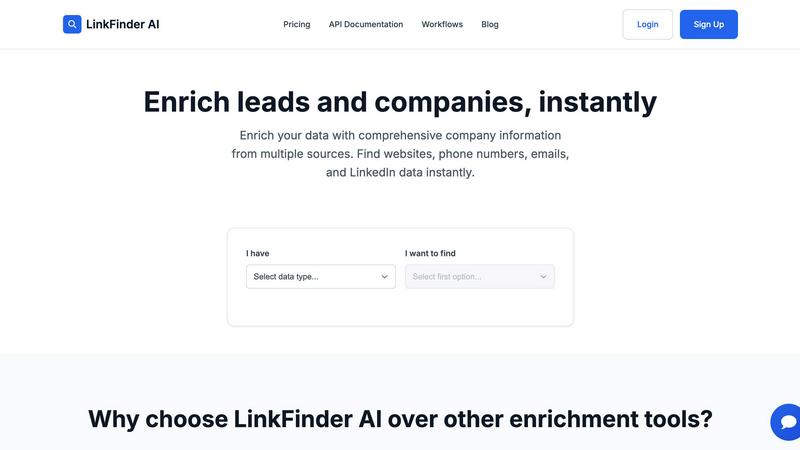
Linkfinder AI is a cutting-edge data enrichment platform engineered to supercharge your lead generation and market intelligence. It eliminates the tedious, manual hours spent hunting for accurate company and contact details by delivering comprehensive, enriched data in minutes. The tool is purpose-built for high-velocity sales teams, growth-focused marketers, and data-driven business analysts who need reliable information to fuel their outreach, research, and strategy. Its core value proposition is speed, accuracy, and simplicity: transform sparse leads into rich, actionable profiles instantly. By leveraging a multi-source engine that pulls from LinkedIn, verified databases, and public records, Linkfinder AI ensures you get a complete picture—including websites, direct phone numbers, email addresses, and key LinkedIn data—without the complexity. With features like bulk CSV processing and a real-time API, it integrates seamlessly into existing workflows, making it the definitive solution for organizations of all sizes aiming to accelerate productivity, improve conversion rates, and drive measurable business growth.
Frequently Asked Questions
Crops FAQ
How does Crops' AI tagging work?
When you upload an asset, Crops' AI engine automatically analyzes the visual and textual content. It identifies objects, scenes, colors, text within images, and file metadata to generate relevant searchable tags and categories. This happens instantly in the background, requiring no manual input from your team, and continuously improves the organization of your entire library.
Can external clients or stakeholders use Crops without an account?
Absolutely. A core feature of Crops is its secure sharing capability. You can generate a shareable link for any asset or board, which you can password-protect and set to expire. Recipients can view, download (if permitted), and leave comments directly on the asset using a simple interface—no Crops account or login is required for them.
What kind of errors does the AI Quality Control catch?
Crops' AI review scans for a wide range of common and critical errors. This includes spelling and grammar mistakes, detection of placeholder text like "lorem ipsum," incorrect dimensions or resolutions, accessibility issues such as poor color contrast for text, and even checks for brand guideline adherence on colors and logos.
How is Crops different from using Google Drive or Dropbox?
While Google Drive and Dropbox are excellent for general file storage, Crops is purpose-built for creative workflows. It adds intelligent AI-powered organization beyond basic folders, centralized visual feedback tools, automated quality assurance, and streamlined approval workflows—capabilities that generic cloud storage lacks. Crops transforms a storage repository into an active, collaborative workspace that manages the entire asset lifecycle.
Linkfinder AI FAQ
How accurate is the data enrichment?
Linkfinder AI guarantees a 95% accuracy rate for its enriched data. This high level of confidence is achieved through comprehensive data validation across its multiple, high-quality sources, including LinkedIn, verified databases, and public records. The cross-referencing engine ensures the information you receive is reliable and up-to-date.
What types of data can I enrich?
You can enrich various data points to find comprehensive company and contact information. Key inputs include Company Name, LinkedIn Company URL, LinkedIn Profile URL, Lead Full Name, and LinkedIn Post URL. From these, Linkfinder AI finds associated websites, phone numbers, email addresses, and detailed LinkedIn data to build complete profiles.
Do you provide API access?
Yes, Linkfinder AI offers full, real-time API access, which is included in its Professional plan. This allows developers and operations teams to integrate instant data enrichment directly into their own applications, CRMs, and automated workflows (like Zapier or Make), enabling seamless data syncing and automation.
Can I process multiple entries at once?
Absolutely. Linkfinder AI is built for scale with its powerful batch processing feature. You can upload thousands of records via a CSV file and have the entire dataset enriched and returned to you in just minutes. This is perfect for large-scale lead generation projects and regular database maintenance.
Alternatives
Crops Alternatives
Crops is a powerful Digital Asset Management (DAM) and workflow platform built for creative and marketing teams. It uses AI to automate asset organization, centralize approvals, and catch costly errors before they go live, transforming chaotic processes into streamlined operations. Teams often explore alternatives for various reasons. Budget constraints, specific feature requirements like deeper third-party integrations, or the need for a platform tailored to a different team size can all drive the search. The ideal solution must align with both your operational needs and financial reality. When evaluating options, prioritize core capabilities. Look for robust asset organization, efficient review and approval tools, and automated quality checks. The right platform should eliminate friction, not add to it, ensuring your team spends less time on admin and more on high-impact creative work.
Linkfinder AI Alternatives
Linkfinder AI is a powerful data enrichment platform in the marketing and sales intelligence category. It automates the process of finding complete company details, emails, and LinkedIn profiles, turning raw data into actionable leads in minutes. Users often explore alternatives for various strategic reasons. This could be due to budget constraints, a need for different feature sets like CRM integrations, or specific data sourcing requirements. The goal is always to find a tool that aligns perfectly with their operational tempo and data quality standards. When evaluating other options, focus on core capabilities. Prioritize enrichment accuracy, processing speed, and integration flexibility. The right tool should not just find data but seamlessly fit into your existing workflow, empowering your team to move faster and smarter without friction.