Customer Connect CRM vs Prompt Builder
Side-by-side comparison to help you choose the right product.

Customer Connect CRM
Customer Connect CRM centralizes leads and automates follow-ups to boost sales and streamline your sales process.
Last updated: February 28, 2026

Prompt Builder
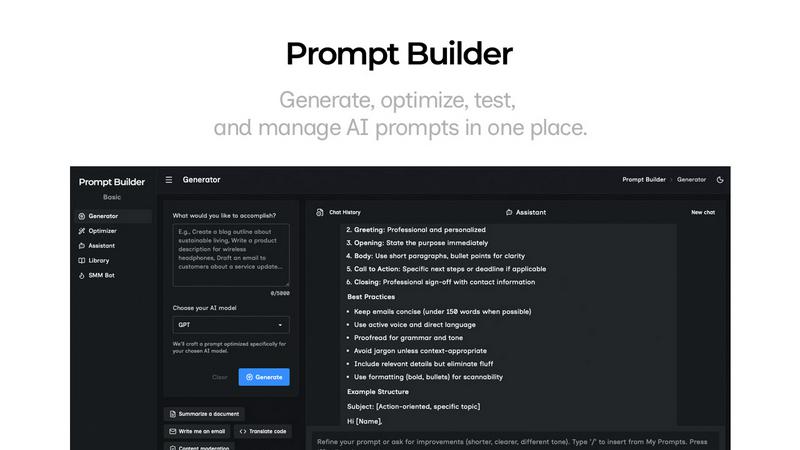
Generate, optimize, test, and manage AI prompts in one place. Turn an idea into a ready-to-use prompt in seconds.
Visual Comparison
Customer Connect CRM

Prompt Builder
Overview
About Customer Connect CRM
Customer Connect CRM is a powerful yet user-friendly customer relationship management tool tailored specifically for small to medium-sized businesses. Designed to streamline the management of customer inquiries and sales processes, it minimizes administrative burdens while maximizing user engagement. This CRM is perfect for professionals who may not possess extensive technical expertise, thanks to its intuitive interface. By consolidating all inquiries—from emails to forms—into a single, accessible platform, Customer Connect CRM enhances productivity, enabling quicker follow-ups that drive increased conversions. The integration of smart AI features automates repetitive tasks and effectively manages leads, making it an ideal solution for freelancers, consultants, and small teams looking to elevate their sales strategies without unnecessary complexity. With Customer Connect CRM, businesses can focus on what truly matters: building meaningful customer relationships and closing more deals.
About Prompt Builder
Prompt Builder is a prompt engineering workspace for writing, testing, and saving prompts. Describe the task in plain English, and it helps you create a prompt that matches the model you choose. Start with a draft, refine it in chat, save or pin versions, then run them when you are ready. It works with GPT, Claude, Gemini, Llama, Mistral, DeepSeek, Grok, Perplexity, and more. You also get an Optimizer, an assistant for quick tests, and a library of reusable prompts and templates from the community. Turn an idea into a ready-to-use prompt in seconds. Refine it in chat, save it to your Library, and run it anytime.