File Studio vs Wipyly
Side-by-side comparison to help you choose the right product.

File Studio
File Studio empowers you to convert, edit, and manage files and PDFs offline, ensuring complete privacy and efficiency.
Last updated: February 26, 2026

Wipyly is the all-in-one app to effortlessly manage and grow your cleaning business.
Last updated: March 4, 2026
Visual Comparison
File Studio

Wipyly
Feature Comparison
File Studio
5 PDF Tools
File Studio offers an array of five comprehensive PDF tools that enable users to merge multiple PDFs, split documents into individual pages, reorder and rotate spreads, and remove passwords. All these features function seamlessly offline, ensuring that sensitive documents are never uploaded to the cloud.
10 Image Tools
With ten specialized image tools, File Studio allows users to handle over 20 formats including HEIC, WebP, and various RAW types. You can resize, compress, crop, add watermarks, and create collages, making it a versatile solution for any image-related tasks, all while maintaining privacy by processing files locally.
Batch Processing
File Studio's batch processing capability lets users convert, resize, or compress entire folders in one go. This feature significantly enhances productivity by allowing multiple files to be processed simultaneously, making it an essential tool for users handling large volumes of documents and images.
100% Offline Functionality
One of File Studio's standout features is its commitment to offline functionality. All file processing occurs locally on your Mac or PC, meaning there are no uploads, no accounts, and no subscriptions. This ensures your sensitive documents remain completely private and secure, providing peace of mind for users who prioritize data confidentiality.
Wipyly
Smart Scheduling & Job Management
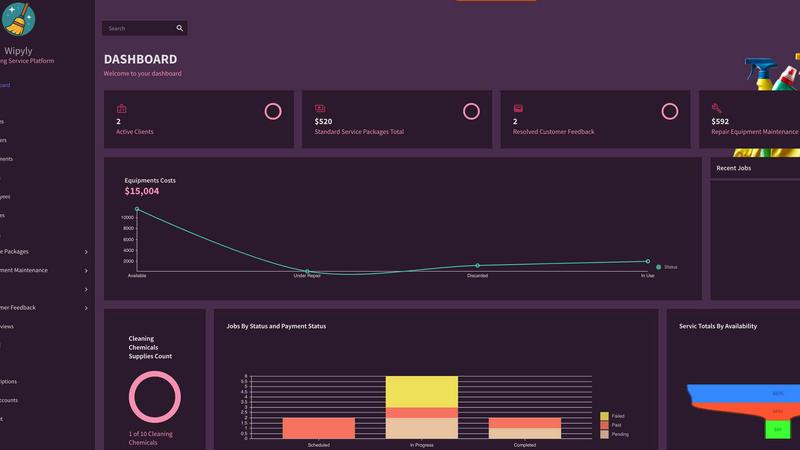
Gain complete operational visibility and control with Wipyly's dynamic scheduling dashboard. Effortlessly assign jobs to teams, track progress in real-time, and adjust schedules on the fly to accommodate last-minute changes or urgent requests. This centralized system ensures no appointment is ever missed or double-booked, maximizing team productivity and ensuring reliable service delivery for every client.
Integrated Customer & Feedback Hub
Manage all client interactions and vital information in one secure, accessible place. Store customer details, service histories, and preferences to deliver personalized service. Crucially, Wipyly's integrated feedback system allows you to collect, analyze, and act on customer reviews directly within the platform, turning insights into immediate action for continuous service improvement and enhanced client satisfaction.
Automated Invoicing & Financial Insights
Streamline your cash flow and financial tracking with automated invoicing and comprehensive financial modules. Generate and send professional invoices instantly, track payments, and manage expenses with ease. Dive into detailed reports on job costs, payroll, and overall profitability, giving you the clear financial insights needed to make informed strategic decisions and drive your business forward.
Equipment & Inventory Management
Ensure operational efficiency by proactively managing your assets. Schedule and track equipment maintenance to prevent costly downtime and extend the lifespan of your tools. Simultaneously, simplify supply chain coordination through a unified platform, monitoring inventory levels to guarantee your teams always have the necessary resources available for every job, right when they need them.
Use Cases
File Studio
Managing Sensitive Documents
File Studio is perfect for managing sensitive documents like passports and contracts. Users can securely edit, merge, and password-protect these files without ever risking exposure to online threats, ensuring that confidentiality is maintained at all times.
Streamlining Workflows for Freelancers
Freelancers can benefit from File Studio's robust capabilities by efficiently merging client contracts, creating portfolios, and converting images for presentations. The ability to handle multiple file types and batch process documents makes it an invaluable tool for managing diverse projects.
Optimizing Image Handling for Photographers
Photographers can use File Studio to convert RAW images to various formats, resize photos for web use, and compress files for easy sharing. This enables them to maintain high-quality images while managing storage space effectively and processing everything offline.
Organizing Digital Archives
File Studio is an excellent solution for anyone looking to organize digital archives. Users can merge related documents, remove unnecessary pages, and convert files into user-friendly formats, creating a streamlined digital filing system that’s easy to access and manage.
Wipyly
Scaling a Solo Cleaning Operation
For the independent cleaner ready to expand, Wipyly provides the infrastructure to grow without the administrative overwhelm. Automate booking and invoicing to save hours each week, use the scheduling tool to efficiently manage a growing client list and additional team members, and leverage financial reports to understand profitability and guide smart investment decisions for sustainable growth.
Managing Multi-Team Commercial Contracts
For businesses handling large commercial sites or multiple simultaneous jobs, Wipyly is essential. Coordinate several crews from a single dashboard, dispatch jobs with specific instructions and checklists, and track the real-time status of each location. This ensures seamless communication, consistent service quality across all teams, and the ability to provide precise updates to corporate clients.
Standardizing Service Delivery & Quality
Use Wipyly to create, manage, and deploy standardized service packages. Ensure every team member understands the scope and requirements of each job type, from a basic clean to a premium detail. By systematizing your offerings and tracking performance against these standards, you guarantee a uniform, high-quality client experience that builds your reputation and encourages repeat business.
Optimizing Resource Allocation & Costs
Gain control over your biggest operational expenses. Use the inventory module to prevent over-ordering or running out of key supplies. Schedule equipment maintenance to avoid emergency repairs and replacements. Analyze job cost data against payroll to identify which services are most profitable, allowing you to optimize pricing, staffing, and resource use for maximum margin.
Overview
About File Studio
File Studio is a powerful desktop application tailored for professionals who need to manage PDFs and images securely, all while working offline. Designed for photographers, freelancers, and remote workers, it prioritizes user privacy, allowing you to handle sensitive documents such as passports, IDs, and contracts without the fear of cloud storage vulnerabilities. With File Studio, you can merge, split, reorder, rotate, and password-protect PDFs, alongside converting files across more than 20 formats, including HEIC, WebP, AVIF, and various RAW types. Its one-time purchase model ensures that users can access its robust features without the hassle of subscriptions or accounts. Compatible with both Mac and Windows, File Studio is the ideal solution for those who seek reliable, efficient file management tools while keeping their data safe and secure.
About Wipyly
Wipyly is the definitive command center for modern cleaning businesses, designed to eliminate operational chaos and drive scalable growth. This all-in-one, cloud-based platform is purpose-built for residential and commercial cleaning services, consolidating every critical function—from the first client booking to the final invoice—into a single, intuitive system. It replaces the messy patchwork of spreadsheets, sticky notes, and disconnected apps with a unified solution that empowers owners and managers. Whether you're a solo entrepreneur or overseeing multiple crews, Wipyly's mission is to slash time-consuming administrative tasks, streamline daily workflows, and deliver a flawless experience for both your team and your clients. With powerful tools for smart scheduling, customer management, online booking, invoicing, and real-time performance tracking, Wipyly provides the clarity and control needed to make data-driven decisions, optimize resources, and scale operations with absolute confidence. It's more than software; it's your strategic partner in building a smarter, more efficient, and more successful service business.
Frequently Asked Questions
File Studio FAQ
Is my data ever uploaded?
No. File Studio processes everything locally on your device. Your files never leave your computer, ensuring 100% offline processing and maximum privacy.
Do you offer a free trial?
Yes. File Studio offers a free trial that allows potential users to explore its features and capabilities before making a commitment.
What file formats does File Studio support?
File Studio supports over 20 file formats, including popular ones like PDF, JPG, HEIC, WebP, AVIF, and various RAW types, providing extensive versatility for all your file management needs.
Can I use File Studio on both Mac and Windows?
Absolutely! File Studio is fully compatible with both Mac and Windows operating systems, allowing you to enjoy its powerful features regardless of your platform.
Wipyly FAQ
Is Wipyly suitable for a one-person cleaning business?
Absolutely. Wipyly is designed to scale with you. As a solo operator, you can immediately benefit from features like online booking to capture clients 24/7, automated invoicing to get paid faster, and a centralized customer database to provide personalized service. It eliminates administrative clutter, giving you more time to focus on the actual cleaning work and client relationships.
How does Wipyly help improve customer satisfaction?
Wipyly enhances customer satisfaction through organization, communication, and responsiveness. Automated reminders keep clients informed about upcoming appointments. A centralized history allows for personalized service. Most importantly, the built-in feedback system lets you quickly gather client input and resolve any issues proactively, demonstrating that you value their experience and are committed to excellence.
Can I access Wipyly on my mobile phone?
Yes, Wipyly is a fully cloud-based platform, which means you can access it securely from anywhere, on any device with an internet connection. This gives business owners and field managers the freedom to check schedules, update job statuses, communicate with teams, and handle invoices directly from a smartphone or tablet, ensuring you're always in control, even on the go.
How secure is my business and client data within Wipyly?
Wipyly takes security seriously, employing robust measures to protect your information. The platform uses SSL encryption to secure all data in transit, ensuring it is safe from interception. We adhere to high industry standards for data protection, providing a secure, reliable environment for managing your sensitive business operations, customer details, and financial information.
Alternatives
File Studio Alternatives
File Studio is a powerful desktop application designed for managing files and PDFs entirely offline, appealing to users who prioritize privacy and security. As a productivity and management tool, it allows users to convert, edit, and handle sensitive documents without the risk associated with cloud storage. Users often seek alternatives to File Studio for various reasons, including pricing, feature sets, and platform compatibility. When selecting an alternative, it's essential to consider factors such as the range of tools offered, ease of use, and whether the software meets specific file management needs without compromising on security or functionality.
Wipyly Alternatives
Wipyly is a comprehensive business management platform designed specifically for cleaning service companies. It falls into the productivity and operations software category, acting as a centralized hub to handle scheduling, client management, invoicing, and more. Its goal is to replace disjointed tools with a single, streamlined system. Business owners often explore alternatives for various reasons. This could be due to budget constraints, a need for different or more specialized features, or a requirement to integrate with other specific software platforms their business already uses. The search for the right fit is a normal part of scaling any service-based operation. When evaluating other options, focus on core needs. Key considerations include the depth of cleaning-specific tools, ease of use for your team, scalability for future growth, and the quality of customer support. The ideal platform should not only manage your current workload but also empower your business to expand efficiently.