
FilexHost vs Session Stacker
Side-by-side comparison to help you choose the right product.

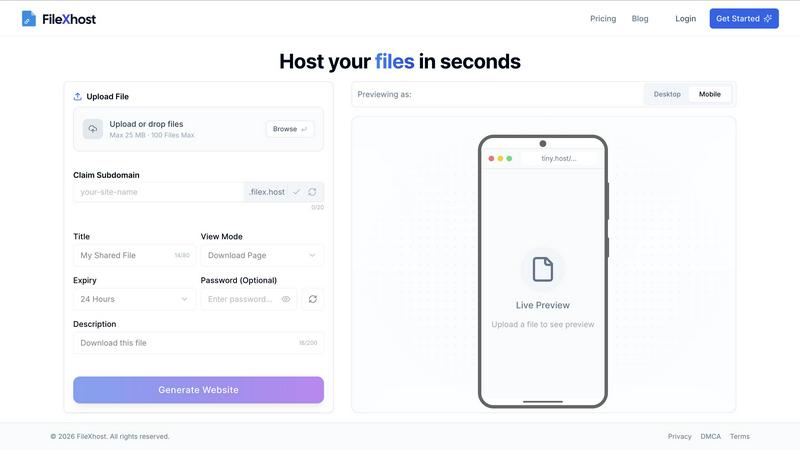
Effortlessly host and share your files with instant, secure links using FilexHost’s simple drag-and-drop interface.
Last updated: February 26, 2026

Session Stacker
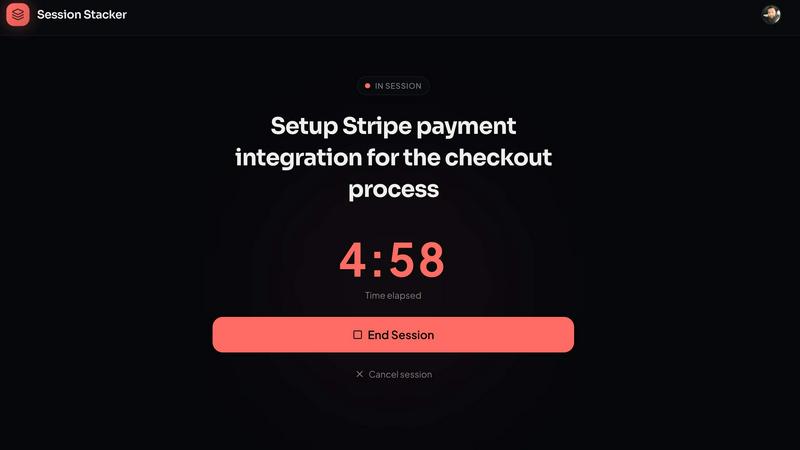
Session Stacker keeps side hustlers focused by defining your next task for seamless building after a busy day.
Last updated: February 26, 2026
Visual Comparison
FilexHost
Session Stacker
Feature Comparison
FilexHost
Universal File Support
FileXHost supports a wide array of file types, including PDFs, Excel spreadsheets, images, audio, video, ZIP archives, and even HTML projects. This versatility ensures that users can host virtually any file they need, making it ideal for a range of applications.
Instant Subdomains
With FileXHost, every uploaded file gets an instant subdomain (your-file.filex.host), requiring zero setup. This feature makes sharing your files incredibly efficient, as you can distribute links immediately after upload without additional configuration.
Smart View Modes
FileXHost offers smart view modes that allow recipients to either directly render files in their browsers or access a download page. This flexibility enhances user experience, ensuring that files are easily accessible and viewable in the way that best suits the recipient's needs.
Secure by Default
Every link generated by FileXHost comes with free SSL encryption, ensuring that your files are shared securely. This commitment to security means users can share sensitive documents without worrying about unauthorized access.
Session Stacker
AI-Powered Task Review
Session Stacker leverages advanced AI technology to review your tasks intelligently. This feature analyzes your past sessions and helps you prioritize your next steps, ensuring that you're always working on what matters most.
Streak Tracking
Build consistency and keep your motivation high with streak tracking. By visualizing your work habits over time, you can stay committed to your side projects and see your progress, reinforcing the discipline needed to achieve your goals.
Session History
Easily access your session history to track what you have accomplished. This feature allows you to reflect on your journey and identify patterns in your productivity, helping you make informed decisions about your future work sessions.
Detailed Stats
Gain insights into your productivity with detailed statistics that showcase your progress over time. This feature provides tangible proof of your efforts, enabling you to celebrate milestones and stay motivated as you build your side projects.
Use Cases
FilexHost
Client Report Sharing
Professionals can use FileXHost to share client reports effortlessly. By uploading reports and generating secure links, they can provide instant access to clients, ensuring timely communication and feedback without the hassle of email attachments.
Developer Hosting
Developers can host landing pages or mock APIs using FileXHost. With the ability to share live HTML projects, they can easily collaborate with team members or showcase their work to potential clients without any complex setup.
Digital Product Distribution
Creators can distribute digital products such as eBooks, music files, or software through FileXHost. The simple drag and drop interface allows them to share their creations quickly, reaching their audience efficiently and effectively.
Quick File Testing
Individuals needing to test files can use FileXHost for quick sharing and access. Whether it is a presentation, spreadsheet, or media file, users can upload and test their files in real-time without the burden of managing file servers or configurations.
Session Stacker
Side Hustlers
For side hustlers balancing a full-time job with personal projects, Session Stacker is the perfect companion. It allows them to quickly pick up where they left off without wasting time on re-planning or remembering previous tasks.
Freelancers
Freelancers can maximize their limited work hours by using Session Stacker to set clear next steps for each project. This helps them maintain momentum across multiple clients and ensures no time is lost between sessions.
Students
Students juggling coursework and personal projects can benefit from Session Stacker by defining specific tasks before ending study sessions. This clarity allows them to transition smoothly back to their projects, making the most of their time.
Creatives
For creatives who often deal with multiple ideas and projects, Session Stacker provides a straightforward way to prioritize and track their creative endeavors. By always knowing the next step, they can focus on the art of creation without unnecessary distractions.
Overview
About FilexHost
FileXHost is your go-to solution for instant file hosting and sharing, designed to streamline the process of delivering files effortlessly. It caters to a diverse audience, including professionals, developers, and creators, providing high-speed hosting for any file type—documents, media, spreadsheets, or even entire websites. With FileXHost, sharing files becomes a breeze thanks to its intuitive "Drop & Share" workflow. Users simply drag and drop their files, receive an instant secure URL, and share it without any complicated setups or recipient logins. The platform prioritizes viewer experience, ensuring that files are presented beautifully and optimally without the need for downloads or plugins. Whether you are sharing client reports, hosting landing pages, or distributing digital products, FileXHost combines speed, simplicity, and security to transform how you manage and share your files.
About Session Stacker
Session Stacker is a powerful productivity tool designed specifically for side hustlers who juggle a full-time job while pursuing their passions. It addresses the common hurdle of forgetting where you left off during your last work session, which often leads to wasted time and diminished momentum. With Session Stacker, you can establish a simple yet effective habit: before concluding your work session, you define your next task. This ensures that when you return, you can dive straight into your work without the frustrating ramp-up time. The platform is built for builders with limited evening energy and tight schedules, offering a streamlined experience that cuts through the clutter of traditional project management tools. With features like AI-powered task review and streak tracking, Session Stacker provides the clarity and consistency needed to achieve your goals. It’s a no-frills solution that empowers you to focus on building and shipping your projects effectively.
Frequently Asked Questions
FilexHost FAQ
What is FileXHost?
FileXHost is an instant file hosting and sharing solution that allows users to upload and share a wide variety of files effortlessly. It prioritizes simplicity and speed, providing users with quick access to secure links for file distribution.
Is it really free?
Yes, FileXHost offers a free plan that allows users to host up to 1,000 files with a maximum size of 25 MB each. This plan includes ad support and a 7-day expiry for hosted files, making it suitable for quick sharing and testing.
What file types are supported?
FileXHost supports a broad range of file types, including documents (PDF, TXT), spreadsheets (XLSX, CSV), images (JPG, PNG), media files (MP4, MP3), and even ZIP archives and HTML projects, ensuring versatility for all your hosting needs.
How do I update my site?
To update your hosted site, simply re-upload your file or website ZIP using the drag and drop interface. FileXHost will automatically generate a new link for you, ensuring that your latest version is always accessible.
Session Stacker FAQ
How does Session Stacker help with productivity?
Session Stacker helps with productivity by eliminating the ramp-up time that often occurs when starting a work session. By defining your next task before you finish, you can jump right back into your work when you return.
Is Session Stacker suitable for large teams?
No, Session Stacker is specifically designed for individual builders and side hustlers. It focuses on personal productivity rather than managing large teams or complex project workflows.
Can I access Session Stacker on multiple devices?
Yes, Session Stacker is a Progressive Web App (PWA), meaning you can access it on any device with an internet connection, providing flexibility and convenience for users on the go.
What happens after the free trial ends?
After the 7-day free trial, you can choose to continue using Session Stacker for $4.99 per month or opt for a one-time payment of $49 for lifetime access. There are no hidden fees, and you can cancel anytime.
Alternatives
FilexHost Alternatives
FilexHost is an innovative file hosting and sharing service that simplifies the process of sharing files through a straightforward drag-and-drop interface. Users can effortlessly upload any file type, from documents to media, and receive a live, shareable URL in seconds, making it an ideal solution for professionals, developers, and creatives alike. However, users often seek alternatives to FilexHost for various reasons, including pricing structures, specific feature sets, or compatibility with particular platforms. When looking for an alternative, it's essential to consider aspects such as ease of use, file type support, security features, and storage options to ensure the chosen service aligns with your needs for fast and reliable file sharing.
Session Stacker Alternatives
Session Stacker is an innovative productivity tool designed specifically for side hustlers, helping them maintain focus by setting the next task before closing their laptops. This user-friendly application falls into the productivity and management category, streamlining the work process for individuals juggling side projects with limited time. Users often seek alternatives due to various reasons, such as pricing concerns, specific feature requirements, or the need for compatibility across different platforms. When looking for an alternative, consider factors like ease of use, task tracking capabilities, and whether it aligns with your unique workflow preferences.