AECharts vs Genstory
Side-by-side comparison to help you choose the right product.

AECharts
Create stunning animated charts effortlessly for presentations and videos, with flexible exports and automatic branding for impactful storytelling.
Last updated: April 13, 2026

Genstory
Genstory instantly creates illustrated storybooks from your text prompts.
Last updated: February 27, 2026
Visual Comparison
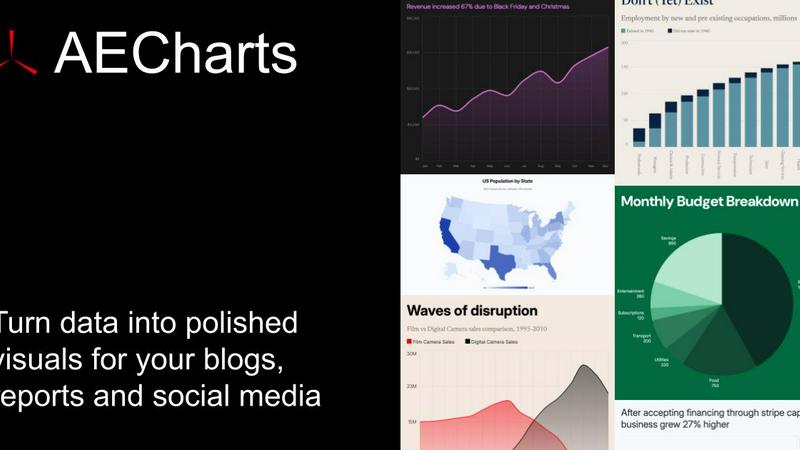
AECharts
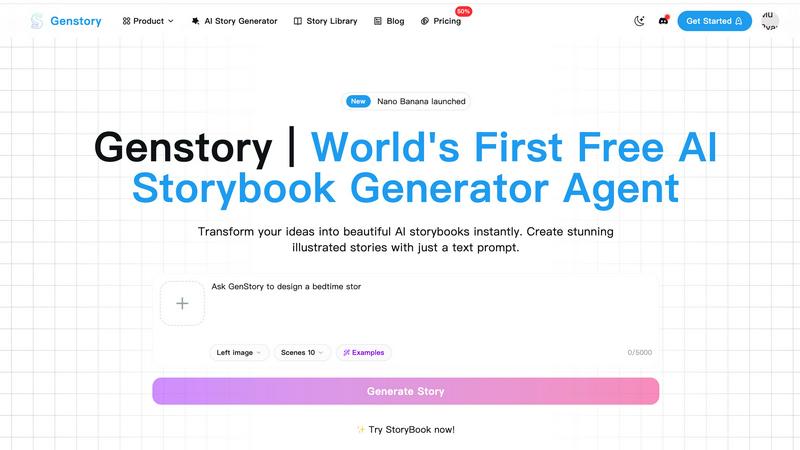
Genstory
Feature Comparison
AECharts
Animated Chart Creation
Every chart you create with AECharts is inherently animated, eliminating the need for additional tools or software. This feature significantly streamlines the process, allowing users to produce engaging video content without any hassle.
Brand Kit Integration
AECharts offers a comprehensive Brand Kit feature that automatically applies your brand's fonts, colors, and logo to every chart. This ensures that all visual representations are consistent with your brand identity, enhancing professionalism and recognition.
Flexible Export Options
Users can download their charts in multiple formats, including JPEG, PNG, and MP4, with various size presets. This flexibility caters to diverse needs, whether for social media, presentations, or reports, making it easier to share high-quality content across platforms.
Extensive Chart Type Variety
With support for 14 different chart types—including bar, line, pie, scatter, and more—AECharts caters to a wide range of data visualization needs. This extensive selection allows users to choose the most effective chart type for their specific data story, enhancing clarity and impact.
Genstory
Lightning-Fast AI Generation
Witness your story come to life in a flash. Genstory's optimized AI engine completes the entire creation pipeline—from narrative structuring to generating high-quality illustrations—in just a few seconds. This rapid turnaround means you can iterate on ideas, generate multiple versions, or create a brand-new storybook during a short break, maximizing creative productivity without any waiting.
Simple Natural Language Interface
Forget complex scripting or design software. Genstory operates through an intuitive, conversation-like interface. Simply type a straightforward prompt describing your idea, characters, or theme. The AI interprets your natural language input to guide its creation, making advanced storybook generation accessible to everyone, regardless of their technical or artistic background.
Multi-Format Export & Sharing
Genstory provides flexible output options to suit any need. Instantly generate your story as a downloadable, print-ready PDF for physical copies or bedtime reading. Alternatively, create an interactive web story that can be easily shared via a link, embedded on websites, or viewed on any device. This seamless export functionality makes distribution and presentation effortless.
Professional-Quality AI Illustrations
Every story is visually brought to life with stunning, coherent artwork. The integrated AI illustration engine generates custom images that match the narrative's tone, characters, and scenes. These are not generic stock images but unique illustrations created specifically for your story, ensuring a professional and immersive visual experience that captivates readers.
Use Cases
AECharts
Marketing Campaigns
Marketers can utilize AECharts to create animated charts that effectively showcase campaign performance, audience insights, and market trends. This engaging visual format boosts audience engagement and comprehension, making marketing reports more compelling.
Journalistic Storytelling
Journalists can leverage AECharts to transform complex data into easily digestible animated visuals. This capability enhances storytelling by providing clear insights that complement written articles, making data-driven narratives more impactful.
Educational Presentations
Educators and trainers can use AECharts to create animated charts for their lectures or workshops. This visual approach helps students grasp challenging concepts quickly, fostering a more interactive and engaging learning environment.
Business Reports and Pitches
Founders and business analysts can craft dynamic animated charts for presentations and pitch decks. By visualizing critical metrics and trends, these animations enhance the clarity of business insights, making it easier to persuade stakeholders and clients.
Genstory
Personalized Bedtime Stories for Parents
Transform bedtime into an unforgettable adventure. When the bookshelf feels repetitive, parents can generate a unique story in seconds. Make their child the hero, incorporate their favorite toy as a sidekick, or explore a magical theme they love. This creates a deeply personal bonding experience and a limitless supply of new tales that delight and engage young listeners.
Dynamic Educational Content for Teachers
Educators can instantly create visual narratives to explain complex concepts, reinforce lessons, or inspire creativity. Perfect for ESL instruction, special education, history lessons, or creative writing prompts, these AI-generated storybooks make learning sticky and engaging. Teachers can tailor content to curriculum needs and student interests, fostering a more interactive classroom environment.
Creative Prototyping for Writers & Creators
Aspiring authors, screenwriters, and content creators can use Genstory to rapidly prototype ideas and visualize narratives. Input a plot concept and receive a drafted story with accompanying visuals, providing a tangible draft to refine, pitch, or use as a foundation for larger projects. It's a powerful tool for overcoming writer's block and exploring new creative directions efficiently.
Specialized Promotional & Brand Narratives
Businesses, nonprofits, and marketers can leverage Genstory to create compelling illustrated stories for campaigns, brand messaging, or internal communications. Craft narratives that explain a product's journey, share company values, or highlight customer testimonials in an engaging, storybook format that stands out and resonates emotionally with the target audience.
Overview
About AECharts
AECharts is an innovative, browser-based tool designed for creating stunning animated chart videos with absolute ease. No design expertise, software installations, or video editing knowledge is required—just your data and creativity. Users can upload spreadsheets, paste data directly, or connect their Google Sheets to AECharts, which then seamlessly transforms this information into polished animated videos in just minutes. With a diverse array of chart types available—including bar charts, line charts, pie charts, and dynamic bar chart races—AECharts empowers marketers, journalists, researchers, and founders to communicate complex data in a visually compelling manner. The platform offers professional templates that can be easily customized to align with your brand’s identity, allowing users to modify colors, fonts, sizing, and logos effortlessly. When complete, you can export your animated charts as MP4 videos for sharing across platforms like YouTube, LinkedIn, Instagram, and more, enhancing engagement and clarity in data presentation. AECharts is the ideal solution for anyone seeking a fast, efficient way to create impactful visual data narratives.
About Genstory
Genstory is a cutting-edge AI story generator agent designed to eliminate creative friction and instantly transform simple ideas into fully illustrated digital storybooks. Powered by advanced Gemini Storybook technology, it automates the entire creation process from a single text prompt. In mere seconds, users receive a complete narrative with vivid plots and exquisite, AI-generated artwork. This tool is engineered for speed and simplicity, requiring no technical skill or complex commands—just natural language. Its core value proposition is democratizing story creation, making it an indispensable asset for parents seeking unique bedtime stories, educators crafting engaging lesson materials, and aspiring writers visualizing their concepts. By supporting multi-dimensional outputs like PDFs and interactive web stories, Genstory ensures that sharing, printing, and embedding these personalized tales is effortless. It turns moments of inspiration into tangible, beautiful storybooks faster than ever thought possible.
Frequently Asked Questions
AECharts FAQ
What is AECharts?
AECharts is a browser-based tool for creating animated chart videos, allowing users to visualize data effortlessly without requiring any design or video editing skills.
Who is this tool designed for?
AECharts is tailored for marketers, journalists, researchers, and founders who need to communicate complex data in an engaging and visually appealing manner.
Can I import data from CSV or spreadsheets?
Yes, AECharts allows users to upload spreadsheets, paste data, or connect directly to Google Sheets, making data input seamless and efficient.
What export formats are available?
AECharts provides multiple export options including MP4 for videos, JPEG, and PNG for images, accommodating various usage scenarios like social media, presentations, and reports.
Genstory FAQ
How long does it take to generate a storybook?
Generation is nearly instantaneous. From the moment you submit your text prompt, Genstory's AI typically creates a complete digital storybook—including both the full narrative text and all custom illustrations—within just a few seconds. The speed allows for real-time creation and iteration.
Do I need any design or writing skills to use Genstory?
Absolutely not. Genstory is designed for users of all skill levels. The only requirement is the ability to describe your story idea in simple, natural language. The AI handles all the complex tasks of plot development, writing, and illustration, making professional-grade story creation accessible to everyone.
What formats can I download or share my story in?
Genstory offers versatile output options. You can download your completed story as a high-quality PDF document, perfect for printing or offline reading. Alternatively, you can generate an interactive web story, which provides a shareable link to a dedicated online page where the story can be viewed on any device with a web browser.
Can I customize the story after the AI generates it?
Yes, the platform allows for review and customization. After the AI generates the initial storybook, you can read through the content and make adjustments to the text, request different illustrations, or tweak the style to better match your vision before finalizing and exporting the story.
Alternatives
AECharts Alternatives
AECharts is a powerful browser-based tool designed for creating animated chart videos that cater to various presentation needs. It falls under the category of design tools, enabling users to transform their data into engaging visuals without requiring any prior design skills or extensive video editing experience. This accessibility makes AECharts particularly appealing for marketers, journalists, researchers, and founders who need to convey data effectively. Users often seek alternatives to AECharts for several reasons, including pricing, feature sets, and specific platform compatibility. When selecting an alternative, it's crucial to consider factors such as ease of use, customization options, the range of chart types available, and the ability to export to various formats. Finding a tool that aligns with your unique needs will ensure you can create compelling animated charts efficiently.
Genstory Alternatives
Genstory is a free AI-powered creator that instantly generates illustrated storybooks, comics, and cinematic videos from simple text prompts. It falls into the category of AI-driven design and storytelling tools, making creative content generation accessible to everyone. Users often seek alternatives for various reasons, such as needing more advanced editing features, different output formats, or a platform tailored for professional publishing rather than casual creation. When exploring other options, it's crucial to identify your primary need. Are you looking for deeper narrative control, higher-resolution artwork, or collaborative features for a team? Some tools might excel in visual quality but lack speed, while others offer robust text generation but simpler illustrations. Your choice should balance the desired output quality, ease of use, and how the tool integrates into your specific workflow, whether for education, entertainment, or professional projects.