
HuntingPad vs Zovo
Side-by-side comparison to help you choose the right product.

HuntingPad
Land your next role faster with AI-powered job tracking and resume matching.
Last updated: March 1, 2026

Unlock 20 privacy-first Chrome extensions for developers and writers, built by a solo developer with user-driven.
Last updated: February 26, 2026
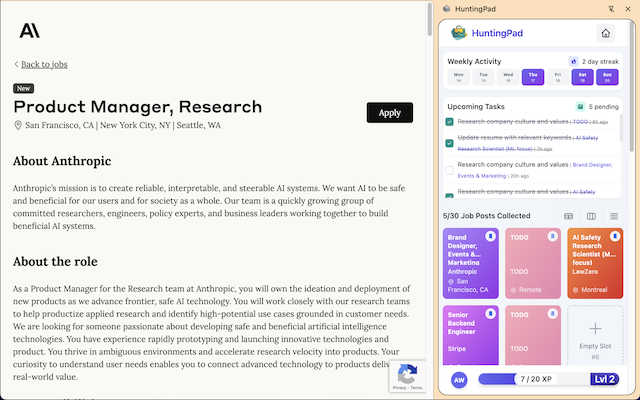
Visual Comparison
HuntingPad
Zovo

Feature Comparison
HuntingPad
One-Click Job Capture
Stop juggling bookmarks and manual data entry. With HuntingPad, a single click on the extension icon instantly saves the job post, company details, and link directly from any career site like LinkedIn or Indeed. It auto-organizes everything into your personal command center, eliminating tab explosion and lost opportunities. You can keep browsing seamlessly while your pipeline builds itself in the background.
AI-Powered Application Insights
Go beyond generic applications. HuntingPad's AI analyzes saved job descriptions and matches them against your resume. It provides actionable insights, suggesting specific tweaks to your resume bullet points and helping you craft a more personalized cover letter. This targeted customization helps your application stand out in a sea of generic submissions, increasing your chances of landing an interview.
Smart Autofill & Tracking
Reclaim hours lost to repetitive form-filling. HuntingPad's smart autofill populates common application fields with your stored information, speeding up the submission process. More importantly, it automatically tracks every application's status, deadline, and associated details. Never again panic during an unexpected recruiter call; all the context you need is organized and searchable in one place.
Centralized Campaign Dashboard
Your job search is a campaign, and you need a command center. HuntingPad provides a unified dashboard that gives you a clear, real-time overview of your entire pipeline. See how many applications are in progress, which need follow-ups, and what deadlines are approaching. This holistic view enables strategic decision-making, allowing you to focus your energy where it matters most.
Zovo
BeLikeNative
BeLikeNative is your go-to extension for perfecting your writing. With just a keystroke, it rewrites your text to sound like a native speaker in 80 different languages. This feature is perfect for students, professionals, or anyone looking to enhance their communication skills without the hassle of manual corrections.
Tab Suspender Pro
Tab Suspender Pro is designed to optimize your browser's performance by automatically suspending inactive tabs. This smart extension tracks your memory usage and helps you reclaim resources, allowing for a smoother browsing experience even when multiple tabs are open.
Clipboard History Pro
Never lose a copied item again with Clipboard History Pro. This tool stores up to 10,000 clips and provides instant search capabilities. You can easily retrieve your copied content whenever needed, making it invaluable for researchers, writers, and anyone who frequently copies text.
JSON Formatter Pro
JSON Formatter Pro makes working with JSON data a breeze. It allows you to format, validate, and explore JSON locally, transforming complex data into a readable format. This feature is essential for developers and data analysts who regularly handle JSON files.
Use Cases
HuntingPad
The Senior Professional Scaling Their Search
An experienced manager accustomed to a selective, relationship-driven job hunt now needs to scale to 100+ applications in a competitive market. HuntingPad eliminates the chaos, allowing them to systematically capture, customize, and track a high volume of applications without letting details slip through the cracks. They maintain their professional edge through personalized applications while managing the scale required to succeed.
The Career Transitioner Managing Multiple Versions
Someone pivoting into a new industry needs to tailor their resume and story for different roles. HuntingPad helps them save jobs from various sectors and use AI insights to customize their experience for each specific opportunity. The centralized dashboard keeps their different application threads organized, preventing mix-ups and ensuring the right resume version is sent to the right company.
The Active Seeker Avoiding Burnout
A job seeker deep into their search is fatigued by constant copy-pasting, manual tracking, and administrative overhead. HuntingPad's one-click save and autofill features cut the grunt work dramatically. Smart reminders and a clear dashboard reduce mental load, freeing up time and energy for networking and interview preparation instead of administrative chores.
The Organized Planner Seeking Strategic Advantage
A methodical professional who starts with a spreadsheet but quickly finds it outdated and cumbersome. HuntingPad automates the tracking they crave, directly from the browser. They gain data-driven insights into their search performance and can follow up strategically with AI-powered suggestions, turning their natural organization into a powerful, efficient competitive advantage.
Zovo
Enhance Your Writing
Use BeLikeNative to improve your writing skills, whether for academic purposes, professional emails, or social media posts. This tool helps you communicate effectively, ensuring your text resonates with native speakers.
Optimize Browser Performance
With Tab Suspender Pro, you can keep your browser responsive even with many tabs open. By suspending inactive tabs, you can save memory and enhance your productivity, making it ideal for multitaskers and busy professionals.
Efficient Research and Writing
Clipboard History Pro is perfect for students and writers who need to copy and paste frequently. By retaining a history of copied text, this tool allows you to compile information and ideas quickly without losing valuable content.
Simplify Data Management
JSON Formatter Pro is invaluable for developers working with APIs. It allows for quick validation and formatting of JSON data, making it easier to debug and manage data structures seamlessly.
Overview
About HuntingPad
HuntingPad is the Chrome extension that transforms the chaotic, time-consuming process of a modern job search into a streamlined, organized, and strategic operation. Built for ambitious professionals managing 50 to 150+ applications, it eliminates the administrative nightmare of tracking dozens of opportunities across multiple tabs and spreadsheets. Instead of forcing you into a separate, cumbersome app, HuntingPad integrates directly into your browser, right where you're already searching on LinkedIn, Indeed, Glassdoor, or any career site. Its core value proposition is powerful efficiency: capture any job with one click, get AI-powered insights to strengthen your application, and automatically track every detail. All your data remains private and secure on your own device. Designed for the competitive market, HuntingPad turns your job hunt from a scattered, reactive task into a focused, data-driven campaign that gives you a tangible edge, helping you get more interviews with significantly less effort.
About Zovo
Zovo is a dynamic suite of 20 Chrome extensions, meticulously crafted by solo developer Michael Lip, who boasts over a decade of experience and an impressive $400K+ earnings with a 100% success record on Upwork. The flagship extension, BeLikeNative, empowers over 3,300 users to write like native speakers using one-keystroke rewrites across 80 languages. Zovo's mission is to provide essential browser tools without the interference of corporate interests, data harvesting, or investor agendas. Users shape the roadmap through direct feature requests, ensuring that the tools evolve to meet their needs. With a commitment to privacy, all data remains on-device, and new extensions are rolled out monthly, often with early access for members. Additional tools can be accessed for free at zovo.one, making Zovo a comprehensive solution for anyone seeking to enhance their browser experience efficiently and securely.
Frequently Asked Questions
HuntingPad FAQ
How does HuntingPad handle my privacy and data?
Your privacy is paramount. HuntingPad operates with a core principle of data security. All your job search data--saved posts, resumes, notes--is stored locally on your own device. It is not sent to our servers for storage. Any AI processing for insights is done with a focus on privacy, ensuring your sensitive career information remains under your control.
Which job sites and platforms does HuntingPad work with?
HuntingPad is designed to work wherever you search. It seamlessly integrates with major platforms like LinkedIn, Indeed, and Glassdoor. Crucially, it also works on any company career page or niche job board you visit in your Chrome browser. If you can view a job posting in your browser, you can likely save it with one click.
Is there a learning curve to start using HuntingPad?
Virtually none. HuntingPad is built for immediate efficiency. Since it works right inside your existing Chrome browser where you already hunt for jobs, there's no new app to learn. You can install it and start capturing jobs in under 30 seconds. The interface is intuitive, designed to feel like a natural extension of your workflow from day one.
Can I try HuntingPad before committing?
Yes. You can install the HuntingPad Chrome extension and start using its core organizational features for free immediately, with no credit card required. This allows you to experience firsthand how it transforms your job search chaos into an organized process before deciding on any potential premium upgrades for advanced features.
Zovo FAQ
What is Zovo and how does it work?
Zovo is a suite of Chrome extensions designed to enhance your browsing experience with tools that prioritize privacy. Built by a solo developer, Zovo allows users to request features directly, shaping the development process.
How does Zovo ensure user privacy?
Zovo is committed to a 100% privacy-first approach. All data remains on your device, with no data harvesting or corporate interference, ensuring that your browsing habits remain confidential.
Can I request new features for Zovo extensions?
Absolutely! Users can submit feature requests directly to the developer. The most requested features are prioritized, ensuring that the tools evolve according to user needs.
How often are new extensions released?
New extensions are typically shipped monthly. Members often receive early access to these tools, allowing them to benefit from the latest features before the public release.
Alternatives
HuntingPad Alternatives
HuntingPad is an AI-powered job search productivity tool designed to streamline application tracking and resume optimization directly from your browser. It transforms a chaotic job hunt into a managed, strategic campaign by capturing opportunities and providing data-driven insights. Users often seek alternatives for various reasons, including budget constraints, a need for different feature sets like advanced analytics or team collaboration, or a preference for a standalone platform instead of a browser extension. The right tool depends heavily on your specific workflow and goals. When evaluating options, prioritize core functionality like one-click job capture, intelligent resume analysis, and seamless integration with your primary job boards. Security and data privacy are also critical, as these tools handle sensitive career information. The best alternative aligns with your search volume and desired level of strategic support.
Zovo Alternatives
Zovo is a suite of 20 privacy-first Chrome extensions designed specifically for developers and writers, providing tools that enhance productivity and streamline various tasks. With features like JSON Formatter, Tab Suspender, and Clipboard History, Zovo caters to users seeking efficient solutions for their daily workflows. Users often explore alternatives to Zovo due to factors such as pricing, specific feature sets, or compatibility with different platforms. When choosing an alternative, consider aspects like user privacy, the range of available tools, and the ability to customize or influence the development of new features. It's essential to find a solution that aligns with your unique needs while ensuring a seamless user experience.