
Hush Touch | Voice-to-Text for MacOS vs StudyPal
Side-by-side comparison to help you choose the right product.

Hush Touch | Voice-to-Text for MacOS
Transform your Mac into a smart dictation tool with Hush Touch, offering offline voice-to-text that learns your.
Last updated: February 26, 2026

StudyPal
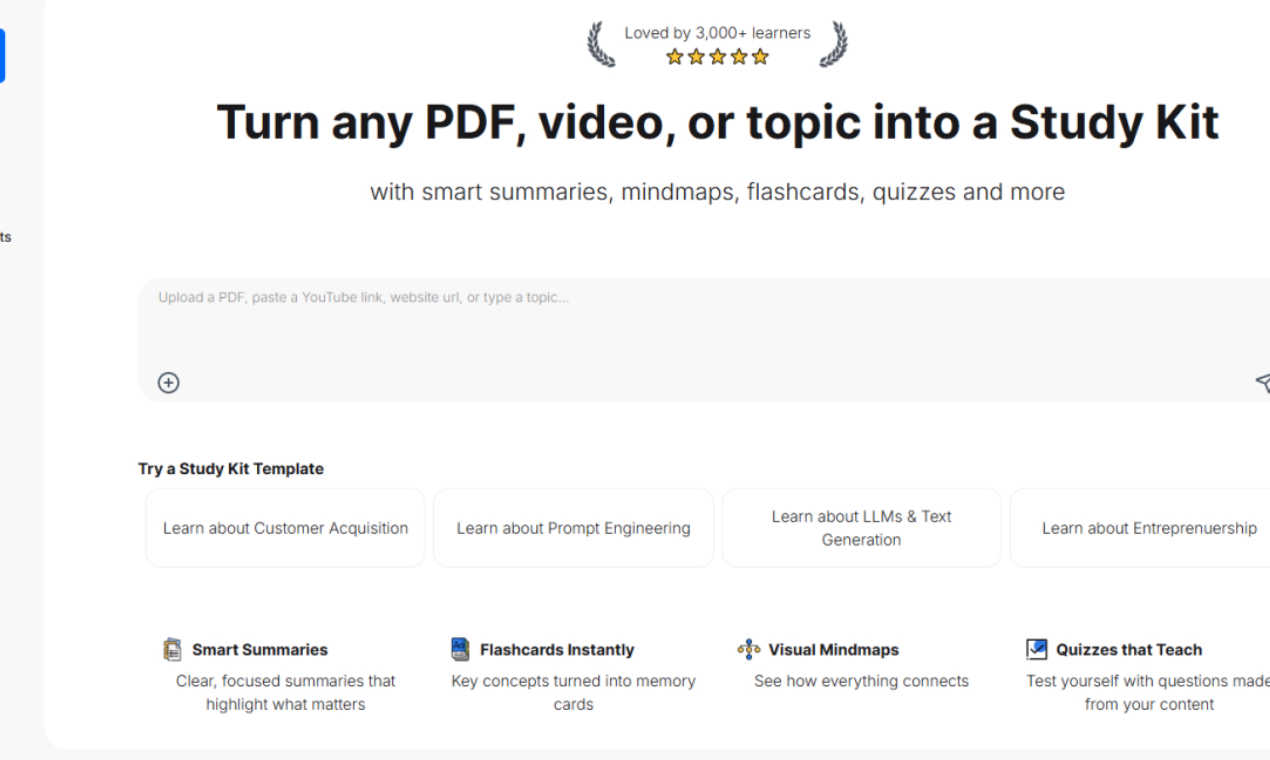
StudyPal instantly turns your PDFs and videos into smart summaries, flashcards, and quizzes.
Last updated: March 1, 2026
Visual Comparison
Hush Touch | Voice-to-Text for MacOS

StudyPal
Feature Comparison
Hush Touch | Voice-to-Text for MacOS
Dual-Engine Recognition
Hush Touch employs a unique dual-engine recognition system that combines DictationTranscriber for natural flow and punctuation with SFSpeechRecognizer for boosting custom vocabulary. This powerful combination ensures that your transcriptions are not only accurate but also contextually relevant.
Custom Vocabulary
With the ability to learn up to 500 terms, Hush Touch recognizes and retains your specialized vocabulary, including technical jargon and brand names. The auto-learning feature continually adapts to corrections, enhancing accuracy over time and making it ideal for professionals in various fields.
Smart Text Processing
Experience advanced text processing capabilities with Hush Touch. The app intelligently removes filler words, auto-corrects common errors, and formats lists, all while processing voice commands locally in real-time. This allows for a smoother dictation experience without the hassle of manual edits.
Context Modes & Hands-Free Operation
Hush Touch offers multiple context modes including General, Email, Code, and Notes, allowing users to switch seamlessly based on their writing needs. Activate hands-free dictation by saying "Hey Siri, start touch" and let the app auto-insert text after a short pause, enhancing convenience and workflow efficiency.
StudyPal
Instant Study Kit Creation
Turn any learning material into a structured study resource in seconds. Simply upload a PDF, paste a YouTube link, or type a topic, and StudyPal's AI gets to work. It intelligently processes the content to build a comprehensive kit, freeing you from the grind of manual organization and letting you dive straight into active learning.
Smart Summaries & Visual Mindmaps
Get clear, concise summaries that distill complex information down to the core essentials. Then, see the big picture with automatically generated visual mind maps. These diagrams illustrate how key concepts connect and relate, transforming abstract ideas into a clear, memorable landscape that enhances conceptual understanding.
Interactive Flashcards & Quizzes
Accelerate memorization with AI-generated flashcards for key terms and concepts. Then, solidify your knowledge with auto-generated quizzes that test your comprehension directly from your content. This active recall practice is engineered to boost long-term retention and confirm your mastery of the material efficiently.
Built-in AI Tutor & Video Curation
Hit a wall? Your personal AI tutor is integrated into every Study Kit, ready to provide instant, clarifying answers to your specific questions. Furthermore, StudyPal enhances your kits with curated video recommendations, offering additional explanations and perspectives to round out your understanding without ever leaving the platform.
Use Cases
Hush Touch | Voice-to-Text for MacOS
Drafting Emails
Whether you are responding to clients or composing a newsletter, Hush Touch allows you to dictate emails quickly and efficiently. The app's smart features help ensure that your messages are clear and professionally formatted.
Taking Notes
For students and professionals alike, Hush Touch is perfect for taking notes during meetings or lectures. You can focus on listening and understanding while the app captures your thoughts in real-time, allowing for better retention of information.
Writing Documents
From reports to creative writing, Hush Touch streamlines the document creation process. By dictating your ideas hands-free, you can maintain your creative flow without the distraction of typing.
Managing Code
Developers can use Hush Touch to dictate code snippets and commands. The app's dual-engine recognition enhances its ability to understand and correctly transcribe technical language, making it a valuable tool for coding professionals.
StudyPal
Exam Preparation for Students
Cramming for finals or mastering a semester's worth of material? Students can upload lecture slides, textbook chapters, and review videos to create unified Study Kits. The smart summaries, flashcards, and quizzes provide a complete, efficient review system that targets weak spots and builds confidence for exam day.
Professional Skill Upskilling
Professionals looking to acquire new skills or earn certifications can use StudyPal to deconstruct complex industry whitepapers, training manuals, or tutorial videos. Quickly generate digestible study materials to learn on the job, turning limited time into maximum learning impact for career advancement.
Research Paper & Thesis Analysis
Researchers and graduate students can upload multiple academic papers and sources into StudyPal. The tool will create summaries and mind maps that help synthesize information, identify central themes, and understand the relationships between different studies, streamlining the literature review process.
Lifelong Learning & Hobby Mastery
For curious minds exploring new hobbies or topics—from history to coding to philosophy—StudyPal simplifies the journey. Type in a topic of interest or paste a link to an educational video, and instantly receive a structured learning kit to guide your exploration, making self-education organized and effective.
Overview
About Hush Touch | Voice-to-Text for MacOS
Hush Touch is a revolutionary voice-to-text application designed specifically for macOS, allowing users to dictate seamlessly and privately. By leveraging dual Apple transcription engines and an advanced Apple Intelligence final pass, Hush Touch delivers accurate and efficient transcription without the need for an internet connection. This lightweight app, weighing in at just 5.5 MB, integrates effortlessly into your daily writing routines, making it an ideal choice for anyone seeking a reliable dictation tool. Whether you are a writer, a professional, or someone who prefers hands-free communication, Hush Touch enhances productivity by enabling quick drafting of emails, messages, notes, and documents. With minimal setup, users can simply tap a hotkey or activate Siri to start dictation, allowing them to focus on their thoughts without interruption. Hush Touch also prioritizes user privacy, processing all data on-device, ensuring that your voice and content remain confidential.
About StudyPal
StudyPal is the ultimate AI-powered study engine, designed to supercharge learning efficiency for the modern student and professional. It eliminates the tedious hours spent on manual note-taking by instantly transforming your raw materials—be it dense PDFs, lengthy YouTube videos, or simple typed topics—into powerful, all-in-one Study Kits. Each kit is a dynamic learning hub, automatically generating smart summaries, visual mind maps, interactive flashcards, and personalized quizzes. With a built-in AI tutor on standby to answer questions 24/7, StudyPal adapts to your unique learning style, creating a personalized path that boosts retention and mastery. Trusted by over 3,000 learners, it's the go-to tool for anyone preparing for critical exams, upskilling for career advancement, or pursuing lifelong knowledge. StudyPal delivers a streamlined, effective, and agile learning experience, turning information overload into actionable understanding.
Frequently Asked Questions
Hush Touch | Voice-to-Text for MacOS FAQ
Is Hush Touch compatible with all macOS versions?
Yes, Hush Touch is designed to be compatible with the latest versions of macOS, ensuring that users can benefit from its advanced features regardless of their operating system updates.
Can I use Hush Touch offline?
Absolutely! Hush Touch is built for on-device processing, meaning you can dictate and transcribe without an internet connection, keeping your data secure and private.
How does Hush Touch learn my vocabulary?
Hush Touch incorporates an adaptive learning system that detects when you correct a transcription. It automatically adds the correct terms to your vocabulary, allowing for improved accuracy in future dictations.
What is the pricing structure for Hush Touch?
Hush Touch offers a one-time purchase for a lifetime license at just $20. This model eliminates the burden of ongoing subscription fees while providing full access to all features.
StudyPal FAQ
What types of files can I upload to create a Study Kit?
StudyPal currently supports PDF uploads directly. For video content, you can paste a link from YouTube, and the AI will process the video's information. You can also simply type or paste any text-based topic or notes to generate a kit from scratch.
How does the AI tutor work?
The AI tutor is accessible within every Study Kit you create. You can ask it specific questions about the material in your kit, request further explanations on complex points, or ask for examples. It uses the context of your uploaded content to provide accurate, instant answers to keep your learning flow uninterrupted.
Are the Study Kits customizable?
Yes, while StudyPal auto-generates all components (summaries, mind maps, flashcards, quizzes), you have full control to edit, add to, or remove items. You can modify flashcard definitions, add your own notes to summaries, or create additional quiz questions to tailor the kit perfectly to your needs.
Can I use StudyPal on my mobile device?
Absolutely. StudyPal is designed to be accessible anytime, anywhere. The platform is fully responsive on web browsers, allowing you to study, review flashcards, and interact with your AI tutor seamlessly on your smartphone, tablet, or desktop computer.
Alternatives
Hush Touch | Voice-to-Text for MacOS Alternatives
Hush Touch | Voice-to-Text for MacOS is an innovative app designed to convert spoken words into text, operating entirely offline for macOS users. As part of the AI Assistants category, it leverages advanced transcription engines to ensure accuracy and efficiency in dictation, catering specifically to those who prioritize privacy and seamless integration into their writing workflows. Users often seek alternatives to Hush Touch for various reasons, including budget constraints, specific feature requirements, or compatibility with different platforms. When searching for a suitable alternative, it’s essential to consider factors such as ease of use, the ability to work offline, customization options, and overall performance to ensure it meets your dictation needs effectively.
StudyPal Alternatives
StudyPal is a dynamic AI-powered study assistant that transforms PDFs, videos, and typed topics into instant summaries, flashcards, mindmaps, and quizzes. It belongs to the category of AI learning tools designed to maximize study efficiency and boost retention for students and professionals alike. Users often explore alternatives for various reasons. Some seek different pricing models or free tiers, while others require specific features, integrations with other platforms, or a different user experience. The perfect tool depends on your unique learning workflow and goals. When evaluating options, consider core functionality like content processing from various sources, output quality of study materials, and interactive features. Also assess the learning curve, platform accessibility, and how well the tool adapts to your personal study style for true efficiency.