SimpleDraw vs Supermachine
Side-by-side comparison to help you choose the right product.

SimpleDraw
Effortlessly create accurate floor plans and scale drawings online for any home project with SimpleDraw, no experience.
Last updated: March 1, 2026

Supermachine
Supermachine instantly generates commercial AI images and videos with over 60 models for creators.
Last updated: March 18, 2026
Visual Comparison
SimpleDraw
Supermachine

Feature Comparison
SimpleDraw
Floor Plan Mode
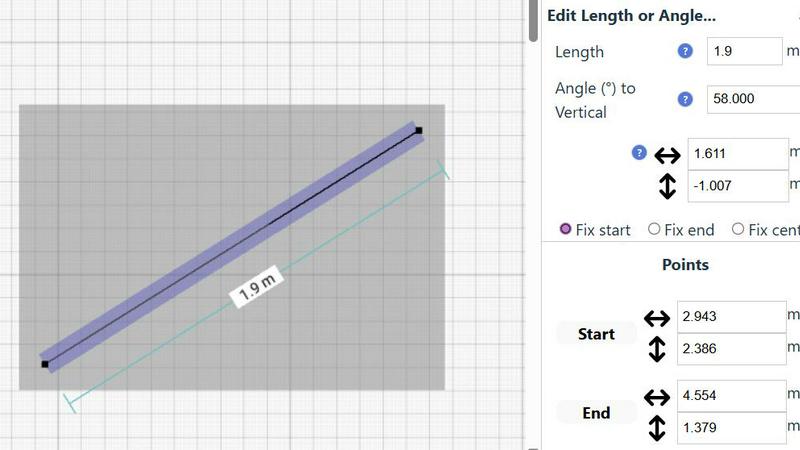
The dedicated Floor Plan Mode streamlines the process of creating accurate floor plans for various spaces. Users can easily draw walls and add windows and doors with just a click, while real-time measurements update as you adjust your design.
Smart Alignment System
SimpleDraw's Smart Alignment System ensures that every point and line is placed exactly where you want it. With visual cues guiding your placement, it enhances accuracy while allowing you to zoom in for greater precision as needed.
Comprehensive Measurement System
The tool offers a robust measurement system that gives users fine control over what measurements are displayed. With options for metric or standard US units, dynamic contextual measurements assist users in achieving their intended design.
Flexible Zoom and Non-Destructive Editing
Users can zoom in and out with ease, targeting specific parts of their drawings. The non-destructive editing feature allows for modifications at any time, with undo/redo options and the ability to move groups of elements simultaneously, streamlining the design process.
Supermachine
60+ Curated AI Models
Supermachine cuts through the noise by offering a handpicked selection of over 60 high-performing AI models. We don't chase every new release; we integrate only the models that have proven to deliver genuinely useful, reliable, and top-tier results. This curated approach saves you time and guarantees professional-quality visuals for any creative need, from photorealistic images to artistic illustrations.
AI Video Generation
Go beyond static images and create dynamic short-form videos powered by AI. This feature is perfect for crafting engaging social media clips, promotional content, or story-driven visuals in a fraction of the time required by traditional editing. Quickly turn your ideas into moving stories to capture more attention and drive engagement.
AI Image Edit Tool (Photoshop AI)
Take full creative control with powerful in-painting and out-painting capabilities. This feature acts like an AI-powered Photoshop, allowing you to seamlessly edit any part of an image. Remove unwanted objects, extend backgrounds, or add new elements with simple instructions, giving you the power to perfect any generated or uploaded image.
ControlNet & Custom Sizes
Achieve precise composition and exact specifications for your projects. ControlNet provides advanced control over image poses and layouts, while custom size options ensure your creations are perfectly formatted for any platform, whether it's a social media post, a blog header, or a digital ad banner. This level of control guarantees your vision is executed flawlessly.
Use Cases
SimpleDraw
Kitchen and Bathroom Renovations
Homeowners can plan their kitchen and bathroom renovations with accurate measurements, visualizing layouts before any physical work begins. This helps to avoid costly mistakes and ensures a smoother renovation process.
Room Layout and Furniture Planning
Designing room layouts becomes a breeze with SimpleDraw. Users can visualize how furniture will fit in their spaces, allowing them to make informed decisions before purchasing new items.
House and Apartment Plans
Real estate agents and homeowners can create comprehensive floor plans for houses and apartments, making it easier to plan renovations or develop rental listings that showcase the property's potential.
Technical Drawings and Elevations
Professionals can utilize SimpleDraw for creating technical drawings and elevations, leveraging its powerful tools to produce detailed and accurate representations for design projects.
Supermachine
Social Media Content Creation
Generate a week's worth of stunning, platform-optimized visuals in minutes. Social media managers and influencers can quickly produce eye-catching posts, stories, and thumbnails to maintain a consistent, professional, and engaging online presence without the need for a designer or expensive stock photo subscriptions.
Marketing & Advertising Campaigns
Rapidly prototype and produce high-conversion visual assets for ads, email campaigns, and landing pages. Marketers can A/B test different creative concepts at lightning speed, craft compelling brand visuals, and keep campaigns fresh and relevant, all while significantly reducing production costs and timelines.
Digital Art & NFT Projects
Artists and creators can explore new digital mediums and generate unique, original artwork to mint as NFTs or sell as digital prints. Supermachine serves as an infinite source of inspiration and a powerful tool for bringing abstract concepts to life, enabling rapid iteration and exploration of artistic styles.
Small Business Branding
Small business owners can instantly create a cohesive visual identity, including logos, product mock-ups, and promotional graphics for websites and local ads. This empowers entrepreneurs to build a professional brand image independently, saving thousands on agency fees and accelerating their go-to-market strategy.
Overview
About SimpleDraw
SimpleDraw is a groundbreaking online tool that empowers users to create precise and accurate scale drawings effortlessly. It caters to a diverse audience, including DIY enthusiasts, homeowners planning renovations, and creative individuals who enjoy visualizing ideas. The main value proposition of SimpleDraw lies in its ability to deliver professional-grade results without the complexity typically associated with CAD software. Users can dive straight into their projects as there is no need for login or registration, making it accessible for anyone from casual users to seasoned professionals. With a focus on delivering powerful yet straightforward tools, SimpleDraw allows users to craft detailed floor plans, elevations, and technical drawings with ease. Its user-friendly interface mimics the familiarity of pen and paper while enhancing precision and flexibility, enabling users to produce stunning designs in mere minutes.
About Supermachine
Supermachine is the all-in-one creative studio that puts the power of advanced AI directly into your hands. It's engineered for speed and simplicity, enabling creators, marketers, social media managers, artists, and business owners to generate professional-grade images and videos in seconds, not hours. Forget complex prompt engineering; Supermachine streamlines the process, allowing you to produce stunning stock photos, compelling illustrations, eye-catching thumbnails, unique NFTs, and engaging short-form videos in under 15 seconds. Its core value proposition is delivering top-tier results with unmatched efficiency. Trusted by a community of over 100,000 creators who generate more than one million images weekly, Supermachine stands out by curating quality over quantity. Instead of overwhelming you with every new model, the platform integrates a selective, high-performing arsenal of over 60 proven AI models. This ensures reliability and consistently exceptional output for every project, making professional creativity accessible to all skill levels.
Frequently Asked Questions
SimpleDraw FAQ
Do I need to create an account to use SimpleDraw?
No, SimpleDraw allows users to start drawing immediately without the need for any login or registration, making it highly accessible.
Can I save my drawings?
Currently, SimpleDraw does not have built-in saving options. Users can take screenshots of their drawings or copy the dimensions manually for future reference.
Is SimpleDraw suitable for professional use?
Absolutely! SimpleDraw combines the precision of professional CAD software with an intuitive interface, making it a great choice for both casual users and professionals.
What types of measurements can I use in SimpleDraw?
SimpleDraw supports a comprehensive measurement system that includes both metric and standard US units, allowing users to choose their preferred measurement style while dynamically displaying measurements as they work.
Supermachine FAQ
What makes Supermachine different from other AI image generators?
Supermachine differentiates itself through a curated model approach and a focus on speed and simplicity. While other platforms may offer hundreds of unstable models, we provide a selective, high-performing arsenal of over 60 proven models. This ensures reliable, professional-grade results every time, and our interface is designed for creators of all levels to generate stunning content in under 15 seconds without prompt engineering expertise.
Do I own the images and videos I create with Supermachine?
Yes, you own the commercial rights to the assets you create using Supermachine. This means you can freely use the generated images and videos for personal projects, client work, commercial advertising, and even sell them as part of products like NFTs, subject to adherence with our Acceptable Use Policy.
What is the "5 days trial package"?
The 5-day trial package is a low-risk way to experience Supermachine's full capabilities. For a small fee starting at $5, you get full access to the platform's features, including its 60+ AI models and video generation tools, for five days. This allows you to test its power and integrate it into your workflow before committing to a larger subscription plan.
Can I use Supermachine for team collaboration?
Yes, Supermachine offers Team features designed for collaborative workflows. Teams can share assets, maintain consistent brand styles, and manage projects together within the platform. This makes it an ideal solution for agencies, marketing departments, and any group that needs to streamline their creative production process.
Alternatives
SimpleDraw Alternatives
SimpleDraw is an innovative online tool designed for users who need to create precise scale drawings and floor plans with ease. It falls under the category of design tools, offering a user-friendly interface that combines the simplicity of traditional sketching with advanced features that enhance accuracy. Users often search for alternatives to SimpleDraw due to various reasons, including the need for more advanced features, specific platform compatibility, or pricing concerns. When selecting an alternative, it's essential to consider factors such as usability, the range of tools offered, support for different measurement systems, and overall accessibility. Finding a tool that aligns with your specific design needs while remaining intuitive can significantly enhance your creative process.
Supermachine Alternatives
Supermachine is a leading AI-powered design tool that helps creators generate commercial-ready images and videos with remarkable speed. It falls squarely into the category of all-in-one creative studios, simplifying complex AI processes for professionals and hobbyists alike. Users often explore alternatives for various reasons. Budget constraints, the need for specific niche features, or a preference for a different platform ecosystem can all drive the search for other options. The AI design tool landscape is dynamic, with new capabilities emerging constantly. When evaluating alternatives, key considerations include the quality and variety of AI models offered, the speed of generation, ease of use, and overall value for your specific creative needs. The right tool should align with your workflow, output requirements, and project scale without compromising on professional results.