Anyrow vs SubtitlesFast
Side-by-side comparison to help you choose the right product.

Anyrow instantly extracts structured, editable data from PDFs and documents using AI.
Last updated: April 13, 2026

SubtitlesFast
SubtitlesFast instantly adds beautiful, animated subtitles to your videos in minutes.
Last updated: March 1, 2026
Visual Comparison
Anyrow
SubtitlesFast
Feature Comparison
Anyrow
Schema-Driven AI Extraction
Ditch per-vendor templates forever. Define your data columns once—like "vendor," "invoice number," "amount," "due date"—and Anyrow's AI does the heavy lifting. It intelligently maps and extracts those specific fields from any document layout, whether it's a native PDF, a scanned image, or a camera photo. This adaptive approach handles format variations automatically, delivering consistent, structured rows with high confidence, typically in just over a second.
Live Editable Tables with Built-in Storage
Extracted data flows instantly into real-time, collaborative tables within Anyrow. This isn't just an export preview; it's a fully functional structured database. Your team can immediately review, sort, filter, edit, and correct data without switching apps. It provides a single source of truth for your extracted data, combining the extraction engine with a powerful storage and collaboration layer so you can manage everything in one place.
Multi-Format Export & Native Integrations
Get your clean data into any downstream system effortlessly. Export directly to common formats like CSV and Excel (XLSX) or JSON for developers. For automated pipelines, use the robust REST API, the convenient TypeScript SDK, or configure real-time webhooks. Anyrow is built to connect, ensuring the data you extract can instantly power your accounting software, ERP, spreadsheets, or custom applications.
Batch Processing & High-Volume Handling
Upload hundreds of documents at once for rapid, bulk processing. Anyrow is engineered for volume, enabling ops and finance teams to process large batches of invoices, receipts, or shipping documents in minutes instead of days. This batch capability, combined with per-document speeds of around 1.4 seconds, transforms back-office data entry from a days-long bottleneck into a swift, automated task.
SubtitlesFast
AI-Powered Auto-Transcription
Leverage cutting-edge AI to generate accurate subtitles in seconds, supporting over 50 languages. The engine captures speech with high precision, providing a solid transcript foundation that you can quickly review and edit. This feature strips away hours of manual typing, letting you focus on perfecting your message and style instead of tedious data entry.
Advanced Subtitle Styling & Animation
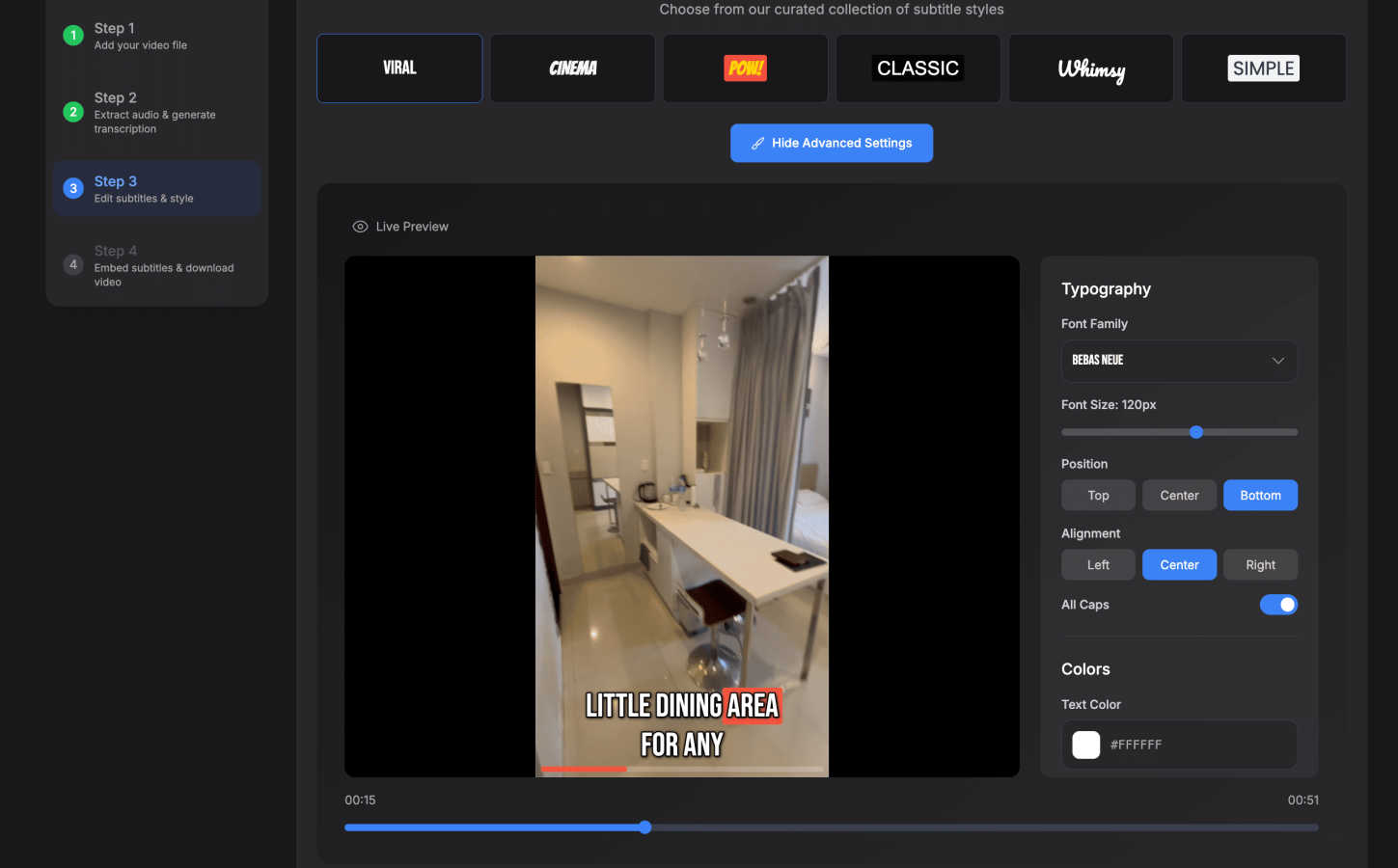
Go beyond basic text with a suite of design tools. Choose from 30+ animated styles and apply word-level highlighting to make your captions dynamic and engaging. Customize fonts, colors, positions, and effects to match your brand identity, ensuring your subtitles aren't just readable but are a visually compelling part of your video's storytelling.
Browser-Based, No-Download Editor
Access a full-featured, intuitive editing suite directly from your web browser. Upload your video, edit the transcript on a simple timeline, add background music or images, and export—all without installing a single piece of software. This guarantees a fast start, seamless updates, and complete privacy, as your video data never leaves your machine.
One-Click, Watermark-Free Export
Publish faster with instant exports optimized for all major platforms. With one click, download a final video with subtitles burned directly into the footage, perfectly formatted for TikTok, YouTube, Instagram Reels, and X. Even the free trial offers exports without any distracting watermarks, so you can publish professional content immediately.
Use Cases
Anyrow
Accounts Payable & Invoice Processing
Automate the entire invoice-to-ledger workflow. Upload batches of supplier invoices in any format. Anyrow extracts key data like vendor details, invoice numbers, amounts, and due dates into structured rows. The finance team can quickly review, approve, and edit within the platform before exporting the clean data directly into their accounting software or ERP, slashing processing time and manual errors.
Receipt & Expense Management
Streamline expense reporting for employees or clients. Staff simply photograph or forward receipt emails. Anyrow extracts merchant names, dates, totals, and tax amounts, populating a centralized, audit-ready table. Bookkeepers can then easily categorize expenses, resolve discrepancies, and export finalized reports for reimbursement or client billing in a fraction of the usual time.
Logistics & Shipping Document Processing
Parse bills of lading, packing slips, and delivery notes at scale. Dispatchers and logistics coordinators upload documents to automatically extract critical data like PO numbers, shipment IDs, weights, and destinations. This data feeds directly into tracking systems and freight audits, providing real-time visibility and eliminating manual data entry from chaotic paper trails.
Client Onboarding & Document Intake
Accelerate KYC (Know Your Customer) and client onboarding for accounting firms or financial services. Upload identification documents, bank statements, and application forms. Anyrow pulls out structured client data (names, addresses, account numbers), organizing it into neat, searchable tables. This reduces manual data scrubbing, speeds up setup, and improves data accuracy for new client profiles.
SubtitlesFast
Daily Social Media Content Creation
Ideal for creators posting daily vlogs, tutorials, or clips to TikTok, Instagram, or X. The sub-5-minute workflow from upload to publish means you can capture a moment, add engaging animated subtitles, and share it with your audience while it's still relevant, all from your phone or computer without slowing down your content cadence.
Enhancing Video Accessibility & Reach
Automatically make your content accessible to viewers who are deaf or hard of hearing, and to those who watch videos on mute. By adding accurate, styled captions, you not only comply with accessibility best practices but also significantly increase watch time and engagement across social media platforms where sound isn't always available.
Rapid Marketing & Promotional Videos
Marketers and small business owners can quickly produce polished promotional clips, product demos, or announcement videos. SubtitlesFast allows you to add professional, branded subtitles that capture attention in crowded feeds, convey key messages clearly, and drive action—all without needing a dedicated video editor or a large production budget.
Repurposing Long-Form Content
Easily clip and subtitle key moments from longer videos like podcasts, webinars, or YouTube videos for use on short-form platforms. The precise timeline editor and fast transcription let you quickly extract the most valuable snippets, add punchy captions, and create a stream of engaging teaser content to drive traffic back to your full-length material.
Overview
About Anyrow
Anyrow is the AI-powered document extraction engine that turns unstructured chaos into structured data in seconds. It's built for ops teams, bookkeepers, accounting firms, logistics dispatchers, and finance professionals who are tired of the manual grind and the tech stack sprawl. The core value proposition is stunningly simple: drop any document—PDFs, scans, invoices, receipts, emails, Word files, Excel sheets, or images—and get back clean, editable rows in a live table. Anyrow eliminates the need for fragile, per-vendor templates. Instead, you define your data schema (the columns you need) once. Its schema-driven AI then intelligently finds and extracts those specific fields across any document layout, whether it's a native digital PDF, a scanned document, or a photographed receipt. The platform consolidates your entire workflow: extraction, structured storage, review, editing, and querying all happen in one login. Then, push your production-ready data out via CSV, XLSX, JSON, REST API, TypeScript SDK, or webhooks. Anyrow is designed to replace the cumbersome patchwork of tools like Parseur (extraction), Airtable (storage), and Zapier (automation), delivering extraction, storage, CRUD operations, and API access in a single, agile product.
About SubtitlesFast
SubtitlesFast is the ultimate, browser-based accelerator for video creators. It's engineered for one mission: to transform a raw video clip into a polished, subtitled piece of content ready for social media in under five minutes. This tool eliminates the bloat and complexity of traditional video editors, focusing purely on the speed-to-publish workflow that daily creators, marketers, and vloggers demand. At its core is a powerful AI that automatically transcribes speech in over 50 languages with impressive accuracy. You then have full control to customize the look with extensive styling options, including word-level highlighting and animated text effects. The final export delivers a video with perfectly burned-in, engaging subtitles—all processed directly in your browser with no software to download. With a commitment to creator privacy and a generous free trial that includes exports without watermarks, SubtitlesFast is the agile, no-fuss solution for anyone serious about boosting engagement and growing their audience through accessible video.
Frequently Asked Questions
Anyrow FAQ
What types of documents can Anyrow process?
Anyrow is built for document diversity. It can process native digital PDFs, scanned PDFs, images (JPEG, PNG), photographs of documents, Microsoft Word files, Excel spreadsheets, and even text extracted from emails. The AI is trained to handle structured, semi-structured, and unstructured layouts commonly found in invoices, receipts, forms, and reports.
How accurate is the AI extraction?
The AI delivers high accuracy, typically demonstrating 99%+ confidence on well-formed documents, as noted in the provided example. Accuracy is maintained across various layouts because the system uses your defined schema to target specific fields, rather than relying on rigid templates. Any extracted data is instantly available for human review and editing within the live tables to ensure 100% correctness before export.
Do I need to create a template for every vendor or document type?
No. This is the core innovation of Anyrow. You do not create per-vendor or per-document-type templates. Instead, you define a single schema for your project—the set of columns you need (e.g., Invoice Date, Amount, Vendor). The AI uses this schema to find and extract the corresponding data from any document you upload, regardless of its visual layout or source.
How do I get my data out of Anyrow?
You have multiple robust options. For manual downloads, you can export your tables directly to CSV or Excel (XLSX) format. For developers and automated workflows, you can export as JSON, use the comprehensive REST API for programmatic access, utilize the TypeScript SDK, or configure webhooks to push data to other apps in real-time. Anyrow is designed to fit seamlessly into your existing data stack.
SubtitlesFast FAQ
Is there really no software to download?
Yes, that's correct. SubtitlesFast is entirely browser-based. You access the full editor directly through your web browser (like Chrome or Safari). There are no downloads or installations required. You simply visit the website, upload your video, and start editing. This also means you get the latest features automatically every time you log in.
How accurate is the AI transcription?
The AI transcription is highly accurate for clear audio and supports over 50 languages. It's built specifically for the varied audio conditions found in creator content, like vlogs and social media clips. For best results, ensure your audio is as clear as possible. You always have full access to the transcript to make any quick corrections or adjustments on the easy-to-use timeline.
What video formats can I upload and export?
SubtitlesFast supports all common video file formats for upload, including MP4, MOV, and AVI. Your final exported video will be delivered as an MP4 file with the subtitles burned directly into the video track. This universal format is ready for immediate upload to any social media platform, including YouTube, TikTok, Instagram, and X.
Does the free trial include a watermark?
No. A key benefit of SubtitlesFast is that its free trial allows you to export your finished videos without any watermarks. You can create, style, and download your subtitled videos for publishing completely free of branding from SubtitlesFast, allowing you to evaluate the tool with real, publishable content.
Alternatives
Anyrow Alternatives
Anyrow is an AI-powered document extraction and structured data platform. It automates the tedious process of pulling data from PDFs, invoices, emails, and scans into clean, editable tables. This places it squarely in the categories of AI automation and productivity software, designed to eliminate manual data entry. Users often explore alternatives for several key reasons. Budget constraints, specific feature requirements like advanced OCR or native integrations, and the need for a different deployment model (like on-premise) can drive the search. Some teams may already have parts of the stack in place and seek a more modular tool. When evaluating options, focus on core capabilities. Look for robust AI that handles diverse layouts without per-template setup, built-in data storage and management, and flexible export and API access. The goal is to find a solution that truly consolidates your workflow, saving time and reducing the complexity of using multiple disconnected apps.
SubtitlesFast Alternatives
SubtitlesFast is a browser-based video subtitle tool designed for creators who need to add animated, engaging captions to their content with maximum speed and minimal friction. It falls squarely into the productivity and marketing categories, empowering users to make their videos more accessible and polished in minutes. Even with its streamlined approach, users often explore alternatives for various reasons. This could be due to specific budget constraints, a need for more advanced video editing features beyond subtitling, or a preference for a downloadable desktop application over a cloud-based service. Different workflows demand different tools. When evaluating other options, focus on your core needs. Key considerations include the accuracy and language support of the auto-transcription, the flexibility of the subtitle styling and animation, the overall platform's ease of use, and the final export quality. The right tool should match your pace without compromising on the professional finish your audience expects.