
AskFormulas
AskFormulas generates and validates Excel and Google Sheets formulas instantly, eliminating debugging hassles for.
Visit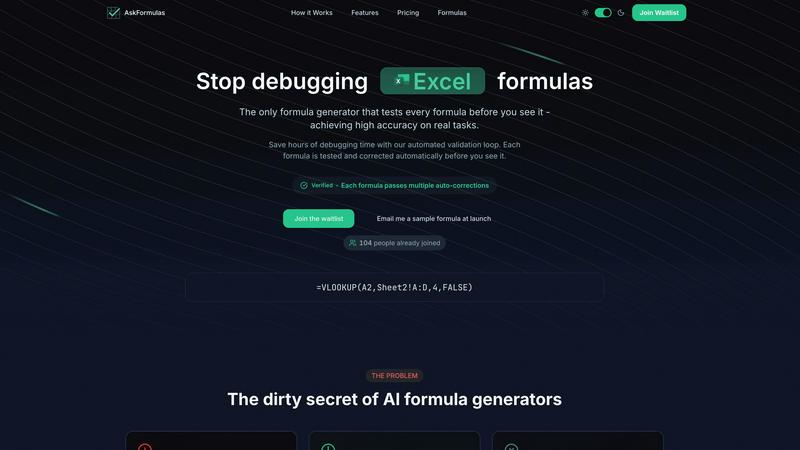
About AskFormulas
AskFormulas is a groundbreaking tool that revolutionizes how users create and validate Excel formulas. Designed for efficiency and accuracy, AskFormulas addresses the common frustrations associated with traditional AI formula generators, which often produce formulas with error rates ranging from 40% to 60%. With AskFormulas, users can simply articulate their needs in plain English, and the advanced AI technology generates a suitable formula. What sets AskFormulas apart is its rigorous validation process, which includes testing each formula on real data and automatically correcting any errors before presenting it to the user. This not only saves valuable time but also eliminates the need for tedious debugging. Ideal for financial analysts, revenue managers, small business owners, and anyone grappling with Excel's notorious formula errors, AskFormulas empowers users to focus on data analysis and informed decision-making rather than getting bogged down by formula frustrations.
Features of AskFormulas
Natural Language Input
AskFormulas allows users to describe their requirements in plain English, eliminating the need for any syntax knowledge. This feature ensures that anyone, regardless of their Excel proficiency, can generate effective formulas quickly and easily.
Three-Step Validation Process
Every formula generated by AskFormulas undergoes a comprehensive three-step validation process. This includes parsing the natural language input, auto-testing the formula on synthetic data, and applying iterative corrections until the formula is verified, guaranteeing high accuracy.
Verified Formula Output
Upon successful validation, users receive their formulas with a prominent "Verified" badge. This immediate feedback ensures users can trust that the formula will work correctly in their spreadsheets, giving them confidence in their data analysis.
Formula History
AskFormulas automatically saves the last ten formulas generated by the user, creating a personal library for easy access. This feature prevents the loss of important formulas and allows users to revisit their recent work without hassle.
Use Cases of AskFormulas
Financial Reporting
Financial analysts can leverage AskFormulas to quickly generate complex formulas for financial reports, such as calculating revenue growth or forecasting sales trends, without worrying about formula errors.
Data Management
Revenue managers can use AskFormulas to create accurate formulas for tracking performance metrics, ensuring that their data management processes are efficient and error-free.
Business Analytics
Small business owners can benefit from AskFormulas by generating formulas that help analyze sales data, manage expenses, and optimize pricing strategies, all with minimal effort and maximum reliability.
Educational Purposes
Teachers and students can utilize AskFormulas to better understand Excel formulas by generating accurate examples for lessons or projects, thereby enhancing the learning experience in data management.
Frequently Asked Questions
How accurate are the generated formulas?
AskFormulas guarantees high accuracy by validating every formula through a rigorous three-step process, which includes testing and auto-correcting any errors before presenting them to the user.
Does it work with both Excel and Google Sheets?
Absolutely! AskFormulas seamlessly integrates with both Excel and Google Sheets. Users can easily toggle between platforms, and the system automatically adjusts the formula syntax accordingly.
How many formulas can I generate in a month?
Depending on the subscription plan selected, users can generate between 500 to 6,000 formulas per month. This flexibility allows individuals and teams to choose a plan that fits their specific needs.
What support options are available?
AskFormulas offers various support options based on the subscription plan. Users can access email support, priority support, and dedicated support for team plans, ensuring assistance is available whenever needed.
Explore more in this category:
Similar to AskFormulas

AI Email Filter sorts incoming mail into folders using plain-language prompts you write. Works with any IMAP mailbox; bring your own LLM if you want.

E-signatures for small teams. $19/month, unlimited users.

Digital guest pager system with zero hardware. Guests scan QR code to track order status and get buzzed on their own phone. No apps or SMS fees

From first scene to published 2D game, no code

Free collection of online developer utilities, code formatters, and digital converters designed to streamline your daily workflow.

All-in-One POS, Inventory & Accounting Software for Bangladeshi Businesses

Online tally counter for tracking attendance, workouts, inventory, visitors, sports scores, habits, and everyday counting tasks.

Product tours, onboarding checklists, changelogs, roadmaps, NPS and in-app feedback for SaaS teams in one no-code tool.