
ProspectBuddy
ProspectBuddy captures LinkedIn leads to your CRM in one click for safe, manual prospecting.
Visit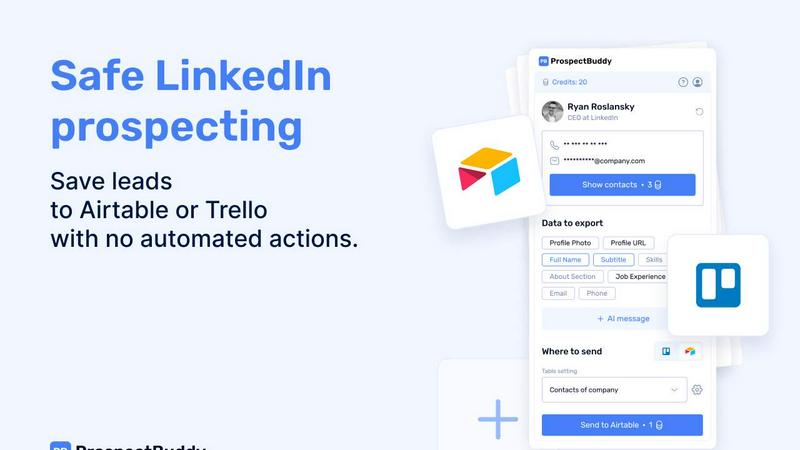
About ProspectBuddy
ProspectBuddy is the definitive Chrome extension for high-impact, manual LinkedIn prospecting. It is engineered for sales teams, recruiters, founders, and operators who demand speed, control, and compliance. The tool eliminates the chaotic, error-prone process of manual copy-pasting by allowing users to capture and structure LinkedIn profile data with a single click, directly into their Airtable or Trello workflows. Unlike risky automation bots, ProspectBuddy is built for safe, manual prospecting, ensuring you stay LinkedIn-compliant while dramatically accelerating your workflow. Its core value lies in transforming scattered leads into clean, actionable records instantly. With integrated verified contact enrichment and AI-powered message generation, ProspectBuddy doesn't just save profiles; it supercharges the entire outreach pipeline from discovery to first contact, all while keeping your data organized and your process consistent.
Features of ProspectBuddy
One-Click Save to Airtable or Trello
Stop the copy-paste madness. ProspectBuddy lets you instantly save any LinkedIn profile as a structured record in your connected Airtable base or Trello board. With a single click, transform a public profile into a clean card or row with mapped fields like name, title, company, and more. This seamless integration turns your prospecting session into a direct data pipeline, saving hours per week and ensuring your CRM is always up-to-date with perfectly formatted information.
Verified Email & Phone Discovery
Go beyond the profile. ProspectBuddy includes powerful enrichment to find verified business emails and direct phone numbers for your prospects. This feature works intelligently, using credits only when a valid email is successfully found. For B2B users with a business email, it can also reveal direct phone numbers, putting the most valuable contact details directly into your workflow without ever leaving LinkedIn.
AI-Powered Outreach Message Generation
Craft personalized messages in seconds, not minutes. Using the data captured from a LinkedIn profile, ProspectBuddy's AI generates tailored, context-aware outreach drafts for you. This feature leverages the prospect's job experience, skills, and about section to create compelling connection requests or follow-up emails that resonate, dramatically increasing your response rates while saving precious time.
Customizable Field Mapping & Capture
Capture only what you need. Not every field on a LinkedIn profile is relevant to your process. ProspectBuddy allows you to select specific data points—like photo, URL, skills, or job experience—and map them precisely to the correct fields in your Airtable table. This ensures your database remains clean, consistent, and perfectly tailored to your team's unique workflow and reporting requirements.
Use Cases of ProspectBuddy
Sales Teams Building Targeted Pipelines
Sales development representatives and account executives can rapidly build qualified lead lists. By instantly saving prospects from LinkedIn Search or Sales Navigator into their Airtable CRM, they create a live pipeline with enriched contact data. The AI message generator then helps craft personalized ice-breakers, allowing reps to move from research to outreach in a seamless, efficient workflow that prioritizes human connection over manual data entry.
Recruiters Managing Candidate Sourcing
Recruiters and talent acquisition specialists sourcing on LinkedIn can streamline their candidate tracking. With one click, a promising candidate's profile becomes a structured card in a Trello hiring pipeline board. Verified contact details are added automatically, and notes from the profile are captured cleanly. This eliminates administrative backlog and ensures no potential hire falls through the cracks due to messy spreadsheets or forgotten follow-ups.
Founders & Operators Conducting Manual Outreach
Startup founders, operators, and solopreneurs who need to prospect manually for partnerships, hiring, or sales can do so with maximum efficiency and safety. ProspectBuddy empowers them to run compliant, high-touch outreach campaigns directly from LinkedIn. They can build a targeted list, enrich it with contact info, and generate personalized messages without resorting to risky automation tools that could jeopardize their account or brand reputation.
Agencies Running Client Campaigns
Marketing and lead generation agencies managing campaigns for multiple clients can use ProspectBuddy to maintain organized, client-specific databases. They can connect different Airtable bases for each client, ensuring lead data is captured correctly and segregated. The consistent, structured data output makes reporting clean and reliable, while the manual, compliant nature of the tool provides peace of mind for both the agency and their clients.
Frequently Asked Questions
How do I connect ProspectBuddy to Airtable?
Connecting is a quick, one-click process. Simply click "Airtable" on the Connect screen within the ProspectBuddy extension. You will then select the specific bases or workspaces you wish to grant access to and click "Grant access." Once connected, the status will be confirmed on your Profile page. You can disconnect or reconnect different bases at any time with full control over your integrations.
Is ProspectBuddy safe to use with LinkedIn?
Absolutely. ProspectBuddy is explicitly built for safe, manual prospecting. It does not perform any automated actions, scraping, or bot-like behavior on your behalf. You remain in full control, clicking to parse and save profiles directly as you browse. This makes it a fully compliant and safer alternative to bulk scraping tools or automation workflows that violate LinkedIn's Terms of Service and carry significant account risk.
What can I spend credits on in ProspectBuddy?
Credits are used for specific high-value actions within the extension. The primary use is for email search, which costs 10 credits per successful find (credits are not charged if no email is found). Credits can also be used for revealing direct phone numbers for B2B profiles. You purchase credits securely via Stripe, and your balance updates automatically after payment, providing a clear, pay-for-what-you-use model.
Why don't I see all my Airtable fields when mapping data?
ProspectBuddy supports specific, compatible Airtable field types to ensure data integrity. Supported types include: Attachment (for photos), URL, Text (for name, subtitle, skills, etc.), Email, and Phone. If a field in your Airtable table is of an unsupported type (like a checkbox, rating, or formula), it will not appear in the dropdown menu for mapping. This ensures only valid data transfers occur.
Pricing of ProspectBuddy
ProspectBuddy offers simple, transparent pricing plans based on credits. The Starter plan is $10 for 500 credits, ideal for solo professionals and small teams beginning their LinkedIn prospecting journey. It includes all core features: email search, phone number reveal, AI messages, and CRM sync. The Growth plan is $20 for 1000 credits, designed for active prospecting teams needing higher volume and consistent sync. For high-volume teams requiring custom workflows, white-label options, or dedicated support, a Custom plan with tailored credit packages and integrations is available. You can start using the extension for free and upgrade as your needs grow.
Similar to ProspectBuddy

CleanSmart removes duplicates, fixes formatting, fills gaps, and flags anomalies in one automated pass. No code. No data engineers.

Peak Answer helps brands understand when AI search engines recommend them, where competitors win, and most importantly, how to close the gap.

Search 20,000+ open-source and SaaS tools by the job you need done or the app you want to replace.

A Mac app that turns your App Store link into a week of Instagram Reels and carousels, written from your real reviews.

Your Social Media Content Engine That Drives Revenue. Distribute your content to every social platform and track it in real time.

Product tours, onboarding checklists, changelogs, roadmaps, NPS and in-app feedback for SaaS teams in one no-code tool.

The #1 Native Form Builder Plugin for Framer - No Code, No Embeds, No External Platforms.

Create ready-to-test AI UGC video ads from a product URL, image, or script with lifelike creators, voices, captions, and CTAs.