
Refbox
Refbox keeps your reference images and notes always visible, streamlining your workflow for maximum efficiency.
Visit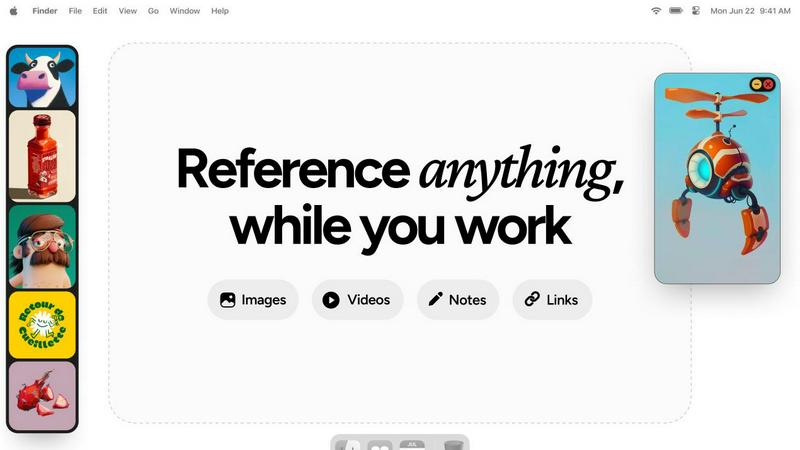
About Refbox
Refbox is an innovative floating reference manager tailored for creative professionals seeking to eliminate workflow disruptions. This powerful desktop application allows users to pin a variety of reference materials—including images, videos, GIFs, and notes—into resizable frames that remain visible above all other applications. By doing so, Refbox eradicates the need for constant alt-tabbing or rummaging through disorganized folders, enabling users to maintain deep focus on their projects. Perfect for artists, designers, animators, and developers, Refbox ensures that inspiration is only a glance away, significantly boosting productivity. Users can effortlessly aggregate content via drag-and-drop, clipboard pasting, or web pulls, and can organize these assets into multiple collections. With a streamlined sidebar, a dynamic Masonry grid, or a full-screen gallery view, Refbox transforms the creative process from mere inspiration to seamless execution, making it an indispensable tool for anyone in the creative industry.
Features of Refbox
Always-On-Top Frames
Refbox provides always-on-top frames that can be resized and placed anywhere on your screen, ensuring that your reference materials remain visible at all times, no matter what application you are using. This feature allows for uninterrupted workflow and keeps your creative inspirations in sight.
Dynamic Collection Management
Organize your assets into multiple, swappable collections that can be easily accessed and switched with a single click. This feature allows for efficient categorization, making it simple to retrieve specific references without losing focus on your current task.
Advanced Media Controls
Refbox offers advanced media controls, including GIF playback that lets you step through frames, cropping tools to focus on specific areas, and pixel rendering for precise pixel art viewing. These controls enhance your ability to interact with your reference materials effectively.
Markdown Notes and Clickable Bookmarks
Integrate markdown notes directly into your workspace, complete with styling options and checklists. Additionally, clickable bookmarks allow you to save and access important web links without disrupting your creative flow, streamlining your workflow even further.
Use Cases of Refbox
Graphic Design
Graphic designers can utilize Refbox to keep reference images and color palettes accessible while working on projects. The ability to pull assets from various sources and organize them into collections enhances creativity and efficiency.
Animation
Animators can benefit from Refbox's GIF playback and frame stepping features, allowing them to analyze motion references in real-time while animating. This ensures that inspiration and technical details remain at their fingertips.
UI/UX Development
UI/UX developers can use Refbox to overlay design inspirations, color schemes, and user interface examples directly over their design applications. This constant access to references helps maintain consistency and improves workflow.
Concept Art Creation
Concept artists can keep a plethora of visual references, sketches, and notes visible while working on their canvases. Refbox's organized visuals and effortless focus capabilities allow for a more streamlined creative process, resulting in impactful artwork.
Frequently Asked Questions
How does Refbox improve my workflow?
Refbox minimizes distractions by keeping your reference material visible and easily accessible, allowing you to focus on your creative tasks without the need to switch between different applications or folders.
Can I use Refbox with any application?
Yes, Refbox is designed to float above any application on your desktop, making it compatible with a wide range of creative software, ensuring you have your references at hand no matter what you're working on.
Is there a limit to the number of collections I can create?
No, Refbox allows you to create multiple collections without any restrictions, enabling you to organize your reference materials according to different projects or themes as needed.
What types of media can I store in Refbox?
Refbox supports various media types, including images, GIFs, videos, and notes. You can also save clickable bookmarks and utilize advanced controls for specific media formats, enhancing your creative experience.
Explore more in this category:
Similar to Refbox

AI Email Filter sorts incoming mail into folders using plain-language prompts you write. Works with any IMAP mailbox; bring your own LLM if you want.

E-signatures for small teams. $19/month, unlimited users.

Digital guest pager system with zero hardware. Guests scan QR code to track order status and get buzzed on their own phone. No apps or SMS fees

Free collection of online developer utilities, code formatters, and digital converters designed to streamline your daily workflow.

All-in-One POS, Inventory & Accounting Software for Bangladeshi Businesses

Online tally counter for tracking attendance, workouts, inventory, visitors, sports scores, habits, and everyday counting tasks.

AI tattoo generator for turning ideas, photos & sketches into expressive designs.

The #1 Native Form Builder Plugin for Framer - No Code, No Embeds, No External Platforms.