
AI Formatter vs LuxSign
Side-by-side comparison to help you choose the right product.
AI Formatter
Instantly format raw text into polished professional documents with AI.
Last updated: March 1, 2026

LuxSign simplifies document signing with secure, legally valid electronic signatures in minutes, compliant across the.
Last updated: February 26, 2026
Visual Comparison
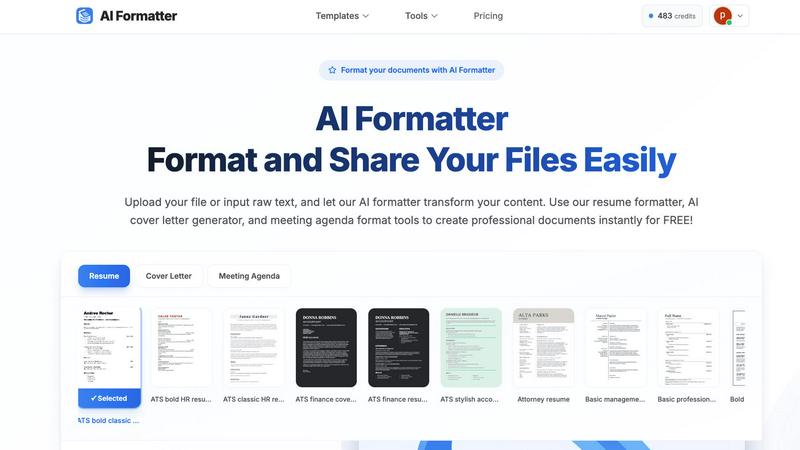
AI Formatter
LuxSign

Feature Comparison
AI Formatter
AI-Powered Formatting Engine
At the heart of AI Formatter is its sophisticated AI engine that intelligently analyzes raw text and documents. It understands context, identifies key sections (like work experience, skills, or agenda items), and automatically applies perfect formatting, structure, and styling. This happens in mere seconds, transforming chaotic drafts into coherent, visually appealing documents ready for professional use, all while preserving your original content and intent.
Vast Library of ATS-Optimized Templates
Choose from over 162 professionally designed templates tailored for resumes, cover letters, meeting agendas, and invoices. Every template is engineered to be ATS-friendly, ensuring your resume passes through automated screening systems with a 95%+ success rate. This library provides industry-specific styles and layouts, giving you a powerful head start in creating documents that impress both software and human readers.
Intuitive Real-Time Online Editor
After the AI works its magic, take full control with the built-in, user-friendly editor. Make adjustments on the fly: customize fonts, colors, spacing, and layouts with simple clicks. This feature allows for personalization and fine-tuning without any technical design skills, ensuring the final document meets your exact specifications and brand identity before you download or share it.
Multi-Format Export & Secure Sharing
Once your document is perfected, export it seamlessly in your preferred format, including PDF, Microsoft Word (.DOCX), and more. This flexibility ensures compatibility with any application or submission portal. Additionally, AI Formatter provides secure sharing options, allowing you to generate shareable links or send documents directly from the platform, streamlining collaboration and distribution.
LuxSign
Multiple Signature Methods
LuxSign provides various options for signing documents, enhancing user convenience. You can draw your signature with your mouse, type your name, or upload an image. This flexibility ensures that users can quickly and easily complete their signing tasks, making the process as seamless as possible.
Advanced Security
Security is paramount with LuxSign. The platform employs industry-standard encryption protocols to protect your documents during upload, storage, and transmission. With secure data hosting in Luxembourg, users can rest assured that their sensitive information remains confidential and protected against unauthorized access.
Collaboration Workspaces
LuxSign offers collaboration workspaces that allow teams to work together efficiently. Users can create shared spaces to organize documents, manage member access, and collaborate on signing workflows. This feature is particularly beneficial for teams that need to streamline their document processes and enhance teamwork.
Complete Audit Trail
The platform provides a comprehensive audit trail that logs every action taken on a document. Detailed logs include timestamps, IP addresses, and signer information, ensuring transparency and compliance. This feature is essential for businesses needing to maintain accurate records for legal and verification purposes.
Use Cases
AI Formatter
Job Seekers Crafting Winning Applications
Job hunters can upload their existing resume or paste raw text to instantly transform it into an ATS-optimized, professionally formatted resume. They can then use the AI cover letter generator to create a compelling, tailored cover letter in minutes. This end-to-end solution drastically cuts application preparation time while maximizing the chances of landing an interview.
Professionals Preparing for Meetings
Managers, team leads, and executives can quickly convert rough notes or bullet points into a structured, clear meeting agenda. Using the meeting agenda format tool ensures all meetings have a professional outline, stay on track, and communicate objectives effectively to all participants, enhancing organizational efficiency and communication.
Freelancers & Small Businesses Creating Invoices
Freelancers, consultants, and small business owners can use the AI invoice generator to create polished, detailed invoices from raw data or draft information. This eliminates the hassle of manual invoice creation in word processors, ensures consistency and professionalism in client billing, and helps maintain a streamlined financial workflow.
Students and Academics Formatting Papers
Students and researchers can use AI Formatter to ensure their essays, reports, and academic documents adhere to specific formatting guidelines. By inputting their text, they can apply consistent styles for headings, citations, and layouts, saving valuable time that can be redirected toward research and content development.
LuxSign
Streamlining Contract Management
Businesses can utilize LuxSign to streamline their contract management processes. By enabling multiple signers and setting up parallel signing workflows, organizations can reduce the time it takes to finalize important agreements, allowing for faster decision-making and execution.
Secure Document Sharing
LuxSign is perfect for securely sharing sensitive documents. With end-to-end encryption and GDPR compliance, businesses can confidently send documents for signature, knowing that their data is safe and legally valid across the EU.
Facilitating Remote Work
In an increasingly remote work environment, LuxSign allows teams to sign and manage documents from anywhere. Its mobile and tablet-friendly design ensures that users can access and complete their signing tasks even on the go, enhancing overall productivity.
Enhancing Compliance and Legal Verification
For businesses in regulated industries, LuxSign’s complete audit trail and eIDAS SES compliance make it an invaluable tool for ensuring compliance with legal standards. Organizations can easily verify document integrity and signer authenticity, mitigating risks associated with disputes.
Overview
About AI Formatter
AI Formatter is a revolutionary cloud-based platform that leverages advanced artificial intelligence to automate and perfect professional document creation. It is designed for job seekers, busy professionals, businesses, and academics who need to produce polished, effective documents without spending hours on manual formatting. The core value proposition is immense time savings and guaranteed quality. Users simply upload a raw file (like a Word doc, PDF, or TXT) or input text, and the AI intelligently structures and styles the content into a professionally designed template in seconds. With a proven 95%+ ATS (Applicant Tracking System) pass rate, it ensures resumes and cover letters are optimized to get seen by recruiters. Beyond resumes, it streamlines the creation of meeting agendas, invoices, receipts, and more. The platform combines powerful AI automation with an intuitive real-time editor for fine-tuning, multi-format export, and secure sharing, making it the ultimate tool to boost productivity, enhance professionalism, and eliminate the tedious grind of document formatting.
About LuxSign
LuxSign is a cutting-edge electronic signature platform designed for businesses that prioritize security and compliance. Built in Luxembourg, this cloud-based service ensures that all documents are securely encrypted and stored within the country, adhering strictly to GDPR regulations. LuxSign caters to various industries requiring robust legal validity, supporting eIDAS SES standards that allow contracts to be recognized across the European Union. The platform is perfect for professionals, small teams, and enterprises alike, offering a seamless experience for signing and managing documents online in just a few clicks. With its user-friendly interface, LuxSign empowers users to create parallel or sequential signing workflows, manage multiple signers, and receive automated notifications, making it an ideal solution for efficient and compliant document management.
Frequently Asked Questions
AI Formatter FAQ
What file formats can I upload to AI Formatter?
AI Formatter supports a wide range of common document formats for upload, including PDF, DOC, DOCX, and TXT files. This ensures you can start from almost any existing document you have. The maximum file size for uploads is 10MB, which is sufficient for most standard professional documents.
How does the AI ensure my resume is ATS-friendly?
The AI is trained on the parsing algorithms used by popular Applicant Tracking Systems. It structures your content using clear, machine-readable formatting, optimizes keyword placement, and uses templates designed to avoid common ATS pitfalls like complex columns, graphics, or unusual fonts. This results in the platform's high 95%+ pass rate.
Can I customize the document after the AI formats it?
Absolutely. The AI provides a perfectly formatted first draft, but you retain complete creative control. The integrated real-time editor allows you to change fonts, colors, adjust spacing, reorder sections, and edit text directly. You can customize every aspect to match your personal or company brand before finalizing.
In what formats can I download my finished document?
For maximum flexibility, AI Formatter allows you to download your professionally formatted document in multiple universal formats. You can export your work as a PDF for secure sharing, as a Microsoft Word document (.DOCX) for further editing in Word, or in other standard formats suitable for your needs.
LuxSign FAQ
What types of documents can I sign with LuxSign?
You can sign various document formats including PDFs, DOC, and DOCX. LuxSign supports automatic conversion for these files, making it easy to upload and sign your documents.
Is LuxSign compliant with GDPR?
Yes, LuxSign is fully compliant with GDPR and Luxembourg data protection laws. All documents are securely stored and encrypted, ensuring your privacy and compliance with EU regulations.
How do I track the progress of my documents?
LuxSign allows you to track the progress of your documents in real-time. You will receive automatic email notifications when documents are sent, viewed, and signed, keeping you informed throughout the process.
Can I customize my signing experience?
Absolutely! LuxSign offers custom branding options for businesses. You can personalize your signing experience and enhance your brand's visibility during the document signing process.
Alternatives
AI Formatter Alternatives
AI Formatter is a dynamic productivity tool that uses artificial intelligence to instantly transform raw text into polished, professional documents. It falls squarely into the document creation and formatting category, designed to save users hours of manual work. Users often explore alternatives for various reasons. This could be due to specific budget constraints, a need for different feature sets like advanced integrations, or platform compatibility requirements. Finding the right fit is crucial for maximizing workflow efficiency. When evaluating other options, focus on core needs. Key considerations include the quality and variety of templates, the intelligence of the automation, ease of customization, and output flexibility. Prioritize tools that seamlessly integrate into your existing process to maintain a fast, agile workflow.
LuxSign Alternatives
LuxSign is a cutting-edge electronic signature platform developed in Luxembourg, specifically designed to meet the needs of businesses requiring high compliance in document signing. As a secure, cloud-based solution, it adheres to eIDAS SES standards, ensuring that signatures are legally valid across all EU member states. Users often seek alternatives to LuxSign for various reasons, including pricing concerns, specific feature requirements, or different platform needs that align more closely with their operational workflows. When searching for an alternative to LuxSign, it's essential to evaluate crucial factors such as compliance with legal standards, data security measures, and ease of use. Additionally, consider the range of features offered, such as signing workflows, document management capabilities, and integration options with existing systems. By focusing on these elements, businesses can find an electronic signature solution that best suits their unique requirements.