AI Formatter vs RocketShare
Side-by-side comparison to help you choose the right product.
Instantly format raw text into polished professional documents with AI.
Last updated: March 1, 2026

RocketShare
RocketShare enables secure, private file sharing with zero-knowledge encryption, ensuring only you access your data.
Last updated: March 4, 2026
Visual Comparison
AI Formatter
RocketShare

Feature Comparison
AI Formatter
AI-Powered Formatting Engine
At the heart of AI Formatter is its sophisticated AI engine that intelligently analyzes raw text and documents. It understands context, identifies key sections (like work experience, skills, or agenda items), and automatically applies perfect formatting, structure, and styling. This happens in mere seconds, transforming chaotic drafts into coherent, visually appealing documents ready for professional use, all while preserving your original content and intent.
Vast Library of ATS-Optimized Templates
Choose from over 162 professionally designed templates tailored for resumes, cover letters, meeting agendas, and invoices. Every template is engineered to be ATS-friendly, ensuring your resume passes through automated screening systems with a 95%+ success rate. This library provides industry-specific styles and layouts, giving you a powerful head start in creating documents that impress both software and human readers.
Intuitive Real-Time Online Editor
After the AI works its magic, take full control with the built-in, user-friendly editor. Make adjustments on the fly: customize fonts, colors, spacing, and layouts with simple clicks. This feature allows for personalization and fine-tuning without any technical design skills, ensuring the final document meets your exact specifications and brand identity before you download or share it.
Multi-Format Export & Secure Sharing
Once your document is perfected, export it seamlessly in your preferred format, including PDF, Microsoft Word (.DOCX), and more. This flexibility ensures compatibility with any application or submission portal. Additionally, AI Formatter provides secure sharing options, allowing you to generate shareable links or send documents directly from the platform, streamlining collaboration and distribution.
RocketShare
Zero-Knowledge Encryption
RocketShare employs a zero-knowledge encryption model, ensuring that files are encrypted on your device before they leave for the internet. This means your data remains private and secure, with no possibility of unauthorized access, even from RocketShare itself.
Multi-Platform Sharing
With RocketShare, you have the flexibility to share files via cloud-based or local "peer-to-peer" methods. This versatility allows users to choose the best option for their needs, whether they prefer the convenience of cloud storage or the speed of direct local transfers.
Secure EU Data Storage
All files shared through RocketShare are stored securely within the EU. This compliance with stringent data protection laws provides users with added peace of mind, knowing their information is handled with the utmost care and legality.
User-Friendly Interface
RocketShare features a beautifully simple interface designed for efficiency. Users can easily drag and drop files or browse for them, making the upload process seamless. This intuitive design ensures that individuals of all tech levels can navigate the platform with ease.
Use Cases
AI Formatter
Job Seekers Crafting Winning Applications
Job hunters can upload their existing resume or paste raw text to instantly transform it into an ATS-optimized, professionally formatted resume. They can then use the AI cover letter generator to create a compelling, tailored cover letter in minutes. This end-to-end solution drastically cuts application preparation time while maximizing the chances of landing an interview.
Professionals Preparing for Meetings
Managers, team leads, and executives can quickly convert rough notes or bullet points into a structured, clear meeting agenda. Using the meeting agenda format tool ensures all meetings have a professional outline, stay on track, and communicate objectives effectively to all participants, enhancing organizational efficiency and communication.
Freelancers & Small Businesses Creating Invoices
Freelancers, consultants, and small business owners can use the AI invoice generator to create polished, detailed invoices from raw data or draft information. This eliminates the hassle of manual invoice creation in word processors, ensures consistency and professionalism in client billing, and helps maintain a streamlined financial workflow.
Students and Academics Formatting Papers
Students and researchers can use AI Formatter to ensure their essays, reports, and academic documents adhere to specific formatting guidelines. By inputting their text, they can apply consistent styles for headings, citations, and layouts, saving valuable time that can be redirected toward research and content development.
RocketShare
Legal Professionals
Lawyers and legal firms can use RocketShare to send sensitive case files and documents securely, ensuring that client confidentiality is maintained throughout the sharing process.
Creative Industries
Photographers and videographers can deliver high-resolution galleries or video files confidently, knowing that their creative works are protected against unauthorized access.
Marketing Agencies
Marketing teams collaborating on confidential campaigns can utilize RocketShare to share presentations, strategies, and client data securely, fostering a safe environment for innovation.
Healthcare Providers
Healthcare professionals can share patient records and sensitive medical information securely, complying with stringent regulations while ensuring that patient privacy is upheld.
Overview
About AI Formatter
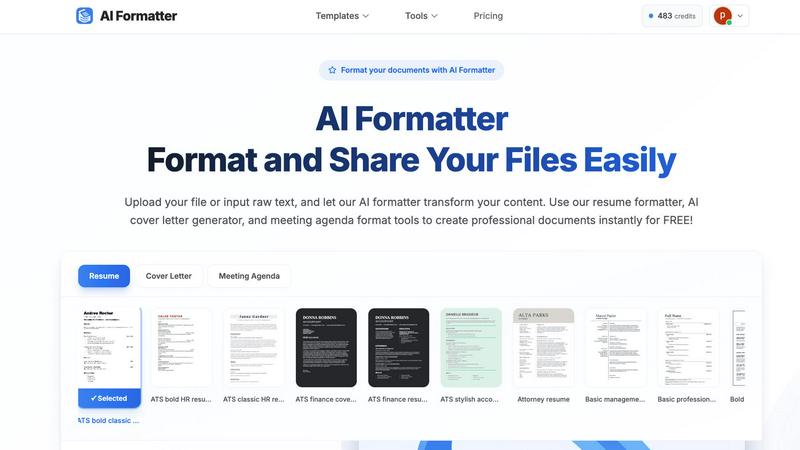
AI Formatter is a revolutionary cloud-based platform that leverages advanced artificial intelligence to automate and perfect professional document creation. It is designed for job seekers, busy professionals, businesses, and academics who need to produce polished, effective documents without spending hours on manual formatting. The core value proposition is immense time savings and guaranteed quality. Users simply upload a raw file (like a Word doc, PDF, or TXT) or input text, and the AI intelligently structures and styles the content into a professionally designed template in seconds. With a proven 95%+ ATS (Applicant Tracking System) pass rate, it ensures resumes and cover letters are optimized to get seen by recruiters. Beyond resumes, it streamlines the creation of meeting agendas, invoices, receipts, and more. The platform combines powerful AI automation with an intuitive real-time editor for fine-tuning, multi-format export, and secure sharing, making it the ultimate tool to boost productivity, enhance professionalism, and eliminate the tedious grind of document formatting.
About RocketShare
RocketShare is a cutting-edge file-sharing platform that prioritizes your privacy above all else. Designed to cater to the needs of both individuals and businesses, RocketShare allows you to transfer files of any size securely. The platform's unique zero-knowledge encryption model ensures that your files are encrypted on your device before they ever traverse the internet, meaning not even the RocketShare team can access your data. This guarantees that your sensitive information, whether it is legal documents, personal photos, or proprietary business files, remains confidential. With options for cloud-based sharing and local peer-to-peer transfers, RocketShare offers flexibility without sacrificing security. All data is stored securely in the EU, ensuring compliance with strict data protection regulations. Whether you are a lawyer needing to send confidential case files, a photographer delivering high-resolution images, or a marketing agency collaborating on sensitive campaigns, RocketShare provides a sleek, user-friendly solution that combines simplicity and robust security.
Frequently Asked Questions
AI Formatter FAQ
What file formats can I upload to AI Formatter?
AI Formatter supports a wide range of common document formats for upload, including PDF, DOC, DOCX, and TXT files. This ensures you can start from almost any existing document you have. The maximum file size for uploads is 10MB, which is sufficient for most standard professional documents.
How does the AI ensure my resume is ATS-friendly?
The AI is trained on the parsing algorithms used by popular Applicant Tracking Systems. It structures your content using clear, machine-readable formatting, optimizes keyword placement, and uses templates designed to avoid common ATS pitfalls like complex columns, graphics, or unusual fonts. This results in the platform's high 95%+ pass rate.
Can I customize the document after the AI formats it?
Absolutely. The AI provides a perfectly formatted first draft, but you retain complete creative control. The integrated real-time editor allows you to change fonts, colors, adjust spacing, reorder sections, and edit text directly. You can customize every aspect to match your personal or company brand before finalizing.
In what formats can I download my finished document?
For maximum flexibility, AI Formatter allows you to download your professionally formatted document in multiple universal formats. You can export your work as a PDF for secure sharing, as a Microsoft Word document (.DOCX) for further editing in Word, or in other standard formats suitable for your needs.
RocketShare FAQ
How does RocketShare ensure my files are secure?
RocketShare uses zero-knowledge encryption, meaning your files are encrypted on your device before they are uploaded. Only you have access to the encryption key, ensuring that no one else, not even RocketShare, can read your files.
Can I share files with anyone using RocketShare?
Yes, you can share files with anyone, regardless of whether they have a RocketShare account. The share link you generate can be sent to anyone, allowing them to access the encrypted files you share.
Where is my data stored?
All files shared through RocketShare are stored securely in the European Union, complying with strict data protection regulations to ensure your information is handled with care.
Do I need a credit card to start using RocketShare?
No, RocketShare offers a no-credit-card-required policy for signing up, allowing users to explore the platform's secure file-sharing capabilities without any financial commitment upfront.
Alternatives
AI Formatter Alternatives
AI Formatter is a dynamic productivity tool that uses artificial intelligence to instantly transform raw text into polished, professional documents. It falls squarely into the document creation and formatting category, designed to save users hours of manual work. Users often explore alternatives for various reasons. This could be due to specific budget constraints, a need for different feature sets like advanced integrations, or platform compatibility requirements. Finding the right fit is crucial for maximizing workflow efficiency. When evaluating other options, focus on core needs. Key considerations include the quality and variety of templates, the intelligence of the automation, ease of customization, and output flexibility. Prioritize tools that seamlessly integrate into your existing process to maintain a fast, agile workflow.
RocketShare Alternatives
RocketShare is a cutting-edge file-sharing platform that prioritizes user privacy through advanced encryption. Designed for individuals and businesses alike, it allows users to share files of any size securely, ensuring that the contents remain inaccessible to anyone, including RocketShare itself. Users often seek alternatives due to varying needs such as pricing, feature sets, or specific platform compatibility that may enhance their sharing experience. When choosing an alternative, it's essential to look for robust security measures, user-friendly interfaces, and support for different file types and sizes. --- [{"question": "What is RocketShare?", "answer": "RocketShare is a secure file-sharing platform that prioritizes user privacy through zero-knowledge encryption."}, {"question": "Who is RocketShare for?", "answer": "RocketShare is ideal for individuals and businesses that need to share sensitive files securely, such as lawyers, photographers, and teams working on confidential projects."}, {"question": "Is RocketShare free?", "answer": "The provided content does not specify if RocketShare is free; please check the official website for pricing details."}, {"question": "What are the main features of RocketShare?", "answer": "RocketShare offers private file sharing with zero-knowledge encryption, cloud-based and peer-to-peer options, and secure data storage in the EU."}]