Amovera vs MeetingMind
Side-by-side comparison to help you choose the right product.

Amovera
Amovera is your all-in-one wedding planner for a beautifully organized day with no hidden fees and lifetime access.
Last updated: April 13, 2026

MeetingMind
Capture every Zoom meeting detail effortlessly with automatic recording, AI summaries, and intelligent transcriptions.
Last updated: March 1, 2026
Visual Comparison
Amovera

MeetingMind
Feature Comparison
Amovera
Guest List & RSVP Management
Manage your guest list effortlessly with personalized RSVP links. This feature allows you to track responses in real-time, ensuring you always know who is attending and who isn't. Say goodbye to the chaos of phone calls and scattered notes.
Budget Tracker
Keep your wedding costs under control with an easy-to-use expense tracking system. This feature enables you to set a budget, monitor spending, and adjust as needed, ensuring you don’t overspend while planning your dream wedding.
Seating Planner
Create the perfect layout with the interactive drag-and-drop seating planner. This feature allows you to arrange tables and guests with ease, making it simple to visualize your reception and ensure everyone is comfortably seated.
Task Management
Stay organized and on schedule with comprehensive wedding checklists. This feature helps you manage all your tasks and deadlines, so you never miss a crucial detail as your big day approaches, providing clarity amidst the excitement.
MeetingMind
Automatic Detection
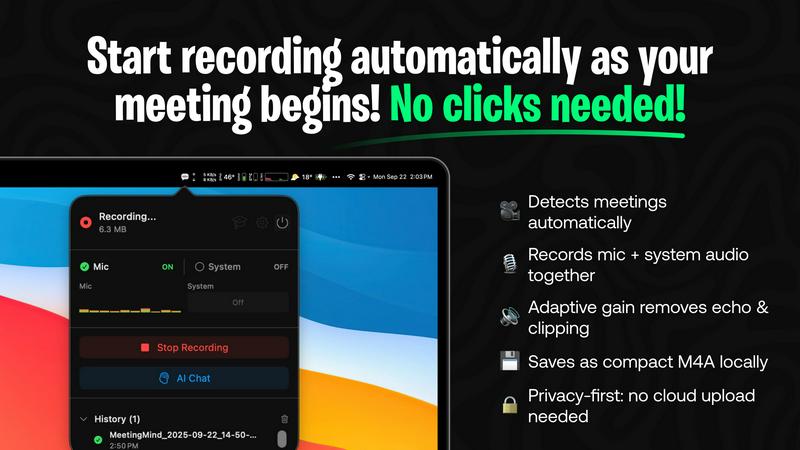
MeetingMind automatically detects Zoom meetings without the need for any clicks. This seamless integration means users can join discussions and let the software handle the recording, freeing them to engage fully in the conversation.
Comprehensive Recording
The tool captures both microphone and system audio simultaneously, thanks to adaptive gain technology. This feature ensures that all voices and sounds during the meeting are recorded clearly, providing an accurate representation of the discussion.
AI Assistant Options
Users can choose between two AI assistants: a local Ollama or a cloud-based OpenRouter. This flexibility allows for personalized summaries and insights, tailoring the experience to individual preferences while enhancing the comprehension of meeting content.
Markdown Export
After each meeting, MeetingMind generates AI-driven summaries and transcripts that can be saved as formatted markdown files. This feature allows users to easily organize and share meeting notes, making follow-ups and action items straightforward and efficient.
Use Cases
Amovera
Collaborative Planning
Amovera’s dual-access feature allows both partners to log in and contribute to the planning process in real-time. This collaboration fosters teamwork and ensures that both individuals are on the same page throughout the journey.
Guest Management for Large Weddings
For those planning grand celebrations, Amovera efficiently manages large guest lists. Whether you are sending invites to 20 or 300 people, the platform handles everything, ensuring no guest is overlooked.
Budget Control for Cost-Conscious Couples
Amovera’s budget tracker is especially beneficial for couples looking to manage their finances carefully. By keeping track of expenses and providing a clear overview of costs, couples can enjoy their planning without financial stress.
Inspiration Gathering with Moodboards
Couples can collect and share their wedding inspirations beautifully using Amovera’s moodboard feature. This is perfect for visualizing themes, colors, and styles, making the design process enjoyable and engaging.
MeetingMind
Efficient Team Meetings
Imagine a team meeting where every member can contribute without worrying about taking notes. MeetingMind captures the entire meeting, allowing team members to focus on collaboration and decision-making.
Remote Work Collaboration
In a remote work environment, clear communication is crucial. MeetingMind ensures that all details from virtual meetings are recorded and accessible, fostering better collaboration among distributed teams.
Educational Sessions
Educators and trainers can utilize MeetingMind to record lectures or training sessions, providing students with accurate transcripts and summaries for review, enhancing the learning experience.
Client Consultations
During client meetings, professionals can use MeetingMind to capture critical discussions and agreements. This ensures that all client interactions are documented, which is essential for maintaining strong professional relationships.
Overview
About Amovera
Amovera is an innovative wedding planning tool designed to streamline the entire wedding preparation process. It offers a comprehensive suite of features that includes guest list management, RSVP tracking, a seating chart builder, budget tracking, moodboards, vendor contacts, and task lists, all integrated into one elegant platform. This tool is perfect for couples who want to plan their big day collaboratively without the hassle of juggling multiple apps or spreadsheets. With Amovera, both partners can access the platform simultaneously, ensuring seamless coordination. Unlike many free wedding tools that monetize by selling your data to vendors, Amovera operates on a straightforward payment model. You pay once for lifetime access, with no subscriptions or hidden fees, ensuring your data remains private and secure. Available in English and German, Amovera is committed to expanding its language offerings to serve a diverse audience. With a 60-day money-back guarantee, Amovera stands out as a trustworthy partner in your wedding planning journey.
About MeetingMind
MeetingMind is an advanced intelligent meeting assistant that transforms the way professionals handle their meetings. Designed specifically for the modern workforce, this innovative tool automatically detects and records Zoom meetings, allowing users to focus entirely on the conversation without the distraction of manual note-taking. With real-time, speaker-attributed transcripts, MeetingMind organizes discussions into clean, interactive markdown notes that capture every significant detail. It is ideal for busy professionals, remote teams, and anyone who prioritizes effective communication and collaboration. By leveraging on-device AI technology, users can query discussions, highlight key takeaways, and track action items effortlessly. MeetingMind prioritizes user privacy by ensuring that all data processing occurs locally on the device, keeping sensitive information secure. With its user-friendly interface and robust features, MeetingMind empowers individuals to make the most of their meetings, ensuring that every conversation is productive and impactful.
Frequently Asked Questions
Amovera FAQ
How does Amovera work?
Amovera is a fully online platform that grants instant access to all its features upon sign-up. After making a single payment, you can start managing your guest list, budget, seating, and more—all with lifetime access.
Can both partners use it?
Absolutely! Amovera allows both partners to share access, enabling them to log in simultaneously. This feature is designed to foster collaboration and ensure that both individuals can contribute to the planning process seamlessly.
Do I need to install anything?
No installation is required! Amovera is accessible from any web browser on your laptop, tablet, or phone, making it incredibly convenient to plan your wedding anytime and anywhere.
Can I export my data?
Yes! Your data is yours, and you can export guest lists, seating charts, and budget information at any time in CSV or PDF formats, ensuring you have full control over your wedding planning details.
MeetingMind FAQ
What is the main benefit of using MeetingMind?
The primary benefit of MeetingMind is its ability to automatically record and transcribe Zoom meetings, allowing users to remain engaged in discussions while ensuring that no important details are missed.
How does MeetingMind handle privacy?
MeetingMind processes all data locally on your device, which means that sensitive meeting information never leaves your Mac. This commitment to privacy ensures that user data remains secure.
Can I use MeetingMind on different devices?
Currently, MeetingMind is designed specifically for macOS, providing a seamless experience for users within the Apple ecosystem.
What happens after my free trial?
After the free trial, users can continue to enjoy up to 60 minutes of recording per day for free. For those needing more, an unlimited version is available for a one-time purchase with no subscription fees.
Alternatives
Amovera Alternatives
Amovera is an all-in-one wedding planning tool designed to streamline the wedding planning process. This productivity and management platform consolidates essential features like guest list and RSVP management, seating chart creation, budget tracking, and more into a single user-friendly interface. Couples appreciate Amovera's ability to allow both partners to collaborate seamlessly without the hassle of juggling multiple applications or spreadsheets. Users often seek alternatives to Amovera due to various reasons such as pricing structures, feature sets, or specific platform needs. When searching for a suitable alternative, it's crucial to consider factors like ease of use, the comprehensiveness of tools offered, and whether the platform aligns with your wedding planning style. Additionally, look for transparency in pricing to avoid unexpected costs, ensuring you get the most value out of your chosen wedding planning solution.
MeetingMind Alternatives
MeetingMind is a cutting-edge intelligent meeting assistant that falls under the productivity and management category. It automates the recording and transcription of Zoom meetings, allowing busy professionals to focus on discussions without the distraction of manual note-taking. While MeetingMind offers robust features, users often seek alternatives for various reasons, including pricing, specific feature needs, or compatibility with other platforms they use. When searching for an alternative, it's essential to consider factors such as ease of use, transcription accuracy, integration capabilities, and privacy measures. Selecting a tool that aligns with your workflow can significantly enhance your meeting experience and ensure that vital details are captured effectively.