
Ayn8n vs Hush Touch | Voice-to-Text for MacOS
Side-by-side comparison to help you choose the right product.

Ayn8n
Ayn8n instantly supercharges your workflow with thousands of ready-to-use AI automation templates.
Last updated: February 28, 2026

Hush Touch | Voice-to-Text for MacOS
Transform your Mac into a smart dictation tool with Hush Touch, offering offline voice-to-text that learns your.
Last updated: February 26, 2026
Visual Comparison
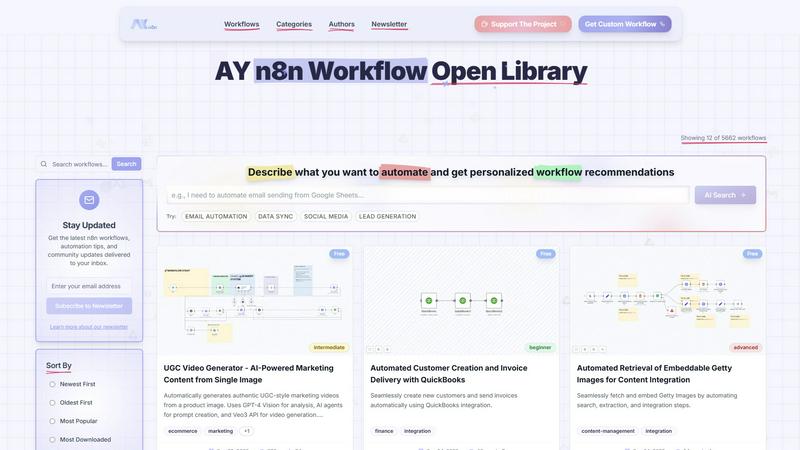
Ayn8n
Hush Touch | Voice-to-Text for MacOS

Feature Comparison
Ayn8n
Massive Pre-Built Workflow Library
Access an ever-growing repository of over 6,150 ready-to-deploy automation workflows. Each workflow is categorized, rated, and tagged for complexity (Beginner to Advanced), allowing you to instantly find vetted solutions for marketing campaigns, data syncs, e-commerce operations, and hundreds of other use cases without starting from scratch.
AI-Powered Search & Recommendations
Go beyond basic filters. Describe your automation goal in plain language using the AI Search bar, and receive personalized workflow recommendations. This intelligent system analyzes your needs to suggest the most relevant pre-built automations, dramatically cutting down your discovery and setup time.
Advanced Filtering & Discovery
Precisely pinpoint the perfect automation with granular filters. Sort workflows by Newest, Most Popular, or Most Downloaded. Filter by complexity level, price (Free or Paid), and specific categories like Integration, Content Management, or Finance to navigate the extensive library with laser-focused efficiency.
Community-Driven Platform & Custom Builds
Ayn8n thrives on its community of builders. Explore workflows from various authors, stay updated with the latest automation trends via newsletter, and even request custom-built workflows tailored to your unique business logic. It’s a collaborative hub for sharing and refining automation best practices.
Hush Touch | Voice-to-Text for MacOS
Dual-Engine Recognition
Hush Touch employs a unique dual-engine recognition system that combines DictationTranscriber for natural flow and punctuation with SFSpeechRecognizer for boosting custom vocabulary. This powerful combination ensures that your transcriptions are not only accurate but also contextually relevant.
Custom Vocabulary
With the ability to learn up to 500 terms, Hush Touch recognizes and retains your specialized vocabulary, including technical jargon and brand names. The auto-learning feature continually adapts to corrections, enhancing accuracy over time and making it ideal for professionals in various fields.
Smart Text Processing
Experience advanced text processing capabilities with Hush Touch. The app intelligently removes filler words, auto-corrects common errors, and formats lists, all while processing voice commands locally in real-time. This allows for a smoother dictation experience without the hassle of manual edits.
Context Modes & Hands-Free Operation
Hush Touch offers multiple context modes including General, Email, Code, and Notes, allowing users to switch seamlessly based on their writing needs. Activate hands-free dictation by saying "Hey Siri, start touch" and let the app auto-insert text after a short pause, enhancing convenience and workflow efficiency.
Use Cases
Ayn8n
Automated Lead Generation & Outreach
Automate the tedious process of prospecting. Use workflows that scrape business directories with AI, qualify leads, and trigger personalized email or LinkedIn outreach sequences. This turns hours of manual research into a hands-free, scalable sales pipeline for marketing and sales teams.
AI-Powered Content Creation & Scheduling
Streamline your content calendar. Implement workflows that automatically generate marketing copy, create UGC-style videos from a single image, schedule posts across social platforms like X and LinkedIn, and audit website SEO—all powered by integrated AI agents and APIs.
Cross-Platform Data Integration & Migration
Eliminate data silos and manual entry. Utilize robust workflows to seamlessly migrate data between platforms (e.g., Airtable to Postgres), sync CRM information, process incoming email attachments, and keep all your business tools in perfect harmony without writing a single line of code.
Automated Finance & Admin Operations
Simplify back-office tasks. Deploy automations that handle invoice creation and delivery via QuickBooks, manage HR onboarding sequences, process recruitment data, and generate financial reports. This reduces administrative overhead and minimizes human error in critical processes.
Hush Touch | Voice-to-Text for MacOS
Drafting Emails
Whether you are responding to clients or composing a newsletter, Hush Touch allows you to dictate emails quickly and efficiently. The app's smart features help ensure that your messages are clear and professionally formatted.
Taking Notes
For students and professionals alike, Hush Touch is perfect for taking notes during meetings or lectures. You can focus on listening and understanding while the app captures your thoughts in real-time, allowing for better retention of information.
Writing Documents
From reports to creative writing, Hush Touch streamlines the document creation process. By dictating your ideas hands-free, you can maintain your creative flow without the distraction of typing.
Managing Code
Developers can use Hush Touch to dictate code snippets and commands. The app's dual-engine recognition enhances its ability to understand and correctly transcribe technical language, making it a valuable tool for coding professionals.
Overview
About Ayn8n
Ayn8n is the definitive open library and automation hub for n8n, designed to supercharge your productivity by turning complex processes into simple, executable workflows. It's a dynamic platform where developers, "vibe coders," and automation enthusiasts can instantly discover, share, and customize over 6,150 pre-built automations. This vast repository covers critical business domains like marketing, CRM, data processing, and content management, allowing you to bypass weeks of development with just a few clicks. The platform leverages AI at its core, offering personalized workflow recommendations through its AI Search and intelligent features like AY Claude to guide your build. Whether you're a solo entrepreneur looking to automate lead generation or a tech team needing robust data integrations, Ayn8n provides the tools to streamline operations, eliminate manual errors, and drive tangible results faster than ever before. It's more than a library; it's an active community and engine for next-level operational efficiency.
About Hush Touch | Voice-to-Text for MacOS
Hush Touch is a revolutionary voice-to-text application designed specifically for macOS, allowing users to dictate seamlessly and privately. By leveraging dual Apple transcription engines and an advanced Apple Intelligence final pass, Hush Touch delivers accurate and efficient transcription without the need for an internet connection. This lightweight app, weighing in at just 5.5 MB, integrates effortlessly into your daily writing routines, making it an ideal choice for anyone seeking a reliable dictation tool. Whether you are a writer, a professional, or someone who prefers hands-free communication, Hush Touch enhances productivity by enabling quick drafting of emails, messages, notes, and documents. With minimal setup, users can simply tap a hotkey or activate Siri to start dictation, allowing them to focus on their thoughts without interruption. Hush Touch also prioritizes user privacy, processing all data on-device, ensuring that your voice and content remain confidential.
Frequently Asked Questions
Ayn8n FAQ
What is n8n, and do I need it to use Ayn8n?
n8n is a powerful, open-source workflow automation tool. Ayn8n is a dedicated library and hub for n8n workflows. To execute the workflows you discover on Ayn8n, you need an n8n instance (either self-hosted or via n8n.cloud) to import and run them. Ayn8n provides the blueprints; n8n is the engine that powers them.
Are the workflows on Ayn8n free to use?
Ayn8n offers a mix of both free and paid workflows. You can use the platform's filters to show "Free Only" workflows. Many of the over 6,150 workflows are completely free, contributed by the community. Paid workflows are typically more complex or specialized solutions offered by individual authors.
Who is a "vibe coder"?
A "vibe coder" refers to an individual who focuses on the high-level logic and outcome of automation rather than low-level syntax. They use visual tools like n8n and pre-built components from libraries like Ayn8n to build powerful applications quickly, prioritizing speed, efficiency, and getting things done over traditional programming.
How do I get help with a specific workflow?
Ayn8n provides community support through its platform. For specific workflows, you can likely engage with the workflow's author. For broader n8n platform issues, you would refer to n8n's official documentation and community channels. Ayn8n also offers a "Get Custom Workflow" service for tailored solutions.
Hush Touch | Voice-to-Text for MacOS FAQ
Is Hush Touch compatible with all macOS versions?
Yes, Hush Touch is designed to be compatible with the latest versions of macOS, ensuring that users can benefit from its advanced features regardless of their operating system updates.
Can I use Hush Touch offline?
Absolutely! Hush Touch is built for on-device processing, meaning you can dictate and transcribe without an internet connection, keeping your data secure and private.
How does Hush Touch learn my vocabulary?
Hush Touch incorporates an adaptive learning system that detects when you correct a transcription. It automatically adds the correct terms to your vocabulary, allowing for improved accuracy in future dictations.
What is the pricing structure for Hush Touch?
Hush Touch offers a one-time purchase for a lifetime license at just $20. This model eliminates the burden of ongoing subscription fees while providing full access to all features.
Alternatives
Ayn8n Alternatives
Ayn8n is a powerful AI-powered automation hub built on the n8n platform, offering a massive library of over 5,000 pre-built workflow templates. It falls into the category of AI assistants and workflow automation tools, designed to supercharge productivity by streamlining complex processes across marketing, CRM, and data management with just a few clicks. Users often explore alternatives for various reasons. These can include budget constraints, the need for different feature sets, specific platform integrations not covered, or a preference for a different user experience or support model. The right fit depends heavily on your team's technical expertise and unique operational bottlenecks. When evaluating other options, focus on key criteria. Look at the size and relevance of the template library, the ease of customization, the strength of community support, and the intelligence of the search and recommendation system. The goal is to find a tool that not only automates tasks but adapts to your evolving business needs with agility.
Hush Touch | Voice-to-Text for MacOS Alternatives
Hush Touch | Voice-to-Text for MacOS is an innovative app designed to convert spoken words into text, operating entirely offline for macOS users. As part of the AI Assistants category, it leverages advanced transcription engines to ensure accuracy and efficiency in dictation, catering specifically to those who prioritize privacy and seamless integration into their writing workflows. Users often seek alternatives to Hush Touch for various reasons, including budget constraints, specific feature requirements, or compatibility with different platforms. When searching for a suitable alternative, it’s essential to consider factors such as ease of use, the ability to work offline, customization options, and overall performance to ensure it meets your dictation needs effectively.