ClipMake vs Gleem.AI Studio
Side-by-side comparison to help you choose the right product.

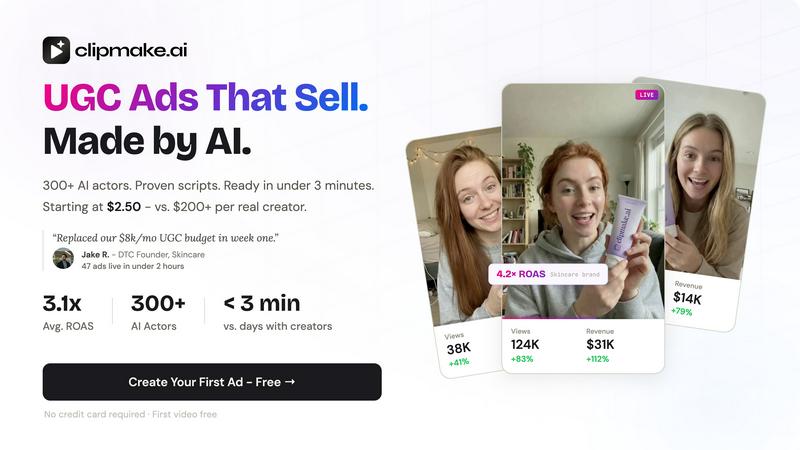
Create stunning AI-generated video ads in minutes with ClipMake, featuring 300+ actors, starting at just $2.50 per video.
Last updated: April 13, 2026

Gleem.AI Studio
Gleem.AI Studio simplifies visual creation by seamlessly generating, editing, and managing images in one intuitive.
Last updated: February 26, 2026
Visual Comparison
ClipMake
Gleem.AI Studio

Feature Comparison
ClipMake
AI Actor Library
Choose from an extensive library of over 300 AI actors, each designed to deliver authentic performances with natural lip sync, facial expressions, and body language. This feature ensures that your video ads resonate with viewers by utilizing relatable and engaging characters.
Multilingual Voice-Matched Dubbing
ClipMake supports voice-matched dubbing in over 20 languages, preserving the unique qualities of each actor's voice. This eliminates the robotic tone often associated with traditional text-to-speech systems, allowing for a more natural and engaging viewing experience.
Scene Templates
Select from a variety of scene templates, including unboxing, testimonials, tutorials, and lifestyle showcases. This flexibility enables brands to create targeted ads that fit their specific marketing needs, ensuring that the content aligns with the intended audience.
Batch Generation Capabilities
With the ability to generate dozens of video variations in a single session, ClipMake allows for extensive testing of different hooks, actors, and scripts. This feature is essential for performance marketers looking to optimize their campaigns and discover winning creatives quickly.
Gleem.AI Studio
Text-to-Image Generator
Transform your concepts into eye-catching visuals effortlessly with the text-to-image generator. Choose your desired dimensions, articulate your vision, and let Gleem's innovative Prompt Enhance feature elevate your words into stunning imagery.
AI Image Editing
Edit images seamlessly within a single platform using natural and simple prompts. Whether you want to add or remove elements, adjust poses, or apply artistic filters, this intuitive AI editor makes complex tasks feel effortless.
AI Avatars
Create and customize your own AI avatars, inserting them into any scene with a few clicks. Adjust poses or experiment with different outfits without the need for additional photoshoots, all while maintaining full creative control.
Project Organization
Stay organized with dedicated project spaces that house your saved prompts, edits, and version histories. This feature ensures that all your creative assets are easily accessible, allowing you to build upon previous work without losing momentum.
Use Cases
ClipMake
E-Commerce Product Launches
When launching a new product, brands can utilize ClipMake to create multiple video ads showcasing the item from different angles. This approach ensures maximum exposure and engagement, helping to drive initial sales effectively.
Seasonal Promotions
ClipMake is perfect for seasonal campaigns, enabling brands to quickly generate themed video ads for holidays or special events. By adjusting the script and visuals, marketers can align their content with seasonal trends and customer expectations.
A/B Testing of Ad Creatives
Marketers can leverage ClipMake's batch generation feature to create various ad variations for A/B testing. This allows for rapid identification of high-performing creatives, optimizing ad spend, and improving return on ad spend (ROAS).
Social Media Engagement
Brands looking to enhance their social media presence can use ClipMake to produce engaging video content tailored for platforms like TikTok and Instagram. The quick turnaround time means that brands can keep their content fresh and relevant, boosting audience interaction.
Gleem.AI Studio
Marketing Campaigns
Gleem.AI Studio is ideal for marketers looking to quickly create compelling visuals for campaigns. From social media ads to email newsletters, the platform allows for rapid iterations that align with branding guidelines.
Social Media Content Creation
Boost your online presence by generating and editing engaging social media graphics. With the ability to produce consistent visuals, you can maintain a cohesive look across multiple platforms, enhancing brand recognition.
E-commerce Product Imagery
Small businesses can leverage Gleem.AI Studio to create professional product images without expensive photography. Easily edit images to highlight features, add backgrounds, or create variations for different listings.
Creative Exploration
Artists and designers can use Gleem.AI Studio as a playground for exploring new ideas. The seamless workflow enables quick experimentation with different styles and compositions, fostering an environment of creativity.
Overview
About ClipMake
ClipMake is an innovative AI-powered tool designed to streamline the creation of user-generated content (UGC) style video ads, specifically tailored for e-commerce brands and performance marketers. By harnessing advanced artificial intelligence, ClipMake eliminates the need for traditional creators, lengthy shoots, and time-consuming edits. Users can select from a diverse library of over 300 AI actors, each capable of delivering captivating performances. Simply input product details, and within minutes, receive a polished video ad that features natural voiceovers, dynamic product visuals, and proven advertising structures. This solution empowers brands to generate high-volume ad creatives efficiently, allowing them to stay ahead in a competitive marketplace. With ClipMake, creating engaging video content is no longer a complex process but a rapid and cost-effective solution to meet advertising demands.
About Gleem.AI Studio
Gleem.AI Studio is an innovative, all-in-one AI image workspace crafted for creators who prioritize creativity over configuration. This platform seamlessly integrates AI-driven image generation and editing, eliminating the hassle of toggling between disparate tools. Gleem.AI Studio empowers marketers, content creators, and small teams to produce high-quality visuals with lightning speed. With a focus on simplicity, it streamlines the creative process, allowing users to iterate on their ideas without the distraction of complex settings or fragmented workflows. Whether you're crafting marketing materials, social media graphics, or product visuals, Gleem.AI Studio enhances your creative flow, enabling rapid iterations and visual decisions that resonate.
Frequently Asked Questions
ClipMake FAQ
How quickly can I generate a video ad with ClipMake?
You can create a finished video ad in under 3 minutes, making it an incredibly efficient tool for busy marketers and e-commerce brands.
Can I customize the AI actors and their scripts?
Yes, you can pick from a library of AI actors and even create a custom avatar. You also have the ability to edit the scripts to suit your brand's voice and messaging.
Is there a limit on how many videos I can create?
ClipMake allows for batch generation, enabling you to create dozens of video variations in one session. This flexibility is designed to support high-volume ad production without constraints.
What is the cost of using ClipMake?
The pricing model is highly competitive, with each video costing just $2.48. This makes it accessible for brands of all sizes to produce high-quality video ads without breaking the bank.
Gleem.AI Studio FAQ
What is Gleem.AI Studio?
Gleem.AI Studio is an all-in-one AI image workspace that combines image generation and editing in a single platform, designed for ease of use for marketers, creators, and small teams.
How does the text-to-image generator work?
The text-to-image generator allows users to input descriptive text that is transformed into visuals. With the Prompt Enhance feature, users can refine their inputs for improved image quality and relevance.
Can I edit images after generating them?
Yes, Gleem.AI Studio features an intuitive AI image editor that lets you modify generated images by adding or removing elements, adjusting poses, and applying filters, all in one place.
Is there a beta program available?
Yes, Gleem.AI Studio currently offers a private beta program. Interested users can join the waitlist for early access and experience the platform firsthand before its official launch.
Alternatives
ClipMake Alternatives
ClipMake is an innovative AI-driven user-generated content (UGC) video generator designed specifically for e-commerce brands and performance marketers. With its impressive library of over 300 AI actors, ClipMake enables users to create hyper-realistic video ads for platforms like Meta, TikTok, and YouTube in just minutes. This efficiency is a game-changer for businesses seeking high-volume ad creatives without the hassle of traditional video production. However, users often find themselves searching for alternatives due to various factors, including pricing, specific feature sets, or compatibility with their existing marketing platforms. When looking for an alternative, it’s essential to assess the ease of use, the diversity of available templates and actors, pricing models, and the overall quality of the generated content. Finding a solution that aligns with your unique marketing needs can significantly enhance your ad performance and ROI.
Gleem.AI Studio Alternatives
Gleem.AI Studio is an all-in-one AI image workspace that empowers users to create and edit visuals seamlessly. Designed for marketers, creators, and small teams, it streamlines the process of generating and refining images without the hassle of juggling multiple tools. Users frequently seek alternatives to Gleem.AI Studio for various reasons, including pricing concerns, the need for specific features, or compatibility with their existing workflows. When searching for an alternative, consider factors such as ease of use, integration capabilities, and whether the platform can support your unique creative needs without complicating the process. Choosing the right alternative involves assessing how well it meets your requirements for speed, simplicity, and functionality. Look for solutions that prioritize a user-friendly interface, robust editing features, and a cohesive workflow that allows you to focus on creativity rather than technical setup. Finding a platform that aligns with your vision will enhance your productivity and ensure you can produce stunning visuals efficiently.