Dokie AI vs SimpleDraw
Side-by-side comparison to help you choose the right product.

Dokie AI
Dokie AI transforms your ideas into stunning PPT slides in minutes, leveraging the power of Claude Opus 4.6 for effortless presentation creation.
Last updated: March 19, 2026

SimpleDraw
Effortlessly create accurate floor plans and scale drawings online for any home project with SimpleDraw, no experience.
Last updated: March 1, 2026
Visual Comparison
Dokie AI

SimpleDraw
Feature Comparison
Dokie AI
AI Generate PPT
Dokie AI's AI Generate PPT feature allows users to describe their presentation topic in plain text. The AI then generates a complete slide deck that includes professional layouts, engaging charts, and well-crafted content, streamlining the presentation creation process.
AI Beautify PPT
With the AI Beautify PPT feature, users can upload existing presentations and have Dokie AI enhance their design. The AI intelligently fixes layouts, improves styling, and applies professional-grade design elements while preserving the original content, transforming ordinary slides into stunning visuals.
Speech Notes Generation
Dokie AI offers the ability to automatically generate detailed speaker notes for each slide. This feature enhances your presentation delivery by providing comprehensive talking points, ensuring that you can present confidently and effectively without missing key information.
Multi-Format Conversions
Dokie AI supports various conversion options, including PDF to PPT, HTML to PPT, and Word to PPT. This versatility allows users to easily transform documents and web content into engaging presentations, facilitating a seamless workflow for content creators.
SimpleDraw
Floor Plan Mode
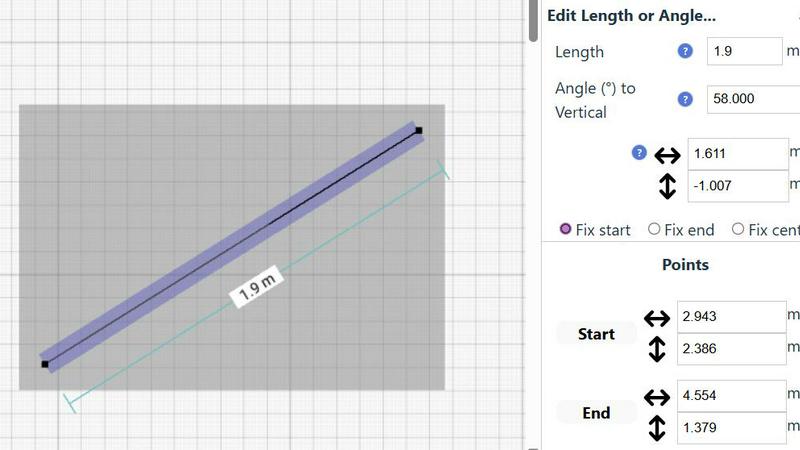
The dedicated Floor Plan Mode streamlines the process of creating accurate floor plans for various spaces. Users can easily draw walls and add windows and doors with just a click, while real-time measurements update as you adjust your design.
Smart Alignment System
SimpleDraw's Smart Alignment System ensures that every point and line is placed exactly where you want it. With visual cues guiding your placement, it enhances accuracy while allowing you to zoom in for greater precision as needed.
Comprehensive Measurement System
The tool offers a robust measurement system that gives users fine control over what measurements are displayed. With options for metric or standard US units, dynamic contextual measurements assist users in achieving their intended design.
Flexible Zoom and Non-Destructive Editing
Users can zoom in and out with ease, targeting specific parts of their drawings. The non-destructive editing feature allows for modifications at any time, with undo/redo options and the ability to move groups of elements simultaneously, streamlining the design process.
Use Cases
Dokie AI
Business Presentations
Business professionals can leverage Dokie AI to quickly create impactful presentations for meetings, pitches, or conferences. The AI-generated slides ensure that key messages are communicated effectively, saving time and enhancing professionalism.
Educational Lectures
Educators can utilize Dokie AI to generate lecture slides that engage students and simplify complex topics. The automatic creation of visually appealing presentations allows teachers to focus on content delivery rather than design.
Marketing Campaigns
Marketers can harness Dokie AI to create stunning presentations for product launches and marketing strategies. The AI's ability to generate visually compelling content helps capture audience attention and convey marketing messages clearly.
Startup Pitches
Startup founders can benefit from Dokie AI when preparing for investor pitches. By quickly generating polished presentations, they can showcase their business ideas effectively, making a strong impression on potential investors.
SimpleDraw
Kitchen and Bathroom Renovations
Homeowners can plan their kitchen and bathroom renovations with accurate measurements, visualizing layouts before any physical work begins. This helps to avoid costly mistakes and ensures a smoother renovation process.
Room Layout and Furniture Planning
Designing room layouts becomes a breeze with SimpleDraw. Users can visualize how furniture will fit in their spaces, allowing them to make informed decisions before purchasing new items.
House and Apartment Plans
Real estate agents and homeowners can create comprehensive floor plans for houses and apartments, making it easier to plan renovations or develop rental listings that showcase the property's potential.
Technical Drawings and Elevations
Professionals can utilize SimpleDraw for creating technical drawings and elevations, leveraging its powerful tools to produce detailed and accurate representations for design projects.
Overview
About Dokie AI
Dokie AI is an innovative AI presentation maker designed to revolutionize how individuals and organizations create presentations. Whether you are a business professional, educator, marketer, or startup founder, Dokie AI empowers you to generate polished, visually appealing slides without needing design expertise. By leveraging the advanced capabilities of Claude Opus 4.6, Dokie AI automates the processes of content structuring, layout selection, typography, and visual design. This means that you can focus on your ideas while Dokie AI transforms them into compelling presentations in mere minutes. With multiple modes of operation, including Generate for creating new presentations, Beautify for enhancing existing slides, and Speech for adding speaker notes, Dokie AI is your go-to solution for efficient and effective presentation creation.
About SimpleDraw
SimpleDraw is a groundbreaking online tool that empowers users to create precise and accurate scale drawings effortlessly. It caters to a diverse audience, including DIY enthusiasts, homeowners planning renovations, and creative individuals who enjoy visualizing ideas. The main value proposition of SimpleDraw lies in its ability to deliver professional-grade results without the complexity typically associated with CAD software. Users can dive straight into their projects as there is no need for login or registration, making it accessible for anyone from casual users to seasoned professionals. With a focus on delivering powerful yet straightforward tools, SimpleDraw allows users to craft detailed floor plans, elevations, and technical drawings with ease. Its user-friendly interface mimics the familiarity of pen and paper while enhancing precision and flexibility, enabling users to produce stunning designs in mere minutes.
Frequently Asked Questions
Dokie AI FAQ
What platforms does Dokie AI work on?
Dokie AI is web-based and can be accessed from any device with internet connectivity, making it versatile and easy to use for anyone, anywhere.
Do I need design skills to use Dokie AI?
No, Dokie AI is specifically designed for users without design skills. It automates the design process, allowing anyone to create professional presentations effortlessly.
How does Dokie AI handle existing presentations?
Dokie AI's Beautify feature enhances existing presentations by improving layouts and styling while maintaining the original content, making it easy to upgrade your current slides.
Is there a free trial available for Dokie AI?
Yes, Dokie AI offers a free trial, allowing users to explore its features and capabilities before committing to a paid plan. This gives potential users a risk-free opportunity to experience the tool.
SimpleDraw FAQ
Do I need to create an account to use SimpleDraw?
No, SimpleDraw allows users to start drawing immediately without the need for any login or registration, making it highly accessible.
Can I save my drawings?
Currently, SimpleDraw does not have built-in saving options. Users can take screenshots of their drawings or copy the dimensions manually for future reference.
Is SimpleDraw suitable for professional use?
Absolutely! SimpleDraw combines the precision of professional CAD software with an intuitive interface, making it a great choice for both casual users and professionals.
What types of measurements can I use in SimpleDraw?
SimpleDraw supports a comprehensive measurement system that includes both metric and standard US units, allowing users to choose their preferred measurement style while dynamically displaying measurements as they work.
Alternatives
Dokie AI Alternatives
Dokie AI is a cutting-edge AI presentation maker designed to empower users to create professional-quality presentations quickly and efficiently. It caters to a diverse range of professionals, including business executives, educators, marketers, and startup founders, enabling them to produce compelling slide decks without requiring any design skills. Users often seek alternatives to Dokie AI for various reasons, such as budget constraints, differing feature sets, or specific platform compatibility needs. When selecting an alternative presentation tool, it’s essential to consider factors like ease of use, available features, pricing structures, and the level of AI integration. Finding the right alternative can greatly enhance your presentation experience, so prioritize tools that align with your workflow and design preferences. Whether you need advanced customization options, collaborative features, or specific integrations, understanding your requirements will help you make an informed decision. Look for platforms that offer scalability and flexibility to ensure they fit your current and future presentation needs.
SimpleDraw Alternatives
SimpleDraw is an innovative online tool designed for users who need to create precise scale drawings and floor plans with ease. It falls under the category of design tools, offering a user-friendly interface that combines the simplicity of traditional sketching with advanced features that enhance accuracy. Users often search for alternatives to SimpleDraw due to various reasons, including the need for more advanced features, specific platform compatibility, or pricing concerns. When selecting an alternative, it's essential to consider factors such as usability, the range of tools offered, support for different measurement systems, and overall accessibility. Finding a tool that aligns with your specific design needs while remaining intuitive can significantly enhance your creative process.