
Dokie AI
Dokie AI transforms your ideas into stunning PPT slides in minutes, leveraging the power of Claude Opus 4.6 for effortless presentation creation.
Visit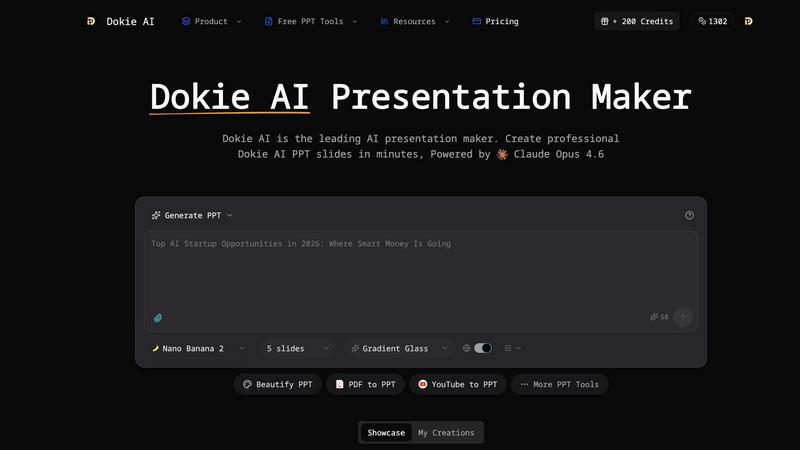
About Dokie AI
Dokie AI is an innovative AI presentation maker designed to revolutionize how individuals and organizations create presentations. Whether you are a business professional, educator, marketer, or startup founder, Dokie AI empowers you to generate polished, visually appealing slides without needing design expertise. By leveraging the advanced capabilities of Claude Opus 4.6, Dokie AI automates the processes of content structuring, layout selection, typography, and visual design. This means that you can focus on your ideas while Dokie AI transforms them into compelling presentations in mere minutes. With multiple modes of operation, including Generate for creating new presentations, Beautify for enhancing existing slides, and Speech for adding speaker notes, Dokie AI is your go-to solution for efficient and effective presentation creation.
Features of Dokie AI
AI Generate PPT
Dokie AI's AI Generate PPT feature allows users to describe their presentation topic in plain text. The AI then generates a complete slide deck that includes professional layouts, engaging charts, and well-crafted content, streamlining the presentation creation process.
AI Beautify PPT
With the AI Beautify PPT feature, users can upload existing presentations and have Dokie AI enhance their design. The AI intelligently fixes layouts, improves styling, and applies professional-grade design elements while preserving the original content, transforming ordinary slides into stunning visuals.
Speech Notes Generation
Dokie AI offers the ability to automatically generate detailed speaker notes for each slide. This feature enhances your presentation delivery by providing comprehensive talking points, ensuring that you can present confidently and effectively without missing key information.
Multi-Format Conversions
Dokie AI supports various conversion options, including PDF to PPT, HTML to PPT, and Word to PPT. This versatility allows users to easily transform documents and web content into engaging presentations, facilitating a seamless workflow for content creators.
Use Cases of Dokie AI
Business Presentations
Business professionals can leverage Dokie AI to quickly create impactful presentations for meetings, pitches, or conferences. The AI-generated slides ensure that key messages are communicated effectively, saving time and enhancing professionalism.
Educational Lectures
Educators can utilize Dokie AI to generate lecture slides that engage students and simplify complex topics. The automatic creation of visually appealing presentations allows teachers to focus on content delivery rather than design.
Marketing Campaigns
Marketers can harness Dokie AI to create stunning presentations for product launches and marketing strategies. The AI's ability to generate visually compelling content helps capture audience attention and convey marketing messages clearly.
Startup Pitches
Startup founders can benefit from Dokie AI when preparing for investor pitches. By quickly generating polished presentations, they can showcase their business ideas effectively, making a strong impression on potential investors.
Frequently Asked Questions
What platforms does Dokie AI work on?
Dokie AI is web-based and can be accessed from any device with internet connectivity, making it versatile and easy to use for anyone, anywhere.
Do I need design skills to use Dokie AI?
No, Dokie AI is specifically designed for users without design skills. It automates the design process, allowing anyone to create professional presentations effortlessly.
How does Dokie AI handle existing presentations?
Dokie AI's Beautify feature enhances existing presentations by improving layouts and styling while maintaining the original content, making it easy to upgrade your current slides.
Is there a free trial available for Dokie AI?
Yes, Dokie AI offers a free trial, allowing users to explore its features and capabilities before committing to a paid plan. This gives potential users a risk-free opportunity to experience the tool.
Similar to Dokie AI

Free, open-source 2D CAD in Rust with precision drafting, layers, dimensions, hatches, plotting, and DWG/DXF/PDF/SVG/PNG support.

Create and edit AI images, videos, music, and designs in one workspace, with multiple models, reusable characters, and API access.

Seedream 5.5 by ByteDance: 80+ rounds of stable image editing, native RGBA transparency, 100-layer splits, 4K output and reliable multilingual text.

Free ad creative hub: 1,750+ prompts behind viral AI ads, 118 hook frameworks, teardowns, swipe files and 27 free AI ad tools.

Create OCs from text or images, customize their look, and turn them into animated videos with AI.

All-in-one digital toolkit for effortless image conversion, compression, resizing, and everyday file utilities in a single place.

AI image and video studio in your browser: generate and edit images, turn photos into videos, edit clips by sentence.

PSL Rating is an AI face analysis tool. Upload one selfie and get your PSL tier, a 1–10 score and percentile, plus measurement lines you can chec