Dreamflow vs TemplateFox
Side-by-side comparison to help you choose the right product.

Dreamflow
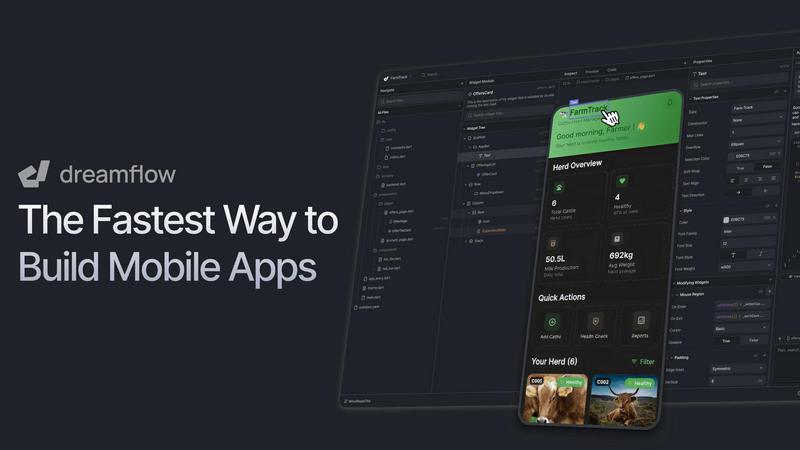
Dreamflow uses AI and visual tools to build production-ready mobile apps at incredible speed.
Last updated: March 1, 2026

TemplateFox
Create dynamic PDF templates effortlessly and automate generation with our API or Zapier to save time and enhance.
Last updated: February 28, 2026
Visual Comparison
Dreamflow
TemplateFox

Feature Comparison
Dreamflow
Tri-Surface Editing
Dreamflow's revolutionary Agentic, Visual, and Code surfaces work in perfect harmony. Start by describing your app to an AI agent, then instantly switch to the visual editor to drag, drop, and adjust components, or hop directly into the underlying Flutter code for granular control. Every change made on any surface is automatically synchronized across the entire project, ensuring your prototype, design, and final code are always aligned and eliminating costly rework.
AI-Powered Development
Go beyond basic code generation with context-aware AI that understands app patterns and best practices. The intelligent agent scaffolds features correctly from the start, interprets your natural language prompts for complex changes, and accelerates development by handling repetitive tasks. This smart assistance ensures you build robust, well-structured applications faster than ever before.
Build for Any Screen
Create truly responsive and robust applications that adapt flawlessly to every device size, from smartphones to tablets and web browsers. Powered by Google's Flutter framework, Dreamflow lets you build once and deploy everywhere with just a few clicks, publishing directly to the Apple App Store, Google Play Store, and the web without managing multiple codebases.
Backend Integrations
Jump straight into full-stack development with managed backend services integrated out of the box. Choose between Firebase or Supabase to handle authentication, databases, and storage seamlessly. This allows you to build scalable, data-driven applications from day one without the overhead of setting up and maintaining complex server infrastructure.
TemplateFox
Visual Drag-and-Drop Editor
TemplateFox's powerful visual editor allows users to create professional PDF templates without any coding. This intuitive interface makes it easy to design headers, footers, and other elements by simply dragging and dropping components into place.
Dynamic Data Binding
With dynamic data binding, TemplateFox enables users to inject real-time data into their templates. Whether it's names, addresses, or prices, the platform ensures that all information updates automatically, making document preparation faster and more accurate.
Automatic Table Management
TemplateFox features tables that can grow dynamically with your data. No matter whether you need to display three items or three hundred, the platform automatically adjusts the table size, ensuring that it spans multiple pages if necessary.
Built-in QR Codes and Barcodes
Easily generate scan-ready QR codes and barcodes directly from your data. TemplateFox supports various formats, including Code128 and EAN-13, allowing you to streamline processes such as inventory management and tracking.
Use Cases
Dreamflow
Rapid Prototyping & MVPs
Entrepreneurs and product managers can validate market ideas at lightning speed. Describe a concept in plain English and watch Dreamflow's AI generate a working prototype. Instantly iterate based on feedback using the visual editor and deploy a functional Minimum Viable Product to real users in a fraction of the traditional time and cost.
Developer-Led App Production
Professional developers and small teams can dramatically accelerate their workflow. Use Dreamflow to generate the foundational UI and logic, then dive into the clean, exported Flutter code for advanced customization, complex state management, and integration with custom APIs, maintaining full control and ownership of the final product.
Cross-Platform Business Tools
Businesses needing internal tools or customer-facing apps can build them efficiently. Create responsive applications that work on employee mobile devices and desktop web browsers from a single project. The visual builder allows non-technical stakeholders to provide direct input, while developers retain code-level control for security and scalability.
Educational & Portfolio Projects
Students and aspiring developers can bridge the gap between idea and implementation. Learn modern app development practices by describing a project, seeing it built visually, and examining the resulting Flutter code. It's an powerful tool for experimenting with ideas and building an impressive portfolio of real, deployable applications.
TemplateFox
Business Invoicing
TemplateFox simplifies the invoicing process for businesses by allowing them to create customizable invoice templates. Users can automatically populate client information, service details, and pricing, ensuring accurate and professional invoices every time.
Education Certificates
Educators can leverage TemplateFox to generate personalized certificates of achievement for students. By integrating data from student databases, schools can automate the creation of certificates that reflect individual accomplishments seamlessly.
E-commerce Order Fulfillment
E-commerce businesses can utilize TemplateFox to create packing slips and shipping labels. The platform's automatic table management ensures that all order details fit perfectly, regardless of the number of items in the order.
Marketing Materials
Marketers can design high-quality promotional materials such as flyers and brochures using TemplateFox. The platform's visual editor allows for rapid adjustments, while dynamic data binding ensures that marketing messages are tailored to specific audiences.
Overview
About Dreamflow
Dreamflow is the cutting-edge platform that shatters the traditional barriers of mobile app development. It merges the speed of AI, the clarity of visual design, and the precision of code-level control into one seamless, synchronized environment. Built for developers, entrepreneurs, and businesses who demand both speed and quality, Dreamflow empowers you to transform your vision into a production-ready application with unprecedented efficiency. Its core innovation is Tri-Surface Editing, allowing you to fluidly switch between describing your app in natural language, fine-tuning it on a visual canvas, and diving directly into clean, exportable Flutter code—all while everything stays perfectly in sync. This eliminates the frustrating disconnect between prototyping, design, and development, enabling rapid iteration and deployment across iOS, Android, and Web from a single codebase. With managed backend integrations and one-click publishing, Dreamflow is the fastest way to go from a bold idea to a real, scalable app in the market, giving you full ownership of your code every step of the way.
About TemplateFox
TemplateFox is an innovative SaaS platform designed to transform the way professionals generate PDFs. By automating and streamlining the PDF creation process, TemplateFox eliminates the complexity associated with traditional coding methods, allowing users to create stunning, pixel-perfect templates effortlessly. With its intuitive drag-and-drop editor, users can design diverse documents such as invoices, reports, and certificates without the need for HTML or CSS knowledge. The platform is ideal for indie hackers, developers, and businesses of all sizes, enabling users to generate thousands of unique PDFs in mere seconds. TemplateFox's robust REST API and seamless integration with no-code tools like Zapier, Make, and Airtable make it easy to automate workflows and enhance productivity. The platform prioritizes speed and reliability, providing secure document delivery through signed URLs or direct binary downloads. With a free plan offering 100 PDFs per month, TemplateFox invites users to experience the efficiency of automated document creation without upfront costs.
Frequently Asked Questions
Dreamflow FAQ
What is Tri-Surface Editing?
Tri-Surface Editing is Dreamflow's core innovation that allows you to interact with your app project through three interconnected interfaces: the AI Agent (for natural language commands), the Visual Canvas (for drag-and-drop design), and the Code Editor (for direct Flutter code manipulation). Changes in one surface are instantly reflected in the others, providing unmatched flexibility and keeping your project perfectly synchronized throughout the entire development lifecycle.
Can I export and own the code from my Dreamflow app?
Absolutely. A key principle of Dreamflow is that you maintain full ownership of your application's source code. You can export the complete, production-ready Flutter project at any time. This allows you to run it locally on simulators, deploy it through your own CI/CD pipelines, host it on your own infrastructure, and continue development in any standard IDE like VS Code.
Which platforms can I deploy to with Dreamflow?
Dreamflow builds truly cross-platform applications using Flutter. With a single project, you can deploy your app to iOS (Apple App Store), Android (Google Play Store), and as a progressive web app (PWA) for the web. The platform provides one-click deployment workflows to streamline publishing to each of these platforms directly from the Dreamflow interface.
What backend services does Dreamflow support?
Dreamflow offers managed integration with two leading backend-as-a-service platforms: Firebase by Google and Supabase. This provides out-of-the-box functionality for essential features like user authentication, real-time and traditional databases, file storage, and serverless functions, enabling you to build full-stack, scalable applications without managing server code.
TemplateFox FAQ
How does TemplateFox handle data security?
TemplateFox prioritizes data security by delivering documents via secure signed URLs and direct binary downloads. This ensures that sensitive information remains protected throughout the document generation process.
Can I use TemplateFox without any coding skills?
Absolutely! TemplateFox is designed for users of all skill levels. Its drag-and-drop editor and no-code integrations with tools like Zapier and Airtable mean you can create and automate PDFs without writing a single line of code.
What types of documents can I create with TemplateFox?
TemplateFox supports a wide range of document types, including invoices, reports, certificates, packing slips, and more. The platform's flexibility allows you to design and customize templates to suit your specific needs.
Is there a free trial available for TemplateFox?
Yes, TemplateFox offers a free plan that allows users to generate up to 100 PDFs per month. This gives you the opportunity to explore the platform's features and capabilities without any financial commitment.
Alternatives
Dreamflow Alternatives
Dreamflow is a dynamic mobile app development platform that merges AI, visual design, and full code control. It falls squarely into the modern development tool category, designed to accelerate building and deploying production-ready applications. Users often explore alternatives for various reasons, including budget constraints, specific feature requirements, or a need for a different development framework. Some may seek simpler tools, while others require deeper integration with existing tech stacks. When evaluating other options, key considerations include the balance between visual design and code access, the underlying technology for deployment, AI capabilities for scaffolding, and overall workflow efficiency. The goal is to find a tool that matches your team's speed and technical depth requirements.
TemplateFox Alternatives
TemplateFox is a powerful SaaS platform designed to automate and streamline the generation of professional PDFs at scale. It falls under the category of productivity and management tools, providing users with a visual drag-and-drop editor that eliminates the complexity of coding. Users frequently seek alternatives for various reasons, including pricing, specific feature sets, integration capabilities, or unique platform requirements that may not be met by TemplateFox. When looking for an alternative, it's crucial to assess the ease of use, the quality of customer support, the flexibility of templates, and the overall scalability of the solution to ensure it aligns with your document generation needs.