Geekflare Connect vs Receipt Generator
Side-by-side comparison to help you choose the right product.

Geekflare Connect
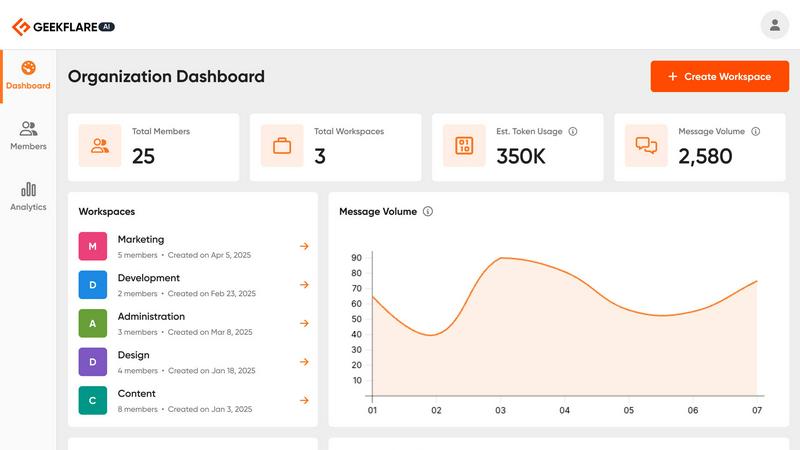
Geekflare Connect unifies AI models to slash team costs by 65% and boost collaboration.
Last updated: March 1, 2026

Receipt Generator
Create realistic, customizable receipts in seconds with 400+ templates for business, creative, and personal use, all for free.
Last updated: April 4, 2026
Visual Comparison
Geekflare Connect
Receipt Generator

Feature Comparison
Geekflare Connect
Multi-Model Comparison
Instantly benchmark and compare outputs from top-tier models like GPT-5.2, Claude 4.5, and Gemini 3 in a single, side-by-side view. This feature eliminates guesswork, allowing you to select the highest-quality or most cost-effective response for any specific prompt, dramatically accelerating decision-making and optimizing output quality without manual, time-consuming testing across separate platforms.
Live Web Access
Supercharge your AI interactions with real-time data. Powered by integrations like Parallel, Exa, and Firecrawl, this feature allows your chosen AI models to perform web searches and pull in the latest information, news, or data directly into the conversation. This transforms static AI chats into dynamic research tools, ensuring your team's work is always informed by the most current information available.
Collaborative Workspaces
Move beyond isolated AI chats. Organize conversations and projects into dedicated workspaces where team members can securely share prompts, chat histories, and insights. This centralizes knowledge, streamlines workflows, and keeps everyone aligned, turning individual AI use into a powerful, synchronized team asset that enhances consistency and oversight across all projects.
Your Private AI Brain
Securely upload your internal documents, PDFs, and data files to create a private, contextual knowledge base. The AI models can then reference this proprietary information to provide answers tailored specifically to your business context. This feature ensures sensitive data remains secure while unlocking deep, personalized insights that generic AI models cannot provide.
Receipt Generator
Extensive Template Library
With over 400 professionally designed templates at your fingertips, Receipt Generator allows you to choose from a wide range of store-specific options. Whether you need receipts for retail, restaurants, or pharmacies, finding the right template is a breeze.
AI "Place in Scene" Feature
This innovative feature lets you create photorealistic images of your receipts placed on various surfaces, such as desks or wallets. This capability enhances your projects without the need for a printer, providing a polished look for visual documentation.
Full Customization Options
Receipt Generator empowers users with complete control over their receipts. You can edit every detail, including line items, prices, taxes, and payment methods, ensuring that your receipt meets specific requirements for personal or business use.
Instant Download Capability
Once you complete your receipt, download it instantly as a high-resolution PNG or PDF file. No waiting, no hassle, and no need for account sign-up, making it incredibly user-friendly and efficient for anyone on the go.
Use Cases
Geekflare Connect
Content Creation & Strategy
Marketing and content teams can generate and compare drafts from multiple AI models simultaneously to identify the most creative or on-brand output. By using the prompt library and web search, they can quickly research topics and produce high-quality content briefs, social media posts, and articles faster, with the ability to refine based on direct model comparisons.
Technical Analysis & Development
Developers and SREs can use the platform to debug code, compare explanations for complex technical concepts from different AI models, and generate scripts. The private AI brain feature allows them to upload architecture diagrams or logs for contextual troubleshooting, making it an indispensable tool for rapid problem-solving and knowledge sharing within tech teams.
Financial Research & Reporting
Analysts and consultants in finance can leverage live web access to pull in real-time market data and news. They can then task different models with summarizing reports, generating insights, or comparing economic analyses side-by-side to ensure thorough due diligence and create comprehensive, data-driven reports with greater speed and accuracy.
Cross-Functional Project Management
Project managers and product teams can utilize collaborative workspaces to centralize AI-driven tasks for a project. Team members can share research, generate project documentation, brainstorm ideas, and track token usage against the budget in one place, ensuring seamless collaboration and cost control across all departments involved.
Receipt Generator
Small Business Management
Receipt Generator is perfect for small business owners who need to issue professional receipts to clients. The customizable templates help maintain a consistent brand image while ensuring compliance with tax regulations.
Freelance Invoicing
Freelancers can benefit from this tool by generating receipts for services rendered. It's an efficient way to keep track of transactions and provide clients with clear documentation of payments.
Expense Reporting
Content creators and marketers can utilize the AI "Place in Scene" feature to create realistic mockups of receipts for expense reporting. This adds a professional touch to presentations and financial documentation.
Inventory Documentation
Resellers can use Receipt Generator to maintain accurate records of inventory purchases. The ability to customize receipts for multiple suppliers streamlines the process of tracking expenses and inventory levels.
Overview
About Geekflare Connect
Geekflare Connect is the definitive BYOK (Bring Your Own Key) AI platform engineered for modern, agile businesses. It solves the critical pain points of AI fragmentation and runaway costs by consolidating access to the world's leading AI models—including OpenAI's GPT series, Google's Gemini, Anthropic's Claude, and more—into a single, powerful workspace. Designed for teams that demand both performance and fiscal control, it empowers organizations to dynamically switch between models to find the perfect fit for any task, from creative brainstorming to complex data analysis. This model-agnostic approach not only boosts productivity by eliminating constant context-switching between different platforms but also delivers staggering cost optimization, with users reporting savings of up to 65% on their AI spending. Beyond access, Geekflare Connect supercharges collaboration with shared workspaces, provides real-time insights via advanced analytics, and ensures your team can leverage the latest AI advancements without vendor lock-in. For businesses ready to harness AI's full potential efficiently and collaboratively, Geekflare Connect is the strategic command center.
About Receipt Generator
Receipt Generator is your go-to online tool for crafting professional-grade receipts with unparalleled speed and convenience. Designed for small business owners, freelancers, content creators, and resellers, this platform offers over 400 store-specific templates, including popular names like Walmart, Target, and Starbucks. Users can customize every detail of their receipts, from item descriptions and prices to payment methods and dates, all in just a few clicks. With no account required, you can dive right into creating high-resolution PNG files instantly. A standout feature is the AI "Place in Scene" capability, which allows you to generate photorealistic images of your receipts on various surfaces, making it ideal for visual projects, inventory documentation, and expense mockups. Receipt Generator's lightning-fast performance ensures you can create and download receipts without any lag, making it the perfect solution for anyone who needs to produce high-quality receipts quickly and efficiently.
Frequently Asked Questions
Geekflare Connect FAQ
What is a BYOK (Bring Your Own Key) AI platform?
A BYOK platform like Geekflare Connect allows you to integrate and use your own existing API keys from AI providers such as OpenAI, Anthropic, and Google. You are not locked into a single vendor's subscription; instead, you bring your keys, and the platform provides the unified interface, collaboration tools, and analytics. You pay the providers directly based on your usage, and Geekflare Connect helps you manage and optimize that spend.
How does Geekflare Connect help reduce AI costs by up to 65%?
The platform reduces costs through consolidation and intelligent comparison. By bringing all your AI usage into one place, it eliminates redundant subscriptions and provides clear analytics on token usage across all models. The multi-model comparison feature allows you to choose the most cost-effective model for a given task (e.g., using a less expensive model for a simple summary), preventing unnecessary spending on premium models when they aren't needed.
Is my data secure and private on Geekflare Connect?
Yes. Geekflare Connect operates on a BYOK model, meaning your API keys and interactions are handled with security in mind. When you use the "Private AI Brain" feature, your uploaded documents are processed securely to provide contextual answers. The platform is designed to give you control over your data and does not use your conversations or proprietary information to train public AI models.
Can my whole team use Geekflare Connect together?
Absolutely. Geekflare Connect is built for team collaboration. The collaborative workspaces feature allows you to invite team members, organize chats by project, and securely share conversations and prompts. This ensures everyone can contribute, access shared knowledge, and benefit from the platform's features while administrators maintain oversight through usage and cost analytics for the entire team.
Receipt Generator FAQ
Do I need an account to use Receipt Generator?
No, you do not need to create an account to start using Receipt Generator. You can begin creating receipts immediately without any sign-up requirements.
Can I customize the templates?
Absolutely! Receipt Generator allows you to fully customize the templates, including changing line items, prices, payment methods, and more to fit your specific needs.
What file formats can I download my receipts in?
You can download your receipts as high-resolution PNG or PDF files, ensuring you have the format that best suits your needs.
Is there a free version available?
Yes, Receipt Generator offers a free tier with a watermark. If you want unlimited downloads and custom templates without watermarks, consider upgrading to one of the Pro plans.
Alternatives
Geekflare Connect Alternatives
Geekflare Connect is a powerful BYOK AI platform in the productivity and management category. It centralizes top AI models into a single collaborative workspace, helping teams boost output while dramatically cutting costs through consolidated usage and smart model switching. Users explore alternatives for various reasons. Some need a different pricing model or a specific feature set not offered. Others may require deeper integration with their existing tech stack or a platform tailored to a different team size or workflow complexity. When evaluating other options, key considerations include multi-model flexibility, real-time data access, and granular cost controls. Prioritize platforms that enhance team collaboration without sacrificing security or blowing your budget. The right fit should streamline AI operations, not complicate them.
Receipt Generator Alternatives
Receipt Generator is an innovative online tool designed for creating customized receipts, offering a vast selection of over 400 templates tailored to specific retailers. As a product in the productivity and management category, it empowers users to quickly generate professional-looking receipts for various personal and business needs without the hassle of complicated software. Users often seek alternatives for a variety of reasons, including pricing structures, feature sets, integration capabilities, or specific platform compatibility. When looking for an alternative, consider factors such as ease of use, available templates, customization options, and the quality of generated output. Additionally, evaluate whether the service meets your specific use case, whether for personal expense tracking, business transactions, or content creation.