HeyVid vs Refbox
Side-by-side comparison to help you choose the right product.

HeyVid AI swiftly generates stunning videos and images, simplifying your creative process with professional results at incredible speed.
Last updated: April 4, 2026

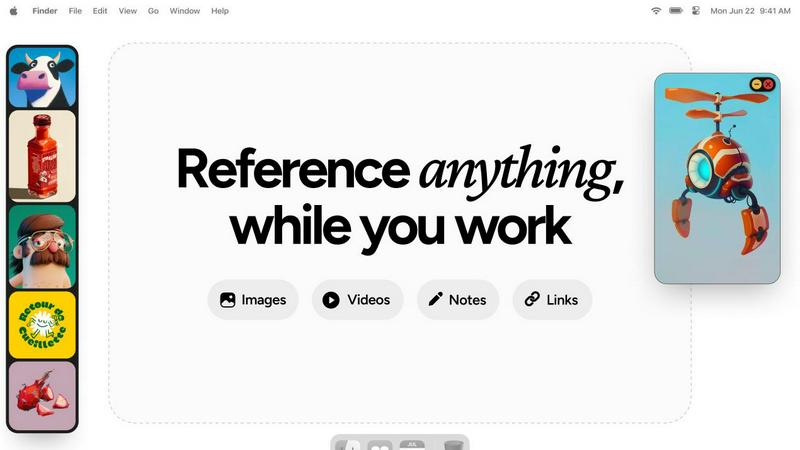
Refbox keeps your reference images and notes always visible, streamlining your workflow for maximum efficiency.
Last updated: February 28, 2026
Visual Comparison
HeyVid

Refbox
Feature Comparison
HeyVid
Text to Video
Transform written content into captivating videos with just a few clicks. The text-to-video feature allows users to seamlessly convert scripts or narratives into dynamic video presentations, perfect for storytelling.
Image to Video
Take your static images and breathe life into them through video animation. With the image-to-video feature, users can create engaging visual stories that enhance marketing strategies and audience engagement.
AI Image Refiner & Stylizer
Enhance and refine your images with advanced AI algorithms. This feature allows users to apply different styles and filters to images, ensuring that visuals meet professional standards and align with branding.
One-Click Video Maker
Create videos effortlessly with the one-click video maker. By simply choosing a model and inputting your ideas, HeyVid takes care of the rest, producing professional-grade content in minutes.
Refbox
Always-On-Top Frames
Refbox provides always-on-top frames that can be resized and placed anywhere on your screen, ensuring that your reference materials remain visible at all times, no matter what application you are using. This feature allows for uninterrupted workflow and keeps your creative inspirations in sight.
Dynamic Collection Management
Organize your assets into multiple, swappable collections that can be easily accessed and switched with a single click. This feature allows for efficient categorization, making it simple to retrieve specific references without losing focus on your current task.
Advanced Media Controls
Refbox offers advanced media controls, including GIF playback that lets you step through frames, cropping tools to focus on specific areas, and pixel rendering for precise pixel art viewing. These controls enhance your ability to interact with your reference materials effectively.
Markdown Notes and Clickable Bookmarks
Integrate markdown notes directly into your workspace, complete with styling options and checklists. Additionally, clickable bookmarks allow you to save and access important web links without disrupting your creative flow, streamlining your workflow even further.
Use Cases
HeyVid
Pitch Videos
Entrepreneurs can utilize HeyVid to create persuasive pitch videos that effectively communicate their business ideas to potential investors. Engaging visuals crafted through the platform can significantly enhance presentation quality.
Social Media Marketing
Marketers leverage HeyVid to generate eye-catching video content for social media platforms. The ability to quickly create short-form videos and stunning thumbnails helps boost engagement and brand visibility online.
Course Creation
Educators can develop high-quality tutorial videos and training materials using HeyVid's intuitive tools. The platform simplifies the creation of educational content, making it easy to share knowledge with students.
Corporate Communications
Businesses can produce internal and external communication materials, such as team updates and client presentations. HeyVid's capabilities ensure that corporate videos maintain a professional edge while conveying important messages.
Refbox
Graphic Design
Graphic designers can utilize Refbox to keep reference images and color palettes accessible while working on projects. The ability to pull assets from various sources and organize them into collections enhances creativity and efficiency.
Animation
Animators can benefit from Refbox's GIF playback and frame stepping features, allowing them to analyze motion references in real-time while animating. This ensures that inspiration and technical details remain at their fingertips.
UI/UX Development
UI/UX developers can use Refbox to overlay design inspirations, color schemes, and user interface examples directly over their design applications. This constant access to references helps maintain consistency and improves workflow.
Concept Art Creation
Concept artists can keep a plethora of visual references, sketches, and notes visible while working on their canvases. Refbox's organized visuals and effortless focus capabilities allow for a more streamlined creative process, resulting in impactful artwork.
Overview
About HeyVid
HeyVid is your ultimate solution for AI-powered video and image generation, designed for creators, marketers, educators, and businesses alike. This all-in-one platform streamlines the content creation process, allowing users to generate high-quality videos and images quickly and efficiently. With a range of robust features, such as text-to-video, image-to-video, and image refinement tools, HeyVid empowers anyone—whether a novice or a seasoned professional—to bring their creative visions to life. The platform supports various AI models, ensuring versatility and high performance in every project, making it an invaluable tool for anyone looking to create stunning visual content without the need for extensive editing skills.
About Refbox
Refbox is an innovative floating reference manager tailored for creative professionals seeking to eliminate workflow disruptions. This powerful desktop application allows users to pin a variety of reference materials—including images, videos, GIFs, and notes—into resizable frames that remain visible above all other applications. By doing so, Refbox eradicates the need for constant alt-tabbing or rummaging through disorganized folders, enabling users to maintain deep focus on their projects. Perfect for artists, designers, animators, and developers, Refbox ensures that inspiration is only a glance away, significantly boosting productivity. Users can effortlessly aggregate content via drag-and-drop, clipboard pasting, or web pulls, and can organize these assets into multiple collections. With a streamlined sidebar, a dynamic Masonry grid, or a full-screen gallery view, Refbox transforms the creative process from mere inspiration to seamless execution, making it an indispensable tool for anyone in the creative industry.
Frequently Asked Questions
HeyVid FAQ
What types of content can I create with HeyVid?
You can create a variety of content including videos from text or images, animations, and refined images. HeyVid supports multiple AI models to enhance your creative capabilities.
Is HeyVid suitable for beginners?
Absolutely! HeyVid is designed to be intuitive and user-friendly, making it accessible for beginners while still offering advanced features for experienced creators.
Can I customize my videos created with HeyVid?
Yes, HeyVid allows for customization in terms of tone, pacing, and visuals. You can tailor your content to match your brand identity and specific audience preferences.
What is the pricing structure for HeyVid?
Pricing details were not provided, but HeyVid currently offers limited-time discounts on annual plans and specific models, making it an attractive option for users looking for value.
Refbox FAQ
How does Refbox improve my workflow?
Refbox minimizes distractions by keeping your reference material visible and easily accessible, allowing you to focus on your creative tasks without the need to switch between different applications or folders.
Can I use Refbox with any application?
Yes, Refbox is designed to float above any application on your desktop, making it compatible with a wide range of creative software, ensuring you have your references at hand no matter what you're working on.
Is there a limit to the number of collections I can create?
No, Refbox allows you to create multiple collections without any restrictions, enabling you to organize your reference materials according to different projects or themes as needed.
What types of media can I store in Refbox?
Refbox supports various media types, including images, GIFs, videos, and notes. You can also save clickable bookmarks and utilize advanced controls for specific media formats, enhancing your creative experience.
Alternatives
HeyVid Alternatives
HeyVid is an innovative all-in-one AI video and image generator designed for those seeking high-quality content creation at speed and efficiency. As a productivity and management tool, it caters to a diverse range of users, from marketers to content creators, who require professional-grade visuals without the hassle. However, users often seek alternatives due to factors such as pricing, specific feature sets, or compatibility with their existing platforms and workflows. When searching for an alternative, it’s essential to evaluate features that align with your needs, such as ease of use, output quality, and integration capabilities. Consider the pricing structure to ensure it fits your budget and explore user reviews to gauge reliability and performance. Ultimately, the right choice should enhance your creative process while delivering the results you expect.
Refbox Alternatives
Refbox is a cutting-edge floating app designed to enhance the workflow of creative professionals by keeping reference images and notes visible above any workspace. As a productivity and management tool, it allows users to pin inspiration in always-on-top frames, ensuring that essential materials are readily accessible without the hassle of switching between applications. However, users often seek alternatives to Refbox for various reasons, including pricing concerns, specific feature requirements, or compatibility with different platforms. When exploring alternatives, it's crucial to consider the features that matter most to your workflow, such as the ability to customize floating frames, media aggregation capabilities, and ease of organization. Additionally, assess how well the alternative integrates into your existing tools and whether it meets your unique creative needs.