
Img Editor vs Seedream 4.0
Side-by-side comparison to help you choose the right product.

Img Editor
Turn your ideas into stunning AI-generated images in seconds with Img Editor.
Last updated: February 28, 2026

Seedream 4.0
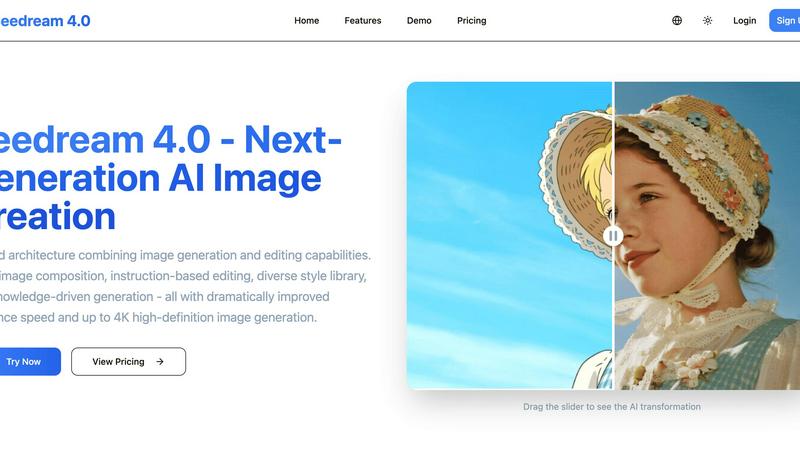
Seedream 4.0 instantly generates and edits stunning 4K images from your text with unified AI speed and precision.
Last updated: March 1, 2026
Visual Comparison
Img Editor

Seedream 4.0
Feature Comparison
Img Editor
Free Daily Generations
Jumpstart your projects immediately with ten free AI image generations every day. This core feature eliminates upfront costs and lets you explore, experiment, and create high-quality visuals daily without any subscription or payment. It's the fastest way to integrate AI art into your regular creative or professional workflow.
Advanced Prompt Generator & Gallery
Overcome creative block and accelerate your process with the built-in prompt generator and a thriving community gallery. Discover popular, effective prompts with a single click to use as-is or as inspiration. This feature provides a constant stream of ideas and proven formulas, drastically reducing the time spent crafting the perfect text description.
Multi-Format & Quality Control
Generate images tailored to your specific project needs with flexible aspect ratios including Square (1:1), Landscape (16:9), and Portrait (9:16). Control output fidelity with selectable quality tiers from Standard 1K up to Ultra Quality 4K Nano Photo, ensuring your image is perfectly sized and detailed for social media, presentations, or print.
Community-Driven Bonus System
Actively grow your generation capacity by participating in the Img Editor ecosystem. By submitting your approved AI creations to the public gallery, you earn 10 extra generations. This reward system incentivizes sharing successful results, fostering a collaborative community where users help each other discover new creative possibilities.
Seedream 4.0
Multi-Image Composition
Revolutionize complex visual projects by inputting multiple reference images and achieving a cohesive composition with a single sentence instruction. This feature enables batch output for maximum workflow efficiency, making it perfect for assembling brand storyboards, creating detailed scenes from various elements, or generating consistent asset suites without manual stitching.
Instruction-Based Editing
Experience true "what you say is what you get" functionality. Generate a high-quality image from a text description, then refine it with another simple command. This intuitive, language-driven control allows for precise edits—changing styles, adding elements, altering compositions—without navigating complex menus, putting rapid iteration and perfect results at your fingertips.
Diverse Style Library
Access a vast, professional-grade library of visual styles instantly. Whether generating new artwork from scratch or applying a transformative look to your own photos, you can effortlessly switch between aesthetics like watercolor, cyberpunk, cinematic, and more. This empowers you to build a unique and consistent visual language across all your projects with speed.
Knowledge-Driven Generation
Go beyond simple patterns with AI that understands context. This feature leverages rich knowledge and reasoning capabilities to produce accurate educational illustrations, detailed charts, and technically precise professional images. It ensures your generated content is not only beautiful but also factually coherent and fit for expert audiences.
Use Cases
Img Editor
Rapid Concept Art & Storyboarding
Artists and game developers can generate multiple visual concepts and storyboard frames in minutes, not hours. Quickly iterate on character designs, environments, and mood pieces by describing scenes, accelerating the pre-production phase and providing a solid visual foundation before detailed work begins.
Dynamic Social Media & Marketing Content
Marketers and content creators can produce a constant stream of unique, eye-catching graphics for posts, ads, and blogs. Generate branded visuals, promotional art, and engaging illustrations on-demand to maintain a fresh and consistent online presence without relying on stock photography or lengthy design cycles.
Personal Creative Exploration & Hobby Projects
Hobbyists and enthusiasts can effortlessly explore digital art and visualize personal ideas. Whether creating custom artwork for a home project, visualizing a book character, or designing a unique greeting card, Img Editor turns imagination into tangible images instantly, making creative expression accessible to all skill levels.
Professional Design Mockups & Prototypes
Designers and product managers can quickly create realistic mockups and prototypes. Generate product-in-context images, app interface concepts, or lifestyle photos to communicate ideas clearly to clients and teams, streamlining the feedback loop and enhancing presentation materials with high-quality AI visuals.
Seedream 4.0
Marketing & Advertising Material Creation
Accelerate campaign rollouts by generating high-impact visuals for social media ads, website banners, and email newsletters in minutes. Use multi-image composition to maintain brand consistency across all assets and leverage the style library to test different visual themes instantly, ensuring your marketing always looks fresh and professional.
Social Media Content Production
Dominate your content calendar by creating eye-catching, platform-optimized graphics daily. Quickly turn blog points into shareable infographics, apply trendy styles to product photos, or generate original artwork for posts. Instruction-based editing lets you rapidly tweak creations to perfection, keeping your feed engaging and on-brand.
Educational & Training Illustration
Develop clear, accurate, and visually appealing educational content efficiently. Knowledge-driven generation is perfect for creating detailed diagrams, scientific illustrations, and historical reconstructions for textbooks, online courses, or corporate training materials, enhancing comprehension with precision-crafted visuals.
Concept Art & Creative Brainstorming
Fuel the creative process for artists and designers by rapidly visualizing concepts. Generate multiple iterations of a character, environment, or product design from text descriptions. Use multi-image composition to blend different ideas, enabling fast exploration of creative directions and accelerating the journey from initial spark to refined concept.
Overview
About Img Editor
Img Editor is a cutting-edge AI image generation platform engineered to supercharge digital creativity by removing barriers and accelerating workflow. It transforms simple text descriptions into stunning, high-quality visuals in seconds, powered by advanced artificial intelligence. The platform is built for speed and accessibility, catering to a wide spectrum of users from professional artists and marketers to designers and creative hobbyists. Its core value proposition is unmatched: users receive ten free image generations every single day at no cost, with no sign-up required. This democratizes access to powerful AI art tools, allowing anyone to experiment and produce professional-grade artwork instantly. Beyond the daily free tier, users can actively earn bonus generations by engaging with the community, such as submitting their creations to the public gallery. With an intuitive interface featuring a prompt generator, multiple aspect ratios, and quality settings, Img Editor is designed for maximum efficiency, enabling users to rapidly iterate and bring their imaginative concepts to life without financial or technical friction.
About Seedream 4.0
Seedream 4.0 is the definitive next-generation AI image creation suite, engineered for speed and precision. It shatters the barrier between imagination and execution by unifying powerful image generation and sophisticated editing within a single, seamless architecture. This tool is built for the fast-paced demands of modern creators: artists pushing visual boundaries, content creators needing rapid-fire assets, marketers crafting compelling campaigns, and businesses requiring professional-grade visuals. Its core value proposition is delivering unparalleled creative control and efficiency. With dramatically improved inference speed, you can generate and edit stunning, high-definition images up to 4K resolution in moments. Whether you're starting from a text prompt or refining an existing image, Seedream 4.0 transforms your instructions into visual reality faster than ever, making it the ultimate engine for visual storytelling and asset creation.
Frequently Asked Questions
Img Editor FAQ
How many free images can I create?
You receive ten free image generations every day, completely resetting at the start of each new day. This allowance lets you consistently use the platform for various projects without any cost. You can also earn more by having your images approved in the community gallery.
What is Nano Photo quality?
Nano Photo refers to the highest quality tiers available on Img Editor, specifically the 2K High Quality and 4K Ultra Quality settings. These options produce images with exceptional detail, sharpness, and resolution, suitable for professional applications where finer details and larger formats are required.
Can I use the images for commercial purposes?
Yes, you own the images you generate with Img Editor. They can be used for both personal and commercial projects, including in marketing materials, publications, and products. This makes it a powerful tool for businesses and freelancers needing original artwork quickly.
How do I get more generations beyond the daily free ones?
The primary way to earn bonus generations is through community participation. When you submit your generated image to the public gallery and it gets approved, you are rewarded with 10 extra generations. This system encourages sharing successful prompts and creations with the wider user community.
Seedream 4.0 FAQ
Can I try Seedream 4.0 for free?
Yes, you can experience Seedream 4.0's capabilities firsthand. The platform offers a trial that allows you to test core features, including instruction-based editing and style application, so you can see the speed and quality of the AI before committing to a subscription plan.
How does Seedream 4.0 work?
Seedream 4.0 operates on a unified AI architecture. You provide input—either a text instruction, an uploaded image, or both. The AI interprets your command using advanced knowledge and reasoning, then executes the requested generation or edit. The process is optimized for dramatically improved inference speed, delivering high-definition results up to 4K resolution in seconds.
What makes Seedream 4.0 different from other AI image tools?
Seedream 4.0's key differentiator is its unified architecture that seamlessly blends generation and professional-grade editing, eliminating the need to switch between disparate tools. Combined with its industry-leading speed, multi-image composition for complex tasks, and knowledge-driven understanding for accuracy, it offers a more efficient, powerful, and versatile all-in-one creative suite.
Can I use the generated images commercially?
Absolutely. Images created with Seedream 4.0 are intended for your commercial use. You retain the rights to use the generated visuals in your marketing materials, social media, products, and client projects, empowering you to scale your professional content creation without licensing concerns.
Alternatives
Img Editor Alternatives
Img Editor is a leading AI image generation platform in the image and photo category. It empowers users to create stunning visuals from text descriptions and edit existing images with ease, all powered by advanced machine learning. It’s designed for anyone needing fast, high-quality visual content. Users often explore alternatives for various reasons. Some may need a different pricing model, more specialized features, or integration with specific creative platforms. Others might seek tools with a different artistic style or higher generation limits to match their project volume and workflow demands. When evaluating other options, key factors include the core AI capabilities, output quality and style, cost structure, and daily usage limits. Also consider the learning curve, editing tools available, and whether the platform supports the specific creative or commercial use cases you have in mind.
Seedream 4.0 Alternatives
Seedream 4.0 is a powerful AI image generator and editor that transforms text prompts into high-quality 4K visuals. It stands out in the image and photo category by blending advanced generation with intuitive instruction-based editing in one unified platform. This makes it a go-to for creators who need both speed and precision for projects like marketing assets or social media content. Even with its robust feature set, users often explore other options. Common reasons include budget constraints, the need for a different subscription model, or specific platform requirements like a desktop app versus a web tool. Some may seek niche capabilities not covered by its core offerings, or simply prefer a different user interface and workflow experience. When evaluating alternatives, focus on your non-negotiable needs. Key considerations are output quality and resolution, the depth of editing tools, cost-effectiveness for your usage volume, and the overall learning curve. The right tool should match your creative pace and project demands without unnecessary complexity or hidden limitations.