
Decode This Text vs MeetingMind
Side-by-side comparison to help you choose the right product.

Decode This Text
Decode This Text delivers quick, human-like analyses of confusing conversations in just 30 seconds for instant clarity.
Last updated: February 28, 2026

MeetingMind
Capture every Zoom meeting detail effortlessly with automatic recording, AI summaries, and intelligent transcriptions.
Last updated: March 1, 2026
Visual Comparison
Decode This Text

MeetingMind
Feature Comparison
Decode This Text
Comprehensive Analysis
Decode This Text provides a detailed breakdown of any message you input, analyzing tone, intent, and emotional cues. This feature allows users to understand the true meaning behind messages that may seem cryptic or ambiguous, ensuring that responses are well-informed and appropriate.
Screenshot Upload
Not in the mood to type? Simply upload a screenshot of your conversation, and Decode This Text will read and analyze the entire chat for you. This feature saves time and effort, allowing for quick insights without the need for manual input.
Tone Detection
Understanding the emotional temperature of a message is crucial. With tone detection, Decode This Text measures whether a message is friendly, sarcastic, or cold. This feature helps users avoid misinterpretations and respond in a manner that aligns with the sender's true feelings.
Response Suggestions
Stuck on how to reply? Decode This Text offers three tailored response options—calm, direct, or firm—based on the context of the conversation. This feature boosts user confidence by providing them with well-crafted replies that match the situation.
MeetingMind
Automatic Detection
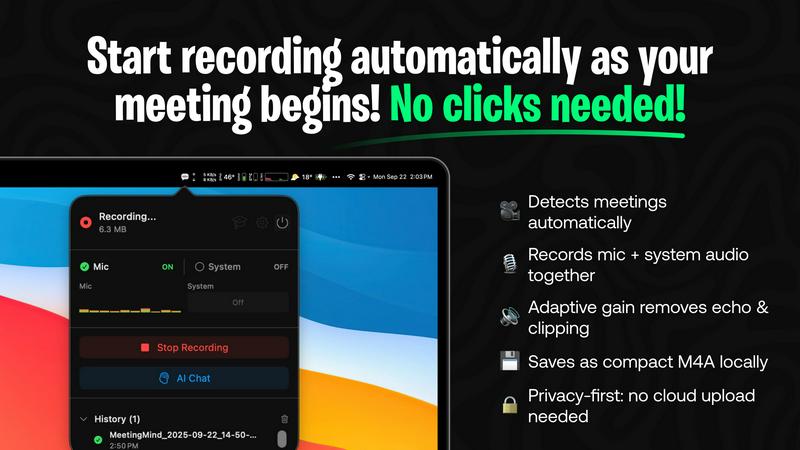
MeetingMind automatically detects Zoom meetings without the need for any clicks. This seamless integration means users can join discussions and let the software handle the recording, freeing them to engage fully in the conversation.
Comprehensive Recording
The tool captures both microphone and system audio simultaneously, thanks to adaptive gain technology. This feature ensures that all voices and sounds during the meeting are recorded clearly, providing an accurate representation of the discussion.
AI Assistant Options
Users can choose between two AI assistants: a local Ollama or a cloud-based OpenRouter. This flexibility allows for personalized summaries and insights, tailoring the experience to individual preferences while enhancing the comprehension of meeting content.
Markdown Export
After each meeting, MeetingMind generates AI-driven summaries and transcripts that can be saved as formatted markdown files. This feature allows users to easily organize and share meeting notes, making follow-ups and action items straightforward and efficient.
Use Cases
Decode This Text
Workplace Communication
Decode This Text is a game-changer for professionals who often deal with ambiguous emails or messages. By deciphering the tone and intent, users can better understand their colleagues' emotions and respond appropriately, fostering a collaborative work environment.
Navigating Friendships
Friendships can sometimes be fraught with misunderstandings. Use Decode This Text to analyze vague texts or sudden changes in communication tone. It helps users gain clarity on their friends’ feelings, enabling them to navigate social dynamics more effectively.
Family Conversations
Family dynamics can be complex, and messages may carry hidden meanings. Decode This Text aids users in interpreting family communications, allowing for more empathetic and constructive conversations that strengthen family bonds.
Romantic Relationships
In the realm of dating and romance, mixed signals can lead to confusion. Decode This Text helps users interpret their partner's messages accurately, ensuring that they respond in ways that foster connection and understanding, rather than conflict.
MeetingMind
Efficient Team Meetings
Imagine a team meeting where every member can contribute without worrying about taking notes. MeetingMind captures the entire meeting, allowing team members to focus on collaboration and decision-making.
Remote Work Collaboration
In a remote work environment, clear communication is crucial. MeetingMind ensures that all details from virtual meetings are recorded and accessible, fostering better collaboration among distributed teams.
Educational Sessions
Educators and trainers can utilize MeetingMind to record lectures or training sessions, providing students with accurate transcripts and summaries for review, enhancing the learning experience.
Client Consultations
During client meetings, professionals can use MeetingMind to capture critical discussions and agreements. This ensures that all client interactions are documented, which is essential for maintaining strong professional relationships.
Overview
About Decode This Text
Decode This Text is an innovative communication tool that transforms the often perplexing world of messaging into clear, actionable insights. Designed for anyone who has ever received a confusing text, email, or message, this tool eliminates the stress of second-guessing the intent behind written communication. Users can simply paste a conversation, upload a screenshot, or describe the context, and within seconds, receive a thorough analysis of the underlying emotions, intentions, and optimal responses. Whether you are navigating workplace dynamics, family discussions, or friendships, Decode This Text is your ally in enhancing communication skills and building better relationships. Its user-friendly interface ensures that you can quickly and confidently interpret messages, saving you time and emotional energy. With the ability to decode messages with human-like understanding, Decode This Text empowers users to respond appropriately and avoid misunderstandings, making it an invaluable resource in today's fast-paced communication landscape.
About MeetingMind
MeetingMind is an advanced intelligent meeting assistant that transforms the way professionals handle their meetings. Designed specifically for the modern workforce, this innovative tool automatically detects and records Zoom meetings, allowing users to focus entirely on the conversation without the distraction of manual note-taking. With real-time, speaker-attributed transcripts, MeetingMind organizes discussions into clean, interactive markdown notes that capture every significant detail. It is ideal for busy professionals, remote teams, and anyone who prioritizes effective communication and collaboration. By leveraging on-device AI technology, users can query discussions, highlight key takeaways, and track action items effortlessly. MeetingMind prioritizes user privacy by ensuring that all data processing occurs locally on the device, keeping sensitive information secure. With its user-friendly interface and robust features, MeetingMind empowers individuals to make the most of their meetings, ensuring that every conversation is productive and impactful.
Frequently Asked Questions
Decode This Text FAQ
How does Decode This Text ensure my privacy?
Your privacy is paramount. Decode This Text operates on a 100% anonymous basis, meaning no human reads your texts. All analyses are conducted through secure algorithms that protect your information.
Can I use Decode This Text for professional messages?
Absolutely! Decode This Text is specifically designed to analyze both personal and professional communications. Whether it’s an email from your boss or a text from a colleague, this tool provides clarity in any context.
What if I don't know how to describe my situation?
No problem! You can simply paste the conversation or upload a screenshot, and Decode This Text will handle the analysis for you. It's designed to be user-friendly, making it accessible for everyone.
How quickly can I expect results?
Decode This Text is optimized for speed, delivering comprehensive insights within 30 seconds. This quick turnaround allows you to respond promptly and confidently, without overthinking your messages.
MeetingMind FAQ
What is the main benefit of using MeetingMind?
The primary benefit of MeetingMind is its ability to automatically record and transcribe Zoom meetings, allowing users to remain engaged in discussions while ensuring that no important details are missed.
How does MeetingMind handle privacy?
MeetingMind processes all data locally on your device, which means that sensitive meeting information never leaves your Mac. This commitment to privacy ensures that user data remains secure.
Can I use MeetingMind on different devices?
Currently, MeetingMind is designed specifically for macOS, providing a seamless experience for users within the Apple ecosystem.
What happens after my free trial?
After the free trial, users can continue to enjoy up to 60 minutes of recording per day for free. For those needing more, an unlimited version is available for a one-time purchase with no subscription fees.
Alternatives
Decode This Text Alternatives
Decode This Text is a cutting-edge tool that fits within the productivity and management category, designed to help users decode the often perplexing messages they encounter in daily communication. With its ability to analyze conversations and extract their true meaning, Decode This Text serves as a valuable asset for anyone looking to improve their interpersonal skills and reduce misunderstandings. Users frequently seek alternatives for a variety of reasons, including pricing concerns, feature sets, or compatibility with different platforms. When exploring alternatives, it's essential to consider factors such as ease of use, response time, and the depth of analysis offered. Finding a solution that aligns with your specific communication needs can significantly enhance your ability to navigate complex conversations and foster clearer connections.
MeetingMind Alternatives
MeetingMind is a cutting-edge intelligent meeting assistant that falls under the productivity and management category. It automates the recording and transcription of Zoom meetings, allowing busy professionals to focus on discussions without the distraction of manual note-taking. While MeetingMind offers robust features, users often seek alternatives for various reasons, including pricing, specific feature needs, or compatibility with other platforms they use. When searching for an alternative, it's essential to consider factors such as ease of use, transcription accuracy, integration capabilities, and privacy measures. Selecting a tool that aligns with your workflow can significantly enhance your meeting experience and ensure that vital details are captured effectively.