MeetingMind vs Prompt Builder
Side-by-side comparison to help you choose the right product.

MeetingMind
Capture every Zoom meeting detail effortlessly with automatic recording, AI summaries, and intelligent transcriptions.
Last updated: March 1, 2026

Prompt Builder
Prompt Builder instantly crafts and refines AI prompts for any model, saving you hours of manual work.
Last updated: April 13, 2026
Visual Comparison
MeetingMind
Prompt Builder
Feature Comparison
MeetingMind
Automatic Detection
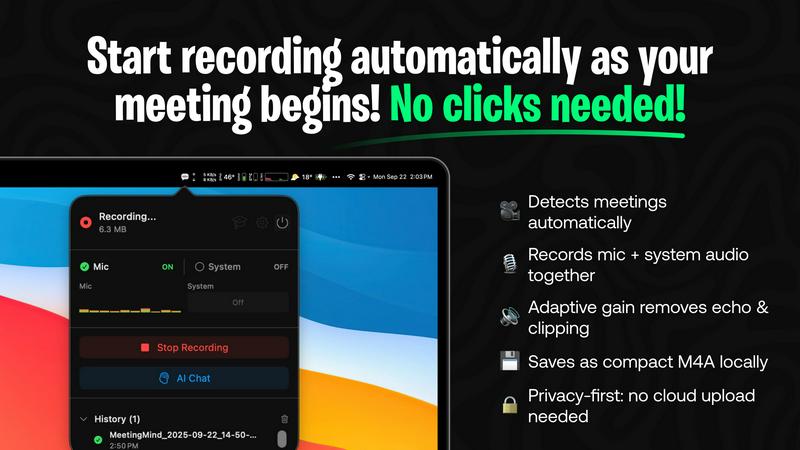
MeetingMind automatically detects Zoom meetings without the need for any clicks. This seamless integration means users can join discussions and let the software handle the recording, freeing them to engage fully in the conversation.
Comprehensive Recording
The tool captures both microphone and system audio simultaneously, thanks to adaptive gain technology. This feature ensures that all voices and sounds during the meeting are recorded clearly, providing an accurate representation of the discussion.
AI Assistant Options
Users can choose between two AI assistants: a local Ollama or a cloud-based OpenRouter. This flexibility allows for personalized summaries and insights, tailoring the experience to individual preferences while enhancing the comprehension of meeting content.
Markdown Export
After each meeting, MeetingMind generates AI-driven summaries and transcripts that can be saved as formatted markdown files. This feature allows users to easily organize and share meeting notes, making follow-ups and action items straightforward and efficient.
Prompt Builder
Prompt Generator
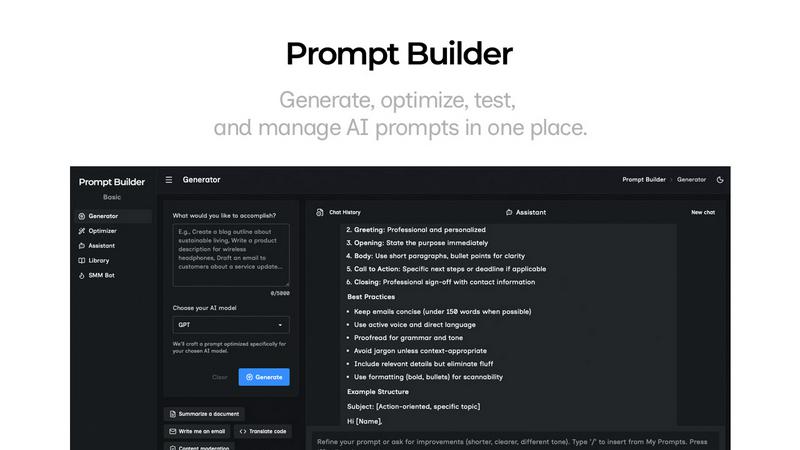
Go from a simple idea to a professional, model-tuned prompt in seconds. Just describe your task, pick your target AI model (like Gemini, Claude, or GPT), and the generator crafts a structured prompt optimized for that specific model's strengths and expected input format. This eliminates the guesswork of manual crafting, giving you a powerful starting point that you can then refine directly in the connected chat interface, saving every iteration.
Prompt Assistant
Test and iterate on your prompts in a dedicated chat workspace without ever leaving Prompt Builder. Select from various assistant models (Grok, Gemini, GPT, etc.) to run your generated or saved prompts. This integrated environment keeps your prompt development and testing cycles tightly organized, allowing for rapid follow-ups and iterations. You can insert prompts directly from your Library or the Generator, and pin the best chat results for future reuse.
Prompt Optimizer
Elevate any existing prompt instantly. Paste a prompt you've been using or select one from your Library, and the Optimizer analyzes it to provide structured improvements. It enhances clarity, adds necessary constraints, refines the output format, and suggests examples. Each optimization is saved in history, and you can run the upgraded version in the Assistant with one click to immediately validate the improvements.
Prompt Library
Your centralized hub for all prompt mastery. Save, organize, and tag your best prompts from the Generator, Optimizer, or Assistant. The Library features powerful search and filtering by category and model. You can also explore a curated collection of Community Prompts for inspiration, adding proven templates to your own repository. Run any saved prompt as a new chat instantly, making your best work endlessly reusable.
Use Cases
MeetingMind
Efficient Team Meetings
Imagine a team meeting where every member can contribute without worrying about taking notes. MeetingMind captures the entire meeting, allowing team members to focus on collaboration and decision-making.
Remote Work Collaboration
In a remote work environment, clear communication is crucial. MeetingMind ensures that all details from virtual meetings are recorded and accessible, fostering better collaboration among distributed teams.
Educational Sessions
Educators and trainers can utilize MeetingMind to record lectures or training sessions, providing students with accurate transcripts and summaries for review, enhancing the learning experience.
Client Consultations
During client meetings, professionals can use MeetingMind to capture critical discussions and agreements. This ensures that all client interactions are documented, which is essential for maintaining strong professional relationships.
Prompt Builder
Content Creation & Marketing
Accelerate your content pipeline by generating first drafts for blogs, social posts, ad copy, and emails tailored for each platform. Use the SMM Bot to turn a brief into platform-ready posts for X, LinkedIn, or TikTok, complete with tone adjustments, hashtags, and CTAs. Refine variations in chat, save your top-performing prompt formulas, and replicate success across campaigns without starting from scratch.
Rapid Prototyping & Ideation
Quickly explore concepts and generate creative assets. Describe an idea for a product name, logo concept, or story outline and get multiple AI-generated options tuned for your chosen model. Use the Assistant to iterate on these ideas in real-time, asking for refinements, expansions, or critiques. Pin the most promising directions to your Library for further development in later sessions.
Technical & Analytical Work
Streamline complex tasks like code generation, data analysis prompts, or system design queries. The model-specific tuning ensures you get properly formatted code snippets, structured JSON outputs, or step-by-step reasoning from models like Claude or GPT. The Optimizer can tighten vague technical prompts for better precision, and you can build a library of reliable prompts for recurring development tasks.
Learning & Research
Enhance your study or research process by crafting precise prompts for summarizing articles, explaining complex topics, or generating quiz questions. Test different phrasings with various models in the Assistant to see which yields the clearest explanations. Save optimized research prompts in your Library to create a personal toolkit for efficient knowledge gathering and synthesis.
Overview
About MeetingMind
MeetingMind is an advanced intelligent meeting assistant that transforms the way professionals handle their meetings. Designed specifically for the modern workforce, this innovative tool automatically detects and records Zoom meetings, allowing users to focus entirely on the conversation without the distraction of manual note-taking. With real-time, speaker-attributed transcripts, MeetingMind organizes discussions into clean, interactive markdown notes that capture every significant detail. It is ideal for busy professionals, remote teams, and anyone who prioritizes effective communication and collaboration. By leveraging on-device AI technology, users can query discussions, highlight key takeaways, and track action items effortlessly. MeetingMind prioritizes user privacy by ensuring that all data processing occurs locally on the device, keeping sensitive information secure. With its user-friendly interface and robust features, MeetingMind empowers individuals to make the most of their meetings, ensuring that every conversation is productive and impactful.
About Prompt Builder
Prompt Builder is the definitive prompt engineering workspace designed to transform how you interact with AI. It's the end of the tedious, hours-long cycle of rewriting and guessing. This platform is built for professionals, creators, and teams who need to ship high-quality AI outputs fast, without the friction. Describe your task in plain English, select your target AI model, and Prompt Builder instantly crafts a model-optimized prompt that speaks the model's language. You get a solid first draft in seconds, not hours. From there, refine it in the integrated chat workspace, save or pin your best versions, and run them anytime. It seamlessly works with all major models including GPT, Claude, Gemini, Llama, Mistral, DeepSeek, Grok, and Perplexity. Beyond generation, you get a powerful Optimizer to upgrade existing prompts, an Assistant to test runs without switching tabs, and a Library to build your personal or team repository of winning prompts. Turn vague ideas into precise, repeatable AI commands and start getting consistent results immediately.
Frequently Asked Questions
MeetingMind FAQ
What is the main benefit of using MeetingMind?
The primary benefit of MeetingMind is its ability to automatically record and transcribe Zoom meetings, allowing users to remain engaged in discussions while ensuring that no important details are missed.
How does MeetingMind handle privacy?
MeetingMind processes all data locally on your device, which means that sensitive meeting information never leaves your Mac. This commitment to privacy ensures that user data remains secure.
Can I use MeetingMind on different devices?
Currently, MeetingMind is designed specifically for macOS, providing a seamless experience for users within the Apple ecosystem.
What happens after my free trial?
After the free trial, users can continue to enjoy up to 60 minutes of recording per day for free. For those needing more, an unlimited version is available for a one-time purchase with no subscription fees.
Prompt Builder FAQ
Which AI models does Prompt Builder support?
Prompt Builder is built for a multi-model world. It works seamlessly as a prompt generator and testing ground for all major models including OpenAI's GPT, Anthropic's Claude, Google's Gemini, Meta's Llama, Mistral AI, DeepSeek, xAI's Grok, Perplexity, and Cohere. You can generate prompts tuned for any of these and run tests using many as assistants within the platform.
How does the free plan work?
The free plan is designed to let you experience the full workflow immediately. It includes 25 assistant requests per month, allowing you to generate, refine, and test prompts using the integrated chat with models like Grok, Gemini, and GPT. This enables you to craft and run prompts without needing a credit card, giving you a real feel for the platform's speed and efficiency.
What is the main benefit of model-specific prompt tuning?
Different AI models have unique architectures and training data, meaning they respond best to slightly different prompt structures and phrasing. Prompt Builder's model-specific tuning automatically adapts your prompt's constraints, output format, and instructions to align with the target model's strengths. This eliminates wasted tokens on retries and gets you higher-quality, more consistent results faster.
Can I collaborate with my team on prompts?
Yes, building a shared library of effective prompts is a core use case. By saving your best prompts to your Library, you can organize them for personal reuse or share them with your team. This creates a centralized knowledge base of proven prompt formulas, ensuring consistency, saving onboarding time, and allowing everyone to leverage the team's collective prompt engineering expertise.
Alternatives
MeetingMind Alternatives
MeetingMind is a cutting-edge intelligent meeting assistant that falls under the productivity and management category. It automates the recording and transcription of Zoom meetings, allowing busy professionals to focus on discussions without the distraction of manual note-taking. While MeetingMind offers robust features, users often seek alternatives for various reasons, including pricing, specific feature needs, or compatibility with other platforms they use. When searching for an alternative, it's essential to consider factors such as ease of use, transcription accuracy, integration capabilities, and privacy measures. Selecting a tool that aligns with your workflow can significantly enhance your meeting experience and ensure that vital details are captured effectively.
Prompt Builder Alternatives
Prompt Builder is a dynamic AI assistant designed as a prompt engineering workspace. It allows users to generate, optimize, test, and manage AI prompts in one central hub, turning a simple idea into a refined, ready-to-use prompt in seconds. It supports a wide range of popular AI models. Users often explore alternatives for various reasons, including budget constraints, the need for specific integrations, or a desire for different feature sets like advanced analytics or team collaboration tools. The landscape of AI productivity tools is vast, and finding the right fit is key. When evaluating other options, consider core functionality like prompt versioning and testing, compatibility with your preferred AI models, and the overall user experience. The goal is to find a tool that streamlines your workflow without adding complexity, maximizing efficiency in your AI projects.