
Modelfy 3D vs SimpleDraw
Side-by-side comparison to help you choose the right product.

Modelfy 3D
Instantly transform any image into stunning 3D models with Modelfy 3D's advanced AI technology and enterprise-grade.
Last updated: February 26, 2026

SimpleDraw
Effortlessly create accurate floor plans and scale drawings online for any home project with SimpleDraw, no experience.
Last updated: March 1, 2026
Visual Comparison
Modelfy 3D
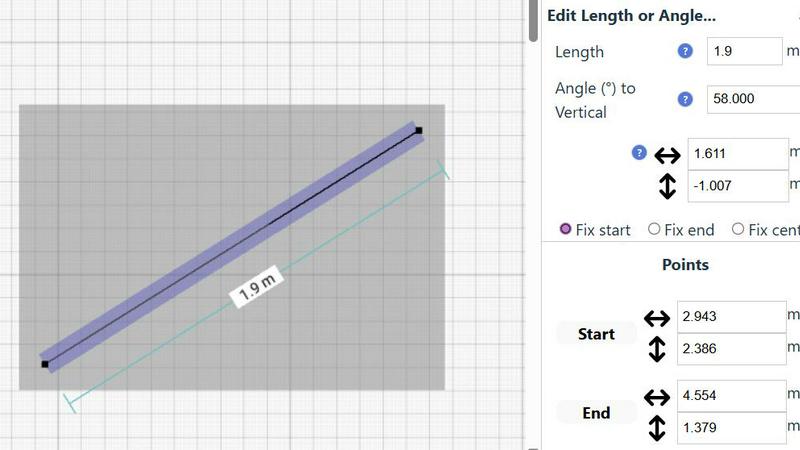
SimpleDraw
Feature Comparison
Modelfy 3D
Ultra-High Precision Models
Generate 3D models with unparalleled detail using up to 300,000 polygons. Our proprietary algorithms ensure that every conversion retains the integrity and quality of the original image, making it perfect for any project.
Professional Asset Management
Organize your 3D creations effortlessly with our enterprise-grade asset management system. Users can filter projects by status, archive completed works, and manage custom titles and descriptions for a streamlined workflow.
Multi-Format Export Options
Export your AI-generated 3D models in various industry-standard formats, including GLB for web applications, OBJ for 3D software, and STL for 3D printing. Each export includes texture maps and preview images for comprehensive project files.
Rapid Conversion Time
Transforming images into 3D models has never been faster. While traditional methods can take days, Modelfy 3D completes conversions in just minutes, allowing users to focus on their creative processes instead of waiting.
SimpleDraw
Floor Plan Mode
The dedicated Floor Plan Mode streamlines the process of creating accurate floor plans for various spaces. Users can easily draw walls and add windows and doors with just a click, while real-time measurements update as you adjust your design.
Smart Alignment System
SimpleDraw's Smart Alignment System ensures that every point and line is placed exactly where you want it. With visual cues guiding your placement, it enhances accuracy while allowing you to zoom in for greater precision as needed.
Comprehensive Measurement System
The tool offers a robust measurement system that gives users fine control over what measurements are displayed. With options for metric or standard US units, dynamic contextual measurements assist users in achieving their intended design.
Flexible Zoom and Non-Destructive Editing
Users can zoom in and out with ease, targeting specific parts of their drawings. The non-destructive editing feature allows for modifications at any time, with undo/redo options and the ability to move groups of elements simultaneously, streamlining the design process.
Use Cases
Modelfy 3D
3D Printing
Modelfy 3D is perfect for hobbyists and professionals alike who need to create custom 3D printed objects. The quick transformation from image to model allows rapid prototyping and iteration, enhancing productivity.
Game Development
Game developers can utilize Modelfy 3D to generate unique assets from concept art or reference images. This tool supports the creation of diverse characters and environments, streamlining the game design process.
Architectural Visualization
Architects and designers can easily convert 2D plans and sketches into 3D models, enabling clients to visualize projects more accurately. This aids in presentations and helps secure client approvals faster.
Educational Projects
Educators and students can use Modelfy 3D to create visual aids for presentations or assignments. The ability to generate 3D models from images enhances learning experiences and fosters creativity in educational settings.
SimpleDraw
Kitchen and Bathroom Renovations
Homeowners can plan their kitchen and bathroom renovations with accurate measurements, visualizing layouts before any physical work begins. This helps to avoid costly mistakes and ensures a smoother renovation process.
Room Layout and Furniture Planning
Designing room layouts becomes a breeze with SimpleDraw. Users can visualize how furniture will fit in their spaces, allowing them to make informed decisions before purchasing new items.
House and Apartment Plans
Real estate agents and homeowners can create comprehensive floor plans for houses and apartments, making it easier to plan renovations or develop rental listings that showcase the property's potential.
Technical Drawings and Elevations
Professionals can utilize SimpleDraw for creating technical drawings and elevations, leveraging its powerful tools to produce detailed and accurate representations for design projects.
Overview
About Modelfy 3D
Modelfy 3D is an innovative AI-driven platform designed to seamlessly transform any 2D image into stunning 3D models in mere seconds. Ideal for creators, designers, and professionals in fields such as 3D printing, gaming, and visual design, Modelfy 3D leverages cutting-edge artificial intelligence technology to deliver ultra-high precision 3D assets with up to 300,000 polygons. Its intuitive interface allows users to upload images without the need for extensive software training, making it accessible for anyone, regardless of their technical background. With its fast conversion times and cost-effective pricing, Modelfy 3D empowers users to accelerate their workflows and achieve professional-grade results efficiently, setting a new standard in the realm of 3D model creation.
About SimpleDraw
SimpleDraw is a groundbreaking online tool that empowers users to create precise and accurate scale drawings effortlessly. It caters to a diverse audience, including DIY enthusiasts, homeowners planning renovations, and creative individuals who enjoy visualizing ideas. The main value proposition of SimpleDraw lies in its ability to deliver professional-grade results without the complexity typically associated with CAD software. Users can dive straight into their projects as there is no need for login or registration, making it accessible for anyone from casual users to seasoned professionals. With a focus on delivering powerful yet straightforward tools, SimpleDraw allows users to craft detailed floor plans, elevations, and technical drawings with ease. Its user-friendly interface mimics the familiarity of pen and paper while enhancing precision and flexibility, enabling users to produce stunning designs in mere minutes.
Frequently Asked Questions
Modelfy 3D FAQ
How does Modelfy 3D convert images to 3D models?
Modelfy 3D employs advanced AI algorithms that analyze the 2D image and generate a corresponding 3D model in a matter of minutes. The process is fully automated and requires no technical skills from the user.
What file formats can I export my models in?
You can export your 3D models in several industry-standard formats, including GLB, OBJ, and STL. Each format is optimized for different applications, such as web use, 3D software compatibility, and 3D printing.
Is there a limit to the number of models I can create?
No, Modelfy 3D allows unlimited concurrent conversions, enabling users to generate multiple models at once without any restrictions. This feature is particularly beneficial for professionals managing large projects.
Do I need to install any software to use Modelfy 3D?
No software installation is required. Modelfy 3D is an online tool that can be accessed directly through your web browser, making it convenient for users to create 3D models from anywhere at any time.
SimpleDraw FAQ
Do I need to create an account to use SimpleDraw?
No, SimpleDraw allows users to start drawing immediately without the need for any login or registration, making it highly accessible.
Can I save my drawings?
Currently, SimpleDraw does not have built-in saving options. Users can take screenshots of their drawings or copy the dimensions manually for future reference.
Is SimpleDraw suitable for professional use?
Absolutely! SimpleDraw combines the precision of professional CAD software with an intuitive interface, making it a great choice for both casual users and professionals.
What types of measurements can I use in SimpleDraw?
SimpleDraw supports a comprehensive measurement system that includes both metric and standard US units, allowing users to choose their preferred measurement style while dynamically displaying measurements as they work.
Alternatives
Modelfy 3D Alternatives
Modelfy 3D is an innovative tool that falls within the design tools, generative art, and image & photo categories. It utilizes advanced AI technology to instantly transform 2D images into 3D models, making it ideal for a variety of applications including 3D printing and game development. However, users often explore alternatives due to factors such as pricing, specific feature sets, or platform compatibility that may better suit their needs. When considering an alternative to Modelfy 3D, it's crucial to evaluate the ease of use, speed of transformation, and the quality of the resulting 3D models. Additionally, look for tools that offer unique features tailored to your specific projects, whether for professional use or creative endeavors. Understanding these aspects can help you find a solution that aligns with your objectives and enhances your workflow.
SimpleDraw Alternatives
SimpleDraw is an innovative online tool designed for users who need to create precise scale drawings and floor plans with ease. It falls under the category of design tools, offering a user-friendly interface that combines the simplicity of traditional sketching with advanced features that enhance accuracy. Users often search for alternatives to SimpleDraw due to various reasons, including the need for more advanced features, specific platform compatibility, or pricing concerns. When selecting an alternative, it's essential to consider factors such as usability, the range of tools offered, support for different measurement systems, and overall accessibility. Finding a tool that aligns with your specific design needs while remaining intuitive can significantly enhance your creative process.