Nani vs Prompt Builder
Side-by-side comparison to help you choose the right product.

Nani transforms AI image generation by organizing prompts and images into reusable sets for effortless creativity.
Last updated: February 26, 2026

Prompt Builder
Prompt Builder instantly crafts and refines AI prompts for any model, saving you hours of manual work.
Last updated: April 13, 2026
Visual Comparison
Nani

Prompt Builder
Feature Comparison
Nani
Supercharged Image Generation
Nani harnesses the power of Nano Banana Pro to deliver rapid image generation. Users can type a prompt and hit generate, resulting in high-quality images in seconds. With customizable aspect ratios and resolutions, the possibilities are endless, and there's no distracting watermark to detract from your creations.
Reusable Prompt Sets
Organize your creative process with Nani's reusable prompt sets. This feature allows you to group images and save prompts as sets, ensuring consistent character designs, styles, and workflows throughout all your projects. Efficiency is key, and this functionality lets you focus on what matters most: your creativity.
Organized Library Management
Say goodbye to clutter with Nani's organized library management tools. You can create folders, filter by favorites, and easily bulk-select images. This streamlined organization helps keep your library tidy and scalable, making it simple to locate your work and maintain a smooth workflow.
Seamless Collaboration Features
Nani promotes collaboration through its drag-and-drop functionality and public sharing links. Users can easily share their creations, allowing others to use them as references or recreate the work in their own accounts. This feature enhances teamwork and community engagement, making it easier to inspire and be inspired.
Prompt Builder
Prompt Generator
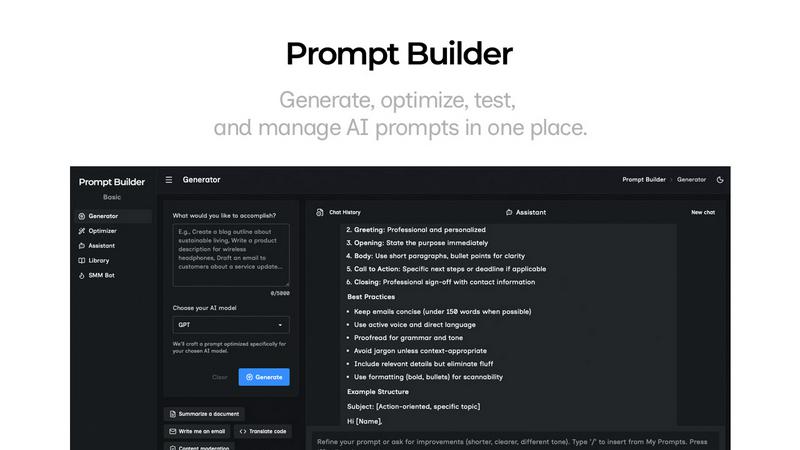
Go from a simple idea to a professional, model-tuned prompt in seconds. Just describe your task, pick your target AI model (like Gemini, Claude, or GPT), and the generator crafts a structured prompt optimized for that specific model's strengths and expected input format. This eliminates the guesswork of manual crafting, giving you a powerful starting point that you can then refine directly in the connected chat interface, saving every iteration.
Prompt Assistant
Test and iterate on your prompts in a dedicated chat workspace without ever leaving Prompt Builder. Select from various assistant models (Grok, Gemini, GPT, etc.) to run your generated or saved prompts. This integrated environment keeps your prompt development and testing cycles tightly organized, allowing for rapid follow-ups and iterations. You can insert prompts directly from your Library or the Generator, and pin the best chat results for future reuse.
Prompt Optimizer
Elevate any existing prompt instantly. Paste a prompt you've been using or select one from your Library, and the Optimizer analyzes it to provide structured improvements. It enhances clarity, adds necessary constraints, refines the output format, and suggests examples. Each optimization is saved in history, and you can run the upgraded version in the Assistant with one click to immediately validate the improvements.
Prompt Library
Your centralized hub for all prompt mastery. Save, organize, and tag your best prompts from the Generator, Optimizer, or Assistant. The Library features powerful search and filtering by category and model. You can also explore a curated collection of Community Prompts for inspiration, adding proven templates to your own repository. Run any saved prompt as a new chat instantly, making your best work endlessly reusable.
Use Cases
Nani
Graphic Design Projects
Designers can leverage Nani to create a series of images for marketing campaigns, ensuring brand consistency across various materials. The reusable prompt sets feature allows them to maintain the same style and character elements easily.
Content Creation for Social Media
Content creators can utilize Nani to generate eye-catching visuals for their social media posts. With the ability to quickly create and organize images, users can keep their feeds fresh and engaging without the hassle of repetitive tasks.
Illustration Work for Clients
Illustrators can speed up their workflow by using Nani to generate multiple iterations of a character or scene. The organized library management ensures they can easily find and present their work to clients, enhancing their professional appeal.
Educational Materials
Educators can benefit from Nani by creating custom illustrations for teaching materials. The quick generation and easy organization of images allow for the rapid development of engaging content that enhances learning experiences.
Prompt Builder
Content Creation & Marketing
Accelerate your content pipeline by generating first drafts for blogs, social posts, ad copy, and emails tailored for each platform. Use the SMM Bot to turn a brief into platform-ready posts for X, LinkedIn, or TikTok, complete with tone adjustments, hashtags, and CTAs. Refine variations in chat, save your top-performing prompt formulas, and replicate success across campaigns without starting from scratch.
Rapid Prototyping & Ideation
Quickly explore concepts and generate creative assets. Describe an idea for a product name, logo concept, or story outline and get multiple AI-generated options tuned for your chosen model. Use the Assistant to iterate on these ideas in real-time, asking for refinements, expansions, or critiques. Pin the most promising directions to your Library for further development in later sessions.
Technical & Analytical Work
Streamline complex tasks like code generation, data analysis prompts, or system design queries. The model-specific tuning ensures you get properly formatted code snippets, structured JSON outputs, or step-by-step reasoning from models like Claude or GPT. The Optimizer can tighten vague technical prompts for better precision, and you can build a library of reliable prompts for recurring development tasks.
Learning & Research
Enhance your study or research process by crafting precise prompts for summarizing articles, explaining complex topics, or generating quiz questions. Test different phrasings with various models in the Assistant to see which yields the clearest explanations. Save optimized research prompts in your Library to create a personal toolkit for efficient knowledge gathering and synthesis.
Overview
About Nani
Nani is a groundbreaking workflow tool engineered to revolutionize the AI image generation landscape, ideal for professionals who engage in regular and repetitive tasks. Unlike traditional AI image generators that focus on singular creations, Nani optimizes the entire creative process, eliminating the tedious need to rewrite prompts and sift through endless galleries of images. Built on Google's advanced Nano Banana Pro (Gemini), Nani provides a comprehensive solution tailored for artists, designers, and content creators who aspire to amplify their creative output. The platform features a user-friendly interface that empowers users to generate stunning images in seconds, while unique functionalities like reusable prompt sets and organized folders ensure consistency and efficiency. With Nani, you can dedicate more energy to your creative vision and less to the logistical details of image production.
About Prompt Builder
Prompt Builder is the definitive prompt engineering workspace designed to transform how you interact with AI. It's the end of the tedious, hours-long cycle of rewriting and guessing. This platform is built for professionals, creators, and teams who need to ship high-quality AI outputs fast, without the friction. Describe your task in plain English, select your target AI model, and Prompt Builder instantly crafts a model-optimized prompt that speaks the model's language. You get a solid first draft in seconds, not hours. From there, refine it in the integrated chat workspace, save or pin your best versions, and run them anytime. It seamlessly works with all major models including GPT, Claude, Gemini, Llama, Mistral, DeepSeek, Grok, and Perplexity. Beyond generation, you get a powerful Optimizer to upgrade existing prompts, an Assistant to test runs without switching tabs, and a Library to build your personal or team repository of winning prompts. Turn vague ideas into precise, repeatable AI commands and start getting consistent results immediately.
Frequently Asked Questions
Nani FAQ
How does Nani ensure high-quality image generation?
Nani is powered by Google's Nano Banana Pro (Gemini), which utilizes advanced AI technology to produce high-quality images rapidly. Users can customize aspects like resolution and dimension, ensuring the final product meets their needs.
Is there a learning curve to using Nani?
No! Nani features a simple, intuitive interface designed to facilitate immediate creativity without the need for extensive training. Users can start generating images right away with minimal setup.
What happens to unused credits?
Nani operates on a credit-based system where users pay only for what they generate. The credits never expire, so you can use them whenever you need without the pressure of monthly fees.
Can I collaborate with others using Nani?
Absolutely! Nani includes features for seamless collaboration, allowing users to drag and drop images and share public links. This makes it easy to work together on projects and inspire one another with creative ideas.
Prompt Builder FAQ
Which AI models does Prompt Builder support?
Prompt Builder is built for a multi-model world. It works seamlessly as a prompt generator and testing ground for all major models including OpenAI's GPT, Anthropic's Claude, Google's Gemini, Meta's Llama, Mistral AI, DeepSeek, xAI's Grok, Perplexity, and Cohere. You can generate prompts tuned for any of these and run tests using many as assistants within the platform.
How does the free plan work?
The free plan is designed to let you experience the full workflow immediately. It includes 25 assistant requests per month, allowing you to generate, refine, and test prompts using the integrated chat with models like Grok, Gemini, and GPT. This enables you to craft and run prompts without needing a credit card, giving you a real feel for the platform's speed and efficiency.
What is the main benefit of model-specific prompt tuning?
Different AI models have unique architectures and training data, meaning they respond best to slightly different prompt structures and phrasing. Prompt Builder's model-specific tuning automatically adapts your prompt's constraints, output format, and instructions to align with the target model's strengths. This eliminates wasted tokens on retries and gets you higher-quality, more consistent results faster.
Can I collaborate with my team on prompts?
Yes, building a shared library of effective prompts is a core use case. By saving your best prompts to your Library, you can organize them for personal reuse or share them with your team. This creates a centralized knowledge base of proven prompt formulas, ensuring consistency, saving onboarding time, and allowing everyone to leverage the team's collective prompt engineering expertise.
Alternatives
Nani Alternatives
Nani is a cutting-edge AI image generation tool that belongs to the workflow enhancement category. It is designed to streamline the creative process by organizing prompts and images into reusable sets, making it a go-to solution for artists, designers, and content creators who engage in repetitive tasks. Users commonly seek alternatives to Nani for various reasons, including pricing considerations, specific feature sets, or compatibility with different platforms. When searching for an alternative, it’s essential to evaluate the tool's usability, the flexibility of its features, and how well it aligns with your creative workflow needs. When exploring alternatives, look for tools that offer similar functionality to Nani, such as the ability to save and reuse prompts, a user-friendly interface, and efficient image generation capabilities. Additionally, consider the level of support and community engagement available for each tool, as these can greatly enhance your experience and help you maximize your creative potential. Ultimately, the right alternative should help you maintain productivity while allowing you to focus on your creative vision.
Prompt Builder Alternatives
Prompt Builder is a dynamic AI assistant designed as a prompt engineering workspace. It allows users to generate, optimize, test, and manage AI prompts in one central hub, turning a simple idea into a refined, ready-to-use prompt in seconds. It supports a wide range of popular AI models. Users often explore alternatives for various reasons, including budget constraints, the need for specific integrations, or a desire for different feature sets like advanced analytics or team collaboration tools. The landscape of AI productivity tools is vast, and finding the right fit is key. When evaluating other options, consider core functionality like prompt versioning and testing, compatibility with your preferred AI models, and the overall user experience. The goal is to find a tool that streamlines your workflow without adding complexity, maximizing efficiency in your AI projects.