
Never Drop vs Refbox
Side-by-side comparison to help you choose the right product.

Never Drop
NeverDrop instantly captures event leads and drafts personalized follow-ups to close deals faster.
Last updated: February 28, 2026

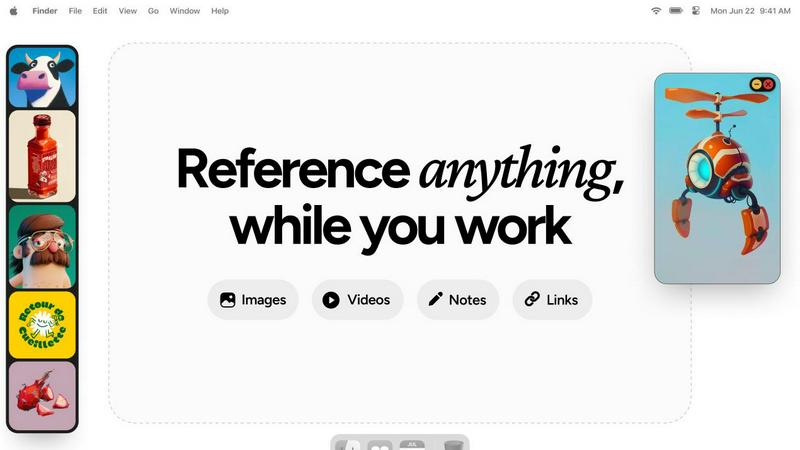
Refbox keeps your reference images and notes always visible, streamlining your workflow for maximum efficiency.
Last updated: February 28, 2026
Visual Comparison
Never Drop

Refbox
Feature Comparison
Never Drop
Instant AI-Powered Card Scanning
Snap a photo of any business card with your smartphone. Never Drop's advanced AI and OCR technology instantly extracts every critical detail—name, company, title, phone number, and email—in seconds. This eliminates manual data entry, squinting at small print, and the physical clutter of cards. You get clean, digital contact data ready for action immediately after a conversation ends, keeping you moving fast.
Voice & Context Capture
Memory fades, but your notes don't. Right after scanning, you can enrich the lead with quick voice dictation or text notes about your conversation. Capture key discussion points, pain points mentioned, next steps, or personal details. This context is the secret sauce that powers personalized follow-ups, ensuring you remember exactly why this lead matters and can reference your actual discussion.
AI-Drafted Personalized Follow-Ups
This is the game-changer. Never Drop's AI analyzes the scanned contact details and your recorded conversation context to generate a unique, personalized follow-up email draft. It's not a generic template; it's a tailored message that references your specific talk. You can review, tweak, and send this professional follow-up directly from your phone in under two minutes, capitalizing on the warmest possible lead.
Smart Email Enrichment & CRM Sync
Business cards often lack direct emails. Never Drop automatically finds and verifies professional work emails using the contact's name and company, eliminating manual LinkedIn searches. Once enriched, the complete contact profile is instantly pushed to your integrated CRM, like HubSpot, keeping your sales pipeline organized, accurate, and ready for the next step without any administrative lag.
Refbox
Always-On-Top Frames
Refbox provides always-on-top frames that can be resized and placed anywhere on your screen, ensuring that your reference materials remain visible at all times, no matter what application you are using. This feature allows for uninterrupted workflow and keeps your creative inspirations in sight.
Dynamic Collection Management
Organize your assets into multiple, swappable collections that can be easily accessed and switched with a single click. This feature allows for efficient categorization, making it simple to retrieve specific references without losing focus on your current task.
Advanced Media Controls
Refbox offers advanced media controls, including GIF playback that lets you step through frames, cropping tools to focus on specific areas, and pixel rendering for precise pixel art viewing. These controls enhance your ability to interact with your reference materials effectively.
Markdown Notes and Clickable Bookmarks
Integrate markdown notes directly into your workspace, complete with styling options and checklists. Additionally, clickable bookmarks allow you to save and access important web links without disrupting your creative flow, streamlining your workflow even further.
Use Cases
Never Drop
Dominating Trade Shows & Conferences
Maximize your ROI at every event. Scan cards on the show floor, add voice context while walking to your next meeting, and queue up personalized follow-ups before the day ends. Never Drop ensures you are the first responder, capturing leads while the conversation is hottest and dramatically increasing your conversion rate from event attendance.
Streamlining Networking Events & Meetups
Turn casual connections into qualified opportunities. At dinners, mixers, or industry meetups, quickly capture new contacts without fumbling for a pen. The voice context feature lets you discreetly record notes, ensuring you remember who discussed what. Send a relevant follow-up the same night to stand out from the crowd who follow up days later.
Empowering Field Sales Teams
For reps constantly on the road meeting prospects in person, Never Drop acts as a digital assistant. Scan cards from lunches, site visits, or impromptu meetings. The immediate CRM sync means all lead data is instantly available to the entire team and management, improving alignment and ensuring no field-gathered intelligence is lost.
Accelerating Partnership & Biz Dev Outreach
When sourcing and connecting with potential partners, speed and personalization are key. Scan a card from an introductory meeting, use context notes to highlight mutual synergies discussed, and send a tailored follow-up that reinforces the collaborative value proposition on the spot, moving the partnership conversation forward immediately.
Refbox
Graphic Design
Graphic designers can utilize Refbox to keep reference images and color palettes accessible while working on projects. The ability to pull assets from various sources and organize them into collections enhances creativity and efficiency.
Animation
Animators can benefit from Refbox's GIF playback and frame stepping features, allowing them to analyze motion references in real-time while animating. This ensures that inspiration and technical details remain at their fingertips.
UI/UX Development
UI/UX developers can use Refbox to overlay design inspirations, color schemes, and user interface examples directly over their design applications. This constant access to references helps maintain consistency and improves workflow.
Concept Art Creation
Concept artists can keep a plethora of visual references, sketches, and notes visible while working on their canvases. Refbox's organized visuals and effortless focus capabilities allow for a more streamlined creative process, resulting in impactful artwork.
Overview
About Never Drop
Never Drop is the ultimate weapon for sales teams who operate at the speed of events. In the chaotic environment of trade shows, conferences, and networking meetups, leads are captured by the dozen but often die in spreadsheets or get lost in a pile of business cards. This app shatters that inefficiency. It's a mobile-first lead capture platform that transforms a simple handshake into a concrete sales opportunity in under two minutes. The process is brilliantly simple: scan a business card with your phone, instantly add voice notes about your conversation for context, and let Never Drop's AI craft a personalized, context-aware follow-up email before you even leave the booth. It doesn't stop there. The app enriches contact data by finding verified work emails, ensuring your pipeline is built on accurate information, and seamlessly syncs everything to your CRM like HubSpot. Built for the fast pace of real-world sales, Never Drop ensures no lead is ever forgotten, dramatically shortening the follow-up window and turning event connections into closed deals with unprecedented speed.
About Refbox
Refbox is an innovative floating reference manager tailored for creative professionals seeking to eliminate workflow disruptions. This powerful desktop application allows users to pin a variety of reference materials—including images, videos, GIFs, and notes—into resizable frames that remain visible above all other applications. By doing so, Refbox eradicates the need for constant alt-tabbing or rummaging through disorganized folders, enabling users to maintain deep focus on their projects. Perfect for artists, designers, animators, and developers, Refbox ensures that inspiration is only a glance away, significantly boosting productivity. Users can effortlessly aggregate content via drag-and-drop, clipboard pasting, or web pulls, and can organize these assets into multiple collections. With a streamlined sidebar, a dynamic Masonry grid, or a full-screen gallery view, Refbox transforms the creative process from mere inspiration to seamless execution, making it an indispensable tool for anyone in the creative industry.
Frequently Asked Questions
Never Drop FAQ
What is Never Drop?
Never Drop is a lead-capture app built specifically for sales teams at in-person events. It allows you to scan a business card with your phone, add voice or text notes about your conversation, and then uses AI to generate a personalized follow-up email in under two minutes. It also enriches contacts with verified work emails and syncs everything to your CRM.
How does the business card scanning work?
You simply take a photo of any business card using the Never Drop mobile app. Our AI-powered OCR (Optical Character Recognition) technology instantly extracts the contact's name, company, title, phone number, and email address with high accuracy. You can also manually enter details if you prefer.
What CRMs do you integrate with?
Never Drop currently integrates with HubSpot for seamlessly pushing enriched contact profiles into your sales pipeline. It also integrates with Gmail, allowing you to send your AI-drafted follow-up emails directly from your own email address. Additional CRM integrations are planned for future updates.
Is my data secure with Never Drop?
Yes. Never Drop is built by SCOPEO, a company based in France. All user data is hosted in the European Union and processed in full compliance with GDPR regulations. Data is encrypted both in transit and at rest. Images of business cards are used solely for contact extraction and are not shared with any third parties.
Refbox FAQ
How does Refbox improve my workflow?
Refbox minimizes distractions by keeping your reference material visible and easily accessible, allowing you to focus on your creative tasks without the need to switch between different applications or folders.
Can I use Refbox with any application?
Yes, Refbox is designed to float above any application on your desktop, making it compatible with a wide range of creative software, ensuring you have your references at hand no matter what you're working on.
Is there a limit to the number of collections I can create?
No, Refbox allows you to create multiple collections without any restrictions, enabling you to organize your reference materials according to different projects or themes as needed.
What types of media can I store in Refbox?
Refbox supports various media types, including images, GIFs, videos, and notes. You can also save clickable bookmarks and utilize advanced controls for specific media formats, enhancing your creative experience.
Alternatives
Never Drop Alternatives
Never Drop is a dynamic lead capture and follow-up automation tool in the productivity and management category. It’s engineered for sales professionals who need to instantly digitize contacts from business cards and generate AI-powered follow-ups to secure every opportunity. Users often explore alternatives for various reasons, such as budget constraints, specific feature requirements like different CRM integrations, or the need for a platform that aligns with a unique sales workflow. The search for the right tool is a common step in optimizing a team's tech stack. When evaluating other solutions, key considerations should include the accuracy of contact capture, the depth of CRM connectivity, the quality of automation for follow-ups, and overall ease of use in high-pressure environments. The goal is to find a system that maintains momentum without dropping the ball.
Refbox Alternatives
Refbox is a cutting-edge floating app designed to enhance the workflow of creative professionals by keeping reference images and notes visible above any workspace. As a productivity and management tool, it allows users to pin inspiration in always-on-top frames, ensuring that essential materials are readily accessible without the hassle of switching between applications. However, users often seek alternatives to Refbox for various reasons, including pricing concerns, specific feature requirements, or compatibility with different platforms. When exploring alternatives, it's crucial to consider the features that matter most to your workflow, such as the ability to customize floating frames, media aggregation capabilities, and ease of organization. Additionally, assess how well the alternative integrates into your existing tools and whether it meets your unique creative needs.