dmaya vs Picture to Drawing
Side-by-side comparison to help you choose the right product.

dmaya
dMaya is the AI design platform for agencies to generate client-ready UI and export production code at speed.
Last updated: April 13, 2026

Picture to Drawing
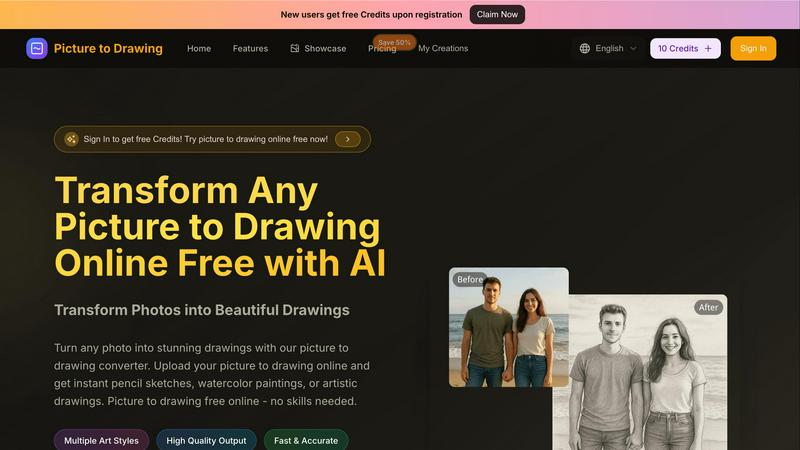
Effortlessly convert your photos into stunning drawings with our AI tool, free and easy for everyone to use online.
Last updated: March 1, 2026
Visual Comparison
dmaya
Picture to Drawing
Feature Comparison
dmaya
Conversational AI Design Generation
Describe your UI needs in plain English and watch as dmaya's AI agent generates complete, production-ready screen designs in seconds. Go from a text prompt for a "fintech mobile app dashboard" to a fully realized visual concept with layouts, components, and a consistent design system, eliminating the blank canvas and accelerating the initial creative phase dramatically.
Real-Time Iteration & Design Tokens
Iterate on your designs through natural language conversation with the AI. Ask to "change the primary color to navy blue," "swap to a sidebar layout," or "increase the font size," and see the updates applied instantly across all relevant screens. Underlying design tokens ensure global consistency, so every change is precise and systematic, not manual and error-prone.
Client Presentation & Feedback Portal
Share your work with clients and stakeholders through a simple, secure link—no accounts required for viewers. They can interact with the design preview directly in their browser, leave contextual feedback, and approve iterations. This streamlines the entire review and sign-off process, turning what was a multi-day email chain into a minutes-long collaborative session.
Multi-Framework Code Export
When designs are finalized, export them as clean, semantic HTML, CSS, and JavaScript code. This output is perfectly structured for handoff to AI coding assistants (like Claude Code or Cursor) or developer teams to build the final product in your preferred technology stack, including React, Next.js, Flutter, or React Native, bridging the gap between design and development.
Picture to Drawing
Multiple Art Styles
Picture to Drawing offers a diverse range of artistic styles including pencil sketches, ink art, charcoal drawings, and watercolor paintings. This variety allows users to choose the perfect effect that aligns with their creative vision for any occasion.
High Quality Output
Each transformation results in professional-quality artwork, ensuring that every detail is captured with precision. The outputs are high-resolution and ready to download, making them suitable for both personal projects and commercial applications.
Fast & Accurate Conversions
With lightning-fast processing, users can convert their photos to drawings in mere seconds. The AI technology behind Picture to Drawing guarantees accurate results, preserving the essence of the original image while enhancing it artistically.
User-Friendly Interface
The platform is designed with simplicity in mind, allowing users of all skill levels to navigate effortlessly. Uploading images, selecting styles, and downloading results require just a few clicks, making the entire process quick and enjoyable.
Use Cases
dmaya
Agency Pitch & Concept Development
Agencies can use dmaya to generate multiple high-fidelity design concepts during a client discovery call or immediately after. This allows them to present tangible, polished visual directions to stakeholders in hours instead of weeks, significantly improving pitch velocity, winning more business, and establishing a collaborative foundation from the very first meeting.
Product Team Ideation & Alignment
Product managers and cross-functional teams can rapidly prototype different UI directions for new features or products before committing engineering resources. This enables faster internal alignment, user testing with realistic prototypes, and catching usability issues early in the process, reducing costly rework during the development phase.
Freelancer Project Delivery
Freelancers and solo designers can drastically increase their project throughput. dmaya allows them to take on more clients by automating the heavy lifting of initial design generation and client revisions. They can deliver professional-grade work faster, impress clients with interactive presentations, and focus on high-value creative direction and strategy.
Design-to-Development Handoff
Development teams and engineers working with AI coding agents receive a superior starting point. Instead of vague wireframes or static images, they get a live, approved design prototype and exportable, clean code. This provides precise visual specifications and foundational markup, enabling coding agents to build more accurately and efficiently in any framework.
Picture to Drawing
Personal Artwork for Social Media
Users can transform their favorite photos into unique drawings that enhance their social media profiles. This feature allows individuals to stand out with creative, eye-catching content that showcases their personality.
Professional Portfolio Development
Artists can utilize Picture to Drawing to generate artwork ideas or to create unique pieces for their portfolios. The diverse styles available can help inspire new directions in their artistic endeavors.
Custom Gifts and Memorabilia
Picture to Drawing is perfect for creating personalized gifts. Users can convert cherished family photos into artistic drawings, making for thoughtful and memorable presents for loved ones.
Marketing and Branding Materials
Businesses can leverage the tool to create distinctive visual content for marketing campaigns. Artistic drawings can help brands convey their message in a creative and engaging way, setting them apart in a competitive market.
Overview
About dmaya
dmaya is the AI-powered design platform engineered for speed and collaboration, purpose-built for agencies, product teams, and freelancers. It solves a critical gap in the modern workflow: the need to design, present, and approve visual concepts before a single line of code is written. While other AI tools rush to generate code, dmaya champions a design-first philosophy. You describe your vision—a SaaS dashboard, an e-commerce flow, a mobile app—and its AI agent generates polished, professional UI screens in seconds. The real power lies in conversational iteration; you chat with the AI to change colors, swap layouts, adjust typography, or add new sections, with every change applied instantly and consistently across your project. Once the design is client-ready, share an interactive preview link for seamless feedback and approval, collapsing review cycles from days to minutes. Finally, export clean HTML, CSS, and JS to hand off to coding agents like Cursor or Claude Code for development in React, Next.js, Flutter, or any framework. dmaya is the strategic tool for teams that need to align stakeholders, catch problems early, and ship with confidence.
About Picture to Drawing
Picture to Drawing is an innovative AI-powered online tool that effortlessly transforms your photos into breathtaking artistic drawings. Designed for both casual users and professional artists, this platform takes the guesswork out of creating beautiful artwork. Whether you're looking to enhance your social media presence or find inspiration for your next masterpiece, Picture to Drawing provides instant results with just a few clicks. With a variety of artistic styles available—ranging from classic pencil sketches to colorful watercolor paintings—there's something for everyone. No artistic skills are required, making this tool incredibly accessible. Simply upload your image, select your preferred art style, and within seconds, watch as your picture transforms into a stunning piece of art. The high-quality outputs can be easily downloaded and shared, making Picture to Drawing a valuable resource for personal and commercial use alike. New users also enjoy free credits upon registration, allowing them to explore the tool without any commitment.
Frequently Asked Questions
dmaya FAQ
How is dmaya different from other AI design tools?
Unlike tools that skip directly to code generation, dmaya is built for the professional, client-facing design process. It focuses on the critical visual design and approval phase first, with features for real-time AI iteration, client presentation, and feedback collection. It respects the workflow where design alignment must happen before development begins, then exports code to feed into your existing dev tools.
Do clients need an account to review designs?
No. Clients and stakeholders do not need any account or login. You simply generate a shareable preview link from your dmaya project and send it to them. They can view the interactive design in their web browser, leave comments, and provide approval entirely as a guest, making the feedback loop frictionless and fast.
What kind of code does dmaya export?
dmaya exports clean, production-ready front-end code as standard HTML, CSS, and JavaScript. This code is structured and semantic, designed to be an optimal starting point for AI coding agents (like Cursor or Claude Code) or developers to then convert into your desired framework, such as React, Next.js, Vue, Flutter, or React Native.
Can I work on multiple screens or device layouts at once?
Yes. dmaya provides a multi-screen, infinite canvas where you can work on desktop, tablet, and mobile frames simultaneously. You can organize screens, drag them around the canvas, and zoom in and out, similar to traditional design tools, but with the power of AI generation and iteration applied across all your artboards.
Picture to Drawing FAQ
How does Picture to Drawing work?
Picture to Drawing uses advanced AI technology to analyze uploaded images and apply artistic effects based on the chosen style. The transformation happens in seconds, providing users with instant results.
What file formats are supported?
The tool supports a variety of image formats, including JPG, PNG, WEBP, and HEIC. This flexibility ensures users can easily upload their preferred images without compatibility issues.
Is there a cost to use Picture to Drawing?
New users receive free credits upon registration, allowing them to try the service without any initial investment. Additional credits can be purchased for continued use.
Can I download the drawings?
Yes, once your photo has been transformed into a drawing, you can easily download the high-quality output. This feature makes it convenient to share or print your artwork as needed.
Alternatives
dmaya Alternatives
dmaya is a specialized AI vibe design platform that streamlines the entire UI design-to-approval workflow for agencies, teams, and freelancers. It uniquely combines AI-powered visual generation with client collaboration tools and clean code export, bridging the gap between concept and development. Users often explore alternatives for various reasons, such as budget constraints, specific feature requirements, or the need for integration with different tech stacks. Some may prioritize raw prototyping speed over design polish, while others might seek tools with different collaboration models or pricing structures. When evaluating options, consider your core workflow needs. Key factors include the quality and control of AI-generated designs, the efficiency of the client feedback loop, the readiness and cleanliness of exported code, and how well the tool integrates into your team's existing presentation and development processes.
Picture to Drawing Alternatives
Picture to Drawing is an innovative AI-driven online tool that allows users to effortlessly convert their photos into stunning artistic drawings. As a design tool, it caters to a diverse audience, from casual users wanting to elevate their social media presence to professional artists seeking inspiration. Users often explore alternatives due to factors such as varying pricing structures, additional features, or compatibility with specific platforms. When selecting an alternative, it's crucial to consider the range of art styles available, the quality of output, conversion speed, and user-friendliness of the interface. A versatile tool should cater to both novice users and seasoned artists, ensuring that the creative process remains simple and enjoyable while delivering high-quality results.