
Picture to Drawing
Effortlessly convert your photos into stunning drawings with our AI tool, free and easy for everyone to use online.
Visit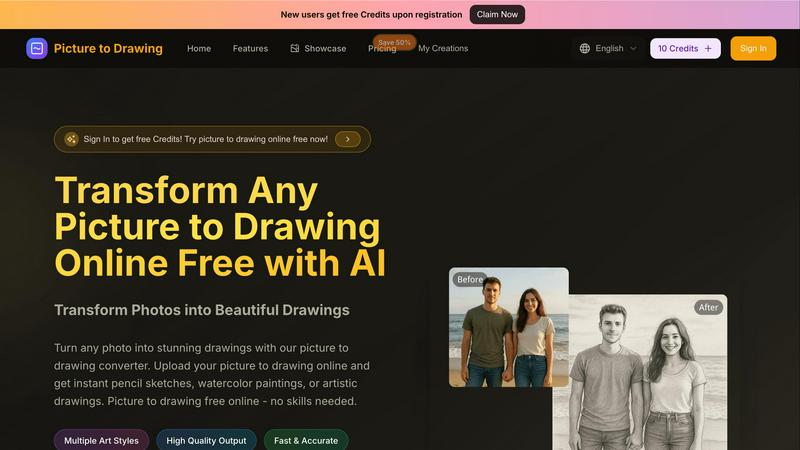
About Picture to Drawing
Picture to Drawing is an innovative AI-powered online tool that effortlessly transforms your photos into breathtaking artistic drawings. Designed for both casual users and professional artists, this platform takes the guesswork out of creating beautiful artwork. Whether you're looking to enhance your social media presence or find inspiration for your next masterpiece, Picture to Drawing provides instant results with just a few clicks. With a variety of artistic styles available—ranging from classic pencil sketches to colorful watercolor paintings—there's something for everyone. No artistic skills are required, making this tool incredibly accessible. Simply upload your image, select your preferred art style, and within seconds, watch as your picture transforms into a stunning piece of art. The high-quality outputs can be easily downloaded and shared, making Picture to Drawing a valuable resource for personal and commercial use alike. New users also enjoy free credits upon registration, allowing them to explore the tool without any commitment.
Features of Picture to Drawing
Multiple Art Styles
Picture to Drawing offers a diverse range of artistic styles including pencil sketches, ink art, charcoal drawings, and watercolor paintings. This variety allows users to choose the perfect effect that aligns with their creative vision for any occasion.
High Quality Output
Each transformation results in professional-quality artwork, ensuring that every detail is captured with precision. The outputs are high-resolution and ready to download, making them suitable for both personal projects and commercial applications.
Fast & Accurate Conversions
With lightning-fast processing, users can convert their photos to drawings in mere seconds. The AI technology behind Picture to Drawing guarantees accurate results, preserving the essence of the original image while enhancing it artistically.
User-Friendly Interface
The platform is designed with simplicity in mind, allowing users of all skill levels to navigate effortlessly. Uploading images, selecting styles, and downloading results require just a few clicks, making the entire process quick and enjoyable.
Use Cases of Picture to Drawing
Personal Artwork for Social Media
Users can transform their favorite photos into unique drawings that enhance their social media profiles. This feature allows individuals to stand out with creative, eye-catching content that showcases their personality.
Professional Portfolio Development
Artists can utilize Picture to Drawing to generate artwork ideas or to create unique pieces for their portfolios. The diverse styles available can help inspire new directions in their artistic endeavors.
Custom Gifts and Memorabilia
Picture to Drawing is perfect for creating personalized gifts. Users can convert cherished family photos into artistic drawings, making for thoughtful and memorable presents for loved ones.
Marketing and Branding Materials
Businesses can leverage the tool to create distinctive visual content for marketing campaigns. Artistic drawings can help brands convey their message in a creative and engaging way, setting them apart in a competitive market.
Frequently Asked Questions
How does Picture to Drawing work?
Picture to Drawing uses advanced AI technology to analyze uploaded images and apply artistic effects based on the chosen style. The transformation happens in seconds, providing users with instant results.
What file formats are supported?
The tool supports a variety of image formats, including JPG, PNG, WEBP, and HEIC. This flexibility ensures users can easily upload their preferred images without compatibility issues.
Is there a cost to use Picture to Drawing?
New users receive free credits upon registration, allowing them to try the service without any initial investment. Additional credits can be purchased for continued use.
Can I download the drawings?
Yes, once your photo has been transformed into a drawing, you can easily download the high-quality output. This feature makes it convenient to share or print your artwork as needed.
Explore more in this category:
Similar to Picture to Drawing

AI tattoo generator for turning ideas, photos & sketches into expressive designs.

Turn any image into editable transparent PNG layers with AI.

Cursive Text Generator is a free online tool for creating stylish cursive fonts and copy-paste text for social media, names, bios and more.

The fastest AI STL generator to turn prompts and images into 3D printable STL files.

AI long video generator: turn text, images, audio and video into production-ready AI videos.

AI-native presentation and visual content platform that turns prompts, documents, images, videos, and data into polished, shareable decks.

Create reviewable 2D floor plan images from prompts, dimensions, or reference images.

Convert video to JPG, PNG, or WebP frames in your browser. High-quality video to image converter with no uploads—fast, private, and free.