Picture to Drawing vs Proofapp
Side-by-side comparison to help you choose the right product.

Picture to Drawing
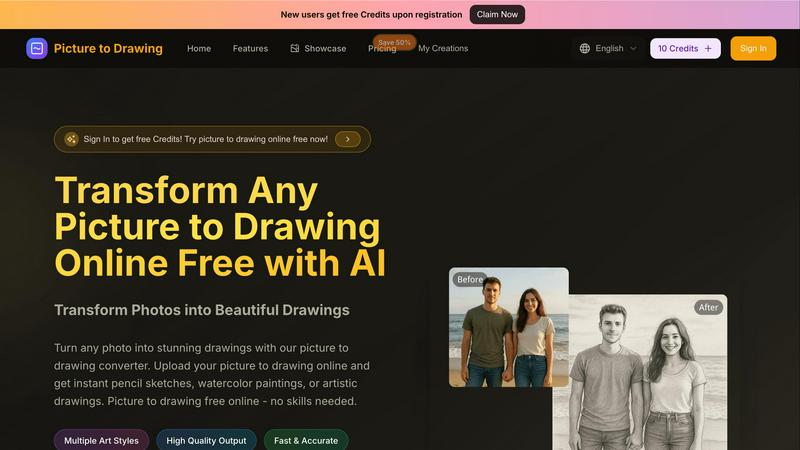
Effortlessly convert your photos into stunning drawings with our AI tool, free and easy for everyone to use online.
Last updated: March 1, 2026

Proofapp
Proofapp pins visual feedback directly on websites to stop endless email chains.
Last updated: March 4, 2026
Visual Comparison
Picture to Drawing
Proofapp

Feature Comparison
Picture to Drawing
Multiple Art Styles
Picture to Drawing offers a diverse range of artistic styles including pencil sketches, ink art, charcoal drawings, and watercolor paintings. This variety allows users to choose the perfect effect that aligns with their creative vision for any occasion.
High Quality Output
Each transformation results in professional-quality artwork, ensuring that every detail is captured with precision. The outputs are high-resolution and ready to download, making them suitable for both personal projects and commercial applications.
Fast & Accurate Conversions
With lightning-fast processing, users can convert their photos to drawings in mere seconds. The AI technology behind Picture to Drawing guarantees accurate results, preserving the essence of the original image while enhancing it artistically.
User-Friendly Interface
The platform is designed with simplicity in mind, allowing users of all skill levels to navigate effortlessly. Uploading images, selecting styles, and downloading results require just a few clicks, making the entire process quick and enjoyable.
Proofapp
Visual Commenting
Click directly on any element of your live website or captured screenshot to leave contextual feedback. This eliminates the guesswork and confusing descriptions like "top left, under the nav." Comments are pinned exactly where they matter, creating a crystal-clear dialogue between creator and reviewer. You can start threaded conversations, mention team members, and ensure every piece of feedback is visually anchored to the design itself, making it impossible to misinterpret.
Multi-Breakpoint Testing
Proofapp automatically captures and presents your website at both desktop and mobile breakpoints the moment you submit a URL. This allows for comprehensive review across the most critical device types without any extra effort. Stakeholders can toggle between views and leave specific feedback for each layout, ensuring your design is polished and functional no matter how your users access it, all from a single project link.
Secure, Account-Free Sharing
Share your review projects with clients and external stakeholders via secure, expirable links. The game-changing advantage is that reviewers can participate fully—viewing, commenting, and attaching files—without the friction of creating a Proofapp account. This drastically reduces onboarding time and barriers to entry, making it effortless to collect feedback from anyone, while you maintain full control over access and project security.
Real-Time Collaboration & Resolution
See comments from your team and clients appear live as they are made. This real-time collaboration keeps everyone on the same page instantly, eliminating version confusion and lag. You can reply directly within threads, attach supporting files for context, and, crucially, mark comments as "Resolved." This creates a clear, trackable progress log from feedback to fix, ensuring nothing falls through the cracks.
Use Cases
Picture to Drawing
Personal Artwork for Social Media
Users can transform their favorite photos into unique drawings that enhance their social media profiles. This feature allows individuals to stand out with creative, eye-catching content that showcases their personality.
Professional Portfolio Development
Artists can utilize Picture to Drawing to generate artwork ideas or to create unique pieces for their portfolios. The diverse styles available can help inspire new directions in their artistic endeavors.
Custom Gifts and Memorabilia
Picture to Drawing is perfect for creating personalized gifts. Users can convert cherished family photos into artistic drawings, making for thoughtful and memorable presents for loved ones.
Marketing and Branding Materials
Businesses can leverage the tool to create distinctive visual content for marketing campaigns. Artistic drawings can help brands convey their message in a creative and engaging way, setting them apart in a competitive market.
Proofapp
Freelancer Client Approvals
Freelancers can present website designs to clients in a professional, centralized hub. Instead of trading messy email chains with annotated screenshots, they share a single Proofapp link. Clients click to give precise visual feedback, which the freelancer can immediately action and mark as complete. This streamlines the revision process, reduces rounds of changes, and projects a polished, efficient service that saves hours per project.
Agency Design Team Workflow
Design agencies managing multiple projects and stakeholders use Proofapp to unify internal and client feedback. Designers, project managers, and developers can all collaborate in one space, with comments pinned directly to the relevant UI element. This visual system eliminates miscommunication between departments, accelerates internal reviews, and provides a clear audit trail of client feedback for approvals, ensuring projects move forward faster and more accurately.
Marketing Campaign Reviews
Marketing teams launching new landing pages or campaign assets need quick, clear feedback from various departments (copy, design, product). Proofapp allows the whole team to review live pages visually. Comments on headlines, CTAs, and imagery are contextually clear, preventing copy edits from getting lost in a Slack thread about hero images. This results in faster iterations and higher-quality, on-brand launches.
Developer Handoff & QA
Developers can use Proofapp during the QA and handoff phase to report bugs and visual inconsistencies directly on the staging site. Instead of writing lengthy bug reports, they can pin a comment exactly where an issue occurs, attach console logs or screenshots, and tag the responsible designer or developer. This visual bug-tracking method cuts down resolution time and ensures fixes are accurate the first time.
Overview
About Picture to Drawing
Picture to Drawing is an innovative AI-powered online tool that effortlessly transforms your photos into breathtaking artistic drawings. Designed for both casual users and professional artists, this platform takes the guesswork out of creating beautiful artwork. Whether you're looking to enhance your social media presence or find inspiration for your next masterpiece, Picture to Drawing provides instant results with just a few clicks. With a variety of artistic styles available—ranging from classic pencil sketches to colorful watercolor paintings—there's something for everyone. No artistic skills are required, making this tool incredibly accessible. Simply upload your image, select your preferred art style, and within seconds, watch as your picture transforms into a stunning piece of art. The high-quality outputs can be easily downloaded and shared, making Picture to Drawing a valuable resource for personal and commercial use alike. New users also enjoy free credits upon registration, allowing them to explore the tool without any commitment.
About Proofapp
Proofapp is the visual feedback platform that kills the endless email chain for good. It's built for designers, developers, freelancers, and agencies who are tired of miscommunication, vague revision notes, and hours wasted playing "screenshot tennis." The core value proposition is simple: replace scattered, text-based feedback with precise, visual collaboration that gets projects shipped faster. You simply paste any website URL, and Proofapp automatically captures desktop and mobile screenshots. From there, your team and clients can click directly on the design to pin comments, reply in threads, attach files, and mark feedback as resolved—all without requiring reviewers to create an account. With features like real-time notifications, Slack integration, multi-page support, and enterprise-grade security, Proofapp centralizes all communication into one actionable dashboard. It's a 5-minute setup that saves teams 5+ hours per week, reduces revision rounds by 60%, and turns chaotic feedback into a streamlined, visual workflow. Stop describing problems and start pointing at them.
Frequently Asked Questions
Picture to Drawing FAQ
How does Picture to Drawing work?
Picture to Drawing uses advanced AI technology to analyze uploaded images and apply artistic effects based on the chosen style. The transformation happens in seconds, providing users with instant results.
What file formats are supported?
The tool supports a variety of image formats, including JPG, PNG, WEBP, and HEIC. This flexibility ensures users can easily upload their preferred images without compatibility issues.
Is there a cost to use Picture to Drawing?
New users receive free credits upon registration, allowing them to try the service without any initial investment. Additional credits can be purchased for continued use.
Can I download the drawings?
Yes, once your photo has been transformed into a drawing, you can easily download the high-quality output. This feature makes it convenient to share or print your artwork as needed.
Proofapp FAQ
How do reviewers leave feedback without an account?
The process is designed for zero friction. You, as the project owner, generate a secure, shareable link from your Proofapp dashboard and send it to your clients or team members. When they open the link, they see the captured screenshots of your site and can immediately click anywhere to leave a comment, attach a file, or reply to a thread. No sign-up, login, or password is required for them to participate fully in the review process.
Does Proofapp work on live websites or just static images?
Proofapp works directly on live website URLs. You paste the URL of your staging site, prototype, or live production site, and our system automatically captures fresh, interactive screenshots at the specified breakpoints. Reviewers are commenting on an accurate representation of the live site, not a static mockup you uploaded weeks ago, ensuring feedback is always relevant and current.
What kind of integrations does Proofapp offer?
Proofapp connects with the tools you already use to maintain a seamless workflow. It offers direct integration with Slack, sending real-time notifications when new feedback is posted on your projects. This means you can stay on top of client comments without constantly checking the app. Additional integrations and API access are available to connect with project management and developer workflows.
Is my data and client feedback secure?
Absolutely. Proofapp is built with enterprise-grade security considerations. Features include secure, expirable share links, role-based permissions for team members, and comprehensive audit logs. Your data and client communications are handled with strict security protocols to ensure confidentiality and give you peace of mind, whether you're working on internal projects or sensitive client work.
Alternatives
Picture to Drawing Alternatives
Picture to Drawing is an innovative AI-driven online tool that allows users to effortlessly convert their photos into stunning artistic drawings. As a design tool, it caters to a diverse audience, from casual users wanting to elevate their social media presence to professional artists seeking inspiration. Users often explore alternatives due to factors such as varying pricing structures, additional features, or compatibility with specific platforms. When selecting an alternative, it's crucial to consider the range of art styles available, the quality of output, conversion speed, and user-friendliness of the interface. A versatile tool should cater to both novice users and seasoned artists, ensuring that the creative process remains simple and enjoyable while delivering high-quality results.
Proofapp Alternatives
Proofapp is a dynamic visual feedback platform in the design tools category. It streamlines collaboration by letting teams and clients pin comments directly on live website screenshots, eliminating the chaos of scattered emails and vague notes. Users often explore alternatives for various reasons. Needs evolve, and a tool's pricing, specific feature set, or integration capabilities might no longer align with a growing team's workflow or budget constraints. The search for a better fit is a natural part of scaling any agile operation. When evaluating other options, prioritize core efficiency. Look for robust visual commenting, seamless stakeholder access, and integrations that plug into your existing toolkit. The goal is to maintain that fast-paced, organized feedback loop without friction.