ScopeSnap vs SupaSidebar
Side-by-side comparison to help you choose the right product.

ScopeSnap
ScopeSnap instantly turns your discovery notes into structured project scopes and client-ready proposals.
Last updated: March 18, 2026

SupaSidebar
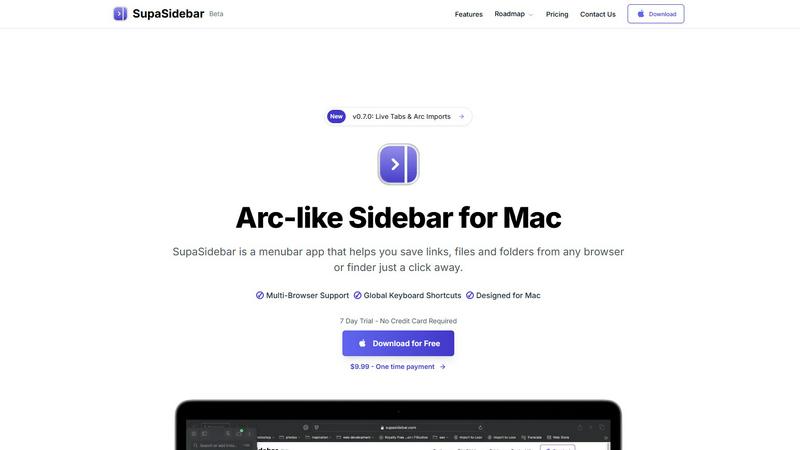
SupaSidebar gives you instant keyboard access to your links, files, and apps on Mac.
Last updated: February 28, 2026
Visual Comparison
ScopeSnap

SupaSidebar
Feature Comparison
ScopeSnap
AI-Powered Scope Generation
Dump your unstructured discovery notes, call transcripts, and client emails into ScopeSnap. Its advanced AI instantly analyzes the content to generate a structured project backlog. It identifies key features, breaks them down into actionable epics and user stories, and creates a clear, organized scope framework from chaos, saving you hours of manual synthesis and guesswork.
Intelligent Assumption & Question Surfacing
The AI doesn't just list tasks; it thinks critically about your project. It automatically flags underlying assumptions and surfaces open-ended questions that are crucial for accurate estimation. This proactive analysis ensures potential gaps and ambiguities are addressed before the proposal is sent, drastically reducing scope creep and misalignment risks down the line.
Interactive Scope Refinement & Estimation Board
You're in full control. Review and edit the AI-generated backlog on an intuitive, interactive board. Drag and drop items, assign roles (e.g., front-end, back-end), and attach time or cost estimates directly to each task. This visual, granular approach allows for iterative refinement until you have a confident, detailed, and fully estimatable project plan.
Automated Proposal & SOW Document Creation
With one click, transform your finalized and estimated scope into a professionally formatted document. ScopeSnap automatically generates a polished Proposal or Statement of Work, pulling in all the structured details, estimates, and defined assumptions. This delivers a client-ready package in minutes, eliminating the tedious copy-pasting and formatting work from scratch.
SupaSidebar
Universal Browser Integration
SupaSidebar works flawlessly with every major browser you use, including Safari, Chrome, Firefox, Brave, and Arc. This universal compatibility means you can save the current webpage link directly to your sidebar from any browser instantly. No more switching contexts or manually copying and pasting URLs between applications. It creates a unified hub that sits above your browser choice, ensuring your workflow remains consistent and uninterrupted regardless of which window you're in.
Lightning-Fast Global Keyboard Shortcuts
Take control with powerful, system-wide keyboard shortcuts that work anywhere on your Mac. Press CMD+CTRL+S to instantly save the current website link directly to your sidebar. Use CMD+CTRL+K to open a blazing-fast search overlay to find any saved link, file, folder, or application. These shortcuts are designed for muscle memory, letting you access your entire digital workspace without ever touching your mouse, dramatically speeding up your navigation and task execution.
Intelligent Recents & Pinned Favorites
Never lose your work again. SupaSidebar's "Recents" feature automatically tracks every website you've visited in the last 48 hours, giving you a chronological lifeline back to your research or browsing session. For your core resources, use the "Pinned" section to keep essential links, files, and folders permanently anchored at the top of your sidebar for one-click access. This combination of automatic history and manual curation ensures both serendipitous rediscovery and reliable, instant access to your most critical items.
Native macOS Design & Local Data Storage
SupaSidebar is built from the ground up for the Mac experience, ensuring buttery-smooth performance and seamless integration with macOS aesthetics and behaviors. Critically, all your data—every saved link, file reference, and folder path—is stored locally on your machine. Nothing is sent to the cloud unless you choose to, guaranteeing your privacy and security. This lightweight, menubar-based approach keeps your desktop clean and clutter-free while providing powerful organization.
Use Cases
ScopeSnap
For Freelance Developers Closing New Clients
Solo developers can use ScopeSnap to rapidly turn initial client consultations into compelling, detailed proposals. It helps them present a highly professional and structured plan that builds client trust, demonstrates thorough understanding, and justifies their estimate with clear, itemized breakdowns, significantly increasing their win rate.
For Software Agencies Streamlining Pre-Sales
Agencies handling multiple concurrent bids can scale their scoping process efficiently. ScopeSnap ensures consistency and quality across all proposals from different team members. It cuts down the time from discovery to proposal delivery, allowing the business development team to respond to more opportunities faster and with greater accuracy.
For Consultants Defining Project Boundaries
Technical consultants who need to define precise project parameters for fixed-price or time-and-materials engagements will find ScopeSnap invaluable. It provides a systematic way to document requirements, expose ambiguities early, and create a clear Statement of Work that serves as a single source of truth, protecting both the consultant and the client.
For Project Managers Onboarding New Projects
When a project is won, the detailed scope and backlog generated in ScopeSnap serve as the perfect handoff document to the development team. Project managers can import the already-structured tasks and estimates directly into their project management tools, ensuring a smooth, accurate, and efficient transition from sales to execution.
SupaSidebar
The Deep Work Researcher
When conducting online research, you often have dozens of tabs open across multiple articles, papers, and sources. SupaSidebar cuts through the chaos. Save every relevant source to your sidebar with a single shortcut as you browse. Later, use the powerful search or Recents list to instantly jump back to any source without sifting through a mountain of tabs. Keep key reference materials pinned for constant access, turning a fragmented research session into a streamlined, organized process.
The Multitasking Project Manager
Juggling multiple projects means constantly switching between communication apps, project docs, design files, and tracking tools. SupaSidebar acts as your central command panel. Pin the Trello board, Google Doc, Figma file, and Slack channel for each active project into dedicated spaces. With a quick CMD+CTRL+K, type the project name and jump directly to the required resource in seconds. It eliminates app-switching friction and keeps all project assets at your fingertips.
The Creative Professional
Creatives juggle inspiration links, asset folders, brand guidelines, and creative software. SupaSidebar streamines this creative toolkit. Save mood board URLs, pin your local folder of stock assets, and keep your go-to design apps handy. When moving from brainstorming in a browser to executing in a design app, everything you need is in one consistent sidebar, preventing disruptive searches through Finder or bookmarks and helping you maintain your creative flow.
The Developer & Technical Power User
Developers context-switch between API documentation, GitHub repositories, local project folders, and terminal sessions constantly. SupaSidebar supercharges this workflow. Pin your most-visited docs, save crucial Stack Overflow answers, and have quick links to your active project directories. Use global shortcuts to log references without leaving your code editor. It reduces context-switching overhead, keeping your development environment tight and efficient.
Overview
About ScopeSnap
ScopeSnap is the AI-powered scoping engine built to eliminate the chaos and risk from custom software project estimation. It is designed specifically for freelance developers, consultants, and software agencies who are tired of the slow, error-prone process of turning messy discovery notes into clear project plans. The core value proposition is speed, accuracy, and professionalism: transforming vague client conversations into structured, estimatable backlogs and client-ready proposals in minutes, not hours. Instead of starting from a blank page, you feed ScopeSnap your raw inputs--meeting transcripts, email threads, and scattered notes--and its AI gets to work. It intelligently breaks down the project idea into epics and detailed scope items, surfaces critical assumptions, and flags open questions that need client clarification. This creates a solid foundation for precise estimation. Once the scope is refined, ScopeSnap automatically generates a polished, professional Proposal or Statement of Work document, ready for client presentation. It streamlines the entire pre-sales workflow, turning a traditionally tedious and risky task into a competitive advantage, ensuring you capture all requirements and deliver accurate, defensible estimates every time.
About SupaSidebar
SupaSidebar is a game-changing menubar application for Mac that redefines digital workspace efficiency. It's a beautifully designed, Arc-inspired sidebar that provides instant, centralized access to everything you need: links, files, folders, and apps. Built specifically for macOS, it seamlessly integrates with Safari, Chrome, Firefox, Brave, and Arc, allowing you to save resources from any browser or Finder with a single click or keyboard shortcut. SupaSidebar is engineered for the modern professional who refuses to let disorganization slow them down. Whether you're a developer context-switching between projects, a researcher compiling sources, a creator managing assets, or a power user tired of tab overload, SupaSidebar eliminates friction. It keeps your essential tools just a keystroke away, enabling you to browse faster, find anything instantly, and maintain a state of deep focus without the clutter of scattered windows or lost bookmarks. Your data stays private and local on your Mac, and with its lightweight, native design, SupaSidebar doesn't just add a tool—it transforms your entire workflow into a streamlined, keyboard-driven command center.
Frequently Asked Questions
ScopeSnap FAQ
What kind of input does ScopeSnap need to work?
ScopeSnap is designed to work with the raw, unstructured output from your discovery phase. You can paste in text from meeting transcripts, email conversations, notes from calls, bullet-point lists of requirements, or even voice memo transcriptions. The AI analyzes this text to identify key themes, features, and requirements to build the initial scope structure.
How accurate are the AI-generated estimates?
ScopeSnap's primary role is to help you create accurate estimates by providing a complete and structured breakdown. The AI assists in surfacing all necessary tasks and questions, but the final time or cost estimates are assigned by you, the expert. This human-in-the-loop approach combines AI efficiency with your professional judgment for reliable results.
Can I customize the generated proposals?
Absolutely. The proposals and Statements of Work generated by ScopeSnap are fully customizable. You can edit the text, adjust the formatting, add your company branding, logo, and terms before sending them to your client. The tool provides a professional first draft that you can tailor to fit the specific tone and details of each client engagement.
Is my client data secure and private?
Yes. Data security is a top priority. All data you input into ScopeSnap is encrypted and handled with strict confidentiality. The platform is built with robust security practices to ensure your client conversations and proprietary project information remain private and secure. Please refer to the full Privacy Policy for detailed information.
SupaSidebar FAQ
Is SupaSidebar a browser extension?
No, SupaSidebar is not a browser extension. It is a standalone, native macOS application that runs from your menubar. It integrates with your browsers at a system level to read the current tab's URL, but it operates independently. This means it works uniformly across Safari, Chrome, Firefox, Brave, and Arc without requiring individual extension installation or management.
Which browsers does SupaSidebar work with?
SupaSidebar offers seamless integration with all major browsers on macOS. This includes Safari, Google Chrome, Mozilla Firefox, Brave, and the Arc browser. The application is designed to detect and work with the currently active tab in any of these supported browsers, allowing you to save links and interact with your web content consistently from a single, unified sidebar.
Where is my data stored?
All your data is stored locally and privately on your Mac. Your saved links, file paths, and organizational structure (like pins and spaces) are kept on your own machine. SupaSidebar does not upload your personal browsing data or saved items to any external cloud servers by default, ensuring your privacy and security are maintained.
What macOS version do I need?
SupaSidebar requires macOS 13 (Ventura) or a newer version to operate. This ensures the application can utilize the latest macOS frameworks and technologies to deliver a stable, performant, and deeply integrated experience that aligns with modern Apple system design and security standards.
Alternatives
ScopeSnap Alternatives
ScopeSnap is an AI-powered productivity tool designed to streamline project scoping and proposal creation for software developers and agencies. It transforms unstructured discovery notes into clear project definitions and client-ready documents, saving significant time and reducing risk. Users often explore alternatives for various reasons, such as budget constraints, the need for different feature sets, or integration with their existing project management stack. The right tool must align with your specific workflow and business size. When evaluating options, prioritize solutions that offer clarity in scope breakdown, accurate estimation capabilities, and professional document generation. The goal is to find a platform that minimizes administrative overhead while maximizing your confidence in project delivery.
SupaSidebar Alternatives
SupaSidebar is a premium Mac productivity tool designed to centralize your digital workspace. It acts as a smart sidebar, giving you instant keyboard-driven access to links, files, and apps to eliminate distractions and maintain your workflow. It falls squarely into the productivity and window management category, helping users streamline their daily computer use. Users often explore alternatives for various practical reasons. Cost is a common factor, as premium tools require an investment. Others might seek different feature sets, like deeper integration with specific apps or cross-platform availability for those who also use Windows or Linux. The search for the right fit is all about matching a tool's capabilities to your unique workflow. When evaluating an alternative, focus on core needs. Consider how it handles your primary tasks: organizing links, managing open tabs, and providing quick access. Look for a clean, non-intrusive interface and reliable performance. The best choice will feel like a natural extension of your habits, removing friction rather than adding new steps to your process.