Seedance 3.0 vs SparkPix
Side-by-side comparison to help you choose the right product.

Seedance 3.0
Seedance 3.0 instantly generates broadcast-quality AI videos from your text prompts for creators and businesses.
Last updated: March 11, 2026

SparkPix
Transform your photos effortlessly with SparkPix, the AI-powered online editor that enhances, restores, and styles images by simply typing your.
Last updated: March 11, 2026
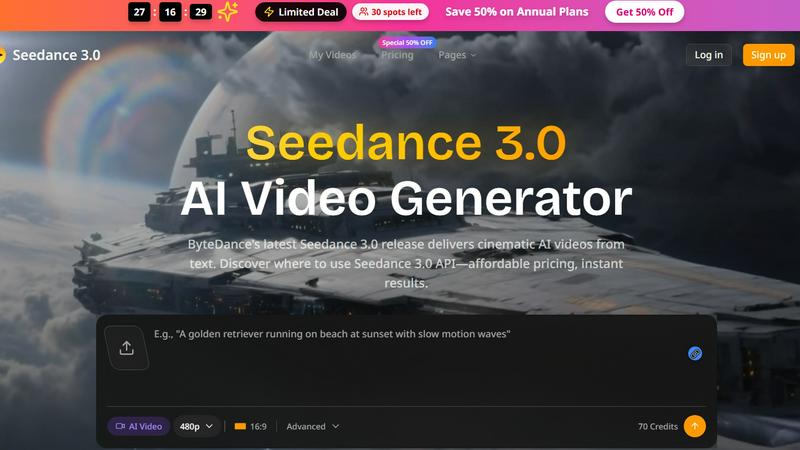
Visual Comparison
Seedance 3.0
SparkPix

Feature Comparison
Seedance 3.0
Broadcast-Quality Video Generation
Seedance 3.0 is engineered to produce videos that meet professional broadcast standards directly from text. Leveraging ByteDance's advanced AI models, it renders high-fidelity visuals, smooth motion, and coherent scenes that look like they came from a production studio, not an AI. This ensures your content stands out with a polished, credible look that captures and holds viewer attention from the first frame.
Intuitive Text-to-Video Prompting
The platform operates on a simple yet powerful principle: you describe it, Seedance creates it. Input a detailed text prompt describing your scene, style, and action, and the AI interprets your vision to generate a complete video sequence. This removes the need for storyboarding, filming, or complex editing software, putting rapid video creation directly into the hands of anyone with an idea.
Batch Processing for Catalogs
Scale your video production effortlessly with batch processing capabilities. E-commerce sellers and content managers can generate multiple videos for entire product catalogs or content series in one go. Simply provide a list of prompts or product details, and Seedance 3.0 handles the rest, ensuring consistent quality and style across all assets while saving countless hours of manual work.
Developer-Friendly API
Integrate the power of Seedance 3.0 directly into your own applications, workflows, or platforms using its robust API. This allows developers to automate video generation, build custom creative tools, or offer AI video features to their own users. The API provides flexible access to the core AI models, enabling seamless and scalable video production within existing ecosystems.
SparkPix
AI Photo Editor
SparkPix's AI Photo Editor allows you to type specific instructions like "remove background" or "enhance colors," and the AI processes your request in under 30 seconds. This feature is perfect for users who want quick edits without the hassle of complicated software.
Background Remover
With just a single click, the Background Remover feature lets you eliminate backgrounds from portraits, product photos, or complex scenes. It's an essential tool for creating professional images that stand out in presentations or social media.
Unblur Image
The Unblur Image feature utilizes advanced AI algorithms to fix motion blur, out-of-focus shots, and compression artifacts. This allows users to salvage their favorite photos that might have been compromised due to poor focus or camera shake.
Style Transfer
Transform your images into stunning works of art with the Style Transfer feature. Whether you want to convert your photo into an anime style, oil painting, or watercolor, SparkPix offers over 15 artistic styles to choose from, allowing for endless creative possibilities.
Use Cases
Seedance 3.0
E-commerce Product Videos
Create high-converting product showcases and promotional videos instantly. Sellers can generate videos with clean white backgrounds, dynamic lifestyle scenes, or seasonal themes without a photo studio. This enables rapid A/B testing of visual styles and the ability to keep product listings fresh and engaging, directly boosting sales and customer engagement.
Social Media Content Creation
Influencers and content creators can defeat creative burnout by generating eye-catching reels, story videos, and feed posts on demand. Seedance 3.0 helps maintain a consistent, high-quality visual brand across platforms like Instagram and TikTok, allowing creators to focus on their narrative and community while the AI handles the demanding visual production.
Indie App & Product Launches
Indie developers and makers can accelerate their launch cycles by creating professional marketing assets in minutes. Generate compelling app store preview videos, engaging OG (Open Graph) videos for social sharing, landing page hero loops, and animations for pitch decks. This lets builders focus on developing their product while Seedance 3.0 crafts the visuals that attract users and investors.
Branded Advertising & Campaigns
Marketing teams can rapidly prototype and produce branded visual content for campaigns. Whether for a new product launch from brands like Lancôme or Sony, or for creating thematic music visuals for platforms like Spotify, Seedance 3.0 allows for the quick iteration of ad concepts, style testing, and final asset generation, drastically reducing time-to-market for creative campaigns.
SparkPix
Family Photo Restoration
SparkPix is ideal for restoring old family photos that are faded, scratched, or damaged. Users can preserve cherished memories by repairing these images, making them suitable for sharing with loved ones or displaying in their homes.
E-commerce Product Photography
For online sellers, SparkPix provides tools to create professional product images that can enhance listings and attract buyers. The Background Remover and AI Image Generator features help create eye-catching visuals that showcase products effectively.
Social Media Content Creation
Users looking to create engaging social media content can leverage SparkPix to enhance their photos or apply creative styles. This feature is perfect for influencers and marketers who need to maintain a visually appealing online presence.
Artistic Exploration
Artists and creative individuals can use the Style Transfer feature to explore new artistic styles and techniques. By transforming photos into different art forms, users can experiment with their creativity and produce unique pieces for portfolios or exhibitions.
Overview
About Seedance 3.0
Seedance 3.0 is ByteDance's cutting-edge AI video generator, engineered to transform simple text prompts into broadcast-quality, cinematic videos in seconds. It's built for speed and professional results, eliminating the traditional barriers of time, cost, and technical skill associated with high-end video production. This tool is designed for a new generation of agile creators, marketers, and entrepreneurs who need to move fast and produce visually stunning content to capture attention. Whether you're an e-commerce seller needing product showcases, a social media influencer crafting viral reels, or an indie developer creating demo videos, Seedance 3.0 delivers. Its core value proposition is powerful simplicity: describe your vision in words, and let the AI handle the complex rendering, offering instant, studio-grade visuals that drive engagement and conversion. With an accessible API for developers and a platform trusted by over 3 million creators, Seedance 3.0 is more than a tool; it's a production partner that scales with your ambition.
About SparkPix
SparkPix is an innovative AI-powered photo editing tool designed for users who want to enhance their images without needing extensive Photoshop skills. Whether you are a professional photographer, an e-commerce seller, or just someone looking to restore family memories, SparkPix provides a user-friendly platform where you can edit photos simply by typing your desired changes. Its main value proposition lies in its ability to deliver quick, effective results, transforming your images in under 30 seconds. With features like background removal, photo restoration, and style transfer, SparkPix is perfect for anyone seeking to elevate their photography game or create stunning visuals for social media, marketing, or personal use. The platform is accessible via web browsers on desktops, iPhones, and Android devices, making it both versatile and convenient for users on the go.
Frequently Asked Questions
Seedance 3.0 FAQ
What is Seedance 3.0?
Seedance 3.0 is an advanced AI video generation platform developed by ByteDance. It allows users to create high-quality, cinematic videos simply by typing a text description of what they want to see. It's designed for professionals and creators who need fast, studio-grade video output without the complexity of traditional production.
Who typically uses Seedance 3.0?
Seedance 3.0 is used by a wide range of professionals, including e-commerce sellers, social media influencers, digital marketers, indie app developers, and content creation agencies. Its versatility makes it ideal for anyone who needs to produce engaging video content quickly, from product demos to viral social clips.
Is there an API available for developers?
Yes, Seedance 3.0 offers a comprehensive API (seedance3 API) that allows developers to integrate its AI video generation capabilities directly into their own applications, services, or automated workflows. This enables scalable, programmatic creation of video content.
How does Seedance 3.0 compare to other AI video tools?
Seedance 3.0, backed by ByteDance's research, is positioned as a tool that delivers "broadcast-quality" results. It competes with other leading models by emphasizing professional-grade output, ease of use through text prompting, and practical features like batch processing, making it a strong choice for commercial and professional creative work.
SparkPix FAQ
How does SparkPix ensure quick edits?
SparkPix employs advanced AI algorithms that process user requests in real-time. This allows for rapid photo editing, enabling users to see results in under 30 seconds.
Can I use SparkPix on mobile devices?
Yes, SparkPix is a web-based application that works seamlessly on desktop, iPhone, and Android devices. There is no need for downloads, making it easy to edit photos on the go.
Is there a limit to the number of free edits I can make?
Upon signing up, users receive 5 free credits to start editing. Additionally, you can earn 1 credit daily, allowing for continued access to the platform without immediate payment.
What types of artistic styles can I apply with SparkPix?
SparkPix offers over 15 artistic styles for transformation, including anime, oil painting, watercolor, and pencil sketches. This range allows users to explore various creative avenues and produce unique artwork.
Alternatives
Seedance 3.0 Alternatives
Seedance 3.0 is a powerful AI video generator from ByteDance, designed to create broadcast-quality videos directly from text prompts. It operates in the competitive AI Assistants and content creation space, offering both a user-facing platform and a developer API for integration. This makes it a go-to for professionals needing high-fidelity visual content generated at speed. Users often explore alternatives for several practical reasons. Cost and pricing structure are primary drivers, as budget constraints vary from individual creators to large enterprises. Others may seek different feature sets, specific platform integrations, or simply want to compare the output quality and creative control offered by different engines in a rapidly evolving market. When evaluating other options, focus on core needs. Prioritize the quality and style of video output, the flexibility of the pricing model, and the robustness of available APIs for automated workflows. Also, consider the tool's learning curve and the speed of generation, as efficiency is paramount in content production.
SparkPix Alternatives
SparkPix is an innovative AI photo editor that allows users to enhance and transform their images simply by typing commands. This web-based platform caters to a wide range of photo editing needs, from removing backgrounds to restoring old photos and applying artistic styles. Users often seek alternatives to SparkPix for various reasons, including pricing options, specific feature sets, or compatibility with their devices. With numerous choices available, it's essential to consider the ease of use, the range of editing capabilities, and the overall value offered when selecting an alternative. When exploring alternatives to SparkPix, prioritize platforms that offer user-friendly interfaces, efficient editing processes, and a good balance of features at competitive prices. Assessing the specific editing capabilities you require, such as background removal, photo restoration, or style transfers, can also help narrow down your options. Additionally, consider the accessibility of the platform across different devices to ensure a seamless editing experience.