GenMix vs SubtitlesFast
Side-by-side comparison to help you choose the right product.

GenMix
GenMix instantly creates stunning AI videos, images, and voiceovers using top models like Sora 2 and Veo 3.1.
Last updated: April 13, 2026

SubtitlesFast
SubtitlesFast instantly adds beautiful, animated subtitles to your videos in minutes.
Last updated: March 1, 2026
Visual Comparison
GenMix

SubtitlesFast
Feature Comparison
GenMix
Unified AI Model Dashboard
Access and compare the best AI generation models from a single control panel. Instantly switch between Sora 2 for cinematic scenes, Veo 3.1 for realistic motion, Kling 3.0 for artistic styles, Seedance 2.0 for dynamic animations, and Nano Banana for fast iterations. This feature saves you time and credits by letting you choose the perfect engine for each project without managing separate accounts or logins.
100+ Creative Effect Templates
Rapidly transform any video with a vast library of pre-built, magical AI effects. Apply trending styles like Motion Control, Transformation, or E-commerce enhancements with one click. Templates such as "Grow Wings," "Cartoon Doll," or "Hulk Dive" allow you to create engaging, professional-looking content in seconds, perfect for social media highlights and advertising.
AI Dance & Lip Sync Studio
Animate any character or subject with realistic dance moves synchronized to music or create perfect lip-sync videos for dialogue and songs. This specialized tool goes beyond standard video generation, enabling the creation of entertaining and engaging content for music videos, promotional clips, and digital avatars with unprecedented ease.
Multi-Format Content Generation
Generate every type of digital content from one platform. Seamlessly move between Text-to-Video, Image-to-Video, Text-to-Image, and Text-to-Speech tasks. This holistic approach streamlines complex projects, allowing you to create a full video package with custom visuals, scenes, and voiceovers without ever leaving GenMix.
SubtitlesFast
AI-Powered Auto-Transcription
Leverage cutting-edge AI to generate accurate subtitles in seconds, supporting over 50 languages. The engine captures speech with high precision, providing a solid transcript foundation that you can quickly review and edit. This feature strips away hours of manual typing, letting you focus on perfecting your message and style instead of tedious data entry.
Advanced Subtitle Styling & Animation
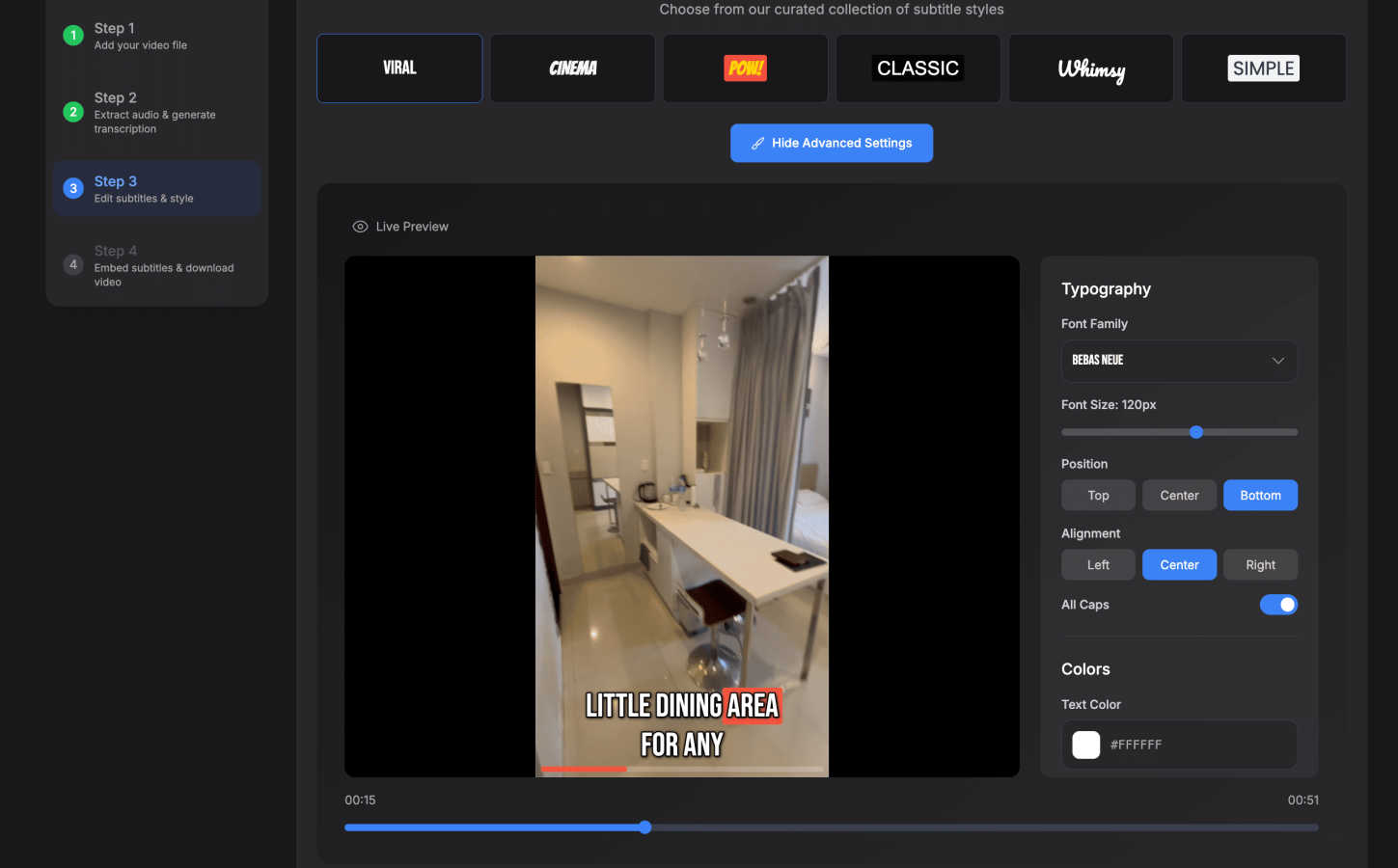
Go beyond basic text with a suite of design tools. Choose from 30+ animated styles and apply word-level highlighting to make your captions dynamic and engaging. Customize fonts, colors, positions, and effects to match your brand identity, ensuring your subtitles aren't just readable but are a visually compelling part of your video's storytelling.
Browser-Based, No-Download Editor
Access a full-featured, intuitive editing suite directly from your web browser. Upload your video, edit the transcript on a simple timeline, add background music or images, and export—all without installing a single piece of software. This guarantees a fast start, seamless updates, and complete privacy, as your video data never leaves your machine.
One-Click, Watermark-Free Export
Publish faster with instant exports optimized for all major platforms. With one click, download a final video with subtitles burned directly into the footage, perfectly formatted for TikTok, YouTube, Instagram Reels, and X. Even the free trial offers exports without any distracting watermarks, so you can publish professional content immediately.
Use Cases
GenMix
Social Media Content Creation
Produce a constant stream of eye-catching, trend-ready videos and images for platforms like TikTok, Instagram, and YouTube. Use AI Effects and templates to quickly remix existing footage or generate entirely new, viral-ready clips from simple text prompts, keeping your audience engaged and growing your follower count exponentially.
Marketing & Advertising Material
Craft high-impact promotional videos, product demos, and ad creatives in-house and on-demand. Generate realistic product shots, animate logos, and create compelling video ads with voiceovers, drastically reducing production costs and lead times compared to traditional agency workflows.
Educational & Explainer Videos
Transform complex concepts into clear, visually engaging explainer videos. Use the Text-to-Video and Text-to-Speech tools to quickly storyboard and produce educational content, training modules, or animated presentations that improve knowledge retention and viewer engagement.
Creative Storyboarding & Prototyping
Visualize ideas rapidly for films, games, or client pitches. Use the storyboard editor and text-to-image capabilities to generate concept art, scene variations, and narrative sequences, allowing teams to iterate on creative visions quickly and cost-effectively before full-scale production.
SubtitlesFast
Daily Social Media Content Creation
Ideal for creators posting daily vlogs, tutorials, or clips to TikTok, Instagram, or X. The sub-5-minute workflow from upload to publish means you can capture a moment, add engaging animated subtitles, and share it with your audience while it's still relevant, all from your phone or computer without slowing down your content cadence.
Enhancing Video Accessibility & Reach
Automatically make your content accessible to viewers who are deaf or hard of hearing, and to those who watch videos on mute. By adding accurate, styled captions, you not only comply with accessibility best practices but also significantly increase watch time and engagement across social media platforms where sound isn't always available.
Rapid Marketing & Promotional Videos
Marketers and small business owners can quickly produce polished promotional clips, product demos, or announcement videos. SubtitlesFast allows you to add professional, branded subtitles that capture attention in crowded feeds, convey key messages clearly, and drive action—all without needing a dedicated video editor or a large production budget.
Repurposing Long-Form Content
Easily clip and subtitle key moments from longer videos like podcasts, webinars, or YouTube videos for use on short-form platforms. The precise timeline editor and fast transcription let you quickly extract the most valuable snippets, add punchy captions, and create a stream of engaging teaser content to drive traffic back to your full-length material.
Overview
About GenMix
GenMix is the ultimate all-in-one AI content creation platform, engineered to supercharge your creative workflow. It consolidates the world's most advanced AI models into a single, intuitive dashboard, eliminating the need to juggle multiple subscriptions and interfaces. Whether you need to generate a viral video from a text idea, transform an image into a dynamic clip, create stunning visuals, or produce natural voiceovers, GenMix delivers professional-grade results in minutes. It's built for content creators, marketers, social media managers, educators, and business owners who demand high-quality output without the steep learning curve or high costs of traditional production. The core value proposition is unmatched efficiency: direct access to top-tier models like OpenAI's Sora 2, Google's Veo 3.1, Kling 3.0, and Nano Banana 2, paired with powerful editing tools like a storyboard editor, 100+ creative effect templates, AI Dance, and Lip Sync. GenMix transforms your imagination into reality faster than ever, making cutting-edge AI creativity accessible to everyone.
About SubtitlesFast
SubtitlesFast is the ultimate, browser-based accelerator for video creators. It's engineered for one mission: to transform a raw video clip into a polished, subtitled piece of content ready for social media in under five minutes. This tool eliminates the bloat and complexity of traditional video editors, focusing purely on the speed-to-publish workflow that daily creators, marketers, and vloggers demand. At its core is a powerful AI that automatically transcribes speech in over 50 languages with impressive accuracy. You then have full control to customize the look with extensive styling options, including word-level highlighting and animated text effects. The final export delivers a video with perfectly burned-in, engaging subtitles—all processed directly in your browser with no software to download. With a commitment to creator privacy and a generous free trial that includes exports without watermarks, SubtitlesFast is the agile, no-fuss solution for anyone serious about boosting engagement and growing their audience through accessible video.
Frequently Asked Questions
GenMix FAQ
What AI models are available on GenMix?
GenMix provides direct access to the latest and most powerful models, including OpenAI Sora 2, Google Veo 3.1, Kling 3.0, Seedance 2.0, and Nano Banana 2. The platform continuously updates to integrate new and improved models, ensuring you always have the best tools at your fingertips for any creative task.
Is there a free plan to try GenMix?
Yes, you can start for free immediately. New users receive free credits upon sign-up to test the platform's core capabilities, including video, image, and voice generation. No credit card is required for the initial free access, allowing you to explore and create without any commitment.
What kind of videos can I create with GenMix?
You can create a wide variety of videos: text-to-video from descriptions, image-to-video animations, video-to-video transformations using effects, AI dance videos, and lip-sync content. The platform supports various styles, from realistic footage and cinematic scenes to animated and stylized artistic creations.
How long does it take to generate an AI video?
Generation time varies by model and complexity. Simple text-to-image or voice generation takes seconds. For AI videos, generation typically takes between 1 to 5 minutes. Higher-quality settings or more complex prompts may take slightly longer, but the process is significantly faster than traditional video production.
SubtitlesFast FAQ
Is there really no software to download?
Yes, that's correct. SubtitlesFast is entirely browser-based. You access the full editor directly through your web browser (like Chrome or Safari). There are no downloads or installations required. You simply visit the website, upload your video, and start editing. This also means you get the latest features automatically every time you log in.
How accurate is the AI transcription?
The AI transcription is highly accurate for clear audio and supports over 50 languages. It's built specifically for the varied audio conditions found in creator content, like vlogs and social media clips. For best results, ensure your audio is as clear as possible. You always have full access to the transcript to make any quick corrections or adjustments on the easy-to-use timeline.
What video formats can I upload and export?
SubtitlesFast supports all common video file formats for upload, including MP4, MOV, and AVI. Your final exported video will be delivered as an MP4 file with the subtitles burned directly into the video track. This universal format is ready for immediate upload to any social media platform, including YouTube, TikTok, Instagram, and X.
Does the free trial include a watermark?
No. A key benefit of SubtitlesFast is that its free trial allows you to export your finished videos without any watermarks. You can create, style, and download your subtitled videos for publishing completely free of branding from SubtitlesFast, allowing you to evaluate the tool with real, publishable content.
Alternatives
GenMix Alternatives
GenMix is a leading all-in-one AI video and image generation platform. It consolidates over ten top-tier models like Sora 2 and Veo 3.1 into a single dashboard, enabling users to create everything from text-to-video to animated images and storyboards. This places it firmly in the competitive category of comprehensive, multi-model creative AI suites. Users often explore alternatives for various practical reasons. These can include budget constraints, a need for a different feature set, or a preference for a platform specializing in just one type of generation, like video or images. Some may seek simpler interfaces or different pricing structures that better match their project volume or team size. When evaluating other platforms, focus on your core needs. Key considerations are the specific AI models available, output quality, the range of creative tools (like lip-sync or templates), and overall workflow efficiency. The right choice balances raw generative power with a streamlined process that fits your creative or business objectives.
SubtitlesFast Alternatives
SubtitlesFast is a browser-based video subtitle tool designed for creators who need to add animated, engaging captions to their content with maximum speed and minimal friction. It falls squarely into the productivity and marketing categories, empowering users to make their videos more accessible and polished in minutes. Even with its streamlined approach, users often explore alternatives for various reasons. This could be due to specific budget constraints, a need for more advanced video editing features beyond subtitling, or a preference for a downloadable desktop application over a cloud-based service. Different workflows demand different tools. When evaluating other options, focus on your core needs. Key considerations include the accuracy and language support of the auto-transcription, the flexibility of the subtitle styling and animation, the overall platform's ease of use, and the final export quality. The right tool should match your pace without compromising on the professional finish your audience expects.