Changeflow vs SupaSidebar
Side-by-side comparison to help you choose the right product.

Changeflow
Changeflow delivers AI-driven insights on critical web page changes, ensuring you stay informed without the noise.
Last updated: March 4, 2026

SupaSidebar
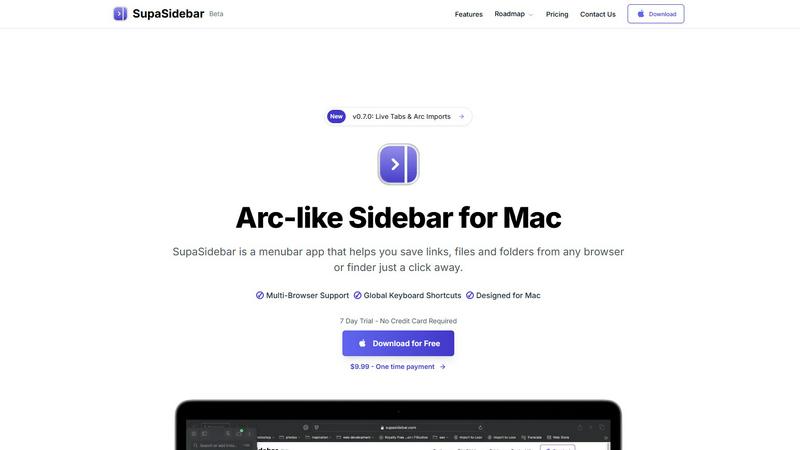
SupaSidebar gives you instant keyboard access to your links, files, and apps on Mac.
Last updated: February 28, 2026
Visual Comparison
Changeflow

SupaSidebar
Feature Comparison
Changeflow
AI-Powered Intelligence
Our AI technology filters out irrelevant changes and focuses on what truly matters to your business. Say goodbye to false alerts and wasted time on insignificant updates.
Natural Language Setup
No technical jargon or complex configurations are needed. Just describe what you want to track in simple English, and our system handles everything from there.
Customized Summaries
Receive concise, AI-generated summaries of updates that explain what changed and why it matters. This feature saves you time by providing only the most relevant information.
Advanced Anti-Blocking
Changeflow employs sophisticated anti-blocking technology to ensure reliable monitoring, even on challenging websites that often hinder other tools. Enjoy uninterrupted access to vital information.
SupaSidebar
Universal Browser Integration
SupaSidebar works flawlessly with every major browser you use, including Safari, Chrome, Firefox, Brave, and Arc. This universal compatibility means you can save the current webpage link directly to your sidebar from any browser instantly. No more switching contexts or manually copying and pasting URLs between applications. It creates a unified hub that sits above your browser choice, ensuring your workflow remains consistent and uninterrupted regardless of which window you're in.
Lightning-Fast Global Keyboard Shortcuts
Take control with powerful, system-wide keyboard shortcuts that work anywhere on your Mac. Press CMD+CTRL+S to instantly save the current website link directly to your sidebar. Use CMD+CTRL+K to open a blazing-fast search overlay to find any saved link, file, folder, or application. These shortcuts are designed for muscle memory, letting you access your entire digital workspace without ever touching your mouse, dramatically speeding up your navigation and task execution.
Intelligent Recents & Pinned Favorites
Never lose your work again. SupaSidebar's "Recents" feature automatically tracks every website you've visited in the last 48 hours, giving you a chronological lifeline back to your research or browsing session. For your core resources, use the "Pinned" section to keep essential links, files, and folders permanently anchored at the top of your sidebar for one-click access. This combination of automatic history and manual curation ensures both serendipitous rediscovery and reliable, instant access to your most critical items.
Native macOS Design & Local Data Storage
SupaSidebar is built from the ground up for the Mac experience, ensuring buttery-smooth performance and seamless integration with macOS aesthetics and behaviors. Critically, all your data—every saved link, file reference, and folder path—is stored locally on your machine. Nothing is sent to the cloud unless you choose to, guaranteeing your privacy and security. This lightweight, menubar-based approach keeps your desktop clean and clutter-free while providing powerful organization.
Use Cases
Changeflow
Competitor Pricing Monitoring
Business teams can leverage Changeflow to keep a close eye on competitor pricing strategies, ensuring they never miss critical changes that could impact their market position.
Regulatory Change Tracking
Compliance teams at Fortune 500 companies use Changeflow to monitor important regulatory updates, such as FDA guidance and SEC filings, ensuring they stay compliant and informed.
Legal Document Monitoring
Legal librarians at Am Law 200 firms utilize Changeflow to track court dockets and legal citations, streamlining their research process and maintaining accuracy in legal documentation.
News Mention Tracking
Changeflow enables teams to follow news mentions relevant to their business or industry, providing timely updates that can influence strategic decision-making and public relations efforts.
SupaSidebar
The Deep Work Researcher
When conducting online research, you often have dozens of tabs open across multiple articles, papers, and sources. SupaSidebar cuts through the chaos. Save every relevant source to your sidebar with a single shortcut as you browse. Later, use the powerful search or Recents list to instantly jump back to any source without sifting through a mountain of tabs. Keep key reference materials pinned for constant access, turning a fragmented research session into a streamlined, organized process.
The Multitasking Project Manager
Juggling multiple projects means constantly switching between communication apps, project docs, design files, and tracking tools. SupaSidebar acts as your central command panel. Pin the Trello board, Google Doc, Figma file, and Slack channel for each active project into dedicated spaces. With a quick CMD+CTRL+K, type the project name and jump directly to the required resource in seconds. It eliminates app-switching friction and keeps all project assets at your fingertips.
The Creative Professional
Creatives juggle inspiration links, asset folders, brand guidelines, and creative software. SupaSidebar streamines this creative toolkit. Save mood board URLs, pin your local folder of stock assets, and keep your go-to design apps handy. When moving from brainstorming in a browser to executing in a design app, everything you need is in one consistent sidebar, preventing disruptive searches through Finder or bookmarks and helping you maintain your creative flow.
The Developer & Technical Power User
Developers context-switch between API documentation, GitHub repositories, local project folders, and terminal sessions constantly. SupaSidebar supercharges this workflow. Pin your most-visited docs, save crucial Stack Overflow answers, and have quick links to your active project directories. Use global shortcuts to log references without leaving your code editor. It reduces context-switching overhead, keeping your development environment tight and efficient.
Overview
About Changeflow
Changeflow is an innovative web monitoring tool designed to help businesses keep track of significant changes across various web pages effortlessly. Utilizing advanced AI technology, Changeflow not only identifies when a page has changed but also interprets the context and summarizes the updates that matter most. This solution is ideal for teams across various sectors, including legal, compliance, marketing, and business strategy, who need timely updates on competitor pricing, regulatory changes, or market movements without sifting through irrelevant information. By allowing users to simply describe what they want to monitor in plain English, Changeflow eliminates the need for technical setup, making it accessible to everyone. With a remarkable 99.9% success rate in unblocking pages that other tools struggle with, Changeflow has become a trusted partner for Fortune 500 companies and Am Law 200 firms, enhancing their operational efficiency and decision-making processes.
About SupaSidebar
SupaSidebar is a game-changing menubar application for Mac that redefines digital workspace efficiency. It's a beautifully designed, Arc-inspired sidebar that provides instant, centralized access to everything you need: links, files, folders, and apps. Built specifically for macOS, it seamlessly integrates with Safari, Chrome, Firefox, Brave, and Arc, allowing you to save resources from any browser or Finder with a single click or keyboard shortcut. SupaSidebar is engineered for the modern professional who refuses to let disorganization slow them down. Whether you're a developer context-switching between projects, a researcher compiling sources, a creator managing assets, or a power user tired of tab overload, SupaSidebar eliminates friction. It keeps your essential tools just a keystroke away, enabling you to browse faster, find anything instantly, and maintain a state of deep focus without the clutter of scattered windows or lost bookmarks. Your data stays private and local on your Mac, and with its lightweight, native design, SupaSidebar doesn't just add a tool—it transforms your entire workflow into a streamlined, keyboard-driven command center.
Frequently Asked Questions
Changeflow FAQ
How easy is it to set up Changeflow?
Setting up Changeflow is incredibly straightforward. Simply describe the web pages you want to monitor and the specific updates you are interested in, and our AI will take care of the rest with no technical setup required.
Can I track multiple pages at once?
Absolutely! Changeflow allows you to monitor multiple pages simultaneously. You can add sources quickly using our AI agent, making it easy to scale your tracking efforts.
What happens if a page is blocked?
Changeflow employs advanced anti-blocking technology, ensuring that we achieve a 99.9% success rate in accessing pages that other tools often struggle with. You can rely on us to keep your monitoring uninterrupted.
How are updates delivered to me?
You will receive clear, concise summaries via your preferred communication channel, whether that be email, dashboard notifications, or integrations with platforms like Zapier. Stay informed without the noise.
SupaSidebar FAQ
Is SupaSidebar a browser extension?
No, SupaSidebar is not a browser extension. It is a standalone, native macOS application that runs from your menubar. It integrates with your browsers at a system level to read the current tab's URL, but it operates independently. This means it works uniformly across Safari, Chrome, Firefox, Brave, and Arc without requiring individual extension installation or management.
Which browsers does SupaSidebar work with?
SupaSidebar offers seamless integration with all major browsers on macOS. This includes Safari, Google Chrome, Mozilla Firefox, Brave, and the Arc browser. The application is designed to detect and work with the currently active tab in any of these supported browsers, allowing you to save links and interact with your web content consistently from a single, unified sidebar.
Where is my data stored?
All your data is stored locally and privately on your Mac. Your saved links, file paths, and organizational structure (like pins and spaces) are kept on your own machine. SupaSidebar does not upload your personal browsing data or saved items to any external cloud servers by default, ensuring your privacy and security are maintained.
What macOS version do I need?
SupaSidebar requires macOS 13 (Ventura) or a newer version to operate. This ensures the application can utilize the latest macOS frameworks and technologies to deliver a stable, performant, and deeply integrated experience that aligns with modern Apple system design and security standards.
Alternatives
Changeflow Alternatives
Changeflow is an AI-driven tool designed to deliver market and competitor insights by monitoring web pages for significant changes. Categorized under productivity and management, Changeflow stands out by not just alerting users that something has changed, but by providing a contextual summary of the important information. This makes it invaluable for business teams, legal professionals, and compliance departments looking to stay ahead in fast-paced environments. Users often seek alternatives to Changeflow for various reasons, including pricing, feature sets, and specific platform requirements. A suitable alternative should offer similar capabilities while addressing unique needs, such as user-friendly interfaces, integration options, and reliability in tracking complex web pages. When choosing an alternative, consider factors like ease of setup, the ability to handle dynamic content, and the availability of collaborative tools to enhance team communication and workflow efficiency.
SupaSidebar Alternatives
SupaSidebar is a premium Mac productivity tool designed to centralize your digital workspace. It acts as a smart sidebar, giving you instant keyboard-driven access to links, files, and apps to eliminate distractions and maintain your workflow. It falls squarely into the productivity and window management category, helping users streamline their daily computer use. Users often explore alternatives for various practical reasons. Cost is a common factor, as premium tools require an investment. Others might seek different feature sets, like deeper integration with specific apps or cross-platform availability for those who also use Windows or Linux. The search for the right fit is all about matching a tool's capabilities to your unique workflow. When evaluating an alternative, focus on core needs. Consider how it handles your primary tasks: organizing links, managing open tabs, and providing quick access. Look for a clean, non-intrusive interface and reliable performance. The best choice will feel like a natural extension of your habits, removing friction rather than adding new steps to your process.