
HypeShare
HypeShare lets you send large files securely with end-to-end encryption, up to 10GB free, and no signup required.
Visit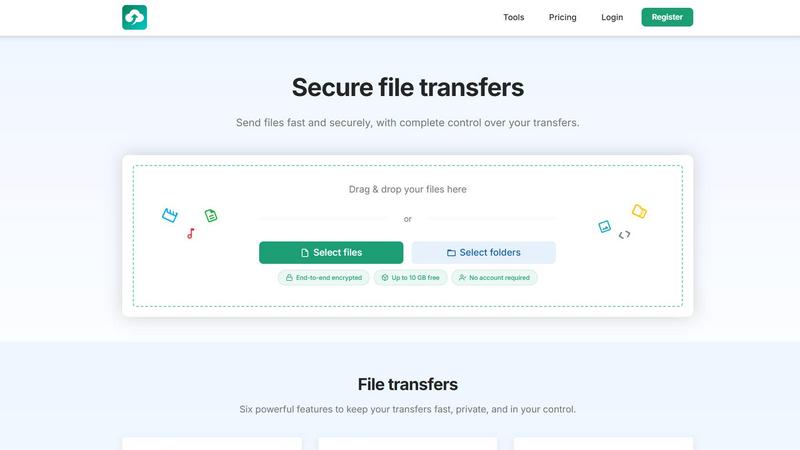
About HypeShare
HypeShare is a secure file transfer platform engineered for speed, privacy, and zero friction. It eliminates the bloat and complexity of traditional file-sharing tools, offering a streamlined experience for sending large files up to 10GB without requiring an account. For users who need more, a free sign-up unlocks 20GB of storage, encrypted transfers, custom expiry links, and powerful file request pages. HypeShare is built for freelancers, agencies, and teams who demand a fast, no-nonsense alternative to sluggish platforms like WeTransfer, Dropbox, or Google Drive. The core value proposition is simple: get your files from point A to point B with maximum speed, end-to-end encryption, and complete control over access, duration, and download limits. Recipients never need an account, making it ideal for client collaboration. For power users, Pro plans unlock unlimited transfers, massive storage, download notifications, and priority support. Whether you are a designer sending a final mockup, a photographer collecting client images, or a business exchanging sensitive documents, HypeShare delivers a dynamic, agile, and secure environment where efficiency is the default. The platform also features a dedicated file request system, allowing anyone to upload files directly to your dashboard using a custom link, with no login required on their end. With a focus on privacy, HypeShare ensures every transfer is encrypted, and you decide how long files live and how many times they can be downloaded.
Features of HypeShare
Instant Transfer Links
Create and share transfer links in seconds with no account required for you or your recipient. Simply drag and drop files up to 10GB, and HypeShare generates a unique, shareable link instantly. This feature is designed for speed, eliminating the need for email attachments or complex upload processes. You retain full control over the link, including the ability to set expiration dates and download limits, ensuring your data remains secure and accessible only to the intended audience.
End-to-End Encryption
Every file transferred through HypeShare is protected with robust end-to-end encryption. This means your data is scrambled on your device and only decrypted on the recipient's device, making it unreadable to anyone in between, including HypeShare itself. This feature is critical for freelancers and businesses handling sensitive information like contracts, legal documents, or proprietary designs. It provides peace of mind that your files are safe from unauthorized access during transit.
Custom Expiry and Download Controls
Take complete command of your transfers with granular control over access. You can set an automatic expiration date for each link, after which the file is permanently deleted from HypeShare's servers. Additionally, define exactly how many times a transfer can be downloaded, preventing over-sharing or accidental distribution. This feature is perfect for time-sensitive projects, limited-release assets, or when you need to ensure a file is only seen by a specific client once.
File Request Pages
Receive files from anyone without them needing an account. Create a custom, branded request link (e.g., hypeshare.io/request/yourname) and share it via email or anywhere. Senders simply drag and drop their files onto your request page, and the files land directly in your HypeShare dashboard. You can set an expiry date for each request and receive email notifications every time a new upload arrives. This is a game-changer for collecting assets from clients, collaborators, or event attendees.
Password Protection
Add an extra layer of security to your transfers by requiring a password for access. When you send a file, you can set a unique password that the recipient must enter before they can download. This ensures that even if your shareable link falls into the wrong hands, the file remains protected. It is an ideal feature for confidential business proposals, personal documents, or any situation where you need to verify the recipient's identity.
Email Notifications and Download Tracking
Stay informed with real-time updates on your transfers. HypeShare sends you an email notification every time a recipient downloads your file, so you know exactly when your content has been received. For Pro users, this extends to detailed transfer analytics, giving you insights into how many times a file was downloaded and when. This feature eliminates the guesswork of "did they get it?" and helps you manage your workflow with precision.
Use Cases of HypeShare
Freelancers Sending Large Project Files
Freelancers such as graphic designers, video editors, and photographers frequently need to send large files like high-resolution images, video renders, or print-ready PDFs. HypeShare allows them to send files up to 10GB without an account, or sign up for 20GB of storage. The custom expiry and download controls ensure that client assets are not left accessible indefinitely. The email notification feature confirms when the client has downloaded the file, allowing the freelancer to move on to the next task immediately.
Agencies Collecting Client Assets
Marketing agencies and creative studios often struggle to get clients to upload logos, brand guidelines, or raw footage. With HypeShare's File Request pages, agencies can create a custom upload link and send it to the client. The client simply drags and drops files, no account needed. The agency receives an email notification the moment files arrive, and all assets are organized in their dashboard. This eliminates endless email threads and clunky FTP setups, saving hours of administrative time.
Businesses Sharing Confidential Documents
For businesses that need to share contracts, financial reports, or legal documents securely, HypeShare provides end-to-end encryption and password protection. A manager can send a sensitive file with a unique password and set it to expire after 48 hours. The recipient receives a secure link, enters the password, and downloads the file. This ensures compliance with data privacy standards and prevents sensitive information from lingering on servers indefinitely.
Teams Collaborating on Time-Sensitive Projects
Project teams working on tight deadlines need to move files fast. HypeShare's instant transfer links and unlimited transfer capabilities (on Pro plans) allow team members to share updated assets, prototypes, or presentations in seconds. The ability to set download limits ensures that a final version is not accidentally distributed before approval. With download notifications, the team lead knows exactly when each member has received the latest file, keeping the project on schedule.
Frequently Asked Questions
Do I need to create an account to send files?
No, you do not need an account to send files up to 10GB. You can simply drag and drop your files, and HypeShare will generate a shareable link. However, creating a free account gives you 20GB of storage, the ability to manage your transfers, create file request pages, and set custom expiry and download limits.
How secure are my files on HypeShare?
Your files are secured with end-to-end encryption, meaning they are encrypted on your device and only decrypted on the recipient's device. HypeShare cannot access the content of your files. You can also add password protection and set automatic expiration dates for an extra layer of security.
What is a File Request and how does it work?
A File Request is a feature that allows you to receive files from anyone without them needing an account. You create a custom request link (e.g., hypeshare.io/request/yourname) and share it. When someone uploads a file via that link, it appears directly in your HypeShare dashboard. You can set an expiry date for the request and receive email notifications for each upload.
What happens to my files after they expire?
When a transfer reaches its expiration date, the file is automatically and permanently deleted from HypeShare's servers. This applies to both sent files and file requests. You can set expiration dates ranging from a few hours to unlimited retention, depending on your plan. For free accounts, data is retained for 30 days, while Pro accounts have unlimited retention.
Pricing of HypeShare
HypeShare offers three tiers to match your needs, from occasional use to heavy production work. All plans benefit from end-to-end encryption and a no-ads experience.
Guest (No Account Required): This is a free, anonymous tier for quick transfers. You get 5 transfers per month, up to 10 files per transfer, with a maximum file size of 10GB. Each transfer allows up to 100 downloads and 5 email sends. Data is retained for 7 days. Includes file encryption and custom alias. No storage is provided.
Free (Registered Account): This plan is free to register and offers 10 transfers per month, up to 10 files per transfer, with 20GB of storage. You can send files up to 10GB each, with 100 downloads and 5 emails per transfer. Data is retained for 30 days. Includes file encryption, custom alias, file requests, and transfer analytics. No branded downloads or priority support.
Pro (8.99 USD / month): The most popular plan for professionals. It unlocks unlimited transfers and unlimited files. You get 1000GB of storage and can send files up to 200GB each. Enjoy unlimited download counts and 50 emails per transfer. Data retention is unlimited. Includes all Free features plus branded downloads, priority support, download notifications, and the ability to use up to 5 custom domains.
Similar to HypeShare

Product tours, onboarding checklists, changelogs, roadmaps, NPS and in-app feedback for SaaS teams in one no-code tool.


Crowdstax helps startups and builders launch, grow, and stay visible with a powerful platform for product discovery and community traction.

TheToolsVerse is a curated AI tools directory that verifies free access limits so you can quickly find, compare, and deploy the best tools for your.

CodeAva is a browser-based toolkit that audits websites, validates code, and formats data so you can ship faster without signup.

ROIpad market research delivers data-driven insights to refine your B2B SaaS positioning, ensuring effective messaging and market alignment.

Whop Trends reveals trending products daily, helping you capitalize on market opportunities and boost your income.