
CodeAva
CodeAva is a browser-based toolkit that audits websites, validates code, and formats data so you can ship faster without signup.
Visit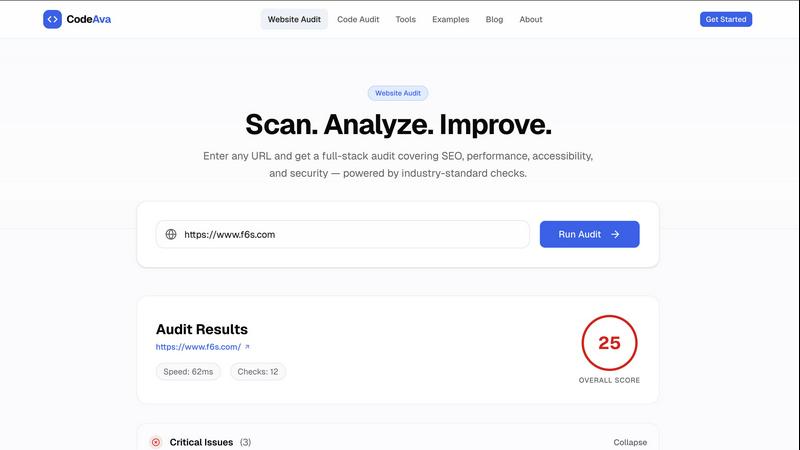
About CodeAva
CodeAva is a browser-based developer productivity platform engineered to eliminate the friction of small, repetitive technical tasks that drain development velocity. It delivers a suite of fast, privacy-focused online tools for debugging, validation, formatting, conversion, and other everyday workflow needs, all without cluttered interfaces, intrusive ads, or unnecessary software installations. The platform is designed for developers, QA engineers, support teams, technical SEO professionals, and product managers who need to work with JSON, timestamps, tokens, headers, hashes, text comparison, robots.txt, sitemaps, and other common web and data utilities directly in the browser. CodeAva goes beyond simple utilities by offering website audits and code audits that surface actionable findings grouped by severity and category. The core philosophy is simple: open a tool, solve the problem, and move on quickly. No signup is required for core tools, and all processing happens browser-side where applicable to protect user privacy. The broader vision is to evolve from one-off utilities into an Automated Validation Assistant that helps technical users validate, troubleshoot, and audit increasingly complex workflows over time. CodeAva is built for real engineering workflows, where speed, accuracy, and minimal friction are non-negotiable.
Features of CodeAva
Website Audit
Run comprehensive audits on public web pages to check for metadata completeness, canonical tags, crawl signals, security headers, Open Graph tag presence, and key technical SEO issues. Results are grouped by category and severity, turning a wall of undifferentiated warnings into a prioritized action list. Each finding includes specific, actionable explanations in plain language, so you know exactly what needs attention and why. No login or setup required, just paste a URL and get immediate results.
Code Audit
Paste any code snippet and receive instant feedback on risky patterns, maintainability concerns, and practical quality issues. The audit engine analyzes your code for complexity, anti-patterns, and potential security risks, then presents findings with clear severity ratings and plain-language explanations. This feature helps developers catch issues before they reach production, turning noisy checks into useful, actionable insights that improve code quality and reduce technical debt.
Developer Tools Suite
Access a comprehensive collection of browser-based utilities for formatting, validation, decoding, and comparison. Tools include JSON formatter and validator, JWT decoder, regex tester, text diff viewer, hash generator, QR code creator, HTTP header analyzer, and more. All tools run directly in your browser with no data sent to servers, ensuring complete privacy. The interface is clean and minimal, designed for speed: open a tool, complete your task, and move on without distractions.
Automated Validation Assistant
CodeAva is evolving beyond individual utilities into an intelligent system that helps technical users validate, troubleshoot, and audit more complex workflows. The platform groups findings by relevance and severity, highlights quick wins, and points to practical next steps. This feature reduces cognitive load by presenting only what needs attention, allowing engineers to focus on fixing issues rather than sifting through noise. It is built to catch issues earlier in the development cycle and turn chaotic checks into structured, actionable reports.
Use Cases of CodeAva
Pre-Deployment Website Validation
Before shipping a new page or update, run a quick website audit to verify metadata, canonical tags, security headers, and Open Graph completeness. This catches missing or incorrect signals that could harm SEO performance or user trust. QA teams can use the grouped findings to create prioritized fix lists, ensuring that critical issues like missing HTTPS redirects or absent meta descriptions are addressed before launch. The process takes seconds and requires no setup.
Code Review and Quality Assurance
During code reviews, paste suspicious or complex code snippets into the Code Audit tool to get instant feedback on risky patterns, maintainability issues, and security vulnerabilities. This speeds up the review process by automatically flagging common problems, allowing reviewers to focus on logic and architecture. The severity ratings help teams decide which issues to fix immediately and which can be deferred, making the review process more efficient and objective.
Technical SEO Troubleshooting
When investigating ranking drops or crawl issues, use the Website Audit to check pages for canonicalization errors, missing sitemaps, broken Open Graph tags, and security header gaps. The tool surfaces specific problems like relative canonical URLs or missing robots.txt directives, providing clear guidance on fixes. Technical SEO professionals can quickly audit multiple pages without leaving the browser, making it ideal for rapid diagnostics during client work or internal site maintenance.
Rapid Data Formatting and Validation
When working with APIs, configuration files, or data pipelines, use the Developer Tools suite to format, validate, or convert data formats like JSON, JWT tokens, or timestamps. The diff tool helps compare configuration changes between environments, while the hash generator verifies file integrity. These utilities eliminate the need to switch between multiple browser tabs or command-line tools, keeping you focused on the task at hand and reducing context switching overhead.
Frequently Asked Questions
Do I need to sign up or create an account to use CodeAva?
No, signup is not required for any of the core tools. You can access the website audit, code audit, and all developer tools directly in your browser without creating an account or providing any personal information. This is by design to ensure you can solve problems quickly without friction.
Is my data safe when using CodeAva's browser-based tools?
Yes, privacy is a core principle. All developer tools run entirely in your browser with no data sent to external servers. For website audits, the tool only accesses publicly available page data, and no audit results are stored on our servers. Your code snippets and URLs remain private and are processed locally or anonymously.
What types of issues does the Code Audit tool detect?
The code audit analyzes snippets for risky patterns, maintainability concerns, and practical quality issues. This includes complexity warnings, potential anti-patterns, security vulnerabilities, and code smells. Each finding is presented with a severity rating and a plain-language explanation of the issue and why it matters, helping you prioritize fixes.
Can I use CodeAva for commercial or agency work?
Absolutely. CodeAva is built for engineers, agencies, QA teams, and technical site owners who need to validate work before shipping. The tools are designed for practical, real-world workflows and can be used to audit client sites, review code in collaborative projects, or perform routine quality checks. All core tools are free to use with no usage limits.
Similar to CodeAva

LetsLaunch is a product launch directory for SaaS and micro-SaaS founders who want to publish a new product and reach people browsing startup tools. I


ChatReconstruct turns multiple messy chat screenshots into one coherent English conversation using context-aware AI translation.


Browser-based JSON, Markdown, and TXT translation that preserves keys, paths, and project structure.

