
ButterKit
ButterKit helps developers create stunning App Store screenshots and translated metadata in seconds to reach more users faster.
Visit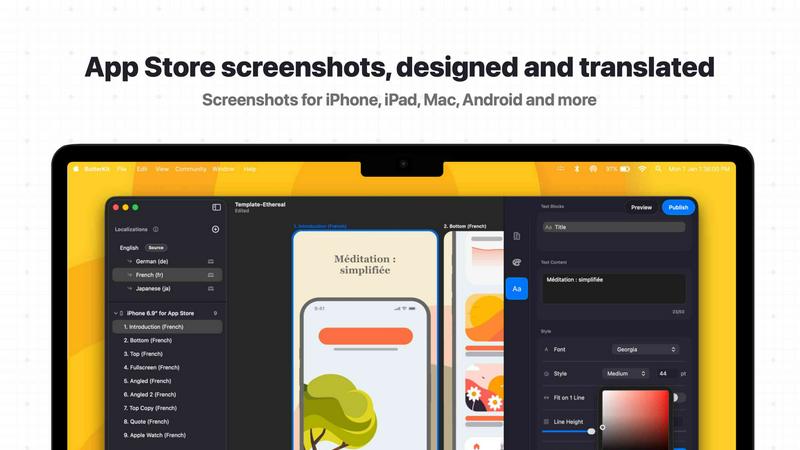
About ButterKit
ButterKit is a native macOS application engineered to streamline and automate the entire App Store publishing workflow for Apple developers. It is purpose-built for iOS and macOS developers, designers, and marketing teams who need to create high-converting App Store listings without the manual drudgery. At its core, ButterKit solves three major pain points: capturing polished screenshots, designing them in photorealistic 3D device frames, and localizing all assets for a global audience. The app integrates directly with Xcode Simulator, allowing users to capture screenshots with a single click, then instantly place them into stunning 3D devices that render at up to 120fps using Apple's Metal framework. Beyond design, ButterKit leverages advanced AI models to translate app metadata and screenshots into all 50 App Store Connect languages in seconds. It then connects directly to the App Store Connect API for one-click uploads. The tool is built for efficiency at scale: it can link entire folders of images for batch processing, making it a natural fit for CI/CD pipelines and Fastlane workflows. Developed by a solo developer who understands the grind of App Store publishing, ButterKit is designed to eliminate repetitive tasks, reduce time-to-market, and improve conversion rates through professional, localized visuals. Thousands of developers worldwide rely on ButterKit to reach more users with less effort.
Features of ButterKit
Capture Screenshots with Speed
ButterKit transforms the tedious screenshot process into a lightning-fast operation. Users can drag and drop PNG or JPG images directly onto 3D device frames, or capture directly from the Xcode Simulator with a built-in capture tool. Unlike web-based tools that require manual file handling, ButterKit integrates natively with Xcode, enabling rapid iteration to get the exact design you want. For power users, the app supports linking entire folders of screenshots, such as those generated by Fastlane or Xcode UI tests, processing them automatically with all localizations intact.
Real 3D Device Rendering Engine
ButterKit is not a simple overlay tool; it is a powerful 3D rendering engine built on Apple's Metal framework. It provides high-resolution photorealistic 3D devices that can be rotated, scaled, and positioned with ease. The devices are fun and intuitive to adjust, allowing you to achieve the perfect angle and lighting for your screenshots. Edits are rendered at up to 120fps, ensuring a smooth, responsive design experience. This level of realism helps create the polished, professional screenshots that drive conversions on the App Store.
Professional Design and Templating
Designing from scratch is fast, but starting from a template is faster. ButterKit comes bundled with high-quality, professionally designed templates that can be applied in one click. Users can also access a growing community marketplace of templates and add-ons. The design tools include pro-level editing capabilities: span 3D devices across multiple artboards, create seamless panoramic backgrounds, and control every detail from fonts and gradients to backgrounds. This flexibility ensures your App Store listing stands out, whether you are a solo developer or a large design studio.
AI-Powered Translation and One-Click Publishing
Localization is no longer a bottleneck. ButterKit uses advanced AI models to instantly translate your screenshots and app metadata into all 50 App Store Connect languages. Designs remain perfectly synced across languages, so you don't have to manually adjust layouts for each locale. Once your assets are ready, the app integrates with the App Store Connect API to batch export images or upload them directly to the store in the correct order. You can even preview how your app's story will look on every device and in every language before hitting publish.
Use Cases of ButterKit
Solo Developers Publishing Apps
Independent developers often wear many hats, and App Store listing creation is a time sink. ButterKit allows a solo developer to capture screenshots from Xcode Simulator, apply a professional 3D frame, translate metadata into 50 languages, and upload everything in minutes. This automation frees up hours of manual work, letting the developer focus on building features and improving the app itself.
Design Agencies Managing Multiple Clients
Design studios handling App Store listings for multiple clients need consistency and speed. ButterKit's template marketplace and folder-linking capabilities allow agencies to create branded templates once, then batch process screenshots for dozens of apps. The ability to preview all languages and devices before upload ensures quality control, while the one-click upload to App Store Connect eliminates repetitive manual steps across different client accounts.
Marketing Teams Running A/B Tests
Marketing teams focused on conversion rate optimization need to iterate quickly on visuals. ButterKit's fast 3D rendering and direct capture from Simulator enable rapid A/B testing of different device angles, backgrounds, and text overlays. The AI translation feature ensures that test variations are localized simultaneously, so teams can launch multilingual experiments without waiting for translation services.
Enterprise CI/CD Pipelines
Large development teams using Fastlane or Xcode UI tests to generate screenshots automatically can integrate ButterKit directly into their CI/CD workflows. By linking a folder of generated screenshots, ButterKit processes all assets, applies device frames, translates text, and exports the final files. This turns App Store listing preparation into a fully automated step in the deployment pipeline, reducing human error and accelerating release cycles.
Frequently Asked Questions
How does ButterKit capture screenshots from Xcode Simulator?
ButterKit includes a native capture tool that integrates directly with Xcode and the iOS Simulator. When you run your app in the Simulator, you can trigger a capture from within ButterKit without needing to use the Simulator's built-in screenshot function. The tool captures the exact screen state, crops it automatically, and places it into the selected 3D device frame. This saves multiple steps and allows for rapid iteration to get the perfect design.
Can ButterKit handle screenshots generated by Fastlane or automated UI tests?
Yes, absolutely. ButterKit is designed to integrate seamlessly with automation tools like Fastlane. You can link an entire folder of screenshots, including those with localization suffixes, and the app will process them in batch. It recognizes file naming conventions and applies the correct device frames and translations automatically. This makes it a natural fit for CI/CD pipelines where screenshots are generated programmatically.
Does ButterKit support all 50 App Store Connect languages?
Yes, ButterKit uses advanced AI models to translate both app metadata and text within screenshots into all 50 languages supported by App Store Connect. The translations are applied instantly, and the designs remain synced across all language variants. You can preview how each language will look on every device before uploading, ensuring nothing is lost in translation.
How does the App Store Connect upload feature work?
ButterKit integrates directly with the App Store Connect API. After you have designed your screenshots and translated your metadata, you can initiate a one-click upload from within the app. ButterKit will connect to your App Store Connect account, organize the screenshots in the correct order for each device and language, and submit them. You can also batch export images to your local drive if you prefer to upload manually or use a different workflow.
Similar to ButterKit

Moderation, routing, intent and scoring for any text over one Jev-compatible API, hosted in the EU.

A free directory of 950+ projects built on Laya, the open-source decision model. Updated daily.

The #1 Native Form Builder Plugin for Framer - No Code, No Embeds, No External Platforms.

Where modern software products get discovered, launched, and distributed. Explore verified AI tools, SaaS startups, and developer software.

Explore Flux LoRA workflows online with a focused AI Studio, model discovery roadmap, and guided training plans.


