
BoltShot
BoltShot delivers ultra-fast, high-quality screenshots from any URL with a simple API that requires no browser management.
Visit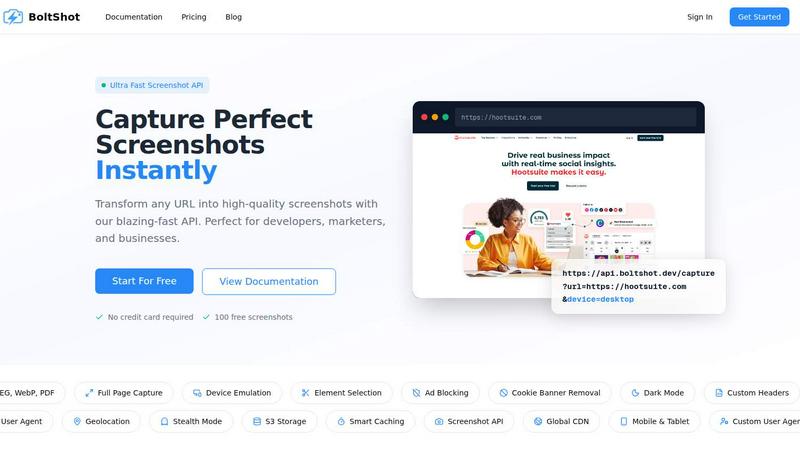
About BoltShot
BoltShot is a high-performance website screenshot API engineered to transform any URL into pixel-perfect images and PDFs through a single, simple API request. It is built for developers, marketers, and businesses who need to capture web content instantly without the overhead of managing browser infrastructure, headless Chrome clusters, or complex rendering pipelines. The core value proposition is speed and reliability: BoltShot delivers blazing-fast capture times while supporting a wide array of output formats including PNG, JPEG, WebP, and PDF. Beyond basic screenshots, the platform offers full-page capture with automatic scrolling, device emulation for mobile, tablet, and desktop viewports, and precise element targeting using CSS selectors. Built-in intelligence removes distractions like cookie banners, ads, and popups automatically, ensuring every screenshot is clean and professional. Advanced capabilities such as ad blocking, dark mode rendering, custom headers, geolocation emulation, stealth mode, and S3 uploads with global CDN delivery make BoltShot a comprehensive solution for demanding workflows. Whether you need e-commerce previews, automated reporting, web archiving, visual regression testing, or compliance monitoring, BoltShot integrates seamlessly into your existing stack. With a 99.9% success rate, sub-100ms response times, and smart caching that accelerates repeat captures, BoltShot eliminates the operational headaches of self-managed solutions. It is designed for teams that value efficiency, scalability, and zero maintenance overhead. Start with 100 free screenshots and no credit card required.
Features of BoltShot
Multi-Format Output & Full-Page Capture
BoltShot supports four major output formats: PNG, JPEG, WebP, and PDF, giving you complete flexibility for any use case from web previews to archival documents. The full-page capture feature automatically scrolls through entire web pages, stitching together a seamless screenshot that captures content below the fold. This eliminates the need for manual scrolling or multiple captures, saving significant time when documenting long articles, landing pages, or product listings. Combined with custom viewport settings, you can specify exact dimensions for pixel-perfect results every time.
Intelligent Clean Capture Technology
Say goodbye to cluttered screenshots. BoltShot automatically detects and removes cookie consent popups, advertisement banners, modal dialogs, and notification overlays that typically ruin automated captures. This clean capture technology ensures your screenshots look professional and distraction-free without any manual post-processing. The system uses advanced heuristics to identify and eliminate these elements while preserving the core content, making it ideal for marketing materials, client presentations, and compliance documentation where image quality and clarity are paramount.
Device Emulation & Element Targeting
BoltShot provides built-in presets for mobile, tablet, and desktop viewports, allowing you to test and capture how your website renders across different devices with a single API parameter. For even greater precision, the element targeting feature lets you use CSS selectors to capture specific page components such as a product card, a hero section, or a pricing table. This granular control is invaluable for developers performing visual regression testing, designers gathering UI references, or marketers creating targeted social media assets from specific page sections.
Advanced Performance & Storage Features
BoltShot is engineered for speed and reliability. Smart caching stores previously captured screenshots and serves them in under 100ms, dramatically reducing latency for repeat requests. The platform supports direct S3 uploads with global CDN delivery, ensuring your screenshots are stored securely and delivered instantly to users worldwide. Additional advanced capabilities include custom user agents for simulating different browsers, geolocation emulation for testing region-specific content, stealth mode to avoid bot detection, and custom headers for authenticated sessions. These features make BoltShot a robust tool for enterprise-grade automation and testing workflows.
Use Cases of BoltShot
Automated Visual Regression Testing
Development teams can integrate BoltShot into their CI/CD pipelines to automatically capture screenshots of web applications before and after code deployments. By comparing full-page captures or specific elements across different viewports, teams can instantly detect visual regressions, layout shifts, or broken UI components. This eliminates manual visual inspection and accelerates release cycles. With device emulation and custom viewport settings, tests can cover the full spectrum of user devices, ensuring consistent quality across mobile, tablet, and desktop experiences without maintaining a separate testing infrastructure.
E-Commerce Product Previews & Social Media Assets
E-commerce platforms can use BoltShot to generate high-quality product previews, category page thumbnails, and promotional banners on the fly. The multi-format output allows for PNG images for social media, JPEG for faster loading on product listings, and WebP for modern, bandwidth-efficient delivery. Element targeting enables capturing only the product image and price, excluding navigation and footer elements. Combined with ad blocking and cookie removal, these screenshots are clean, professional, and ready for marketing campaigns, reducing the time spent on manual screenshot editing and asset creation.
Web Archiving & Compliance Monitoring
Organizations needing to maintain records of web content for legal, regulatory, or historical purposes can leverage BoltShot for automated archiving. The full-page capture and PDF output ensure complete documentation of web pages as they appeared at a specific point in time. Features like custom headers allow for capturing authenticated content behind login walls, while geolocation emulation ensures region-specific pages are archived correctly. With S3 storage and CDN delivery, archived screenshots are securely stored and easily retrievable for audits, compliance checks, or historical research without manual effort.
Dynamic Reporting & Dashboard Snapshots
Business intelligence teams can integrate BoltShot into their reporting pipelines to automatically capture screenshots of dashboards, charts, and data visualizations. Instead of manually exporting images from analytics platforms, a simple API call can generate a PNG or PDF of the current state of a Grafana dashboard, a Tableau report, or a custom analytics page. Smart caching ensures that frequently accessed reports are served instantly, while dark mode rendering can be used for more visually appealing presentations. This automation streamlines weekly or monthly reporting cycles and ensures stakeholders always receive up-to-date visual data.
Frequently Asked Questions
What output formats does BoltShot support?
BoltShot supports four output formats: PNG, JPEG, WebP, and PDF. You can specify the desired format as a parameter in your API request. PNG is ideal for screenshots requiring transparency or lossless quality, JPEG offers smaller file sizes for photographs and complex images, WebP provides modern compression for faster web delivery, and PDF is perfect for full-page document archiving and printable reports.
How does BoltShot handle cookie banners and ads?
BoltShot uses advanced intelligent detection algorithms to automatically identify and remove cookie consent popups, advertisement banners, modal dialogs, and notification overlays before capturing the screenshot. This clean capture technology is built directly into the API and requires no additional configuration. It ensures your screenshots are free from distracting elements, making them ready for professional use in marketing materials, compliance documentation, or testing reports without any post-processing.
Is there a free tier available and how do I get started?
Yes, BoltShot offers a free tier that includes 100 screenshots with no credit card required. To get started, simply sign up on the BoltShot website, and you will receive API credentials. You can then make your first API request to capture a screenshot. The documentation provides clear examples and code snippets for popular programming languages, making integration straightforward. After your free screenshots, you can choose a paid plan that scales with your usage.
Can I capture specific elements on a page instead of the whole page?
Absolutely. BoltShot supports element targeting using CSS selectors. You can specify a CSS selector in your API request, and the API will capture only that specific element on the page. This is extremely useful for isolating product images, pricing tables, headlines, or any other component for use in social media assets, visual regression tests, or UI reference libraries without the surrounding page content.
Similar to BoltShot

A strictly human-verified directory for active SaaS, practical AI tools, and custom n8n workflows. Discover software that works without bot spam.

From first scene to published 2D game, no code

Moderation, routing, intent and scoring for any text over one Jev-compatible API, hosted in the EU.

A free directory of 950+ projects built on Laya, the open-source decision model. Updated daily.

A free browser-based toolkit for creating, cutting, converting, and previewing sprite sheet animations.

The #1 Native Form Builder Plugin for Framer - No Code, No Embeds, No External Platforms.

Where modern software products get discovered, launched, and distributed. Explore verified AI tools, SaaS startups, and developer software.
