
invoice Sonic
Create stunning professional invoices instantly with our free, easy-to-use generator.
VisitPublished on:
December 20, 2025
Pricing:
About invoice Sonic
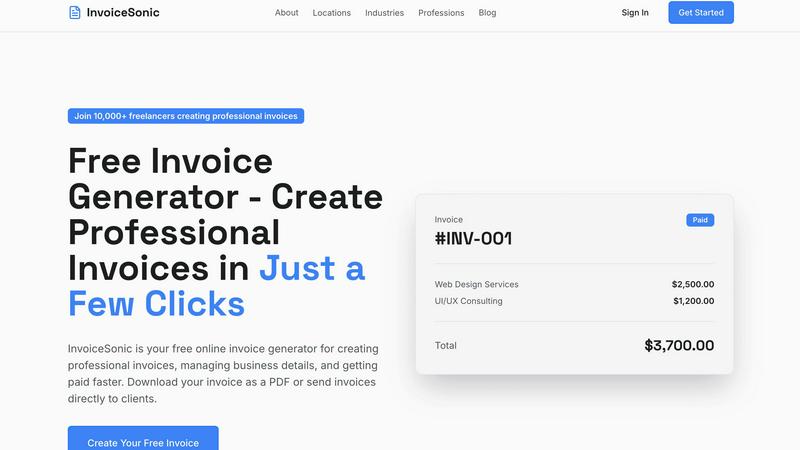
InvoiceSonic is a dynamic, free invoice generator engineered for speed and professional results. It is the definitive solution for freelancers, small business owners, and startups who need to create polished invoices instantly, without the friction of sign-ups, subscriptions, or complex software. The platform eliminates the inefficiency of manual spreadsheets and outdated tools by providing a sleek, web-based generator where users can input details, preview, and download a finished invoice in seconds. Its core value proposition is delivering immediate professionalism: a library of modern, customizable templates, automatic calculations for totals and taxes, and the ability to embed your brand identity. Designed for agility, it empowers solo entrepreneurs and growing teams to streamline their billing workflow, ensure accuracy, and get paid faster, all while maintaining a credible and consistent business image with every client transaction. By removing financial and procedural barriers, InvoiceSonic puts powerful invoicing capability directly into the hands of those who need it most.
Features of invoice Sonic
Completely Free Tier
InvoiceSonic operates on a generous free model, allowing users to create up to 5 professional invoices per month without any cost, hidden fees, or requirement for a credit card. This zero-commitment access is perfect for testing the platform or for freelancers with moderate billing needs, providing full functionality including template access and PDF download without the pressure of a trial or subscription.
Professional Template Library
Access a curated collection of clean, modern invoice templates designed for various industries and purposes. Choose from standard professional invoices, proforma invoices for quotes, and blank templates—all fully customizable. Each template adheres to professional standards, ensuring your invoices always include essential elements like invoice numbers, due dates, and itemized lists for a polished presentation.
Instant PDF Generation & Download
Speed is paramount. InvoiceSonic delivers a finished, professional document in moments. Once you input your business and client details, add line items, and apply any taxes, you can instantly preview and download your invoice as a ready-to-send PDF file. This feature eliminates formatting headaches and ensures your invoice looks perfect on any device your client uses.
Automated Calculations & Customization
The generator automatically handles all math, calculating subtotals, applying taxes (like GST), and displaying the final balance due, removing human error. Simultaneously, it offers deep customization: add your business logo, set payment terms, include hourly rates or discounts, and save your business details for future use, creating a branded, consistent invoicing experience in just a few clicks.
Use Cases of invoice Sonic
The Freelancer Closing a Project
A graphic designer or writer completes a client project and needs to bill immediately. Using InvoiceSonic, they select a modern template, input saved business details, add the project description with an hourly rate, and apply the agreed-upon discount. Within 60 seconds, a professional PDF invoice is generated and emailed to the client, accelerating payment and closing the loop efficiently.
The Startup Issuing Its First Invoices
A new consulting startup needs to establish a professional billing process without investing in expensive software. The founder uses InvoiceSonic’s free tier to create branded invoices with their logo, automatically calculate service taxes, and set clear 30-day payment terms. This allows them to present a credible, established company image from day one while managing cash flow.
The Small Business Managing Recurring Billing
A small marketing agency has several clients on monthly retainer agreements. The office manager uses InvoiceSonic to quickly duplicate and modify previous invoices, updating descriptions and amounts as needed. The automated calculations ensure accuracy for each billing cycle, and the instant PDF download allows for fast distribution via email, streamlining recurring administrative tasks.
The Contractor Sending a Proforma Invoice
A contractor needs to provide a detailed quote or proforma invoice before starting a large job. They utilize InvoiceSonic’s proforma template to outline the scope of work, materials, and estimated costs. This professionally formatted document builds client trust by clearly communicating the project breakdown and total investment required, facilitating faster approval and project kickoff.
Frequently Asked Questions
Is InvoiceSonic really free to use?
Yes, absolutely. InvoiceSonic offers a completely free tier that allows you to generate up to 5 invoices per month without any cost, sign-up, or credit card required. You have full access to professional templates, customization options, and instant PDF downloads. This makes it an ideal, risk-free tool for freelancers and small businesses to start invoicing professionally immediately.
What file format are the invoices downloaded in?
All invoices created with InvoiceSonic are downloaded as high-quality PDF files. This universal format ensures your invoice maintains its professional layout, fonts, and branding on any device or operating system your client uses. PDFs are also the standard for business documents, making them easy for clients to save, print, or forward for payment processing.
Can I add my company logo and branding to the invoices?
Yes, you can fully customize your invoices with your brand identity. InvoiceSonic allows you to upload your company logo directly into the invoice template. You can also permanently save your business details, color schemes, and preferred payment terms, ensuring every invoice you send is consistently branded and reinforces your professional image with clients.
Does InvoiceSonic support different tax rates and calculations?
Yes. The invoice generator includes a dedicated field for GST/Tax or any other sales tax. You can specify a tax percentage, and the system will automatically calculate the tax amount and add it to the invoice subtotal to display the correct final total. This automation ensures accuracy and compliance, saving you time on manual calculations for every invoice you create.
Similar to invoice Sonic

AI Email Filter sorts incoming mail into folders using plain-language prompts you write. Works with any IMAP mailbox; bring your own LLM if you want.

E-signatures for small teams. $19/month, unlimited users.

Digital guest pager system with zero hardware. Guests scan QR code to track order status and get buzzed on their own phone. No apps or SMS fees

Free 2026 Paycheck Calculator for Estimating Take-Home Pay After Taxes

Free collection of online developer utilities, code formatters, and digital converters designed to streamline your daily workflow.

All-in-One POS, Inventory & Accounting Software for Bangladeshi Businesses

Online tally counter for tracking attendance, workouts, inventory, visitors, sports scores, habits, and everyday counting tasks.

The #1 Native Form Builder Plugin for Framer - No Code, No Embeds, No External Platforms.