
Meme Library
Find any meme instantly by searching text inside images, save from anywhere, and backup your collection.
Visit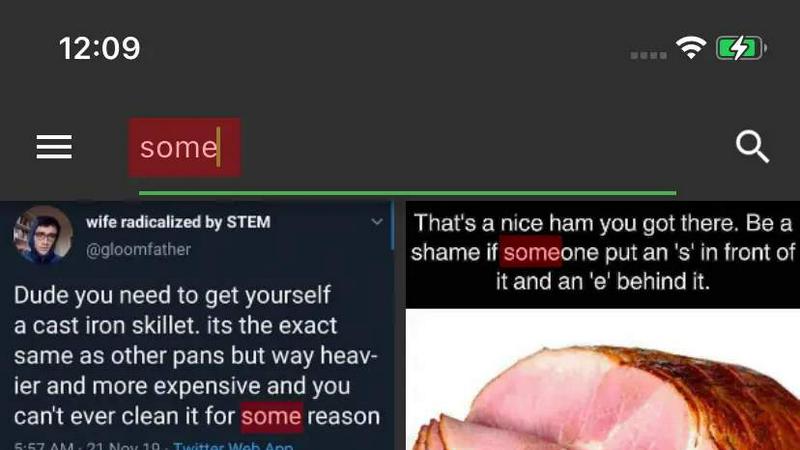
About Meme Library
Meme Library is a fast, private, and searchable home for your entire meme collection. Built for people who love a good reaction, a niche joke, or a perfectly timed screenshot, this app eliminates the endless scrolling through your camera roll to find that one specific image. Instead, Meme Library gives you a dedicated vault where you can save, organize, and instantly locate any meme you have ever collected. The core value proposition is simple: never lose a meme again. You can save memes directly from popular platforms like Instagram, Reddit, and your browser using the share sheet, or import them from your camera roll. Once inside, the app’s standout feature is text search inside images. This means you can search for memes by the actual text visible in the screenshot, caption, or image itself, even if it is a screenshot of a screenshot. The app is lightweight and clean, with zero bloat, no ads, and a laser focus on speed and utility. It is designed for meme people by meme people, prioritizing fast recall and fast sharing over social feeds or forced engagement. Privacy is a core principle: your memes stay on your device by default, with no tracking, no social network integration, and no data collection. For those upgrading phones or reinstalling the app, optional backup and restore functionality ensures your collection travels with you safely. Whether you are a casual meme enjoyer or a dedicated curator, Meme Library transforms your chaotic image collection into a powerful, searchable asset.
Features of Meme Library
Text Search Inside Images
Search memes by the actual text visible inside the image itself. This feature uses advanced optical character recognition to index every word in your screenshots, captions, and even screenshots of screenshots. No more guessing file names or scrolling through hundreds of images. Just type a keyword or phrase you remember from the meme, and the app instantly surfaces the exact image you need. This makes finding that one reaction meme with a specific caption effortless and lightning fast.
Save From Anywhere
Save memes directly from any source without breaking your workflow. Whether you are scrolling Instagram, browsing Reddit, or finding a gem on a website, you can use the system share sheet to send the image straight to Meme Library. The app also supports direct imports from your camera roll and gallery. This universal save capability means your collection grows automatically as you browse, without requiring manual downloads or tedious file management.
Backup and Restore
Never lose your collection again with secure, optional backups. Meme Library allows you to create a backup of your entire meme vault, including all images and their searchable text indexes. If you upgrade your phone, switch to a new device, or need to reinstall the app, you can restore your collection in seconds. This feature ensures your carefully curated library of reaction memes, niche jokes, and internet classics survives any device transition.
Lightweight and Clean
Experience a meme vault that is fast, focused, and free from bloat. Meme Library is designed to be a pure utility with no ads, no unnecessary features, and no distractions. The interface is clean and intuitive, allowing you to save, browse, search, and share memes with minimal taps. This performance-first approach means the app launches instantly, searches return results in milliseconds, and your storage is used efficiently without any hidden background processes.
Use Cases of Meme Library
Finding the Perfect Reaction Meme Instantly
You are in a group chat and need the exact reaction meme that perfectly matches the conversation topic. Instead of scrolling through your entire camera roll or digging through message history, you open Meme Library and type a keyword from the meme’s text. Within seconds, the app surfaces the image, and you can share it directly. This saves you from awkward pauses and ensures your timing is always on point.
Curating a Personal Collection of Niche Jokes
You collect highly specific memes related to your hobbies, profession, or inside jokes with friends. Over time, these images become scattered across different platforms and devices. Meme Library lets you save them all in one private, searchable vault. You can organize them by topic, search by text, and quickly find that one obscure reference when the moment calls for it. Your collection becomes a powerful tool for humor and connection.
Archiving Screenshots and Internet Classics
You frequently take screenshots of funny tweets, comments, or web pages that you want to keep for later. These images pile up in your camera roll and become impossible to find. Meme Library solves this by letting you save these screenshots directly and then search them by the text they contain. Whether it is a classic meme format or a screenshot of a screenshot, your archive remains accessible and usable.
Switching Phones Without Losing Your Meme Collection
You are upgrading to a new phone and worry about losing your carefully curated meme library. With Meme Library’s backup and restore feature, you create a secure backup of your entire collection before switching devices. On your new phone, you install the app and restore from the backup. All your memes, including their searchable indexes, are instantly available. Your collection survives the transition without any manual effort.
Frequently Asked Questions
How does the text search inside images work?
Meme Library uses on-device optical character recognition to scan every image you save and extract any visible text. This text is indexed and stored locally on your device. When you search for a term, the app quickly matches it against this index and returns the relevant images. The process is fast, private, and works even for low-quality images or screenshots of screenshots.
Is my meme collection private and secure?
Yes, privacy is a core design principle. By default, all your memes are stored locally on your device. There is no social feed, no forced sharing, and no tracking. The app does not upload your images to any server or collect any personal data. Your collection remains yours alone, and you control if and when you share any image.
Can I save memes from Instagram, Reddit, and other apps?
Absolutely. Meme Library integrates with your device’s share sheet, which means you can save images from virtually any app that supports sharing. This includes Instagram, Reddit, Twitter, Facebook, your browser, and your camera roll. Simply open the share menu on the image and select Meme Library as the destination. The image is saved instantly to your vault.
What happens to my memes if I uninstall the app?
If you uninstall Meme Library without creating a backup, your local collection will be lost. However, the app provides an optional backup and restore feature. Before uninstalling or switching phones, you can create a secure backup file. When you reinstall the app or set up a new device, you can restore from that backup to recover your entire collection, including all images and search indexes.
How much storage space does the app use?
Meme Library is designed to be lightweight and efficient. The app itself is very small, and the storage used depends entirely on the number and size of memes you save. The text indexes for search are also stored locally and are very compact. There is no bloat or unnecessary data consumption. You control what you save and can delete memes at any time to free up space.
Can I share memes directly from Meme Library?
Yes, sharing is built directly into the app. Once you find the perfect meme using search or browsing, you can tap to open it and use your device’s standard share sheet to send it to any messaging app, social media platform, or contact. The app is designed for fast recall and fast sharing, making it a seamless part of your meme workflow.
Explore more in this category:
Similar to Meme Library

AI-powered CA practice, task, meeting, OKR, and workflow management software for growing teams.

imgtxtapp.laviolab.com is a Telegram-based image-to-text converter that turns photos, screenshots, scanned documents into editable text

Apps and files on an infinite canvas where people and AI agents work together.

Team calendar for engineering managers to plan vacations, on-call weeks, project work, and releases together.

Panzoe is an all-in-one AI platform for personal productivity, business automation, AI assistants, content creation, and custom AI solutions.

Draw genograms and family relationship diagrams in your browser with editable templates.

AI Email Filter sorts incoming mail into folders using plain-language prompts you write. Works with any IMAP mailbox; bring your own LLM if you want.

E-signatures for small teams. $19/month, unlimited users.