
Online Keyboard Shortcuts
Master every essential keyboard shortcut across Windows, MacOS, and Linux to work faster and ditch your mouse at OnlineShortcuts.com.
Visit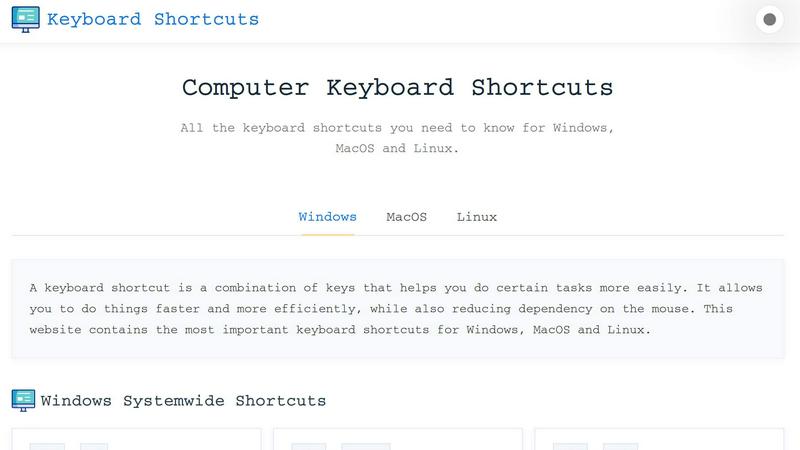
About Online Keyboard Shortcuts
Online Keyboard Shortcuts, hosted at OnlineShortcuts.com, is your ultimate, no-nonsense productivity accelerator. It is a comprehensive, cross-platform database of the most essential keyboard shortcuts for Windows, MacOS, and Linux operating systems. This tool is designed for anyone who wants to break free from mouse dependency and execute tasks at lightning speed. Whether you are a power user, a developer, a designer, or an office worker, this resource provides a centralized, easy-to-navigate repository of hotkeys that cover system-wide operations, application-specific commands, and advanced productivity tricks. The core value proposition is simple: stop hunting for menu items and start flying through your workflow. The website delivers a clean, distraction-free interface where you can instantly find the exact shortcut you need, from basic text editing to complex virtual desktop management. It is a pure, utility-first tool built for efficiency, stripping away all fluff to give you the raw, actionable data you need to optimize your daily computer interaction. It is the definitive cheat sheet for mastering your operating system.
Features of Online Keyboard Shortcuts
Cross-Platform Coverage
This feature delivers a unified command center for all major operating systems. You get dedicated, meticulously organized sections for Windows, MacOS, and Linux shortcuts. Instead of searching through scattered forums or outdated help pages, you access a single source of truth for system-wide shortcuts, window management, and navigation commands across all three platforms. This saves you from context-switching and memorizing conflicting key combinations, allowing you to maintain a high-speed workflow regardless of the machine you are using.
Systemwide and Application Specific Shortcuts
The tool goes beyond basic operating system commands by providing deep dives into application-specific hotkeys. You can rapidly find shortcuts for Command Prompt, File Explorer, Web Browsers, and text editing tools. This granularity means you can master the exact commands for your most-used software. It eliminates the friction of fumbling through menus, letting you perform complex operations like creating new folders, opening task managers, or managing browser tabs with a single, precise keystroke.
Downloadable Cheat Sheets
Efficiency is not just about speed; it is about accessibility. This feature allows you to download the entire shortcut library as a PDF or PNG image in both dark and light themes. You can print a physical reference, save it to your desktop, or set it as a wallpaper. This offline capability ensures that your productivity toolkit is always available, even without an internet connection. It transforms a web resource into a permanent, portable asset that integrates directly into your physical and digital workspace.
Dynamic and Responsive Design
The website is engineered for instant access on any device. It is fully responsive, meaning the shortcut lists are perfectly readable on mobile phones, tablets, and desktop monitors. You do not need a dedicated app; the website adapts to your screen size, ensuring you can quickly reference a shortcut on your phone while working on a laptop. This eliminates the friction of zooming or scrolling, allowing you to maintain your pace and get the information you need in the moment.
Use Cases of Online Keyboard Shortcuts
Accelerating Data Entry and Document Editing
For writers, data analysts, and office professionals, every second counts. This tool provides instant access to text editing shortcuts like Ctrl+B for bold, Ctrl+I for italics, and Ctrl+F for find. By memorizing these, you can format documents, navigate spreadsheets, and edit code without lifting your hands from the keyboard. This drastically reduces the time spent on repetitive actions, allowing you to focus on the content and logic of your work rather than the mechanics of the software.
Streamlining System Administration and IT Support
System administrators and IT support staff manage multiple systems daily. This resource provides critical shortcuts for Windows like Win+X for the Power User menu, Ctrl+Shift+Esc for Task Manager, and Win+R for the Run dialog. These hotkeys allow for rapid system diagnostics, application management, and configuration changes. Instead of navigating through layers of menus, a technician can execute commands in seconds, significantly improving response times and overall system management efficiency.
Boosting Developer and Designer Workflows
Developers and designers thrive on uninterrupted flow states. This tool offers shortcuts for virtual desktop management (Win+Ctrl+D to create a new desktop) and window snapping (Win+Left/Right arrow). These commands allow for rapid context switching between code editors, design tools, and terminal windows. By organizing their digital workspace with keystrokes, creatives can maintain focus, reduce cognitive load, and move between tasks with a fluidity that is impossible with a mouse.
Onboarding and Training New Users
For organizations, this tool serves as an excellent training resource. New employees can use the shortcut lists to quickly learn the most efficient ways to navigate their operating system and core applications. It provides a structured, easy-to-reference guide that accelerates the learning curve. Instead of relying on informal knowledge transfer, companies can point new hires to this definitive list, ensuring everyone adopts best practices for speed and efficiency from day one.
Frequently Asked Questions
What is the main purpose of the Online Keyboard Shortcuts website?
The primary purpose is to serve as a comprehensive, centralized, and distraction-free reference for the most important keyboard shortcuts across Windows, MacOS, and Linux. It is designed to help users increase their productivity by reducing dependency on the mouse, allowing for faster and more efficient task execution. It is a pure utility tool focused on delivering actionable information without any advertisements or upsells.
How can I use these shortcuts on my computer?
Simply navigate to OnlineShortcuts.com and browse the lists organized by operating system and application. To use a shortcut, press the designated keys simultaneously on your keyboard. For example, to close an active window on Windows, press the Alt key and the F4 key at the same time. The website provides clear, visual representations of each key combination for easy learning and memorization.
Are the shortcuts guaranteed to be accurate for the latest software versions?
The shortcuts are curated to be as accurate as possible for the specified software versions. However, software updates can sometimes change hotkeys. It is always good practice to verify a specific shortcut with the exact version of the software you are running. The website provides a solid foundation of the most common and stable shortcuts, but users should be aware of potential changes in newer updates.
Is there a way to save the shortcuts for offline use?
Yes, the website offers downloadable cheat sheets. You can download the entire shortcut library as a PDF file or as a PNG image. These are available in both dark and light themes. This allows you to print a physical copy, save it to your desktop for quick reference, or use it as a wallpaper on your device, making the information accessible even without an internet connection.
Explore more in this category:
Similar to Online Keyboard Shortcuts

All-in-One POS, Inventory & Accounting Software for Bangladeshi Businesses

Online tally counter for tracking attendance, workouts, inventory, visitors, sports scores, habits, and everyday counting tasks.

The #1 Native Form Builder Plugin for Framer - No Code, No Embeds, No External Platforms.

Practical, independent guides to home repairs, maintenance, costs, troubleshooting, and everyday fixes.

Highlight faster. Study in flow with custom shortcuts and a workflow built around you. Print smarter, or turn any page into a tiled poster.


AjaxCalculators offers free online calculators, unit converters, and image and document tools. Explore practical tools for finance, health, math, scie

Build Mode is a Mac app that turns focused sessions into visible progress, so you can see the work adding up before the results arrive.