
ProcessSpy
ProcessSpy is the advanced Mac process monitor that delivers real-time insights and powerful filtering for ultimate system control.
Visit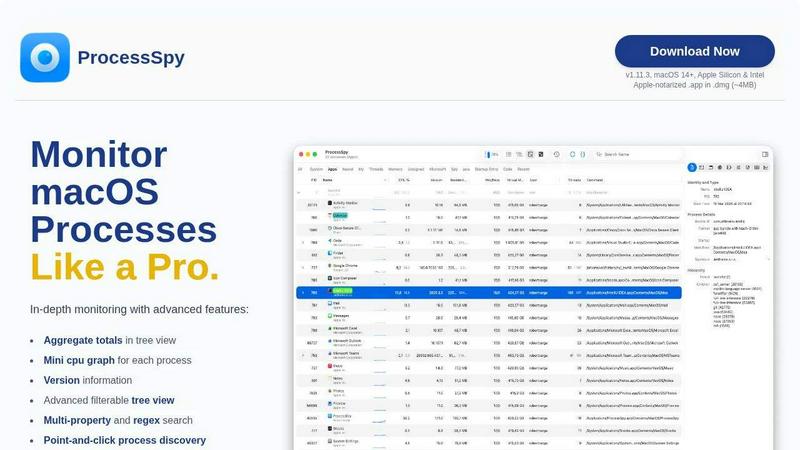
About ProcessSpy
ProcessSpy is the ultimate native process explorer for macOS, built for power users, developers, and IT professionals who demand more than what the built-in Activity Monitor can offer. It serves as the definitive macOS counterpart to the legendary Sysinternals Process Explorer for Windows, delivering unparalleled visibility into your system's inner workings. The tool cuts through the noise to show you exactly what's running, from the full command-line arguments and file paths to environment variables and open network connections. Its core value proposition is deep, actionable insight: it reveals the hidden details that macOS typically obscures, allowing you to diagnose stubborn apps, analyze system performance, and manage processes with surgical precision. Built exclusively for macOS using native APIs, ProcessSpy offers a fast, responsive, and integrated experience without the bloat of cross-platform frameworks. Whether you're untangling multiple Java runtime instances, hunting down a memory leak, or simply need to kill an unresponsive application for good, ProcessSpy provides the advanced toolkit you need to monitor your Mac like a true pro.
Features of ProcessSpy
Advanced Hierarchical Process Tree
ProcessSpy visualizes your system's activity as a dynamic, collapsible tree view that mirrors the parent-child relationships between processes. This isn't just a simple list; it shows aggregate totals for CPU usage, memory footprint, and thread counts for entire branches of processes at a glance. This hierarchical insight is critical for understanding how applications spawn sub-processes and identifying which process group is consuming your system's resources, enabling faster root-cause analysis and more efficient troubleshooting.
Multi-Property & Regex Search
Move beyond basic name searches. ProcessSpy's powerful quick-search bar supports complex queries across multiple process properties simultaneously using regular expressions. For instance, you can instantly filter for processes with "node" in the name AND a specific port in the command line arguments. This precision targeting lets you cut through thousands of processes to find the exact one you need in seconds, dramatically speeding up investigation and debugging workflows.
JavaScript-Powered Custom Filters
For ultimate control, ProcessSpy allows you to define custom filters using JavaScript. This feature lets you craft complex, conditional logic to highlight or isolate processes based on any combination of criteria—like CPU usage spikes, specific environment variables, or recent launch times. It transforms static monitoring into a programmable, adaptive system tailored to your specific diagnostic needs and automation scenarios.
Comprehensive Process Context & Inspection
Right-click on any process to unlock a wealth of actionable information and tools. Instantly view open files and network connections, inspect loaded dynamic libraries (dylibs), and access powerful context menu actions. The paid version expands this further, revealing critical details like code entitlements, Info.plist contents, bundle identifiers, and environment variables, providing a complete forensic profile of any application running on your Mac.
Use Cases of ProcessSpy
Developer Debugging & Runtime Analysis
Developers can instantly distinguish between multiple instances of the same runtime, like different Java or Python processes. View the full command-line path, version information, and environment variables to verify which JDK version a service is using or which virtual environment a script launched from. This clarity is essential for debugging configuration issues, memory leaks, and dependency conflicts in complex development environments.
System Performance Triage & Optimization
Quickly identify resource hogs by using the tree view with aggregate CPU and memory totals. The mini CPU graph per process provides an at-a-glance view of activity spikes. By combining this with filtering, you can pinpoint the specific process or sub-process tree causing system slowdowns, fan noise, or battery drain, allowing for rapid intervention and more informed optimization decisions.
Security Auditing & Malware Investigation
Gain deep visibility for security purposes. Inspect process signatures, entitlements, and launch agents to verify software legitimacy. The ability to see all open files and network connections for a suspicious process is invaluable for incident response. Flagging newly discovered processes adds a layer of monitoring, helping you spot unauthorized or unexpected software execution in real time.
IT Support & Stubborn Process Management
When applications freeze and refuse to quit, Activity Monitor often falls short. ProcessSpy gives you the upper hand by showing the complete process hierarchy, allowing you to terminate not just the main application but all its child processes and associated daemons instantly and completely. This ensures clean terminations and resolves "application already running" errors that plague standard force-quit methods.
Frequently Asked Questions
Is ProcessSpy safe to install on my Mac?
Absolutely. ProcessSpy is an Apple-notarized application, meaning it has been scanned and approved by Apple for security. It is distributed as a signed .app inside a .dmg file, ensuring its integrity. It runs natively and safely on both Intel and Apple Silicon Macs without requiring lower security settings.
What macOS versions are supported?
ProcessSpy is designed for modern macOS systems, specifically supporting macOS 14 Sonoma and newer. It is optimized for the latest APIs and features, including support for the upcoming macOS 26 Tahoe, ensuring it remains compatible with future Apple operating system updates.
What is the difference between the free and paid versions?
The free version offers powerful core functionality like the advanced tree view, multi-property search, JavaScript filters, and basic process inspection. The paid license unlocks advanced professional features including viewing environment variables, process entitlements, historical CPU/memory recording with CSV export, and the ability to remember finished processes for later forensic review.
How does the licensing model work?
A single license purchase costs $24.99 and is valid for one user across an unlimited number of personal devices. This is a one-time fee that includes lifetime access to all future updates and new features added to ProcessSpy, providing exceptional long-term value.
Similar to ProcessSpy

Face recognition API that is a drop-in replacement for AWS Rekognition. Index, search, compare and detect faces, billed per photo, no subscription.

Bilingual console and guide for the jev decision model: classify, route, and score text or JSON.

Panorama screenshot editor for App Store listings on iPhone and iPad.

Search 20,000+ open-source and SaaS tools by the job you need done or the app you want to replace.

Explore Jev AI use cases, live demos and open-source projects that use typed decisions.

A comprehensive suite of browser-side financial planners, health trackers, and developer utilities running completely on your terms.

A strictly human-verified directory for active SaaS, practical AI tools, and custom n8n workflows. Discover software that works without bot spam.
